Dedao Brain Sync
 Andy Zheng(公众号:关山的月儿)4k downloads
得到大脑官方推荐|很好用的【得到大脑 / Get笔记 / GetNote / Getbiji <-> Obsidian】双向同步插件
- Overview
- Scorecard
- Updates33
把得到大脑(原Get笔记)里的灵感、摘录、链接、录音和 AI 总结与 Obsidian 双向同步,变成可长期整理、搜索和链接的本地 Markdown 知识库。
想了解这个项目的由来和背景,可以阅读这篇文章:我做的得到大脑OB插件,上架官网了😃。
🎉 1.6.1 最新更新
- 🚦 自动同步不再撞上游限流:修复了一个让双向同步每次都把上游读接口打满的 bug——现在只在本地文件有改动时才重新拉取详情,自动同步不再因上游速率限制而失败。中间被中断的同步也会从断点续跑,不会从头再来。
- 📝 划线笔记同步有内容了:划线笔记从云端同步过来不再变成空正文加
(无标题)文件名,会保留原始划线内容并归到正确标题。 - 📄 文字笔记不再丢失正文:列表接口偶发返回空 content 的文字笔记,现在会走详情接口补全,不再以空 body +
(无标题)文件名落库(#309)。
这是一次稳定性修复,建议所有开启自动同步的用户升级。
README 仅保留当前版本的核心亮点;完整版本历史请查看 GitHub Releases。
✨ 为什么好用
- 🔄 真正双向同步:得到大脑 → Obsidian 持续同步;同步目录中的本地文字笔记可自动新建或回传修改,也支持手动选择 Markdown 创建笔记。
- 🧠 不只是一次性导出:把笔记同步成独立 Markdown 文件,持续进入你的本地知识库,而不是导出完就结束。
- ⚡ 同步稳定可续传:支持增量同步、同步断点、最近 N 天、指定日期、指定笔记、指定知识库等多种范围控制。
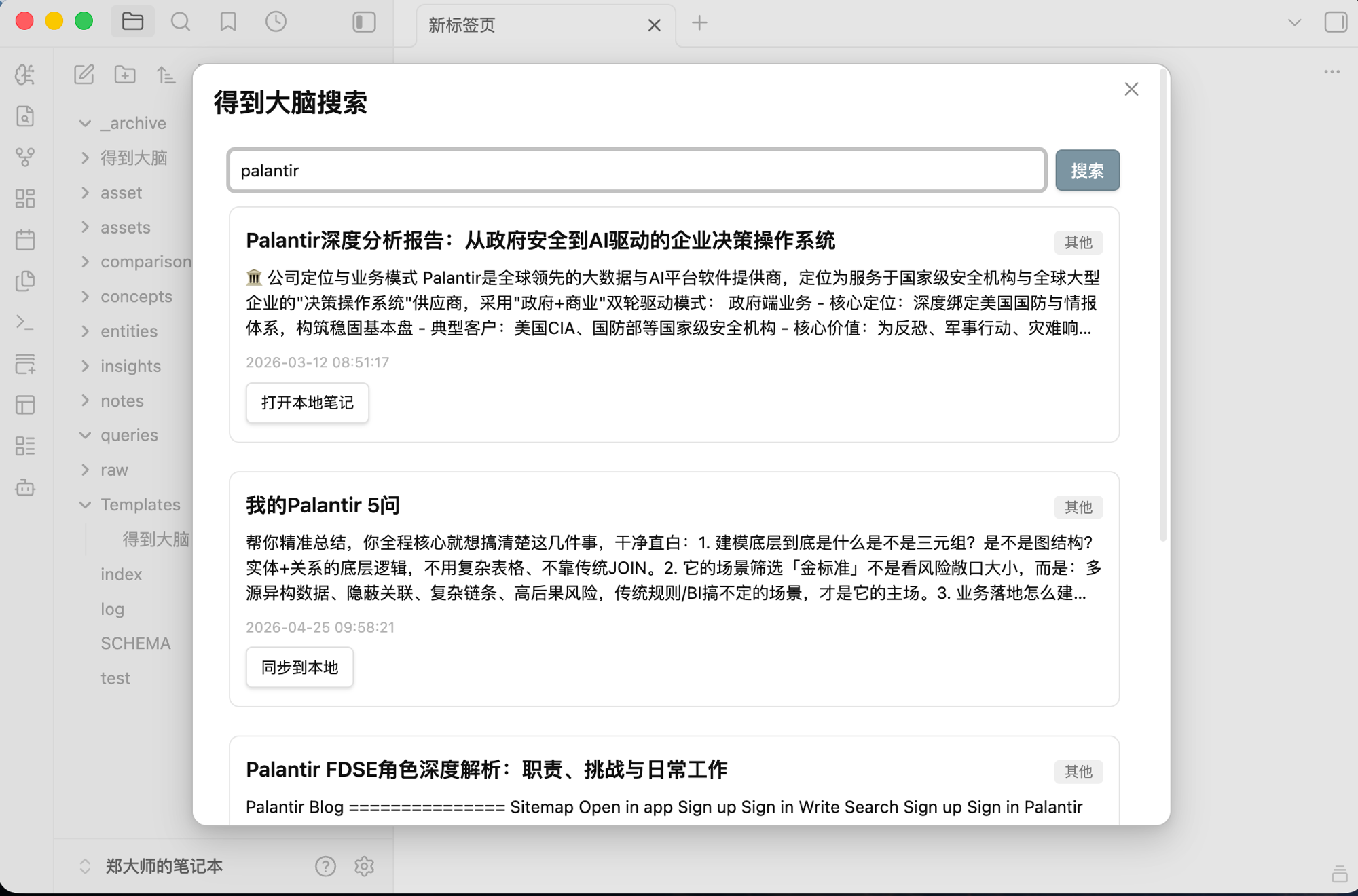
- 🔎 直接在 Obsidian 搜得到大脑:侧边栏全文搜索,命中后可直接打开本地笔记或一键同步到本地。
- 🖱️ 选中文字即可搜索:编辑器中选中文字,通过右键菜单直接发起得到大脑搜索。
- 📚 知识库同步更完整:支持指定知识库同步,也可通过命令一次同步全部已订阅知识库。
- 🗂️ 本地结构可控:支持分类目录、文件名前缀、按创建日期组织路径,以及已有笔记的路径迁移 / 回迁。
- 🏷️ 筛选更丰富:可按更新时间、起始日期、笔记类型、标签、知识库等条件控制同步范围。
- ⏱️ 自动同步:支持定时同步和启动时同步,可选择仅下载或同时上传同步目录中的本地修改。
- 📜 同步过程可追溯:保留最近 30 天同步历史,包括范围、耗时、状态以及逐篇新增 / 更新 / 跳过 / 失败结果。
- 📱 桌面端 + 移动端:插件本身不是 Desktop Only;OpenAPI 模式适合桌面和移动端 Obsidian。
🧰 功能一览
| 功能 | 说明 |
|---|---|
| 🔄 增量同步 | 识别远端新增 / 更新内容,避免每次全量重拉 |
| 🔎 搜索侧边栏 | 在 Obsidian 内全文检索得到大脑笔记 |
| 🖱️ 选中文本搜索 | 编辑器中选中文字,右键直接搜索得到大脑 |
| ⏳ 按时间同步 | 支持同步起始日期或最近 N 天 |
| ☑️ 按笔记同步 | 从远端列表中选择需要同步的笔记 |
| 📚 按知识库同步 | 选择指定知识库进行同步 |
| 🌐 全部订阅知识同步 | 命令面板可一次同步全部订阅知识库 |
| 🕒 定时同步 | 按指定间隔自动下载,可选择同时上传同步目录中的本地文字笔记 |
| 🚀 启动时同步 | 定时同步启用后,可在 Obsidian 启动时自动执行一次 |
| ⬆️ 本地上传 | 自动上传同步目录中的文字笔记,或手动选择 Markdown 创建到得到大脑 |
| 🏷️ 标签筛选 | 使用标签白名单限制同步内容 |
| 📎 附件下载 | 可分别控制图片 / 音频 / 视频 / 文档附件 |
| 🗂️ 日期路径 | 按创建日期组织目录,并支持历史文件迁移 / 回迁 |
| 📜 同步历史 | 保存最近 30 天同步记录和逐条结果 |
| 🎛️ Ribbon 快捷入口 | 可显示 / 隐藏同步与搜索快捷按钮 |
🖼️ 截图
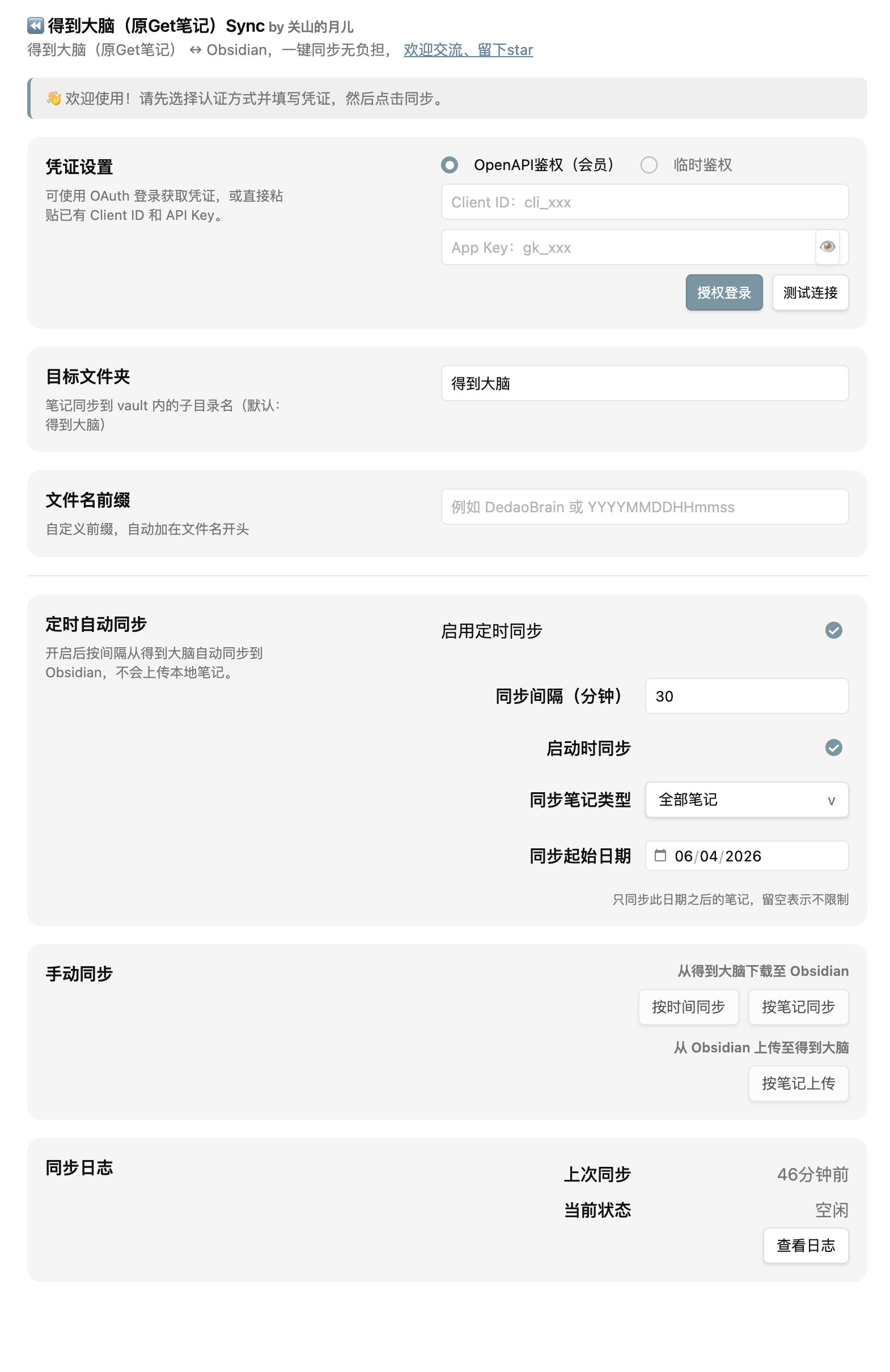
⚙️ 设置页面
统一配置鉴权、目标文件夹、同步方式、附件、自动同步及同步历史。
🔎 搜索侧边栏
在 Obsidian 中直接搜索得到大脑笔记,命中后一键打开或同步到本地。
📦 安装
💜 通过 Obsidian 社区插件
- 打开
设置 → 第三方插件 → 浏览。 - 搜索
Dedao Brain Sync、得到大脑、GetNote或Get笔记。 - 安装并启用插件。
🛠️ 手动安装
- 从 最新版本 下载
main.js、manifest.json、styles.css。 - 放入:
<your-vault>/.obsidian/plugins/getnote-importer/
- 重启 Obsidian 并启用
Dedao Brain Sync。
插件 ID 仍为
getnote-importer,用于兼容 Obsidian 社区历史 listing 和旧版数据;显示名称已统一为Dedao Brain Sync。
🔑 获取 API 凭证
⚠️ 得到大脑 OpenAPI 当前需要 得到大脑 PRO 会员。免费用户无法通过 OpenAPI 获取完整数据,可在桌面端尝试 Web 模式。
凭证只保存在本地 Obsidian 插件数据中,用于访问你选择的接口模式。
🟢 OpenAPI 模式(推荐长期使用)
- 打开得到大脑。
- 进入
设置 → 开放平台。 - 创建应用并获取
Token与Client ID。 - 在
设置 → Dedao Brain Sync中选择 OpenAPI 鉴权并填写凭证。 - 点击测试连接确认可用。
🟡 Web 模式(桌面端快速使用)
桌面版 Obsidian 可以使用插件内的 Web 登录流程获取会话 Token,并在会话失效时尝试自动刷新;也仍然支持手动粘贴 Token。
独立图文步骤见:Web 模式手动 Token 指南。
Web Token 属于浏览器会话凭证,可能过期。如果出现
401、403或会话过期提示,请重新登录或刷新 Token。Web 自动登录 / 自动续期依赖桌面环境,移动端建议优先使用 OpenAPI。
🔄 使用
⬇️ 从得到大脑同步到 Obsidian
在设置页发起同步,或在命令面板运行:
Dedao Brain Sync: 同步笔记
可以进一步选择按时间、按笔记或按知识库执行同步。
🌐 同步全部订阅知识库
命令面板提供独立命令,可一次同步全部已订阅知识库。知识库列表会分页获取,避免只处理首屏订阅内容。
🔎 搜索得到大脑
- 点击搜索 Ribbon,在 Obsidian 侧边栏直接搜索远端笔记。
- 已经同步到本地的结果可以直接打开。
- 本地不存在时可以一键同步。
- 在编辑器中选中文字,右键可直接发起搜索。
🕒 定时同步
开启自动同步后,插件会按设定间隔从得到大脑同步到 Obsidian,也可设置启动时同步。启用“本地修改自动上传”后,同一轮还会处理同步目录(含子目录)中新建或修改的文字笔记。
自动上传默认关闭,仅支持 OpenAPI。它不会传播删除;若本地与远端同时修改,会保留两端内容并提示使用手动同步选择版本。
⬆️ 从 Obsidian 创建到得到大脑
在设置页或命令面板打开本地上传,选择一个或多个 Markdown 文件。
手动上传是 选择型、创建型,与自动同步中的本地修改回传相互独立:
- 目前主要支持
plain_text和link类型。 - 已有
uid且确认远端仍存在的笔记会跳过,避免重复创建。 - 不会自动覆盖得到大脑已有笔记。
- 同步目录中已关联文字笔记的修改,可由“本地修改自动上传”处理。
- 上传标签会去重,并限制数量。
📁 输出结构
默认目标目录为 得到大脑,实际结构会根据笔记类型、知识库和日期路径设置变化。
vault/
└── 得到大脑/
    ├── 2026/
    │   └── 08/
    │       ├── 纯文本/
    │       │   └── 会议记录.md
    │       ├── 链接笔记/
    │       │   └── 一篇文章.md
    │       └── 知识库/
    │           └── 我的知识库/
    │               └── 专题笔记.md
    └── ...
每个 Markdown 文件都会写入 frontmatter,后续同步会用其中的远端标识识别同一篇笔记。
---
uid: "1908723638246504120"
title: "会议记录"
created: 2026-04-30 12:45:24
modified: 2026-04-30 13:00:07
source: 得到大脑
note_type: recorder_audio
tags: ["work"]
---
🏷️ 文件命名与日期路径
✏️ 文件名前缀
支持日期 / 时间占位符:
| 占位符 | 含义 | 示例 |
|---|---|---|
YYYY |
年 | 2026 |
MM |
月 | 08 |
DD |
日 | 30 |
HH |
小时 | 14 |
mm |
分钟 | 30 |
ss |
秒 | 05 |
例如:YYYY-MM-DD → 2026-08-30_会议记录.md
📅 按创建日期整理路径
开启后可使用类似 YYYY/MM 的目录规则:
得到大脑/2026/08/纯文本/会议记录.md
日期取笔记的创建时间,而不是更新时间。修改或关闭日期路径时,插件会先预检,再迁移 / 回迁历史文件与相关附件。
迁移支持重复执行;遇到目标冲突、无效元数据、共享附件或可能导致链接失效的情况时,会优先跳过,而不是强行覆盖。
⚙️ 主要设置
| 设置项 | 默认值 / 说明 |
|---|---|
| 🔐 鉴权方式 | OpenAPI |
| 📁 目标文件夹 | 得到大脑 |
| 🏷️ 文件名前缀 | 空 |
| 📅 日期路径 | 关闭,默认格式 YYYY/MM |
| ⏳ 手动同步范围 | 最近 30 天 |
| 🕒 定时同步 | 默认关闭 |
| ⏱️ 同步间隔 | 30 分钟 |
| 🚀 启动时同步 | 定时同步启用后默认开启 |
| 📎 下载附件 | 默认开启 |
| 🖼️ 图片 / 🎵 音频 / 🎬 视频 / 📄 文档 | 默认全部开启 |
| 🔎 搜索 Ribbon | 默认显示 |
| 🔄 同步 Ribbon | 默认显示 |
| 📜 同步历史 | 保留最近 30 天 |
🔒 隐私
- 🔐 API 凭证保存在本地 Obsidian 插件数据中。
- 🏠 插件不依赖额外的第三方中转后端。
- ⬇️ 下载同步的数据从得到大脑直接写入你的 vault。
- ⬆️ 手动上传只发送你明确选择的 Markdown;启用“本地修改自动上传”后,会发送同步目录(含子目录)中符合条件的新建或已修改文字笔记。
- 📎 附件只从得到大脑接口返回的地址下载。
- 🛡️ 本地路径迁移遇到冲突或无法安全处理的文件时,会优先跳过而不是覆盖。
⚠️ 已知限制
- OpenAPI 依赖得到大脑开放平台可用性,并需要 PRO 权限。
- Web 模式依赖网页版接口和登录会话,接口变化或 Token 失效都可能影响使用。
- Web 自动登录 / Token 刷新主要面向桌面端。
- 手动上传目前是创建型;自动上传可回传同步目录中已关联纯文本笔记的标题、正文和标签修改。
- 手动上传主要支持纯文本与链接类型;自动上传仅支持 OpenAPI 下的纯文本笔记。
- 部分附件能力取决于得到大脑详情接口是否返回有效附件地址。
- 得到大脑接口字段发生变化时,部分类型的解析可能需要插件跟进适配。
👨💻 开发
npm install
npm run typecheck
npm run lint
npm test
npm run build
发布前会检查类型、Lint、测试、构建以及版本号一致性。
发布产物:
main.jsmanifest.jsonstyles.css
💬 支持与反馈
- 🐛 Bug:GitHub Issues
- 💡 功能建议:GitHub Issues
- 📝 用户问题收集:Dedao Brain Sync 需求问题收集问卷
如果这个插件对你有帮助,欢迎点一个 ⭐ Star。
👋 关于作者
企业 AI 从业者,野生 AI 博主,AGI 信徒,AI 发烧友。
欢迎通过 GitHub Issue、反馈问卷或公众号继续交流。