Search...Search plugins and themes...
⌘K
Sign in
  • Get started
  • Download
  • Pricing
  • Enterprise
  • Account
  • Obsidian
  • Overview
  • Sync
  • Publish
  • Canvas
  • Mobile
  • Web Clipper
  • CLI
  • Learn
  • Help
  • Developers
  • Changelog
  • About
  • Roadmap
  • Blog
  • Resources
  • System status
  • License overview
  • Terms of service
  • Privacy policy
  • Security
  • Community
  • Plugins
  • Themes
  • Discord
  • Forum / 中文论坛
  • Merch store
  • Brand guidelines
Follow us
DiscordTwitterBlueskyThreadsMastodonYouTubeGitHub
© 2026 Obsidian

Fuzzy Chinese Pinyin

lazyloonglazyloong26k downloads

Fuzzy search using Chinese Pinyin.

Add to Obsidian
  • Overview
  • Scorecard
  • Updates102

为 Obsidian 提供中文拼音搜索的功能。

支持

  1. 繁体
  2. 双拼
  3. 模糊音(双拼和模糊音不能同时开启)

使用方法

文件搜索

插件增加命令 Fuzzy Chinese Pinyin: Open Search,为其设置快捷键即可更方便地使用。 可使用全拼或首字母,可以随便混合。
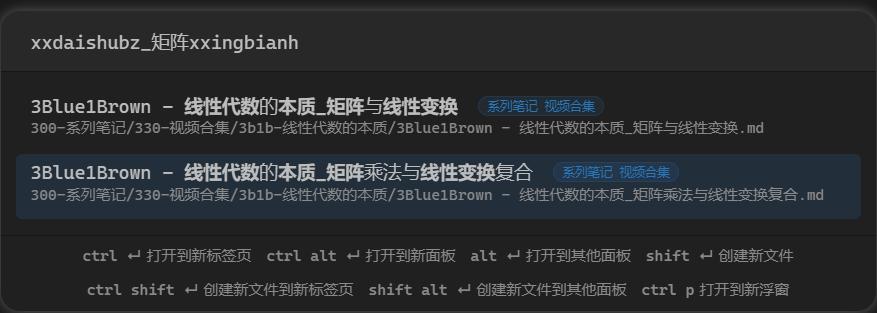
特性:

  1. 显示 tag
  2. 使用路径搜索
  3. 携带标签一起搜索(目前仅支持单个标签)

快捷键设置: Obsidian -> 选项 -> 快捷键 -> 搜索 Fuzzy -> 给 Fuzzy Chinese Pinyin: 搜索文件 设置 <Cmd+o> 快捷键,就可以平替默认的 快速切换:打开快速切换 面板。

在文件 frontmatter 中设置 linkText 字段,可以将标题或者 block id 加入搜索(与 alias 不同的是,可以直接跳转到对应标题或块)。如

linkText:
  - 标题
  - 标题|别名
  - ^blockId
  - ^blockId|别名

文件移动

命令 Fuzzy Chinese Pinyin: 移动文件,效果类似命令 将文件移动到其他文件夹。 在文件列表中选择文件后,右键可一起移动,若设置了快捷键也可以快捷键打开,优先级大于当前页面文件。

特性:

  1. 文件列表中选择文件或文件夹后调用此命令,可以同时移动多个文件或文件夹。
  2. 按下 Tab 键直接补全文件夹路径到输入框

命令搜索

命令 Fuzzy Chinese Pinyin: 执行命令,效果类似命令 命令面板: 打开命令面板。

快捷键设置: Obsidian -> 选项 -> 快捷键 -> 搜索 Fuzzy -> 给 Fuzzy Chinese Pinyin: Execute Command 设置 <Cmd+p> 快捷键,就可以平替默认的 命令面板:打开命令面板。

特性:

  1. 置顶最近使用过的命令
  2. 可自定义置顶的命令
  3. Ctrl O 直接进入快捷键配置
  4. Alt I 复制命令 ID,Alt N 复制命令名称

当前文档标题搜索

命令 Fuzzy Chinese Pinyin: 搜索标题 对当前文档标题进行拼音搜索。

特性:

  1. 隐藏第一级标题
  2. 对标题进行缩进

插入模版

命令 Fuzzy Chinese Pinyin: 插入模版,效果类似命令 模板:插入模板。 与核心插件模板功能相同,仅加入拼音搜索功能。

双链

选项设置: Obsidian -> 选项 -> 第三方插件 -> Fuzzy Chinese Pinyin -> 开启 使用双链建议 选项。

标签

选项设置: Obsidian -> 选项 -> 第三方插件 -> Fuzzy Chinese Pinyin -> 开启 使用标签建议 选项。

使用: 在笔记文档中直接输入 # 就会有中文标签建议,可以继续输入拼音搜索中文标签,回车即可自动补全标签。 在 yaml 区的 tag: 或 tags: 后也有同样的效果。

安装

直接在插件市场里安装即可。

打赏

如果觉得插件好用,欢迎打赏支持作者。

76%
HealthExcellent
ReviewCaution
About
Search notes, tags, paths, and headings using Chinese pinyin (full or initials), with support for Traditional, double-pinyin, and fuzzy-sound modes. Move files and folders with a pinyin file picker, autocomplete folder paths, run and pin commands from a pinyin command palette, insert templates, and get Chinese tag/backlink suggestions when typing # or in YAML.
SearchLanguagesFiles
Details
Current version
2.28.0
Last updated
2 months ago
Created
3 years ago
Updates
102 releases
Downloads
26k
Compatible with
Obsidian 1.0.0+
Platforms
Desktop, Mobile
License
MIT
Report bugRequest featureReport plugin
Author
lazyloonglazyloong
GitHublazyloong
  1. Community
  2. Plugins
  3. Search
  4. Fuzzy Chinese Pinyin

Related plugins

Omnisearch

Intelligent search for your notes, PDFs, and OCR for images.

Home tab

A browser-like search tab for your local files.

Snippets Manager

Snippets manager with full mobile support. You can manage code snippets, infos like passport number, email signature or anything.

Notebook Navigator

A better file browser and calendar inspired by Apple Notes, Bear, Evernote and Day One.

Local REST API & MCP Server

Unlock your automation needs by interacting with your notes over a secure REST API.

QuickAdd

Quickly add new notes or content to your vault.

Recent Files

Display a list of recently opened files.

Claudian

Embeds Claude Code/Codex as an AI collaborator in your vault. Your vault becomes agent's working directory, giving it full agentic capabilities: file read/write, search, bash commands, and multi-step workflows.

Smart Connections

AI link discovery copilot. See related notes as you write. Lookup using semantic (vector) search across your vault. Zero-setup local model for embeddings, no API keys, private.

Quick Switcher++

Enhanced Quick Switcher, search open panels, and symbols.