Search...Search plugins and themes...
⌘K
Sign in
  • Get started
  • Download
  • Pricing
  • Enterprise
  • Account
  • Obsidian
  • Overview
  • Sync
  • Publish
  • Canvas
  • Mobile
  • Web Clipper
  • CLI
  • Learn
  • Help
  • Developers
  • Changelog
  • About
  • Roadmap
  • Blog
  • Resources
  • System status
  • License overview
  • Terms of service
  • Privacy policy
  • Security
  • Community
  • Plugins
  • Themes
  • Discord
  • Forum / 中文论坛
  • Merch store
  • Brand guidelines
Follow us
DiscordTwitterBlueskyThreadsMastodonYouTubeGitHub
© 2026 Obsidian

Extended Task Lists

joeriddlesjoeriddles3k downloads

Extended reader view support for task lists, including in-progress and won't do task items.

Add to Obsidian
Extended Task Lists screenshot
  • Overview
  • Scorecard
  • Updates14

image

Features

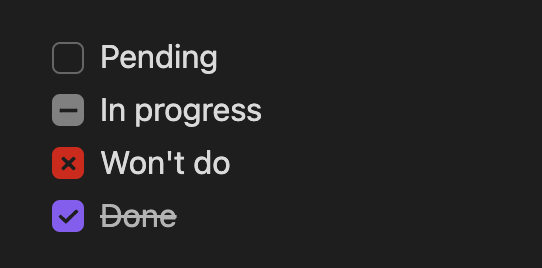
  • 🌟 Render in-progress and won't do task items with their own UI:
    • in-progress syntax: - [.] In progress
    • won't do syntax: - [~] Won't do
    • Now supports live preview mode (as of release 1.0.4)!
  • 🌟 Generate a top-level TODO.md file by scanning all tasks lists in markdown files
    • Run using the command Extended Task Lists: Update TODO

To use

Extra syntax

Simply add an in-progress or won't do task item:

- [ ] Pending
- [.] In progress 
- [~] Won't do
- [x] Done

Generate TODO.md

Open the command palette (Ctrl/Cmd + P by default) and run the Extended Task Lists: Generate TODO command.

The generated filename can be configured in the plugin settings, as well as what task item types are included. By default, done and won't do task items are excluded.

To exclude a markdown file's task items from being included in the generated TODO.md file, add <!-- exclude TODO --> anywhere in the markdown file. To exclude are markdown files in a folder, add an empty .exclude_todos file in the folder.

Development

To get started, set up your local dev environment by following steps 1–3 in the official Obsidian docs for building a plugin.

Basically, the steps look like this:

mkdir -p extended-task-lists/.obsidian/plugins
cd extended-task-lists/.obsidian/plugins
git clone https://github.com/joeriddles/extended-task-lists.git
npm i
npm run dev

Then open the top-level extended-task-lists/ folder in Obsidian as a new vault, enable community plugins in the settings, and enable the Extended Task Lists plugin.

Remember to run npm run dev while developing or you won't see your changes in Obsidian.

Release

Note: releases are now done using GitHub Actions and Releases.

To update the package version:

npm version [major|minor|patch]

To create a release:

git tag x.y.z  # done by `npm version`
git push origin --tags
92%
HealthExcellent
ReviewSatisfactory
About
Render "in-progress" and "won't do" task items with dedicated UI and live-preview support. Generate a top-level TODO by scanning task lists across your vault, and exclude files or folders with `<!-- exclude TODO -->` or an `.exclude_todos` file.
TasksCommandsFiles
Details
Current version
1.0.14
Last updated
2 weeks ago
Created
2 years ago
Updates
14 releases
Downloads
3k
Compatible with
Obsidian 0.15.0+
Platforms
Desktop, Mobile
License
MIT
Report bugRequest featureReport plugin
Author
joeriddlesjoeriddles
github.com/joeriddles
GitHubjoeriddles
  1. Community
  2. Plugins
  3. Tasks
  4. Extended Task Lists

Related plugins

Task Collector (TC)

Change task status and collect tasks within a document using hotkeys and context menus.

Find orphaned files and broken links

Find files that are not linked anywhere and would otherwise be lost in your vault. In other words: files with no backlinks.

Notebook Navigator

A better file browser and calendar inspired by Apple Notes, Bear, Evernote and Day One.

Local REST API & MCP Server

Unlock your automation needs by interacting with your notes over a secure REST API.

QuickAdd

Quickly add new notes or content to your vault.

Recent Files

Display a list of recently opened files.

TaskNotes

Note-based task management with calendar, pomodoro and time-tracking integration.

Omnisearch

Intelligent search for your notes, PDFs, and OCR for images.

Day Planner

Day planning from a task list in a Markdown note with enhanced time block functionality.

Claudian

Embeds Claude Code/Codex as an AI collaborator in your vault. Your vault becomes agent's working directory, giving it full agentic capabilities: file read/write, search, bash commands, and multi-step workflows.