Encounter Builder
 Walker Brown23 downloads
Build tabletop fights in a note. List the party and the monsters, see the XP budget and how hard it is, then start the fight in Quick Initiative.
- Overview
- Scorecard
- Updates4
Plan tabletop fights in an Obsidian note. List the party and the monsters, and the block adds up the XP against the 5E encounter budget (low, moderate or high) or Pathfinder 2e's (trivial to extreme). When it looks right, Start fight hands it to Quick Initiative.
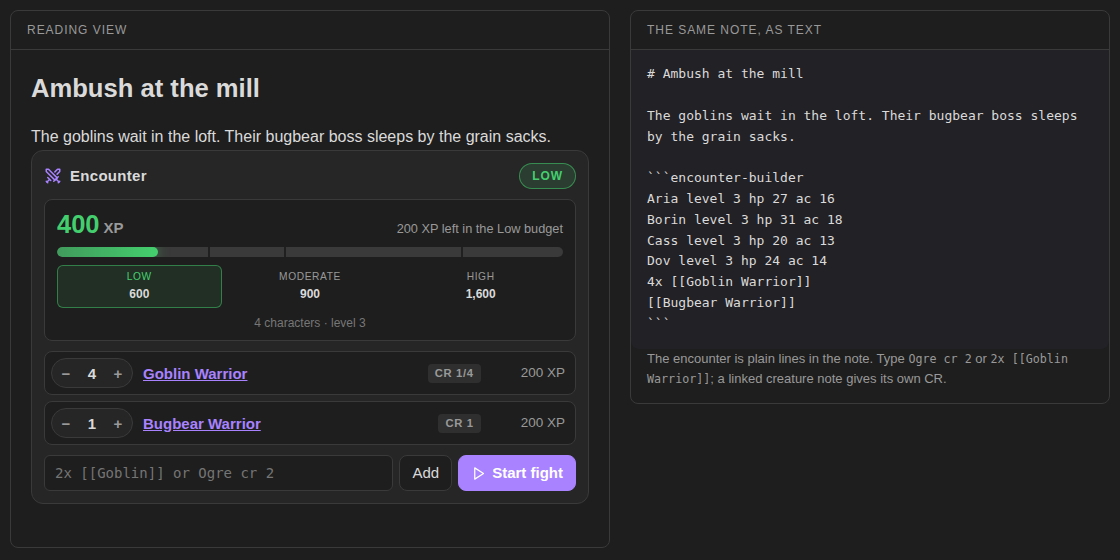
Try it in your browser before installing: https://bulkhead.bananafest-destiny.com/press/encounter-builder/ runs the real plugin code over a sample note.
Build an encounter
Write an encounter-builder block, one line per character or creature:
```encounter-builder
party 4x level 3
3x Goblin Warrior
Bugbear Warrior
Ogre cr 2
```
Switch to reading view (or live preview) and the block shows:
- the total XP, with a bar marked at the Low, Moderate and High budgets for this party
- each creature with its CR and XP, and − / + buttons that change the count in the note
- an add box: type
2x WolforTroll cr 5and press Enter; it suggests the 329 SRD monsters as you type - notes when something looks risky (below)
- Start fight, which writes an
initiativeblock under the encounter
The command Insert encounter drops a starter block at the cursor.
The party
| Write | Meaning |
|---|---|
party 4x level 3 |
four characters of level 3 |
Aria level 4 |
one character; any line with a level is a character |
Borin player hp 44 ac 18 |
a character with no level counts as level 1 |
Mixed levels are fine: each character adds their own budget. Set a Default party in settings and you can leave the party out of each encounter.
Creatures
| Write | Meaning |
|---|---|
3x Goblin Warrior |
that many; a monster from the SRD 5.2.1 needs only its name |
3x [[Goblin Warrior]] or x3 |
that many, CR read from the linked note |
Ogre cr 2 |
CR on the line |
Bandit captain xp 450 |
XP on the line, for creatures from other games |
hp 59 ac 11 init +2 |
passed on to Quick Initiative |
A linked note gives its CR from a cr field in its frontmatter, the way Fantasy Statblocks writes it (cr: 1/4, cr: 0.25 and cr: 2 all work). Creatures kept only in Fantasy Statblocks' own bestiary (not as notes) are not read; add cr to the line.
The SRD monsters
The 329 monsters of the SRD 5.2.1 are built in, by name: Owlbear, 2x Goblin Warrior, Adult Red Dragon. Plurals work too (3x Wolves). Hover a creature's CR to see its type, AC and HP. Start fight passes their HP, AC and initiative on to Quick Initiative, so a fight against SRD monsters needs no notes at all.
Only the name, CR, size, type, AC, HP and initiative are kept, not the stat blocks. Your own numbers come first: a cr or xp on the line, or a linked note with a cr, is used instead of the SRD's.
The budget
The XP budget per character and the XP for each CR come from the encounter-building rules in the SRD 5.2.1, the 2024 version of the rules:
- Low, Moderate and High are the budget for that difficulty, added up over the party.
- An encounter is the lowest difficulty whose budget its XP fits in. Past High it reads Over high.
- There is no multiplier for the number of creatures in these rules. Instead the block warns when a fight has more than two creatures per character, a creature whose CR is above the party's level, more than three different stat blocks, or a crowd of CR 0 creatures.
Turn the warnings off in settings if you know what you're doing.
Pathfinder 2e
Put a system pf2e line in the block, or set Rules to Pathfinder 2e in settings for every block (a block can still say system 5e).
```encounter-builder
system pf2e
party 4x level 3
2x [[Goblin Warrior]] level -1
Bugbear boss level 2
Ogre level 3
```
In Pathfinder a level on a line is the creature's level. Characters are the party line, or lines marked pc (Aria level 3 pc). A linked note gives its level from a level field in its frontmatter.
The math is GM Core's (pages 75 and 76):
- A creature is worth XP by its level against the party level: 10 at four below, 40 at the party level, 160 at four above.
- The budget for four characters is Trivial 40, Low 60, Moderate 80, Severe 120 and Extreme 160. Each character more or fewer moves each one by its character adjustment (10, 20, 20, 30, 40), so five characters get 50, 80, 100, 150 and 200.
- A creature more than four levels from the party is off the table and counts nothing; the block says so. Give it an
xpto count it. Hazards take anxptoo (Spiked pit xp 15). - If the characters are different levels, the party level is their average, rounded down, and the block says which it used.
The Pathfinder numbers come from Pathfinder GM Core by Paizo, under the ORC License. Encounter Builder isn't made or endorsed by Paizo.
Start fight
Press Start fight and an initiative block appears under the encounter with everyone in it. Characters are marked player; levels, CR and XP are left out. With Quick Initiative installed it turns into a tracker, ready to roll. Without it, it's a plain list you can copy anywhere.
Privacy
Encounter Builder does not use the network, has no accounts, collects nothing and sends nothing. It only edits the encounter-builder block it is drawing, and adds the initiative block when you press Start fight.
Install
From Obsidian: Settings → Community plugins → Browse → search "Encounter Builder".
By hand: copy main.js, manifest.json and styles.css from the latest release into <your vault>/.obsidian/plugins/encounter-builder/, then enable it under Community plugins.
Also from this maker
- Quick Initiative: a light initiative tracker that keeps the fight as text in the note.
- Session Log: a quick log for game night. With Quick Initiative, fights log themselves.
- Dice Tray: rolls dice, random tables and note sections inline, and reads Dice Roller's
dice:syntax. - Tabletop Clocks: segmented clocks for danger, plans and factions, ticked with a click and kept as text in the note.
Source
On your players' phones
DM Screen, from the same maker, shows the fight on your players' phones once you start it: the turn order, hit points and conditions, with a battle map beside it. They open a link or a QR code in any phone browser, with nothing to install. DM Screen is paid ($12 once, on itch.io) with a free one-hour trial. Encounter Builder stays free.
Playing alone
Solo Oracle, from the same maker, is for games with no GM: ask it yes or no, frame scenes, keep threads and people, and roll on your own tables, with every answer written into the note. It's free.
https://github.com/walkertbrown/encounter-builder
Build
npm install
npm test
npm run build
MIT licensed. 5E compatible.
This work includes material from the System Reference Document 5.2.1 ("SRD 5.2.1") by Wizards of the Coast LLC, available at https://www.dndbeyond.com/srd. The SRD 5.2.1 is licensed under the Creative Commons Attribution 4.0 International License, available at https://creativecommons.org/licenses/by/4.0/legalcode.