Dowse
 Walid82 downloads
Find anything in your vault by what's in it: notes, PDFs, images, recordings and videos, searched by meaning, on your computer.
- Overview
- Scorecard
- Updates4
Find what you remember, even when you forgot what you called it.
Dowse searches your Obsidian vault by meaning: your notes, PDFs, images, recordings, videos and canvases, together. Describe a diagram, ask about an idea from a lecture, or find files related to the note you are writing. Results take you back to the original file, its page, or an approximate matching moment.
The search model runs on your computer. No account, API key or cloud search service is required.
Desktop only · Free · In Obsidian's community plugins
See it in action · Install · Get started · Supported files · Privacy and requirements · Develop
See it in action
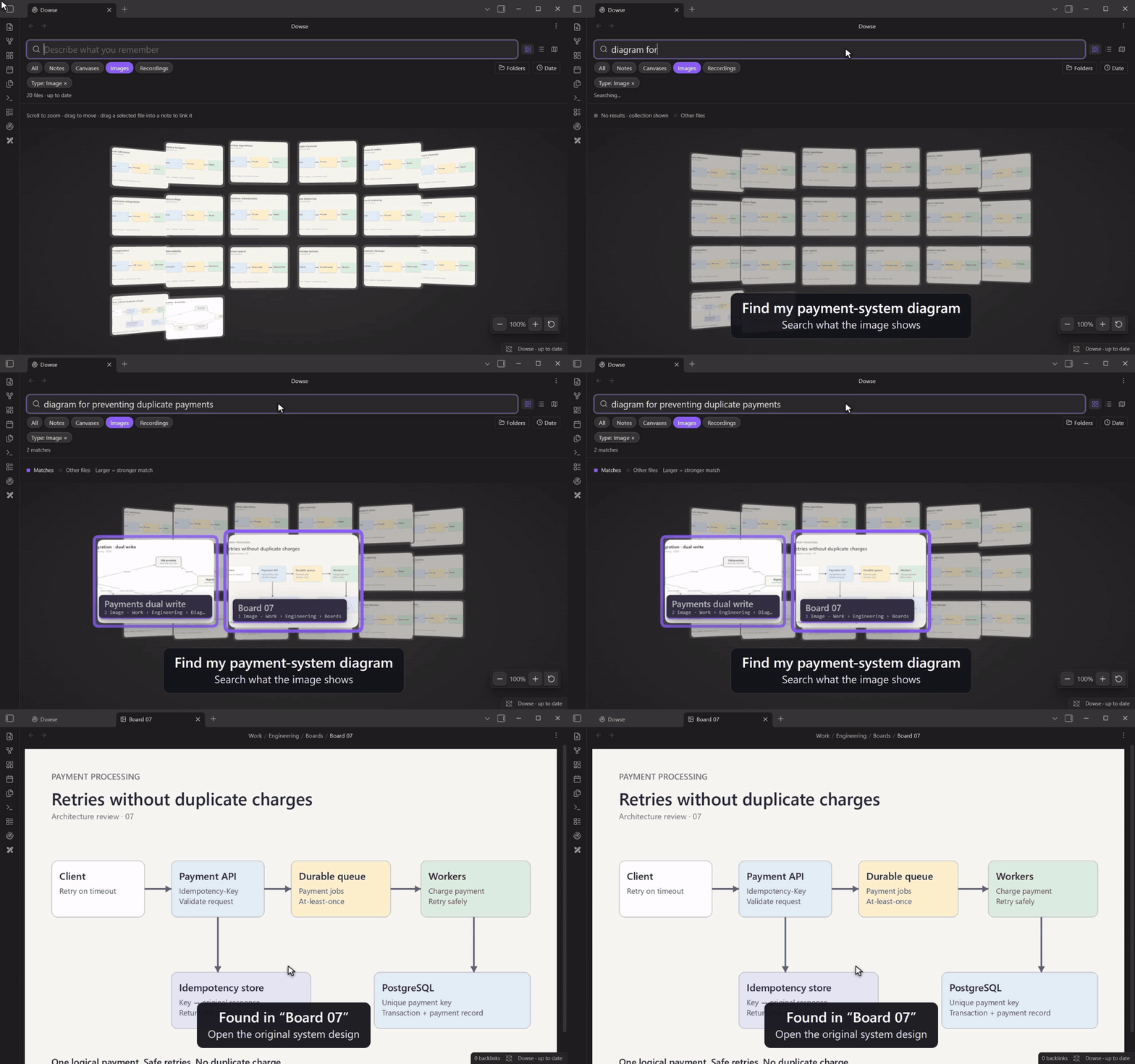
Find a diagram by what it shows
Search for “diagram for preventing duplicate payments” and find the system
design saved as Board 07. Images and scans can be found by their contents, even
when their filenames give you little to go on.
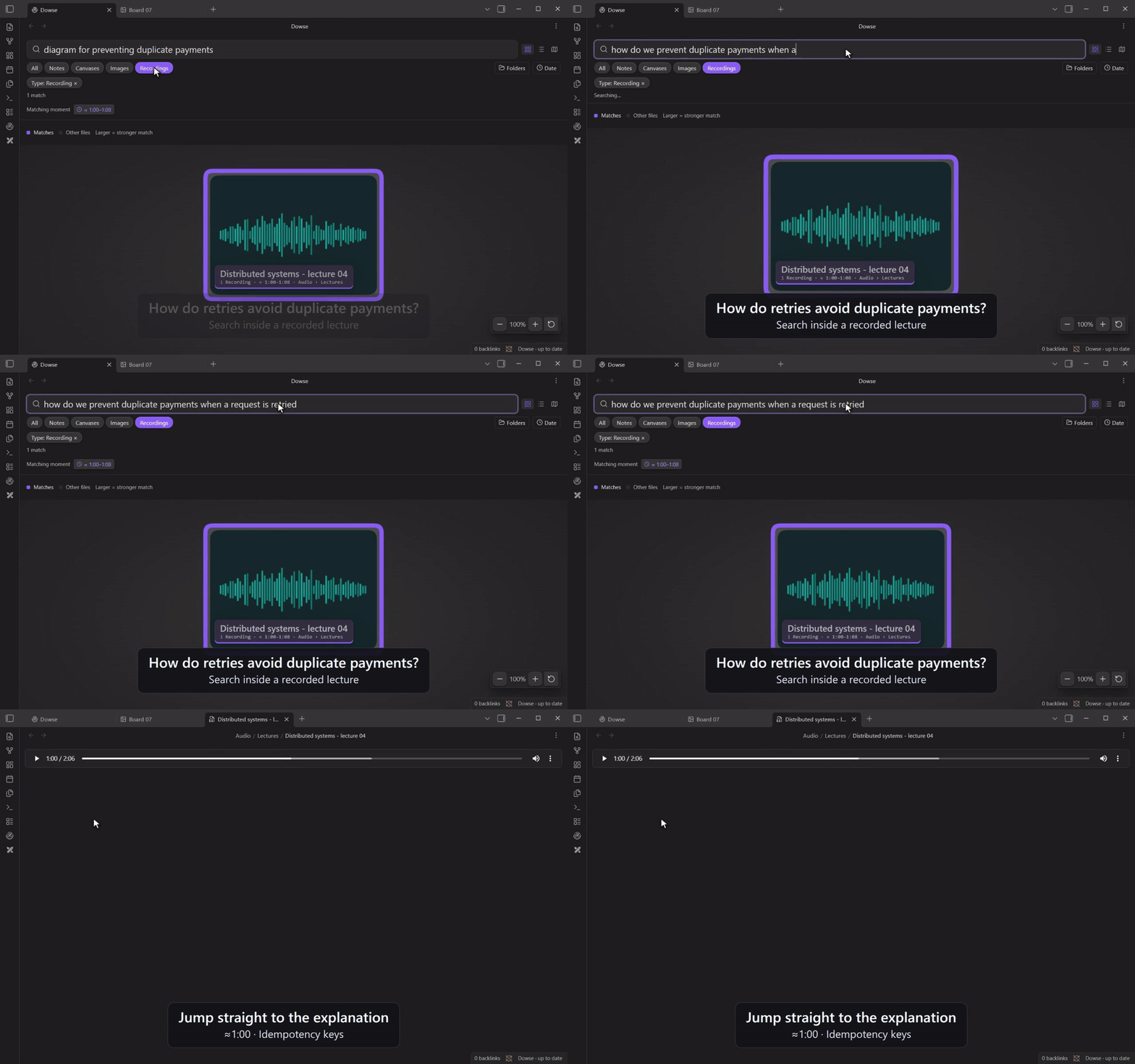
Find the explanation inside a recording
Choose Recordings and ask “how do we prevent duplicate payments when a request is retried”. Dowse finds the lecture and offers Matching moments. Click a passage to open the recording near the explanation—in this example, around 1:00.
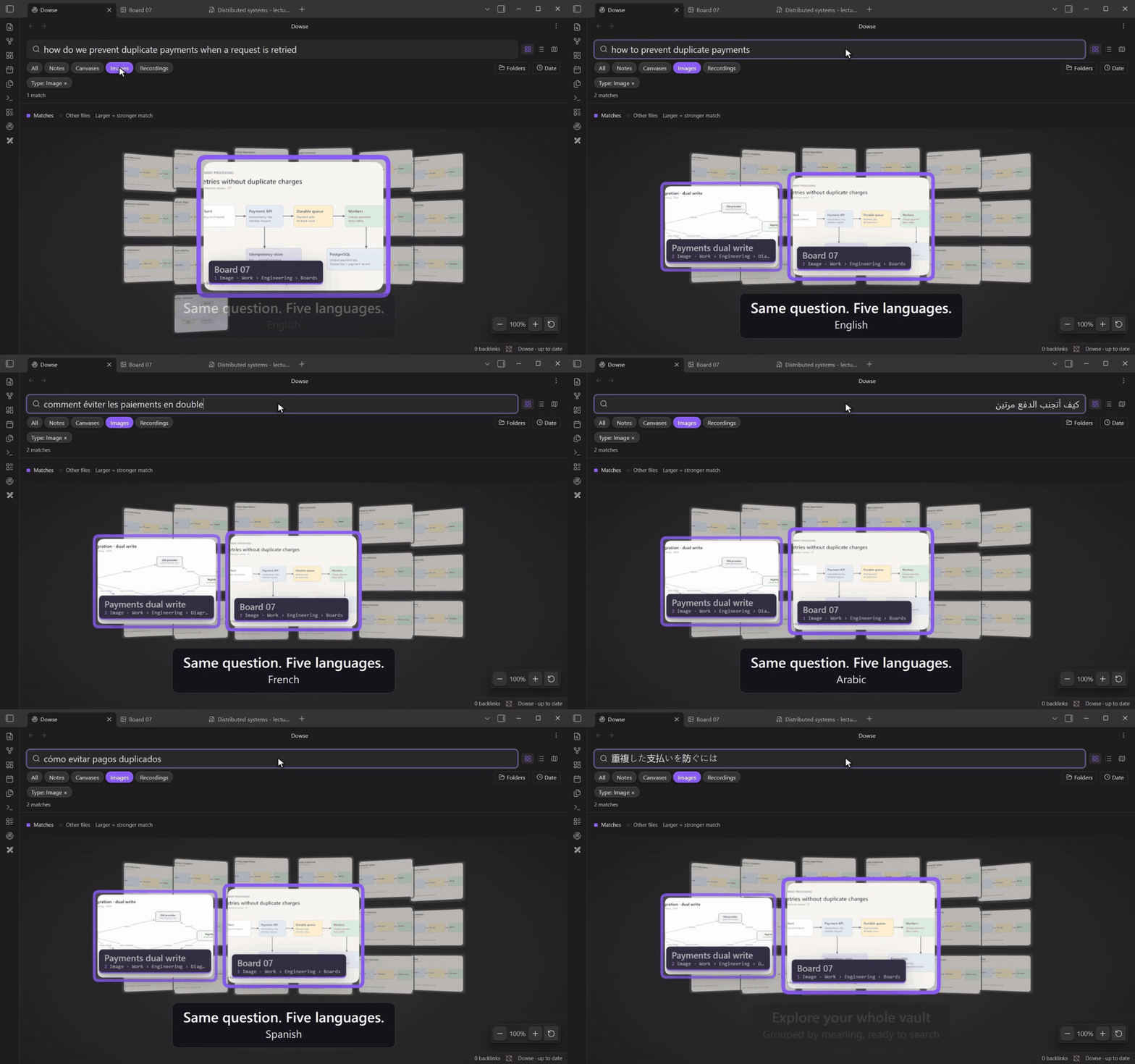
Search in your own language
Ask the same question in English, French, Arabic, Spanish or Japanese. This example finds the same English-language diagram across all five queries. You can also search across languages in your notes and other supported content.
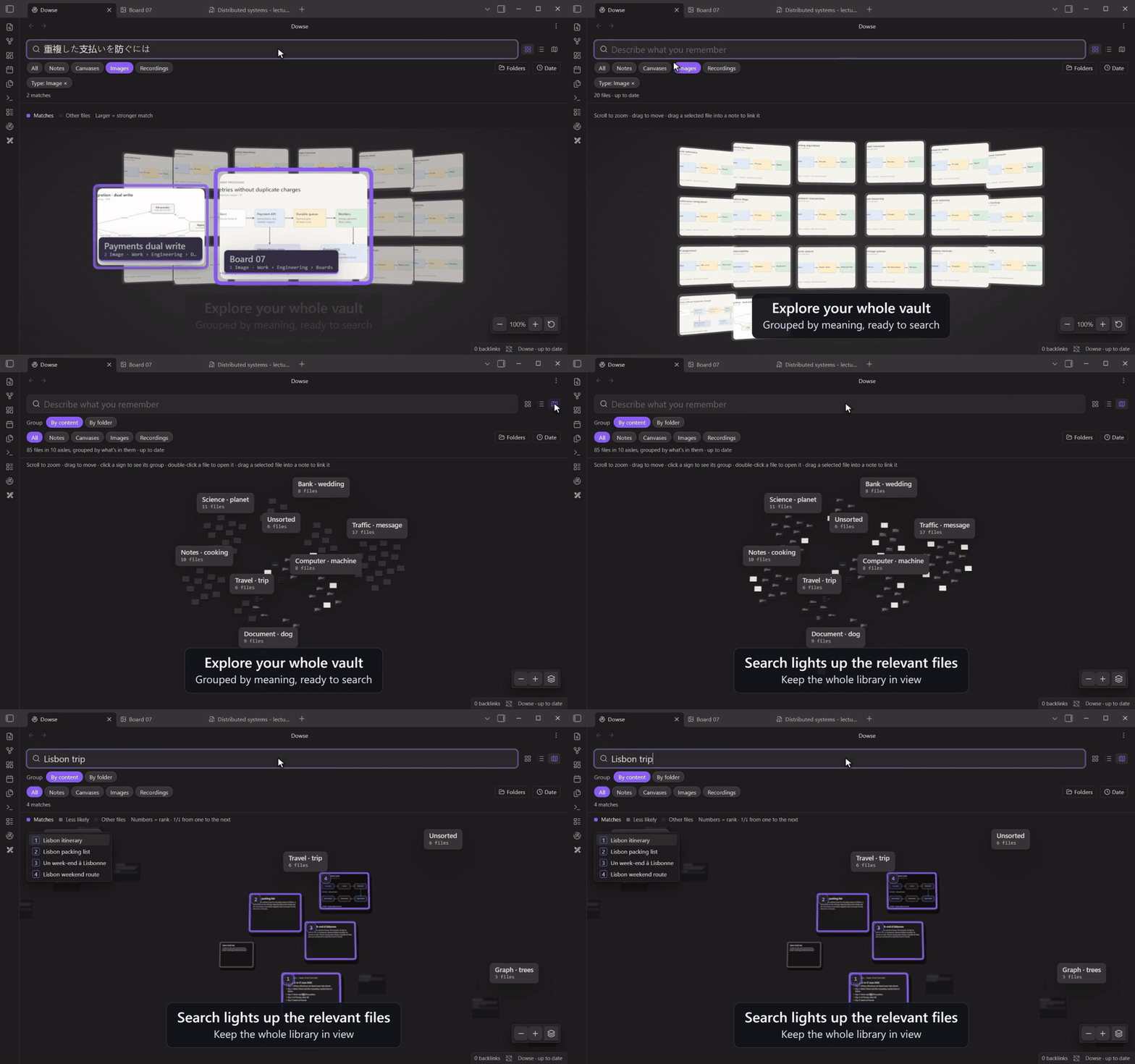
Explore the connections in your vault
Browse files in a spatial view, grouped By content or By folder. A search highlights the relevant files within the collection, and numbered results let you move through them in rank order.
Bring related files into the note you are writing
Open Dowse: Show what's like this note to find related notes, PDFs, images and recordings in a sidebar. Choose Not linked yet, then click Link to insert a reference into your note.
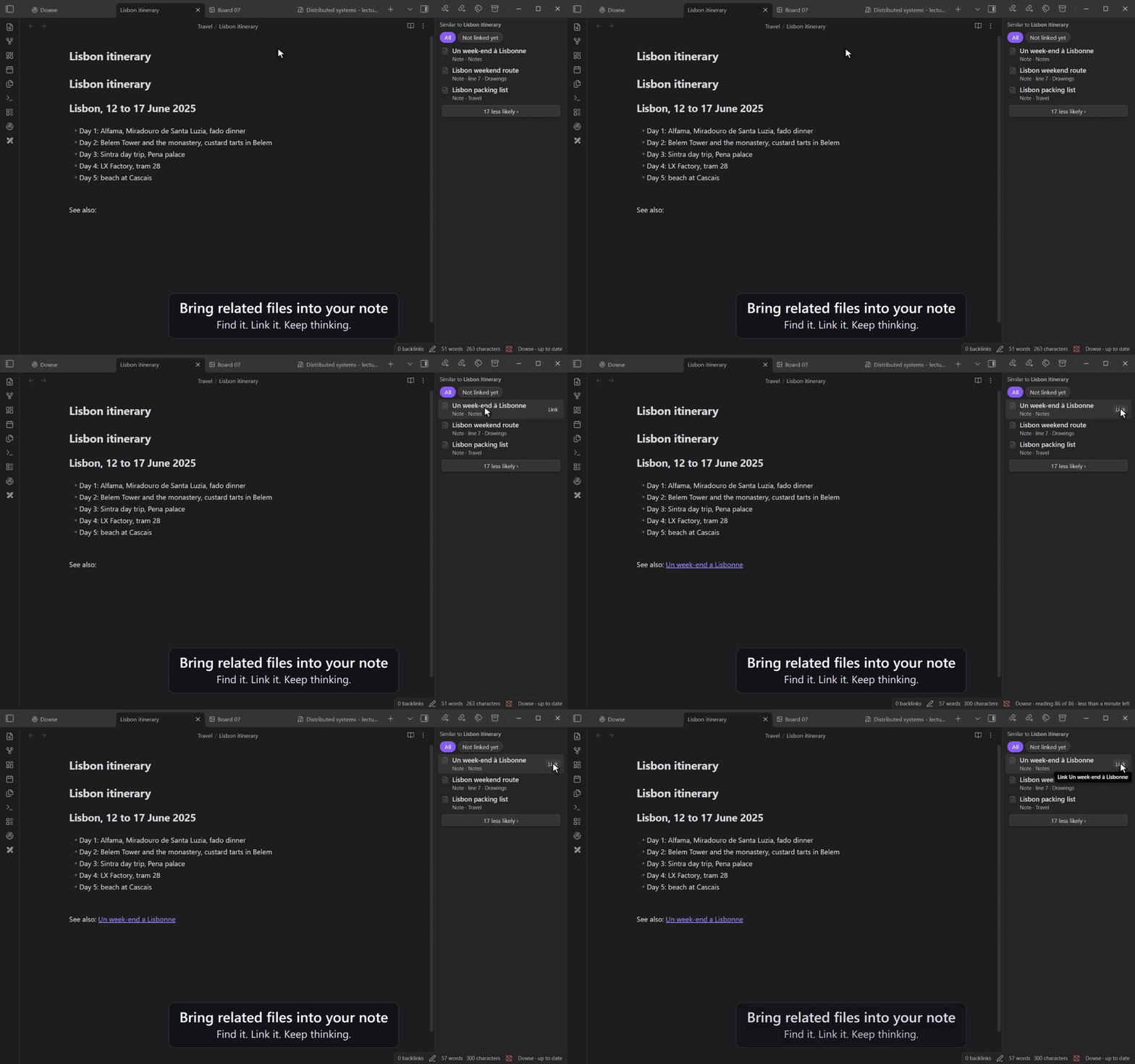
Recorded in a demo vault using real Dowse searches. Matching passages are approximate; results depend on the contents of your vault. About the demos.
Install
In Obsidian, open Settings → Community plugins, turn community plugins on if needed, choose Browse, search for Dowse, then Install and Enable. Obsidian keeps it up to date from there.
Then click the Dowse ribbon icon, or run Dowse: Open the search tab from the command palette.
Installing the plugin does not start indexing or download a model. You choose when to turn it on for each vault.
Dowse's main.js is about 7 MB, mostly the runtime that runs the model on your
computer. Obsidian Sync's Standard plan doesn't sync files over 5 MB, so on that
plan install Dowse on each computer from Browse.
Install by hand
Download main.js, manifest.json and styles.css from the
latest release,
put them together in your vault's .obsidian/plugins/dowse/ folder, then enable
Dowse under Settings → Community plugins (reload Obsidian if it isn't listed).
To update by hand, replace all three files together. You can also
build from this repository.
Get started
- Open the Dowse tab and choose whether to read images and recordings/video sound. Enable these for the visual and lecture examples above.
- Choose Turn on for this vault. Dowse downloads the selected model parts once, then reads your files in the background. You can keep working and searching as the index grows.
- Type what you are looking for. Use List for excerpts, the fisheye gallery for a visual collection, or Explore for spatial groups.
- Narrow a search with file-type chips, Folders (multiple selections) and Date. Applied filters appear as removable chips, including filters inferred from your query.
For a quick search while writing, run Dowse: Search the vault. Assign it a shortcut in Settings → Hotkeys. To leave something out, right-click a file or folder and choose Dowse: stop searching.
Dowse distinguishes matches from closest candidates when nothing clearly matches. Raw scores stay hidden. In the gallery, stronger matches appear larger and move forward.
Read the usage guide for navigation, filters, exclusions, matching moments, Excalidraw and settings.
Supported files
| Content | What Dowse searches |
|---|---|
| Markdown notes | Text passages, with results opening at the relevant line. |
| PDFs | Text pages; scanned or mostly visual pages with image reading enabled. |
| Images and screenshots | Visual content with image reading enabled. |
| Audio recordings | What is said or heard, with approximate matching passages. |
| Videos | Sampled frames and, when enabled, their sound. |
| Obsidian Canvas | Text cards; group labels and linked-file names also support word searches. |
Excalidraw .excalidraw.md |
Readable text and descriptions. With the Excalidraw plugin, drawings preview and open as drawings. |
Excalidraw scene geometry is not visually indexed from the Markdown backing file.
Export a drawing as PNG to search its visual content. Standalone .excalidraw
JSON files are not indexed. Formats and limits
lists extensions and media restrictions.
Privacy and requirements
- Local processing. Your vault content is processed on your computer. The initial model download comes from Hugging Face; search works offline once the selected model parts are cached. Vault content and queries are not sent to Hugging Face.
- Desktop Obsidian. Windows, macOS and Linux are supported; mobile is not. Obsidian 1.15+ also needs a recent installer/runtime. Dowse checks compatibility and explains when an installer update is needed.
- GPU or processor. Automatic mode uses WebGPU when available and falls back to the processor. You can choose the processor in Settings → Dowse.
- One-time downloads. Text is about 542 MB. Images add about 336 MB; audio adds about 587 MB. The local index needs additional space depending on your vault.
- Windows graphics preference. If you explicitly change this option, Dowse reads installed display-adapter information and updates Windows’ per-user GPU preference for the Obsidian executable. This accesses the Windows registry outside the vault.
- Recording limits. Audio content search currently accepts files up to 20 minutes and 32 MiB, with a 128 MiB decoded-audio limit. Split longer lectures into shorter files. Oversize recordings remain searchable by filename; videos may still be searched by their frames.
Each vault has its own local index, stored outside the vault in Obsidian's storage. It is not synced with your notes. The downloaded model is shared across vaults. Settings → Dowse lets you pause reading, change media options, rebuild or remove the index, and remove the cached model. Original files remain in your vault; adding a link from the sidebar is an explicit action.
See storage, privacy and troubleshooting for details, including what remains after uninstalling.
Develop
Use Node.js 24, npm and Python 3. The build also needs xz on Linux/macOS;
Windows can use Python's standard-library lzma support.
git clone https://github.com/WalidHadri-Iron/dowse-obsidian.git
cd dowse-obsidian
npm ci
npm run lint
npm run check
npm test
npm run build
python3 scripts/package.py
The installable plugin is in build/dowse/; the ZIP, checksums and commit metadata
are in build/. Install the three plugin files into a separate development vault
using the steps above.
The development guide covers the repository layout, development builds, native Obsidian testing, media-accuracy checks, CI and packaging. Measurements records test results and their practical limits.
For a bug report, include your OS, Obsidian app/installer versions, Dowse version, the steps to reproduce and a small non-private example where possible. For code changes, describe the behavior and relevant validation in your pull request.
License
Plugin code is available under the MIT license. Model weights are downloaded separately; see the upstream model repository for its terms.
Bundled dependency notices are included in THIRD_PARTY_NOTICES.md
and the release archive. The same license texts are embedded in main.js so
Obsidian’s three-file installer retains them.