Search...Search plugins and themes...
⌘K
Sign in
  • Get started
  • Download
  • Pricing
  • Enterprise
  • Account
  • Obsidian
  • Overview
  • Sync
  • Publish
  • Canvas
  • Mobile
  • Web Clipper
  • CLI
  • Learn
  • Help
  • Developers
  • Changelog
  • About
  • Roadmap
  • Blog
  • Resources
  • System status
  • License overview
  • Terms of service
  • Privacy policy
  • Security
  • Community
  • Plugins
  • Themes
  • Discord
  • Forum / 中文论坛
  • Merch store
  • Brand guidelines
Follow us
DiscordTwitterBlueskyThreadsMastodonYouTubeGitHub
© 2026 Obsidian

Desk

davidlandry93davidlandry933k downloads

A desk to see notes at a glance. Requires Dataview.

Add to Obsidian
  • Overview
  • Scorecard
  • Updates7

Desk is an Obsidian plugin that lets you choose some of your notes and see them together, at a glance. The notes are laid down in a 4x6 aspect ratio which is typically used in analog Zettelkasten systems. The inspiration for this plugin is to emulate picking up the cards for a particular topic, and laying them down on a desk. To learn more about the rationale behind the plugin, read this post.
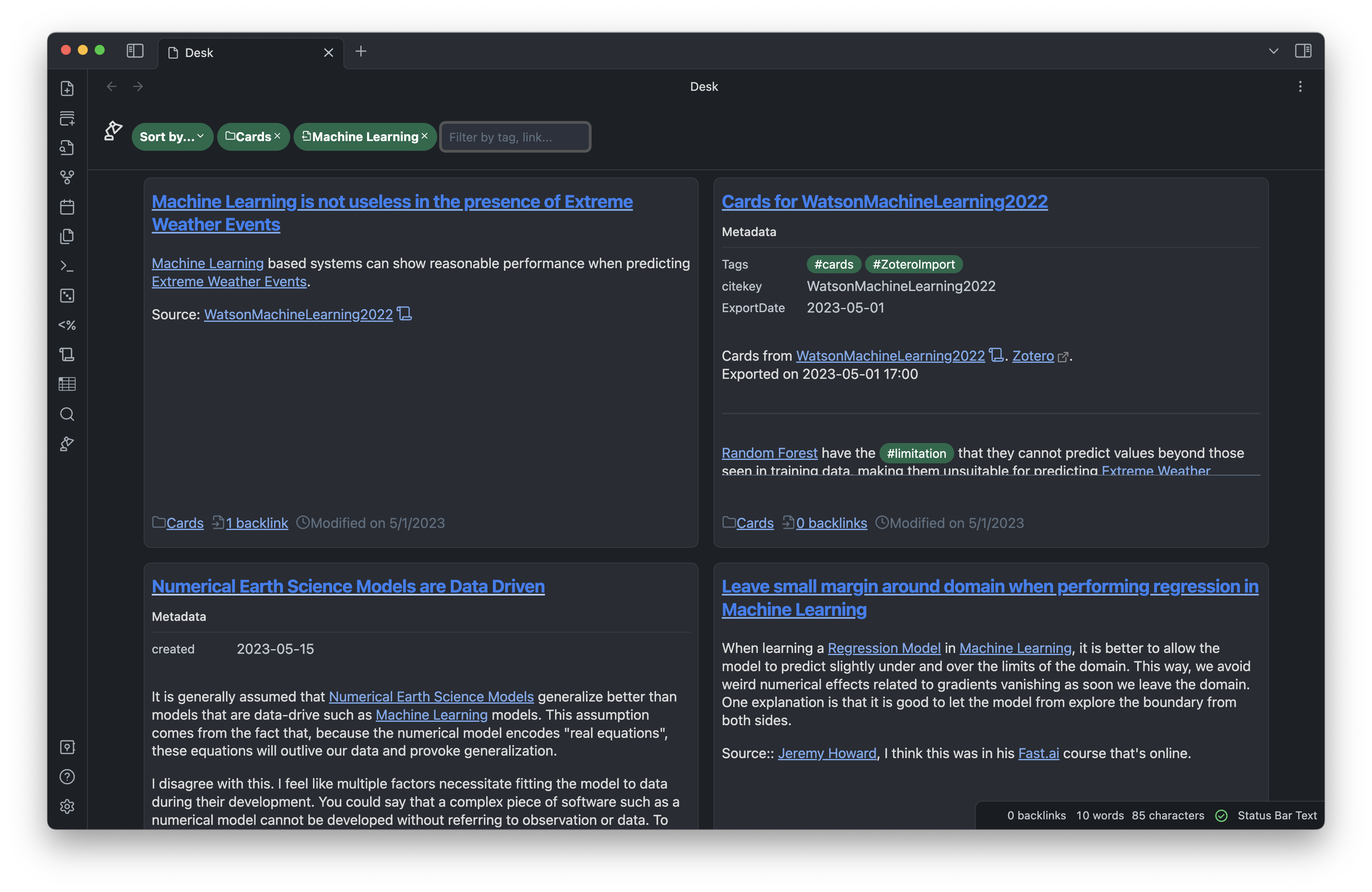
Screenshot of Desk for Obsidian

Installation

Through community plugins

The easiest way to install this plugin is through Obsidian's community plugins. Desk will be available there as soon as the initial code review is finished.

Manual installation

Download the manifest.json, main.js and style.css files from the lastest release, and copy them in the <vault_directory>/.obsidian/plugins/desk.

Dependencies

This plugin requires the Obsidian Dataview plugin to be installed. The Enable Javascript Queries option must be enabled for Dataview.

Usage

Once enabled, the plugin adds a desk lamp icon in the left ribbon. Click on the icon to open a new desk. Alternatively, use the Create new desk command from the command palette to create a new desk.

Type in the search box to browse through your available filters. Desk for Obsidian can filter you notes by outgoing links, incoming links, string, tag and directories. You can make a exclusion filter by clicking on a filter after it was added.

Click on a note card to expand it and see the full note.

Feel free to scale your Obsidian UI up and down to see more of less notes at the same time.

Contribution

Pull requests welcome!

Support

If you like the extension, don't hesitate to buy me a coffee. This will help me to keep contributing to the Obsidian ecosystem.

Contact

If you have any problem or comments about the extension, don't hesitate to open a Github issue, or a pull request. You can also contact me on Twitter/X and Discord.

67%
HealthFair
ReviewSatisfactory
About
Lay out selected notes as 4x6 Zettelkasten-style cards on a virtual desk to view related material at a glance. Filter by outgoing/incoming links, text, tags or folders, and click a card to expand the full note.
VisualizationLinksTags
Details
Current version
1.0.6
Last updated
2 years ago
Created
3 years ago
Updates
7 releases
Downloads
3k
Compatible with
Obsidian 0.15.0+
Platforms
Desktop only
License
MIT
Report bugRequest featureReport plugin
Sponsor
Ko-fi
Author
davidlandry93davidlandry93
blog.dlandry.xyz
GitHubdavidlandry93
  1. Community
  2. Plugins
  3. Visualization
  4. Desk

Related plugins

Excalidraw

Visual PKM powerhouse. Create and edit Excalidraw drawings.

Strange New Worlds

Reveal networked thought and the strange new worlds created by your vault.

Supercharged Links

Add attributes to internal links with the values of target note's frontmatter attributes.

Leaflet

Interactive maps inside your notes.

Smart Connections Visualizer

View your Smart Connections in a visualized format.

Graph Link Types

Link types for graph view.

Advanced Canvas

Supercharge your canvas experience. Create presentations, flowcharts and more.

Smart Connections

AI link discovery copilot. See related notes as you write. Lookup using semantic (vector) search across your vault. Zero-setup local model for embeddings, no API keys, private.

Mermaid Tools

Improved Mermaid.js experience: visual toolbar with common elements and more.

Maps

Adds a map layout to bases so you can display notes as an interactive map view.