Default query in backlinks
 benature5k downloads
Automatically input default query in search input of backlinks in document.
- Overview
- Scorecard
- Updates5
This plugin support set custom default navigation of backlinks, including search query, collapse results, show more context, sort order and expanding unlinked mentions.
You can also ask the plugin to remember the bottom backlinks panel display configuration for each file. (thanks to remember-cursor-position)
Features
Basic: Set default query for bottom backlinks panel.
- Automatically trigger query after file is opened.
- Custom query is preserved in the same leaf.
- Overwrite old default query if settings is updated.
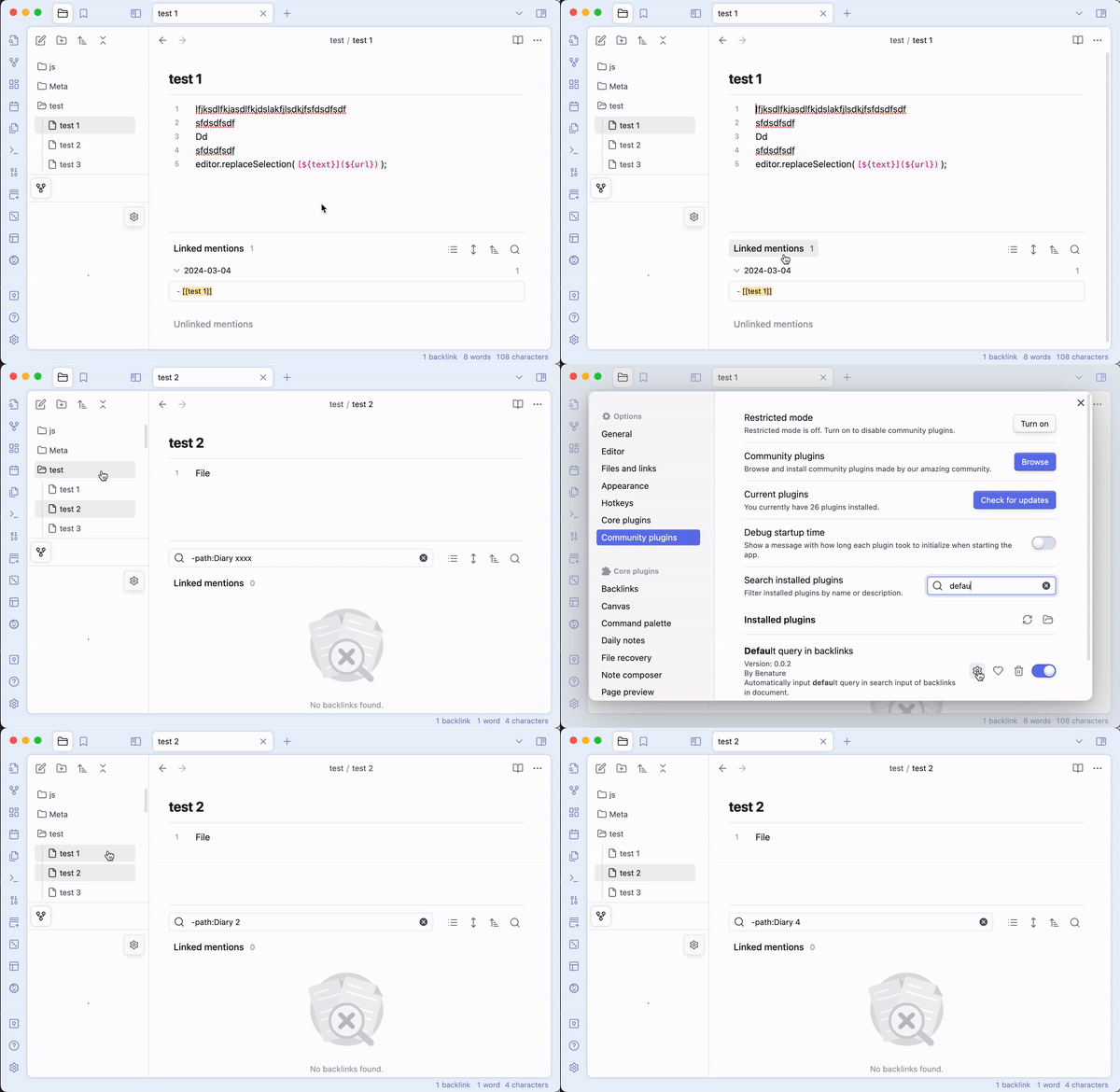
Other demo videos: TBA
My Story
I use the "backlinks in document" feature to explore connections with other notes. Meanwhile, many note files are linked from my daily notes, such as todo items or those automatically added by the List Modified plugin.
However, since there are many daily notes linking to other notes, the backlinks view becomes cluttered, overwhelmed by daily notes that don't provide much useful information.
To avoid displaying daily notes (for example, those located in the Diary/ folder), I have to manually input the search query -path:Diary in the backlinks view each time. This is why I developed this plugin – to simplify the process of inputting search queries in the backlinks view.
How to open backlinks in Obsidian?
- Settings - Options - Core plugins: Enable "Backlinks"
- Settings - Core plugins - Backlinks: Enable "Backlink in document"
- For specific file, there is a
···at the top right corner, click it and select "Backlinks in document".
Install
Install from community plugins
Install by BRAT Plugin
- First install BRAT Plugin:
- In BRAT Plugin, click
Add Beta plugin - Enter https://github.com/Benature/obsidian-default-query-in-backlink
- Enable
Default query in backlinksinCommunity plugins
Manually install
- Download latest version in Releases
- Copy over
main.js,manifest.jsonto your vaultVaultFolder/.obsidian/plugins/default-query-in-backlink/ - Reload plugins in
Community pluginsand enableDefault query in backlinks
How to build
git clone https://github.com/Benature/obsidian-default-query-in-backlinkclone this repo.npm iinstall dependenciesnpm run devto start compilation in watch mode.npm run buildto build production.
Support
If you find this plugin useful and would like to support its development, you can sponsor me via Buy Me a Coffee ☕️, WeChat, Alipay or AiFaDian. Any amount is welcome, thank you!