Search...Search plugins and themes...
⌘K
Sign in
  • Get started
  • Download
  • Pricing
  • Enterprise
  • Account
  • Obsidian
  • Overview
  • Sync
  • Publish
  • Canvas
  • Mobile
  • Web Clipper
  • CLI
  • Learn
  • Help
  • Developers
  • Changelog
  • About
  • Roadmap
  • Blog
  • Resources
  • System status
  • License overview
  • Terms of service
  • Privacy policy
  • Security
  • Community
  • Plugins
  • Themes
  • Discord
  • Forum / 中文论坛
  • Merch store
  • Brand guidelines
Follow us
DiscordTwitterBlueskyThreadsMastodonYouTubeGitHub
© 2026 Obsidian

Datepicker

joycode-hubjoycode-hub9k downloads

Use a date picker to modify and insert date/time anywhere in your markdown notes.

Add to Obsidian
  • Overview
  • Scorecard
  • Updates36
  • Can automatically show picker whenever a date is selected.
  • Can add a calendar button to date and time values in your notes that can be selected to open a datepicker.
  • Can automatically select date/time text for quick formatting.
  • Adds command to edit date and time.
  • Adds commands to insert a new date or date and time.
  • Adds commands to select previous/next date and time.
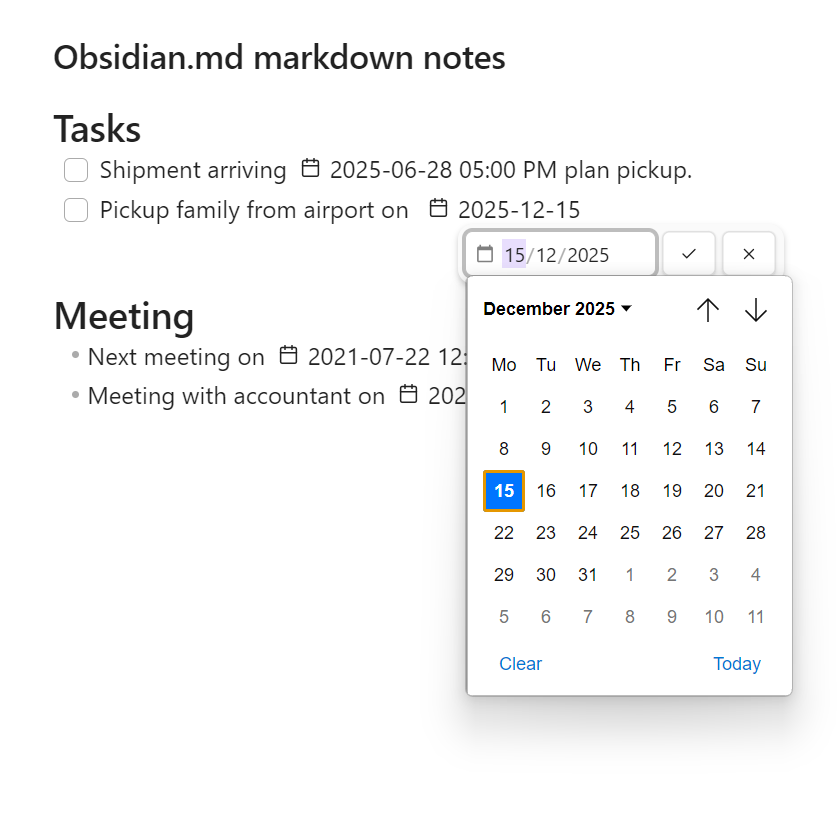
datepicker-screenshot

For issues or bugs with the plugin, feature requests or suggestions, please open an issue.

Your support is welcome and appreciated!

74%
HealthGood
ReviewCaution
About
Insert and edit dates and times anywhere in your Markdown notes using a clickable calendar button or an automatic picker when date text is selected. Use commands to add new dates or date-times, edit existing ones, and jump to previous or next date/time for quick adjustments.
DatesCalendarEditing
Details
Current version
0.3.25
Last updated
10 months ago
Created
2 years ago
Updates
36 releases
Downloads
9k
Compatible with
Obsidian 1.1.9+
Platforms
Desktop, Mobile
License
MIT
Report bugRequest featureReport plugin
Sponsor
Buy Me a Coffee
Ko-fi
Support
Author
joycode-hubjoycode-hub
GitHubjoycode-hub
  1. Community
  2. Plugins
  3. Dates
  4. Datepicker

Related plugins

Day Planner

Day planning from a task list in a Markdown note with enhanced time block functionality.

Thino

Quickly capture memos and display them in the sidebar with a heatmap. (Closed source)

Periodic Notes

Manage your daily, weekly, and monthly notes.

Full Calendar Remastered

Complete Calendar HUB experience. Work with all your calendars in one place. Analyze your time and take action!

Calendarium

Craft mind-bending fantasy and sci-fi calendars.

Journals

Manage your journals.

Chronology

A calendar and a timeline of the note's creation and modification.

Calendar

Explore your daily notes.

Prisma Calendar

Prisma turns any note with a date into a flexible planning system inside Obsidian. There are no rigid schemas or predefined structures — just your data, your rules, fully under your control.

Persian Calendar

Persian Calendar for managing periodic notes based on persian solar (shamsi) calendar.