Data Autocomplete
 phoenixyun64 downloads
Obsidian 内完全本地运行的数据自动补全引擎:直接解析 vault 内 Excel/CSV,按报告上下文从真实数据检索候选数值并强制溯源;无外部服务、无 LLM。支持占位符补全、指标缺值波浪线 + 下拉/Tab 补全、语义兜底、手动搜索、备份恢复。
- Overview
- Scorecard
- Updates4
A fully local data autocomplete engine for Obsidian: it parses Excel/CSV files inside your vault and retrieves real values by report context, with forced source tracing. No external services, no LLM, no Python backend — your data never leaves the vault.
- Version: 0.1.8
- Category: Desktop plugin (
isDesktopOnly: true) - Install: copy this folder to
<vault>/.obsidian/plugins/data-autocomplete/, then enable it in Settings → Community plugins (turn off restricted mode).
What it does
When writing reports or documents, you often need to fill "metric name + value" into the text. This plugin automates that:
- Put your Excel/CSV files into the vault's data directory (default
data-autocomplete-data/); - While writing, mark missing data with a placeholder (e.g.
本月试驾量为【待补充】), or just write the metric name without a value; - The plugin parses the report context (first-line title + current paragraph) to extract "metric / entity / date", then retrieves candidate values from real data;
- Every candidate carries a source trace (file / sheet / row number). If nothing matches, it shows
NO_RESULT— it never fabricates values.
It depends on no external service. Data stays inside the vault and works fully offline.
How the context recommendation works
When you type a placeholder (【待补充】) or a metric name without a value, the plugin runs a 5-stage retrieval state machine — it never invents numbers:
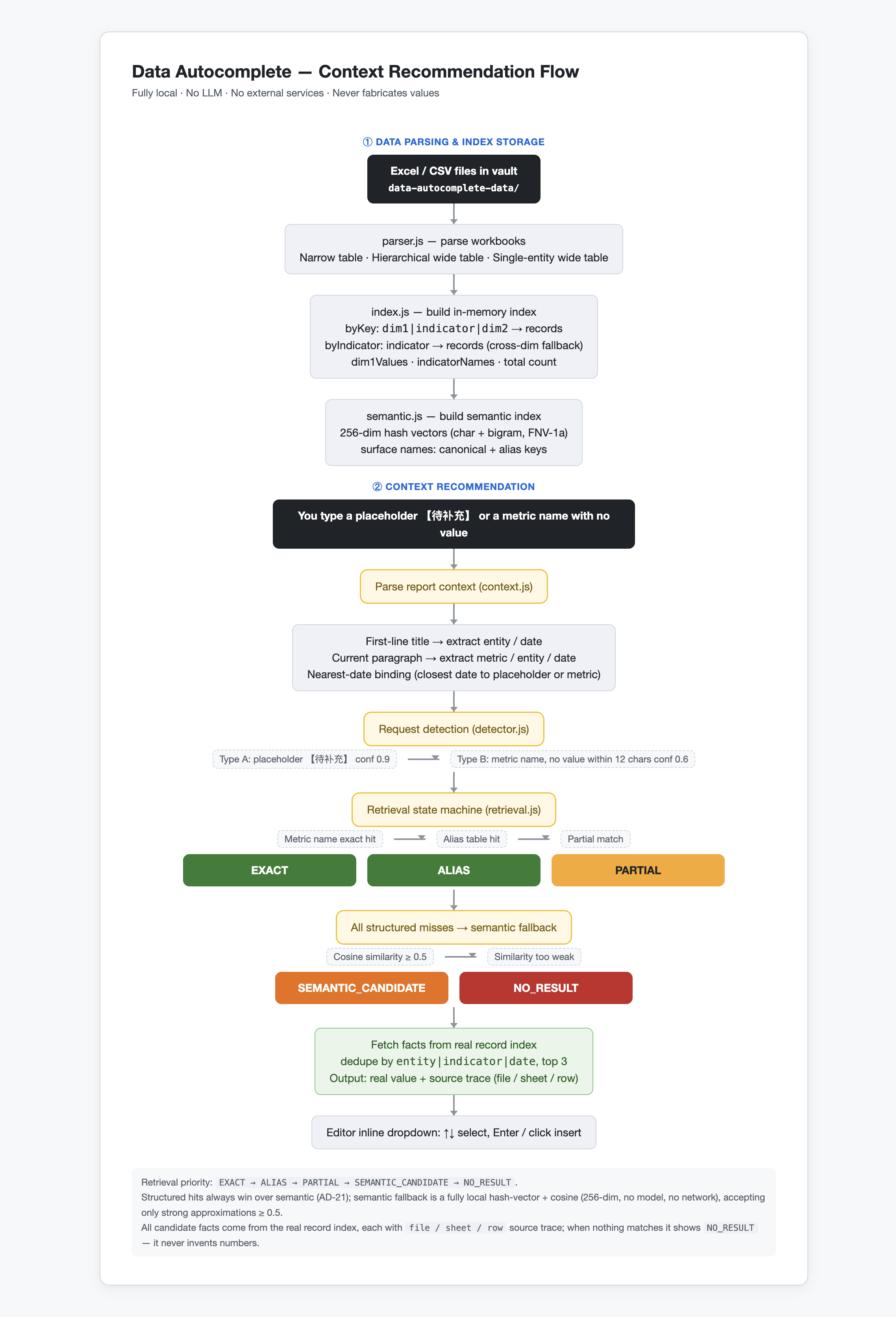
Retrieval priority: EXACT → ALIAS → PARTIAL → SEMANTIC_CANDIDATE → NO_RESULT. Structured hits always win over semantic (AD-21); the semantic fallback is a fully local hash-vector + cosine similarity (256-dim, no model, no network), accepting only strong approximations ≥ 0.5 to prevent weak substring overlaps from creating misleading candidates. All candidate facts come from the real record index, each with file / sheet / row source trace.
Demo
Watch a short demo of the plugin in action (placeholder completion, wavy-underline + dropdown, source tracing):
Or download it directly: demo.mp4
Install (3 steps)
- Add data: create a
data-autocomplete-data/folder in your vault root and put Excel/CSV files inside (supported layouts:- Narrow table:
dimension1/dimension2/month/metric/value/metric description - Hierarchical wide table / single-entity wide table: row 1 headers (
…/specific metric/metric description/entity), row 2 date columns (累计值/2026-07月数据/ranking columns), data starts from row 3) - The directory name can be changed in settings.
- Narrow table:
- Install the plugin: copy this folder to
<vault>/.obsidian/plugins/data-autocomplete/, then enable it in Settings → Community plugins (turn off restricted mode). - Rebuild the index: run 「重建数据索引(解析 vault 内 Excel/CSV)」 from the command palette, or click "Rebuild index" on the settings page.
Usage
Mark missing data with placeholders while writing, for example:
华东区 2026年7月经营数据

本月试驾量为【待补充】,成交量为【待补充】,客流量是【待补充】。
客单价【待补充】,单车毛利为【待补充】,成交率【待补充】。
Run 「分析当前笔记(数据自动补全候选)」 (
Ctrl/Cmd+P), and a popup lists every data request:- Request type (
placeholder/metric_no_value), confidence, metric word, original sentence - Parsed dimensions: metric (match mode) · entity (scope) · date (scope) · missing item
- Retrieval status (
EXACT/ALIAS/PARTIAL/NO_RESULT) with explanation - Each candidate fact: real value + entity + date + match mode + source trace (file/sheet/row)
- "Copy candidate text" writes it into the note in one click.
- Request type (
NO_RESULTis a normal path: it means there is no matching record in the real data. This plugin never invents numbers.
Commands
重建数据索引(解析 vault 内 Excel/CSV)— rebuild the data index分析当前笔记(数据自动补全候选)— analyze the current note for autocomplete candidates数据索引概览— data index overview手动搜索数据(查询理解 + 排序)— manual search with natural-language query understanding and ranking数据预览:单主体单指标全部历史— preview all history for one entity + one metric浏览数据:全量明细分页— browse all records with pagination多表管理:切换活跃数据表— switch the active data table (each subfolder = one named table)创建数据备份(打包数据目录)— back up the data directory as a zip恢复最新备份— restore from the latest backup确保数据目录存在(幂等)— ensure the data directory exists (idempotent)一键补全全部占位符(auto/manual/nodata)— fill all placeholders in one pass (auto / manual / nodata)展开省略号为【待补充】占位符— expand ellipses (。。。/.../……) into placeholders
Settings
Data source & basics
- Data directory: default
data-autocomplete-data(relative to vault root) - Auto-rebuild index on startup: parse automatically when the vault opens (default on)
- Rebuild index now: rebuild manually after data files change (or use the command palette)
Retrieval & semantics
- Semantic fallback (approximate match, fully local): when structured retrieval misses, use local hash-vector approximation to find metrics, then query real data; turn off for strict structured matching only
- Semantic candidate count: how many candidate metrics the semantic fallback shows (default 3)
- Semantic hit threshold: below this similarity, "approximate metrics" don't count as hits (default 0.5)
Editor completion & detection
- Inline completion (placeholder + metric-name dropdown): typing
【shows a real-data candidate dropdown in place (↑↓ to select, Enter/click to insert and auto-close】); typing a metric-name prefix (e.g.成交/本月成交) pops up a metric-name dropdown, Enter completes the name (default on) - Type-B missing-value detection (wavy underline + Tab/dropdown completion): when a metric name has no value within 12 characters, candidates are generated: a red wavy underline under the metric name; when the cursor stops at the end of the metric name, a real-value candidate dropdown pops up (↑↓ to select, Enter/click to insert); Tab inserts the first candidate directly
- Record completion history: every popup copy / inline insert appends a line to
数据目录/history.jsonl
Local self-test
# Engine regression tests against real data (no Obsidian needed, plain node)
node test/engine.test.mjs
Current engine 25 assertions, wavy-mark 9 assertions, dropdown 29 assertions all pass: narrow table 1008 records, hierarchical wide table 498 records, single-entity wide table 10 entities × 20160 records, 21666 real records total / 13 entities / 263 metrics; all 7 placeholders in the sample note hit EXACT real values (试驾量 235.3, 成交量 35.2, 客流量 1086.5, 客单价 301569.4, 单车毛利 42552.6, 成交率 11.2, 总利润 8127), each with file/sheet/row source trace.
Development
npm install          # esbuild + xlsx
npm run build        # src/main.js → single-file main.js (2.1MB, includes xlsx)
npm run test:engine  # engine regression
node test/marks.test.mjs    # wavy-mark + Tab chain
node test/dropdown.test.mjs # dropdown decision
Module layout (mirrors the Python pipeline):
parser.js (narrow/hierarchical wide tables) → index.js (in-memory index) → context.js (context/entity/date/metric extraction) → detector.js (placeholder/metric-missing detection) → retrieval.js (EXACT→ALIAS→PARTIAL→NO_RESULT) → engine.js (orchestration, output shaped like the Python /analyze-report).
M2: Semantic fallback (implemented in this version)
When structured retrieval (exact/alias/partial) all miss, semantic fallback kicks in:
- Local hash-vector + cosine (
semantic.js): embed metric "surface names" (canonical name + alias keys) as 256-dim unit vectors via character/bigram hashing; embed the query the same way, compute cosine, take top-3. - Threshold gating: cosine ≥ 0.5 to accept a candidate, preventing weak substring overlaps (e.g.
人数/数量) from creating misleading approximations (外星人数量always staysNO_RESULT). - Structured always wins (AD-21): semantic only acts as
SEMANTIC_CANDIDATEfallback after EXACT → ALIAS → PARTIAL all fail; candidate facts still come from the real record index (lookupMetric) — never generates values. - Can be disabled: the "semantic fallback" toggle in settings; when off, only strict structured matching.
New status SEMANTIC_CANDIDATE (shown in orange in the popup), retrieval order: EXACT → ALIAS → PARTIAL → SEMANTIC_CANDIDATE → NO_RESULT.
Example: note writes 本月到店人数为【待补充】 → semantic layer hits 进店人数 (0.71) → normalized to 客流量 → returns real value 1086.5 (2026-07, 经营数据-示例.xlsx row 76).
M3: Editor inline completion (implemented in this version)
When you type the placeholder 【, a candidate card pops up in place (src/editor/inlineSuggest.js, CodeMirror 6):
- Candidates:
Engine.suggest(cursor-prefix)reuses the full pipeline — it automatically combines the note's first line (entity/date title) + the paragraph before the cursor into a query segment, then runs request detection → structured → semantic fallback; - Interaction:
↓/↑to switch candidates, Enter or click inserts the real value and auto-closes】,Esccloses; - Trace visible: each candidate shows
value metric@date entity (file:row); status/explanation in the title line (EXACT/ALIAS/PARTIAL/SEMANTIC_CANDIDATE/NO_RESULT). - Never fabricates: when nothing matches it shows
NO_RESULTinstead of forcing a number.
Toggle in settings (default on). CodeMirror packages are injected by the Obsidian runtime (build.mjs marks them external, not bundled).
Roadmap
- M4 Wide-table column recognition: auto-detect and fold arbitrary entity matrices (entity × metric × month).
- M5 Candidate history & frequent metrics: record every pick, weight future ranking.
License
MIT License — see LICENSE.