
- Overview
- Scorecard
- Updates9
Create missing Obsidian daily notes without opening each day, including backfilled ranges that use nested folder formats.
English · 简体中文
Why?
- Backfill any date range — create missing daily notes for a selected period instead of opening each date by hand.
- Respect your Daily Notes setup — uses your configured folder, format, and template from Daily Notes or Periodic Notes.
- Nested paths work — detects existing notes with formats such as
YYYY/MM/DDandYYYY/YYYY.MM.DD. - Startup automation stays optional (fixed in v0.2.1) — create today's note when the vault opens without duplicate creation attempts.
- Desktop daily scheduling — create today's note at a configurable local time even when Obsidian stays open across multiple days.
- Safer backfill modal (new in v0.3.0) — use quick date presets, live range stats, and disabled confirmation for invalid or empty work.
Nested Daily Note Formats
Daily Note Plus checks existing notes using the full path relative to your configured daily note folder, then parses that path with the full date format.
Daily Notes folder: DailyNotes
Date format:        YYYY/MM/DD
Existing note:      DailyNotes/2025/05/12.md
Parsed date:        2025-05-12
This fixes the common failure mode where a plugin only reads the final file name, such as 12.md, and cannot tell which year or month it belongs to.
Backfill Missing Notes
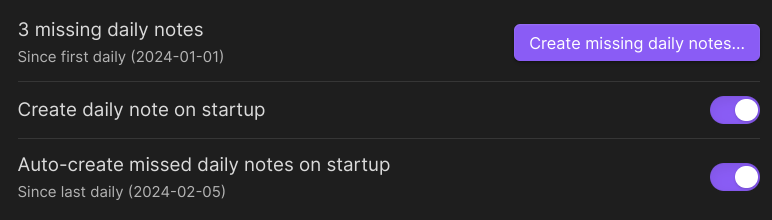
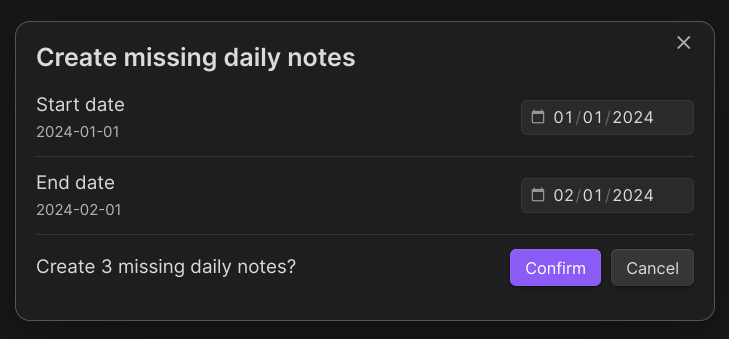
Use the Create missing daily notes command to select a start and end date. Daily Note Plus scans the notes that already exist and only creates the missing dates.
Range:    2025-12-28 to 2026-01-03
Existing: 2025/12/28.md, 2026/01/01.md
Creates:  2025/12/29.md, 2025/12/30.md, 2025/12/31.md, 2026/01/02.md, 2026/01/03.md
If more than seven older notes would be backfilled automatically, Daily Note Plus creates today's note first and asks for confirmation before creating the older dates.
The backfill modal includes quick presets for the last 7 days, last 30 days, this month, and last month. Presets only fill the date inputs; no files are created until you select Start backfill. The modal also shows the inclusive range length and how many daily notes already exist in that range.
Invalid ranges disable the confirmation button. Future end dates are clamped to today, and very large ranges are capped at 3650 days to avoid accidental oversized backfills.
Quick Start
- Install Daily Note Plus from Obsidian's Community plugins browser.
- Enable Obsidian's Daily Notes core plugin, or enable Periodic Notes if you use that workflow.
- Configure your daily note folder and format, such as
YYYY-MM-DD,YYYY/YYYY.MM.DD, orYYYY/MM/DD. - Run
Create missing daily notesfrom the command palette.
Install
Community plugins (recommended)
This is the default install method now that Daily Note Plus has been accepted into the Obsidian community plugin directory. If it does not appear immediately, wait for Obsidian's plugin list to refresh and try again.
- Open
Settings -> Community plugins. - Turn off Restricted mode if Obsidian asks you to.
- Select
Browse. - Search for
Daily Note Plus. - Select
Install. - Select
Enable, or enableDaily Note Pluslater fromSettings -> Community plugins -> Installed plugins.
Migrate from BRAT
Use this if you installed Daily Note Plus through BRAT before the community plugin listing was available.
- Go to
Settings -> Community plugins -> Installed plugins. - Disable
Daily Note Plus. - Go to
Settings -> BRAT. - Find
o1xhack/obsidian-daily-note-plusin BRAT's beta plugin list. - Click the
xbutton next to it, then confirm the removal from BRAT updates. - Return to
Settings -> Community plugins, selectBrowse, and search forDaily Note Plus. - The plugin should show as
Installedbecause it uses the same plugin ID,daily-note-plus. - Enable
Daily Note Plusagain from the community plugin page or the installed plugins list.
Removing the repository from BRAT stops BRAT from managing updates. It does not delete the installed plugin files from your vault; Obsidian can then manage updates through its normal community plugin update flow.
Manual release install
- Download
main.js,manifest.json, andstyles.cssfrom the latest release. - Create this folder in your vault:
.obsidian/plugins/daily-note-plus/ - Put the three downloaded files in that folder.
- Reload Obsidian.
- Go to
Settings -> Community pluginsand enableDaily Note Plus.
Build from source
git clone https://github.com/o1xhack/obsidian-daily-note-plus.git
cd obsidian-daily-note-plus
npm ci
npm run build
Copy main.js, manifest.json, and styles.css into .obsidian/plugins/daily-note-plus/ in your vault.
Configuration
| Setting | Default | Description |
|---|---|---|
Create daily note on startup |
On | Creates today's daily note when the vault opens, but skips creation if today's note already exists. |
Create daily note on schedule |
On | On desktop only, checks for today's note at or after the configured local time. Existing users inherit their startup preference when this setting is introduced. |
Daily creation time |
00:00 |
Local computer time for scheduled creation. If the computer was asleep, the check runs after it resumes. |
Auto-create missed daily notes |
Off | During startup or a scheduled run, also backfills missing notes between the latest existing daily note and yesterday. |
Daily Notes folder |
Your Obsidian setting | The root folder used when detecting and creating daily notes. |
Daily Notes format |
Your Obsidian setting | The full Moment date format, including folder segments like YYYY/MM/DD. |
Daily Notes template |
Your Obsidian setting | The template used by Obsidian's Daily Notes or Periodic Notes setup. |
FAQ
Does it support nested folders like YYYY/MM/DD?
Yes. Daily Note Plus detects existing notes by parsing the full path relative to your configured daily note folder, so DailyNotes/2025/05/12.md is recognized as 2025-05-12 when the format is YYYY/MM/DD.
Will it duplicate notes that already exist?
It should not duplicate notes that strictly match your configured daily note format. It builds a date index before creating missing notes, then skips dates already present in that index.
Startup, scheduled, and manual backfill creation share the same serialized creation queue. Each queued operation scans the vault again before creating a file, so overlapping triggers still create at most one note for a given date.
Does scheduled creation run on mobile?
No. The scheduled trigger is registered only in the Electron desktop app. Startup creation and the manual backfill command remain available on mobile.
Does it support file names with extra title text?
Not yet. Daily Note Plus intentionally uses strict parsing, so 2025-05-12 Beach day.md is not treated as a daily note unless your configured format also includes that title text pattern.
I installed with BRAT. Do I need to uninstall the plugin?
No. Remove o1xhack/obsidian-daily-note-plus from BRAT's beta plugin list so BRAT stops managing updates, then enable the same installed plugin through Obsidian's community plugin UI. Only use Obsidian's Uninstall action if you want to remove Daily Note Plus from the vault completely.
Roadmap
- Rename the plugin to Daily Note Plus with plugin ID
daily-note-plus. - Publish release
0.1.0. - Support existing-note detection for nested daily note formats.
- Publish release
0.2.0for Obsidian community review warnings. - Publish release
0.2.1to prevent duplicate startup creation attempts. - Accepted into the Obsidian community plugin directory.
- Publish release
0.3.0with quick date presets, live range stats, input validation, and tests. - Publish release
0.4.0with desktop-only daily scheduled creation, local-time scheduling, and sleep-resume handling. - Add broader in-vault test coverage for common date formats and long backfill ranges.
Contributing
Issues and PRs are welcome. Before opening a PR, run:
npm run build
For larger behavior changes, open an issue first so the expected Daily Notes behavior is clear.
Acknowledgements
Daily Note Plus is derived from Mario Holubar's Daily note creator, licensed under the MIT License. This fork keeps the original backfill workflow and adds path-aware detection for nested daily note formats.
It also depends on obsidian-daily-notes-interface for Daily Notes settings and note creation.
License
MIT — see LICENSE.
Author: o1xhack