Copy Selected Name
 mikeddy1k downloads
Copy selected files or folders as editable @mentions with Alt+C, with append mode, history, and vault URL conversion.
- Overview
- Scorecard
- Updates10
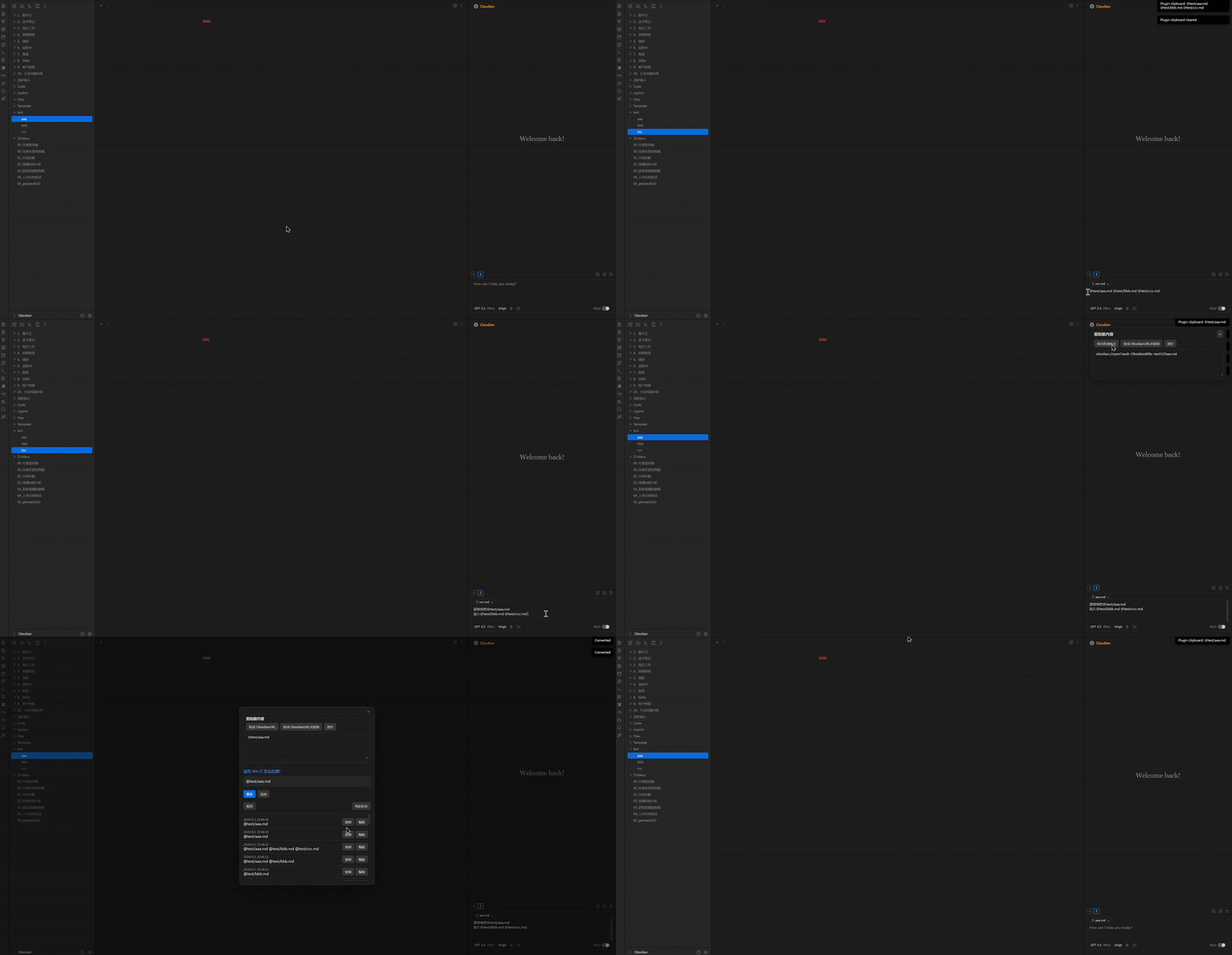
点击这里观看高清 MP4 演示视频。 / Click here to watch the full MP4 demo.
Copy Selected Name 是一个 Obsidian 桌面端插件,用于在文件列表中选中文件或文件夹后,通过 Alt+C(macOS 为 Option+C)快速生成适合 AI 对话和笔记上下文引用的文件名格式,例如:
@01_抖音拆解.md
它特别适合这些场景:
- 在 Obsidian 里使用 Claudian、Claude、Codex 或其他 AI 对话插件时,快速把当前文件作为上下文引用插入输入框。
- 同时选择多个笔记文件,把它们整理成一串可直接粘贴给 AI 的文件名引用。
- 按
Alt+X(macOS 为Option+X)直接复制选中文件或文件夹的真实磁盘路径到系统剪贴板;双按Alt+X会把这次的路径追加到上一次复制的路径后面。 - 在做短视频拆解、选题策划、项目复盘、客户资料整理时,快速收集多个相关文件名。
- 需要在普通
@文件名.md格式和obsidian://open?...Obsidian URL 格式之间来回转换。
Alt+C / Option+C 使用插件自己的内部剪贴板,不会默认覆盖系统剪贴板。Alt+X / Option+X 是真实系统复制,可以直接粘贴到记事本、浏览器、外部文件或其他应用。
联系方式
微信:abc7752abc
备注:问题反馈、建议、合作
界面预览
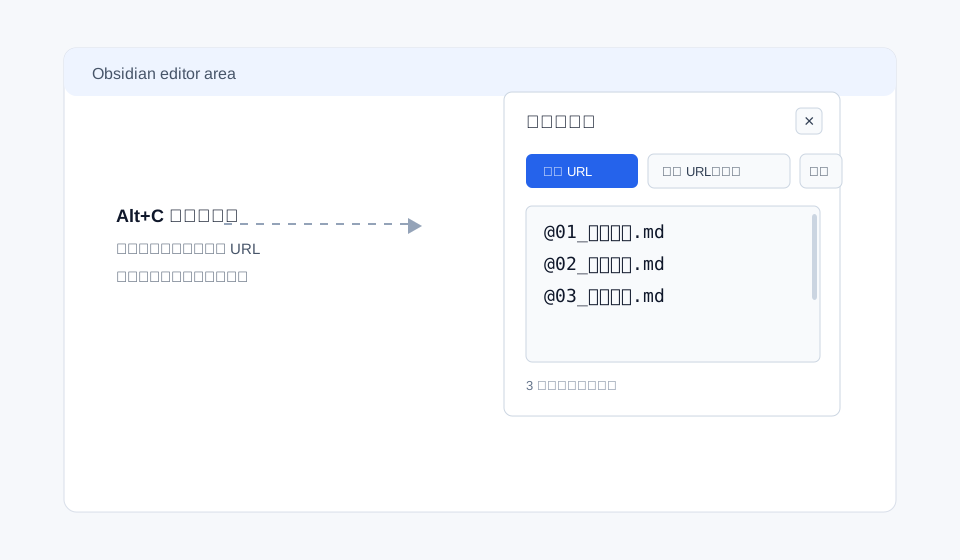
剪贴板内容面板
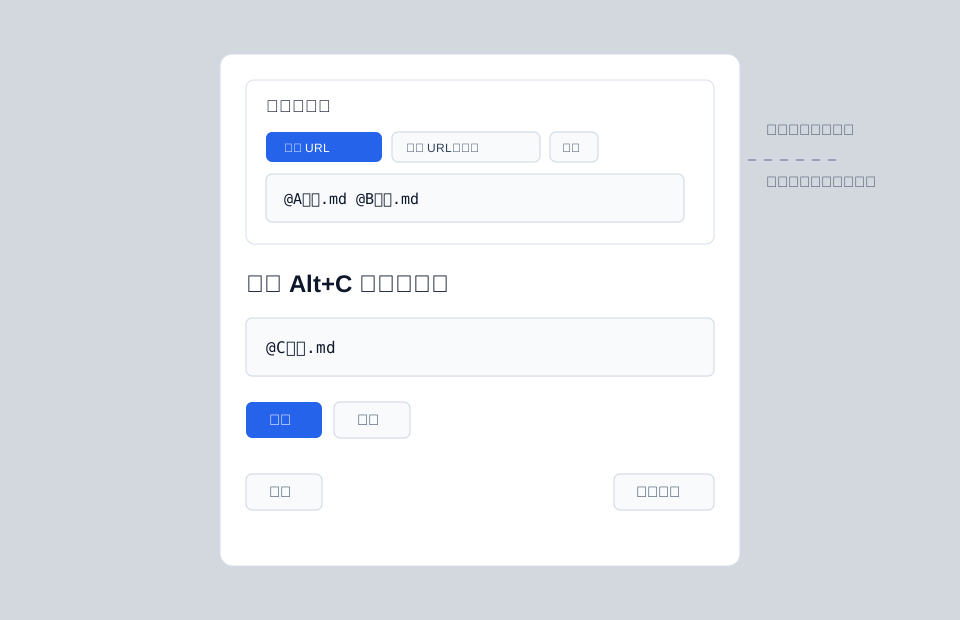
覆盖 / 追加弹窗
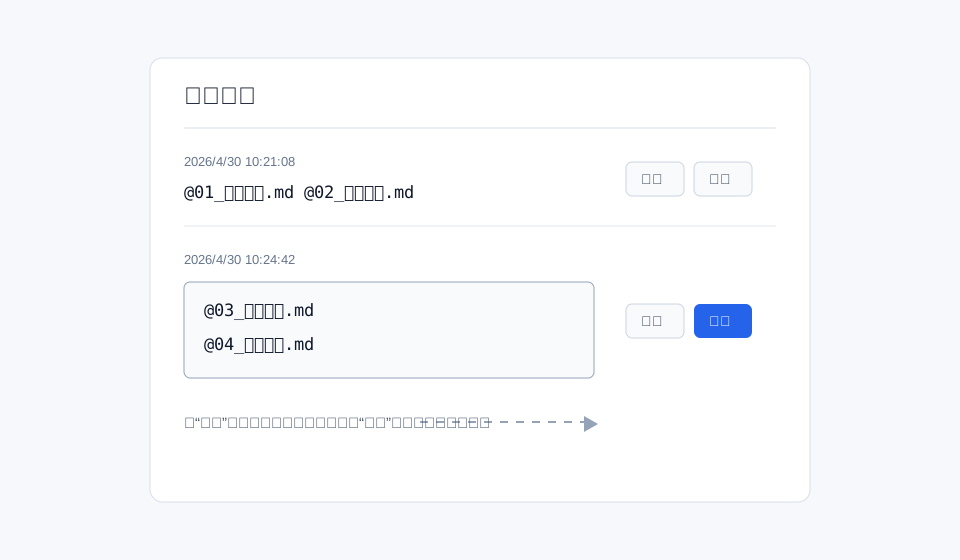
历史记录编辑
安装方法
方法一:下载 ZIP 手动安装
- 打开本仓库页面。
- 点击
Code -> Download ZIP。 - 解压 ZIP 文件。
- 将解压后的插件文件夹重命名为:
copy-selected-name
- 把这个文件夹放到你的 Obsidian 库插件目录:
<你的 Obsidian 库>/.obsidian/plugins/copy-selected-name
以 Windows 为例:
D:\Obsidian\.obsidian\plugins\copy-selected-name
- 确认文件夹里至少包含这些文件:
main.js
manifest.json
styles.css
- 打开 Obsidian,进入
设置 -> 第三方插件 / Community plugins。 - 如果第三方插件还没有开启,先关闭安全模式。
- 找到并启用
Copy Selected Name。
方法二:使用 Git 安装
进入你的 Obsidian 插件目录:
cd "<你的 Obsidian 库>/.obsidian/plugins"
克隆仓库,并把本地文件夹命名为插件 ID:
git clone https://github.com/mikeddy/obsidian-copy-selected-name.git copy-selected-name
然后回到 Obsidian,启用 Copy Selected Name。
使用方法
单个文件
- 在 Obsidian 左侧文件列表里选中文件,例如
01_抖音拆解.md。 - 按
Alt+C(macOS 为Option+C)。 - 插件内部剪贴板会得到:
@01_抖音拆解.md
格式规则:
- 前面自动加
@ - 保留
.md - 末尾保留一个空格
- 多个文件时一行一个文件,每一行末尾仍保留一个空格
多个文件
选中多个文件后按 Alt+C(macOS 为 Option+C),会一次性复制所有选中文件名:
@A文件.md
@B文件.md
@C文件.md
复制物理磁盘路径
选中文件或文件夹后按 Alt+X(macOS 为 Option+X),会把真实磁盘路径直接写入系统剪贴板:
/Users/you/Obsidian/项目/A文件.md
多选时会一行一个路径。这个功能不使用插件内部剪贴板,可以直接粘贴到浏览器、记事本、终端或外部文件中。
和 Alt+C 一样,Alt+X 也支持双按追加:在连按判断间隔内双按 Alt+X(macOS 为 Option+X),会把这次选中的磁盘路径追加到上一次复制的路径后面,而不是覆盖。例如:
- 在 A 文件上按一次
Alt+X,系统剪贴板是 A 的路径。 - 切换到 B 文件,双按
Alt+X。 - 系统剪贴板变成:
/Users/you/Obsidian/项目/A文件.md
/Users/you/Obsidian/项目/B文件.md
追加时会自动去重,同一个路径不会出现两行。单按 Alt+X 仍然是覆盖,会重新开始攒路径。
单按、双按、三连按
- 单按
Alt+C(macOS 为Option+C):覆盖插件内部剪贴板。 - 1 秒内双按
Alt+C(macOS 为Option+C):进入追加逻辑,把新文件名追加到原内容后面。 - 1 秒内三连按
Alt+C(macOS 为Option+C):打开“覆盖 / 追加 / 取消”弹窗。
例如:
- 在 A 文件上双按
Alt+C(macOS 为Option+C)。 - 切换到 B 文件。
- 在 B 文件上双按
Alt+C(macOS 为Option+C)。 - 最终插件剪贴板会是:
@A文件.md
@B文件.md
自定义快捷键和频率
在 Obsidian 中进入 设置 -> 第三方插件 -> Copy Selected Name,可以修改:
- 文件名引用复制快捷键:默认 Windows/Linux 为
Alt+C,macOS 为Option+C。 - 物理磁盘路径复制快捷键:默认 Windows/Linux 为
Alt+X,macOS 为Option+X。 - 每个功能都可以分别配置 Windows 快捷键和 Mac 快捷键。
- 连按判断间隔:设置多少毫秒内算作双击或三击。
- 单击动作:可选智能覆盖、覆盖、追加、弹窗或不执行。
- 双击动作:可选覆盖、追加、弹窗或不执行。
- 三击动作:可选覆盖、追加、弹窗或不执行。
插件命令也会出现在 Obsidian 的 设置 -> 快捷键 中。你可以在那里绑定原生命令快捷键;单击、双击、三击的动作仍以插件设置页为准。
Claudian 输入框联动
如果 Claudian 插件界面已经打开,并且光标正处在 Claudian 输入框中:
- 按
Alt+C(macOS 为Option+C)会把文件名引用直接插入光标所在位置。 - 同时更新插件内部剪贴板和右上角剪贴板面板。
如果光标不在 Claudian 输入框中:
- 插件只更新自己的内部剪贴板。
右上角剪贴板面板
每次按 Alt+C(macOS 为 Option+C),右上角都会弹出剪贴板面板。
它支持:
- 查看当前插件剪贴板内容
- 直接编辑剪贴板内容
- 清空剪贴板
- 转成 Obsidian URL(再次点击转回普通
@文件名.md格式) - 转成磁盘路径(如
D:\库\笔记.md,再次点击转回普通格式) - 复制 Obsidian URL:把转换结果直接写入系统剪贴板,不改动面板内容
- 复制磁盘路径:把完整磁盘路径直接写入系统剪贴板,不改动面板内容
面板默认 3 秒后自动消失。鼠标悬停或正在编辑时不会消失,移开后重新开始 3 秒倒计时。
粘贴后自动清空
在 Obsidian 普通文本编辑区域按 Ctrl+V:
- 如果插件内部剪贴板有内容,会粘贴插件剪贴板内容。
- 第一次粘贴完成后,插件剪贴板会自动清空。
在插件自己的剪贴板面板中按 Ctrl+V:
- 不会触发自动清空。
- 你可以正常把外部文本粘进面板里编辑。
历史记录
打开“覆盖 / 追加 / 取消”弹窗后,可以进入历史记录。
历史记录支持:
- 查看之前复制过的内容
- 把某条历史重新放回插件剪贴板
- 编辑历史记录
- 保存修改后的历史记录
English
Copy Selected Name is an Obsidian desktop plugin for quickly turning selected files or folders into AI-friendly mention text with Alt+C on Windows/Linux or Option+C on macOS, such as:
@01_Example.md
It is designed for Obsidian-based AI workflows where you often need to reference notes, collect multiple files as context, insert file mentions into Claudian, or convert selected notes into Obsidian URLs.
Contact
WeChat: abc7752abc
For feedback, suggestions, and collaboration.
Installation
Option 1: Download ZIP
- Open this repository.
- Click
Code -> Download ZIP. - Unzip the downloaded file.
- Rename the extracted folder to:
copy-selected-name
- Move it to your vault plugin folder:
<your vault>/.obsidian/plugins/copy-selected-name
- Make sure the folder contains at least:
main.js
manifest.json
styles.css
- Open Obsidian and go to
Settings -> Community plugins. - Enable community plugins if needed.
- Enable
Copy Selected Name.
Option 2: Install with Git
cd "<your vault>/.obsidian/plugins"
git clone https://github.com/mikeddy/obsidian-copy-selected-name.git copy-selected-name
Then enable Copy Selected Name in Obsidian.
Features
- Single
Alt+C/Option+C: overwrite the plugin clipboard with selected file or folder mentions. - Double
Alt+C/Option+Cwithin 1 second: append new mentions to the current plugin clipboard. - Triple
Alt+C/Option+Cwithin 1 second: open the overwrite / append / cancel modal. - Multi-selection support: copy several selected files or folders at once, one mention per line.
- Custom shortcut recording from the plugin settings tab.
- Configurable single / double / triple press actions.
- Claudian support: insert mentions directly into the focused Claudian input textarea.
- Editable plugin clipboard panel: view, edit, clear, and reuse clipboard text.
- Obsidian URL conversion: toggle mention text into Obsidian URLs and back.
- Disk path conversion: toggle mention text into full disk paths and back.
- Copy Obsidian URLs or full disk paths to the system clipboard without changing the plugin clipboard editor.
- Paste-once behavior: pasting outside the plugin clipboard panel clears the plugin clipboard after insertion.
- Editable history: copy, edit, and save previous copy records.
The plugin clipboard is separate from the system clipboard. The system clipboard is only written by the 复制 Obsidian URL and 复制磁盘路径 buttons.
Settings
Open Settings -> Community plugins -> Copy Selected Name to customize:
- Windows shortcut: configure the shortcut used on Windows/Linux.
- Mac shortcut: configure the shortcut used on macOS.
- Press interval: define how quickly repeated presses become double or triple presses.
- Single press action: smart overwrite, overwrite, append, modal, or no action.
- Double press action: overwrite, append, modal, or no action.
- Triple press action: overwrite, append, modal, or no action.
The plugin command also appears in Obsidian's native Settings -> Hotkeys list. Native hotkey bindings trigger the same command, while press-frequency behavior follows the plugin settings tab.
Development
This plugin is plain CommonJS JavaScript and does not require a build step.
npm run check
npm run check runs:
node --check main.js