Content Linker
 medill-east4k downloads
Search and add bi-directional links to existing content.
- Overview
- Scorecard
- Updates23
For English, please see English below.
免责声明
该插件中的代码 95% 以上由 codeGPT 完成。 本插件只进行过自测,以防意外,请提前备份库中内容 :) 如无意外,可能不会更新 :)
说明
这是一个为 Obsidian (https://obsidian.md) 而作的插件。
该插件旨在帮用户快速基于库中已有内容建立双向链接。
本插件中所提到的 "bi-link" 所指的都是双向链接(双链)。即内容被 [[]] 包裹的形式。
适用场景
本插件适用于以下场景:
- 库中已有大量笔记,但其中还存在大量需要添加双链的内容
- 库中已有大量笔记,想要寻找其中潜在的双向链接
建议搭配 Various Complements (https://github.com/tadashi-aikawa/obsidian-various-complements-plugin) 插件一同使用:
- 使用本插件先建立库中双链
- 使用 Various Complements 在未来输入时基于已有双链快速输入双链
安装
- 从社区插件库中安装(推荐)
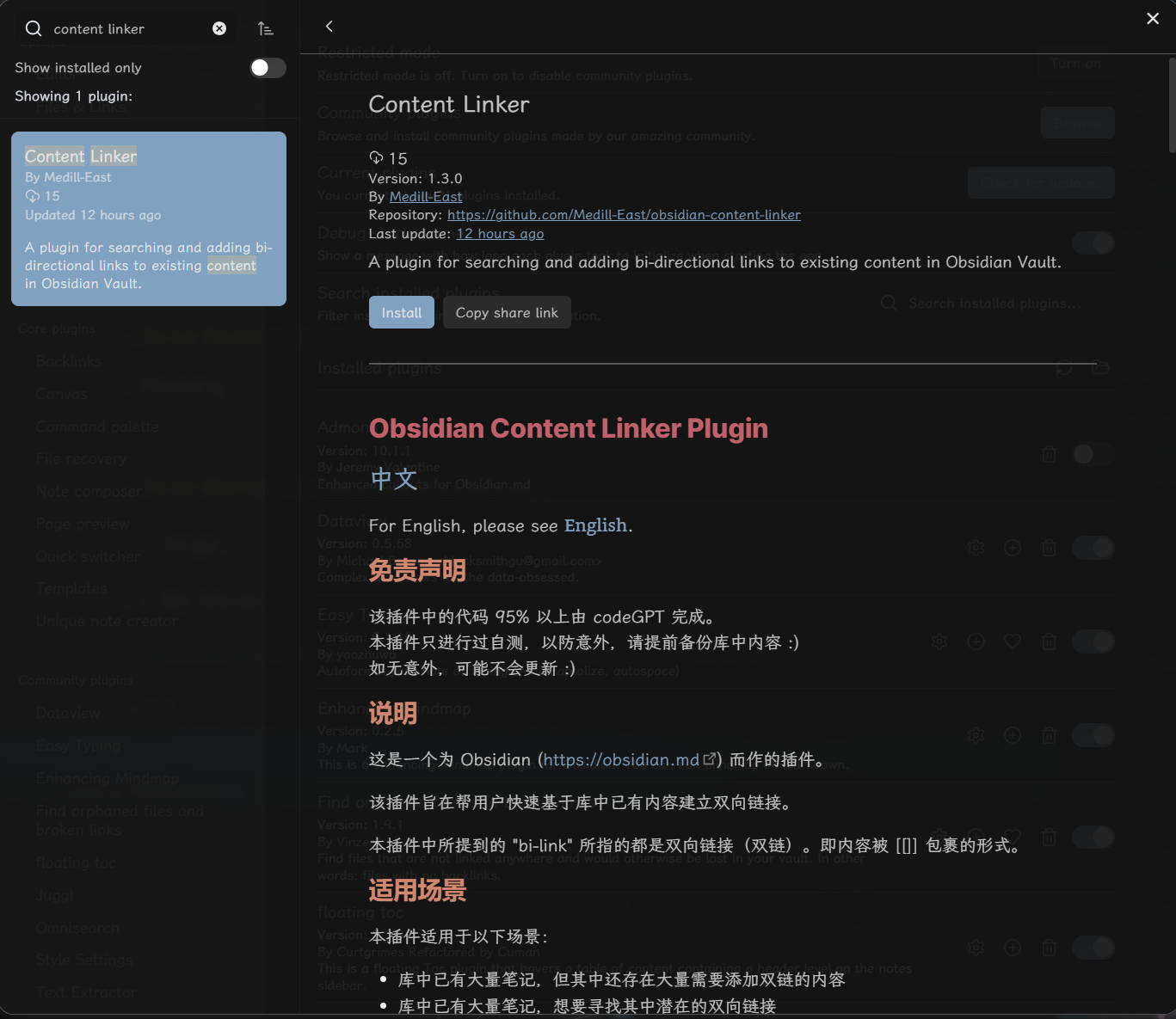
- 拷贝
main.js,styles.css,manifest.json到库中的以下位置:VaultFolder/.obsidian/plugins/obsidian-content-linker/.
如何使用
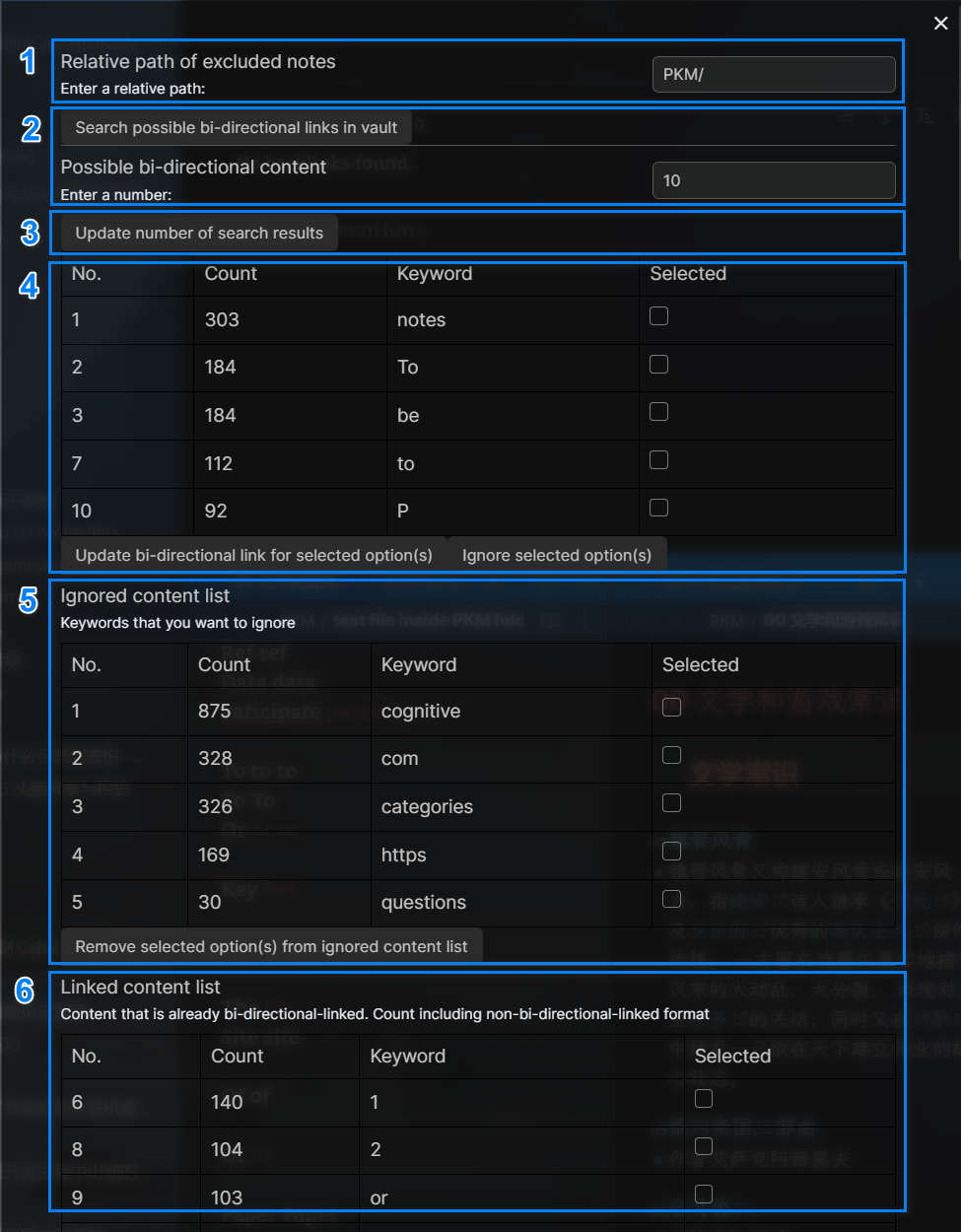

- 排除特定范围下的笔记
- 可以通过输入相对路径来排除特定范围下的笔记,防止本插件对该路径下的内容进行改动
- 如截图中输入的相对路径是
PKM/,则会将库中 PKM 文件夹及其下子文件夹中的内容都排除在搜索/更改范围外
- 如截图中输入的相对路径是
- 搜索潜在双链
- (建议)直接使用设置面板中的“Search Possible Bi-Links in Vault”按钮来搜索库中潜在的双向链接
- 在设置面板中还可以设置想要显示的结果数量(但若是将其中的结果使用本插件更新为双链形式后,就不再显示在结果列表中,但仍然占用数量,详见已知问题部分。
- 也可以在编辑模式中调用指令“Content Linker: Search Possible Bi-Links in Vault”来进行搜索
- 更新所选项为双链形式
- 使用“Update Bi-Link For Selected Options”按钮可以将列表中所选中的选项在库中的原文位置更新为双链形式
- 可以将不想使其出现在搜索结果中的内容加入忽略列表中
- 使用“Ignore Selected Options(s)”按钮即可将潜在双链列表中的所选项移除并加入忽略列表中
- 可以将选项从忽略列表中移除,使其可以重新出现在潜在双链内容列表中
- 使用“Remove Selected Option(s) from Ignored Content List”按钮即可将所选项从忽略列表中移除,并使其可以重新出现在潜在双链内容列表中
- 可以看到当前库中目前已经建立了双链的内容,可以将其转换为非双链形式
- 使用“Remove bi-directional links for selected option(s)”按钮即可将所选项从双链形式转换为非双链形式
- 这里的 Count 的计数包括了双链 + 非双链形式的总数。非双链形式指的是虽然该内容存在双链的形式,但可能并非所有的该关键词都是双链形式。如同时存在“Content”和“[[Content]]”形式的内容,那么两种形式都会被计数。
开发过程
大致是通过与 codeGPT 交流,使其基于以下 prompt 来实现代码:
你是一位出色的 obsidian 插件开发者。现在想为 Obsidian 开发一款新的插件 Content Linker,以便能让用户能够为库中的已有内容添加双链。
请逐条分析所选代码是否能实现以下功能,如果不能,请分析原因并给出修正后的完整代码:

1. 该插件应该可以通过在编辑窗口中调用函数,或是在设置页面中点击“Search Possible Bi-Directional Link [[in]] Vault” 按钮来搜索库中已有的所有内容;
2. 该插件应该有一个单独的设置页面;
3. 基于 1. 的搜索结果,存储库中所有重复出现过的内容,并且这些内容不双链形式,那么就将这些内容作为潜在的双链关键字。完成后给出弹窗提示“Search Finished!”;
4. 将 2. 中存储的结果中重复次数从高到低的前 n 个结果以列表形式呈现在该插件的设置页面中。在设置页面中添加一个名为"Option Count"的只能输入数字的输入框和名为“Update”的按钮,根据用户在输入框所输入的数字作为列表中可显示的选项数量(即 n 的数量);
5. 基于前面的回答,将 4.的结果以一个四列的列表形式呈现在该插件的设置页面中。每一个潜在的双链关键字即列表中的一个选项。第一列为序号,第二列为该潜在双链关键字在库中重复出现的次数,第三列为该潜在双链关键字,第四列为当前该选项的选择情况。
6. 当用户点击设置页面中的 “Update Bi-Link For Selected Options” 按钮后,遍历 5. 中用户所选择的所有选项,并将其所选内容在原文位置中替换为双链形式;
7. 该插件的设置页面中应该有一个单独的名为“Ignored Content List”的列表。该列表有四列,第一列为序号,第二列为该潜在双链关键字在库中重复出现的次数,第三列为该潜在双链关键字,第四列为当前该选项的选择情况。
8. 当用户点击设置页面中的“Ignore Selected Option(s)”按钮后,遍历 5. 中用户所选择的所有选项,将这些选项从潜在双链关键字列表中排除,并将这些选项加入 Ignored Content List,并在 Ignored Content List 中显示。对 Ignored Content List 中的内容根据其第二列的 Count 数量进行倒序排列。
9. 当用户点击设置页面中的“Remove From Ignored Content List”按钮时,遍历 7. 中所选的所有选项,并将这些选项重新加入潜在双链关键字列表。
如感兴趣,可以看开发回顾。
已知问题
搜索性能问题
- 目前的搜索需要对库进行遍历,所以会有比较大的性能消耗
- 如要优化会涉及较多重构,不一定会进行优化
结果列表中的序号显示有歧义
- Possible bi-directional content 和 Linked content list 中显示的 No. 是其在整个库中所出现频率的排名
- Ignored content list 的 No. 是新的序号,无其他意义
- 因为不影响使用,所以不再费心
搜索结果中没有将语气词等排除
- 易用性不够好,但因为不影响使用,所以不再费心
中文说明, 请见上方 中文.
English
Disclaimer
More than 95% of the code in this plugin was developed by codeGPT. This plugin has only undergone self-testing as a precaution. Please make a backup of your vault contents in advance :) Unless unexpected situations arise, there may be no further updates :)
Description
This is a plugin created for Obsidian (https://obsidian.md).
The purpose of this plugin is to help users quickly establish bi-directional links based on existing content in the vault.
If you see "bi-link" in this plugin, it means "bi-directional link". i.e., content with the format of [[]] :)
Applicable Scenarios
This plugin is suitable for the following scenarios:
- There are numerous notes in the vault, but there is still a substantial amount of content that needs bidirectional linking.
- There are numerous notes in the vault, and you want to discover potential bidirectional links among them.
It is recommended to use this plugin together with the Various Complements (https://github.com/tadashi-aikawa/obsidian-various-complements-plugin) plugins:
- Utilize this plugin to establish bidirectional links within the vault.
- Utilize Various Complements in the future to quickly input bidirectional links based on the existing ones.
Installation
- Install from Community plugins (recommended)
- Copy over
main.js,styles.css,manifest.jsonto your vaultVaultFolder/.obsidian/plugins/obsidian-content-linker/.
How to Use
- Exclude Notes within a Specific Scope
- You can exclude notes within a specific scope by inputting a relative path, preventing this plugin from making changes to content within that path.
- For example, if the relative path input, as shown in the screenshot, is PKM/, it will exclude the content within the PKM folder and its subfolders in the vault from the scope of searching/updating.
- Search for Potential Bi-Directional Links
- (Recommended) Use the "Search Possible Bi-Links in Vault" button in the settings panel to search for potential bi-directional links in the vault.
- You can also specify the number of results you want to display in the settings panel (if you update any of these results to bi-link format using this plugin, they will no longer appear in the results list, but they will still be count into the total number, see Known Issues section for details).
- Alternatively, you can invoke the command "Content Linker: Search Possible Bi-Links in Vault" in edit mode to perform the search.
- Update Selected Options to Bi-Link Format
- Use the "Update Bi-Link For Selected Options" button to convert the selected options in the list to bi-link format in their original locations in the vault.
- Add Options to Ignore List to Exclude from Search Results
- Use the "Ignore Selected Option(s)" button to remove the selected options from the potential bi-link list and add them to the ignore list.
- Remove Options from Ignored Content List to Include in Search Again
- Use the "Remove Selected Option(s) from Ignored Content List" button to remove selected options from the ignore list, allowing them to reappear in the list of potential bi-link content.
- You can see the content that is already bi-directional-linked in your vault, and can convert them back to non-bi-directional-link format
Use the "Remove bi-directional links for selected option(s)" button to convert selected items from bi-directional-link format to non-bi-directional-link format. The Count here includes the total count of both bi-link and non-bi-link forms. E.g., "Content" and "[[Content]]" are counted.
How it is developed
The general approach involves interacting with codeGPT and using the following prompt (in chinese, below is a translated version) to implement the code:
You are an excellent Obsidian plugin developer. You want to develop a new plugin called "Content Linker" for Obsidian, allowing users to add bidirectional links to existing content in their vault.
Please analyze each piece of code to determine if it can achieve the following functionalities. If not, provide an analysis of the issues and present the corrected and complete code:

1. The plugin should be able to search through all existing vault content by either calling a function in the edit window or clicking the "Search Possible Bi-Directional Link in Vault" button in the settings panel;
2. The plugin should have a dedicated settings page;
3. Based on 1, store all content that appears more than once in the vault and that is not in bi-link format. Treat this content as potential bi-link keywords. Display a pop-up with the message "Search Finished!" once completed;
4. Present the top n results from the stored results of 2, in descending order of frequency, as a list in the plugin's settings page. Include an input field called "Option Count" and a button called "Update" in the settings page. The number entered by the user in the input field will determine how many options (i.e., n) are displayed in the list;
5. Based on the previous response, present the results from 4 in a four-column list format on the plugin's settings page. Each potential bi-link keyword will be an option in the list. The first column shows the index, the second column shows the frequency of the keyword's occurrence in the vault, the third column displays the keyword, and the fourth column indicates the current selection status of the option;
6. When the user clicks the "Update Bi-Link For Selected Options" button on the settings page, iterate through all the selected options from 5 and replace their corresponding content in the original locations with bi-link format;
7. The settings page of the plugin should include a dedicated list called "Ignored Content List." This list has four columns: index, frequency of the potential bi-link keyword's occurrence in the vault, the keyword itself, and the current selection status of the option;
8. When the user clicks the "Ignore Selected Option(s)" button on the settings page, iterate through all the selected options from 5. Exclude these options from the potential bi-link keyword list, add them to the Ignored Content List, and display them within it. The contents of the Ignored Content List should be sorted in descending order based on the Count in the second column;
9. When the user clicks the "Remove From Ignored Content List" button on the settings page, iterate through all the selected options from 7 and re-add them to the potential bi-link keyword list.
If interested, you can check out the development review (in chinese).
Known Issues
Performance issue on searching
- Current searching algorithm needs to search all files in vault, cost much
- Optimization needs to do refactory, not sure whether I have time to do that :(
There is ambiguity in the numbering displayed in the result lists:
- The "No." displayed in the "Possible Bi-Directional Content" and "Linked Content List" represents their ranking in terms of frequency across the entire vault.
- The "No." in the "Ignored Content List" is a new serial number with no other significance.
- Since it doesn't affect usability, will not address this.
The search results might not exclude particles and similar elements.
- This could affect usability, but since it doesn't impact functionality significantly, I haven't took time on addressing it further.