Codex Narrative Engine
 djinnmind578 downloads
Narrative intelligence for TTRPG world-building — entity indexing, consistency linting, and dead-link detection for your campaign vault.
- Overview
- Scorecard
- Updates6
You built the campaign in Obsidian. Codex compiles it.
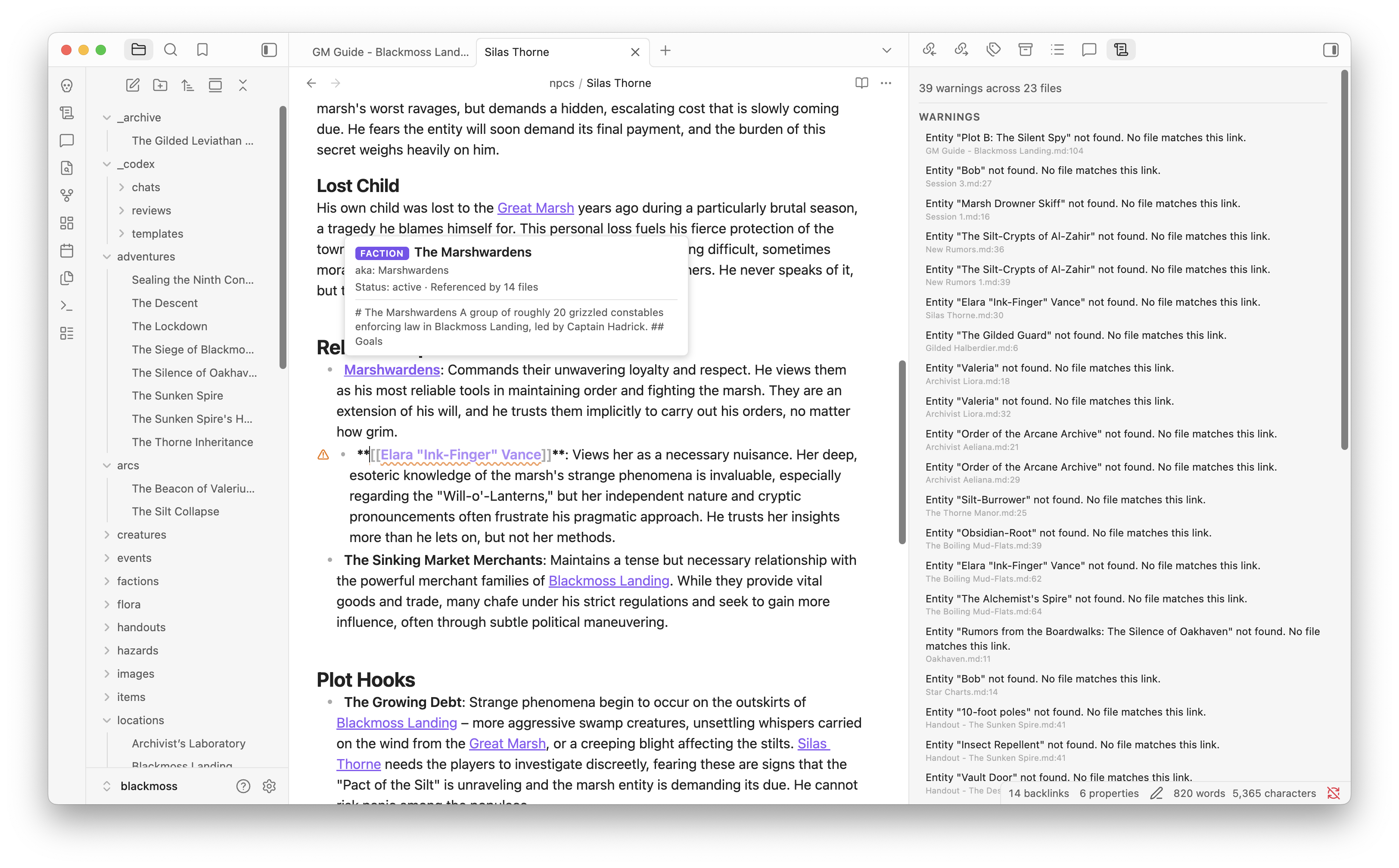
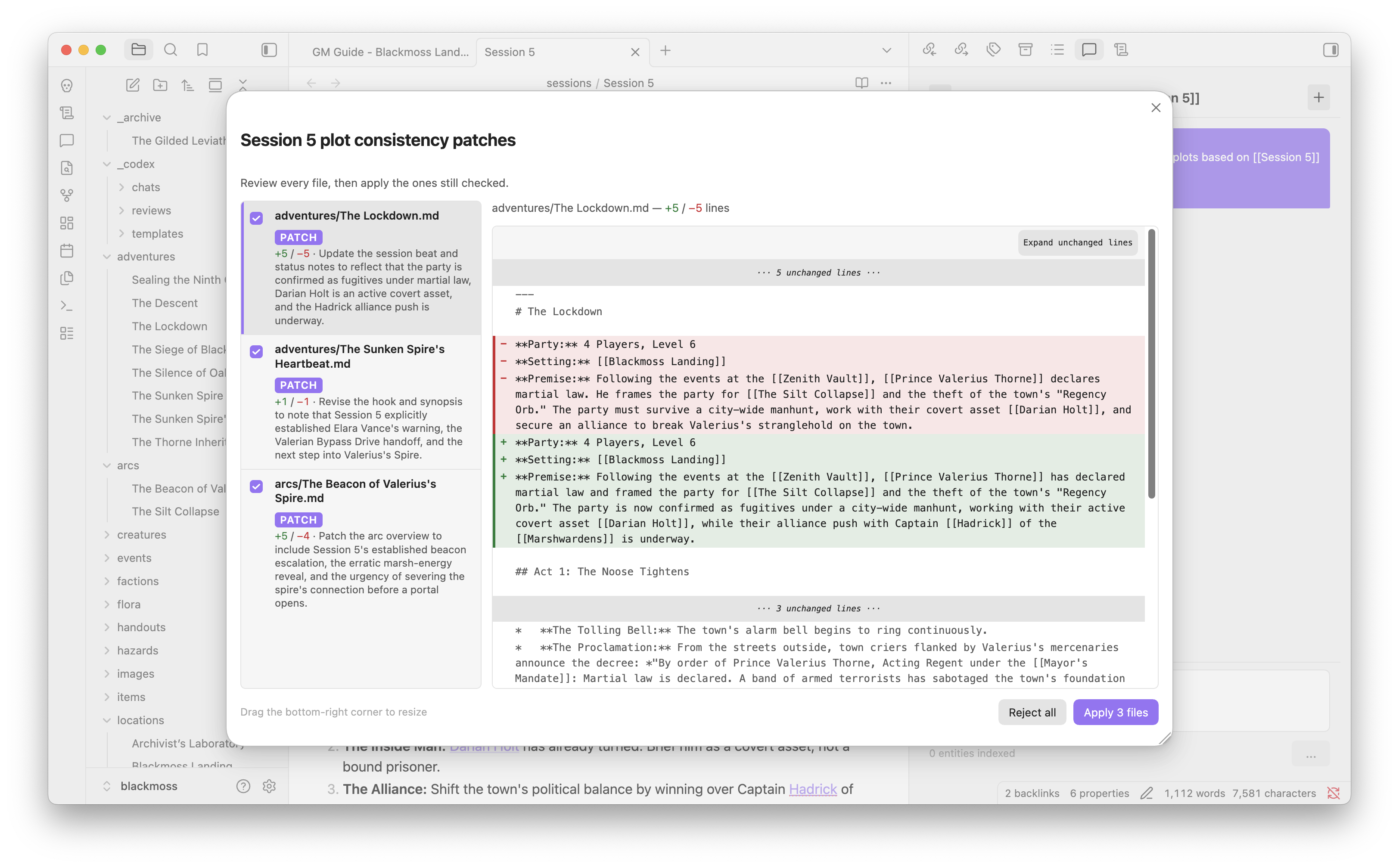
An Obsidian plugin for TTRPG vaults: it indexes your notes, lints dead links and contradictions, then runs recipes that plan which files to change. You see the diffs before anything is written.
1:25 demo (Session 5 → advance plots): https://youtu.be/YOrChVk6fSY
Quick Start
- Install from Obsidian Community Plugins (or BRAT / manually).
- Add frontmatter to your notes — at minimum
type: npc,type: location, etc. — so Codex can index them. - Open the warnings panel (ribbon icon or
Codex: Open narrative warnings) to see dead links and state conflicts. - Set up an AI provider in Settings > Codex Narrative Engine > AI provider to unlock Lore Chat and recipes.
Features
World Management
- Entity indexing — reads frontmatter to build a live index of every entity in your vault.
- Smart autocomplete — type
[[to search your entity index; filter by type with[[npc:,[[location:, etc. - Hover previews — hover any
[[wiki-link]]for a quick summary from the entity's frontmatter and opening text. - Dead-link detection — unresolved links are underlined in the editor, flagged in the gutter, and listed in the Narrative Warnings panel.
- State conflict warnings — catches contradictions like a dead NPC listed as present in a session, or an item held by a dead character.
- Create & rename entities — create new entity files from templates, or rename an entity and have every reference updated automatically.
AI-Powered Tools (Bring Your Own Key)
All AI features use your own API key — no subscription required. Supports Google Gemini, OpenAI, Anthropic (Claude), Ollama, LM Studio, and any OpenAI-compatible endpoint.
- Lore Chat — a sidebar conversation panel grounded in your campaign lore. Type
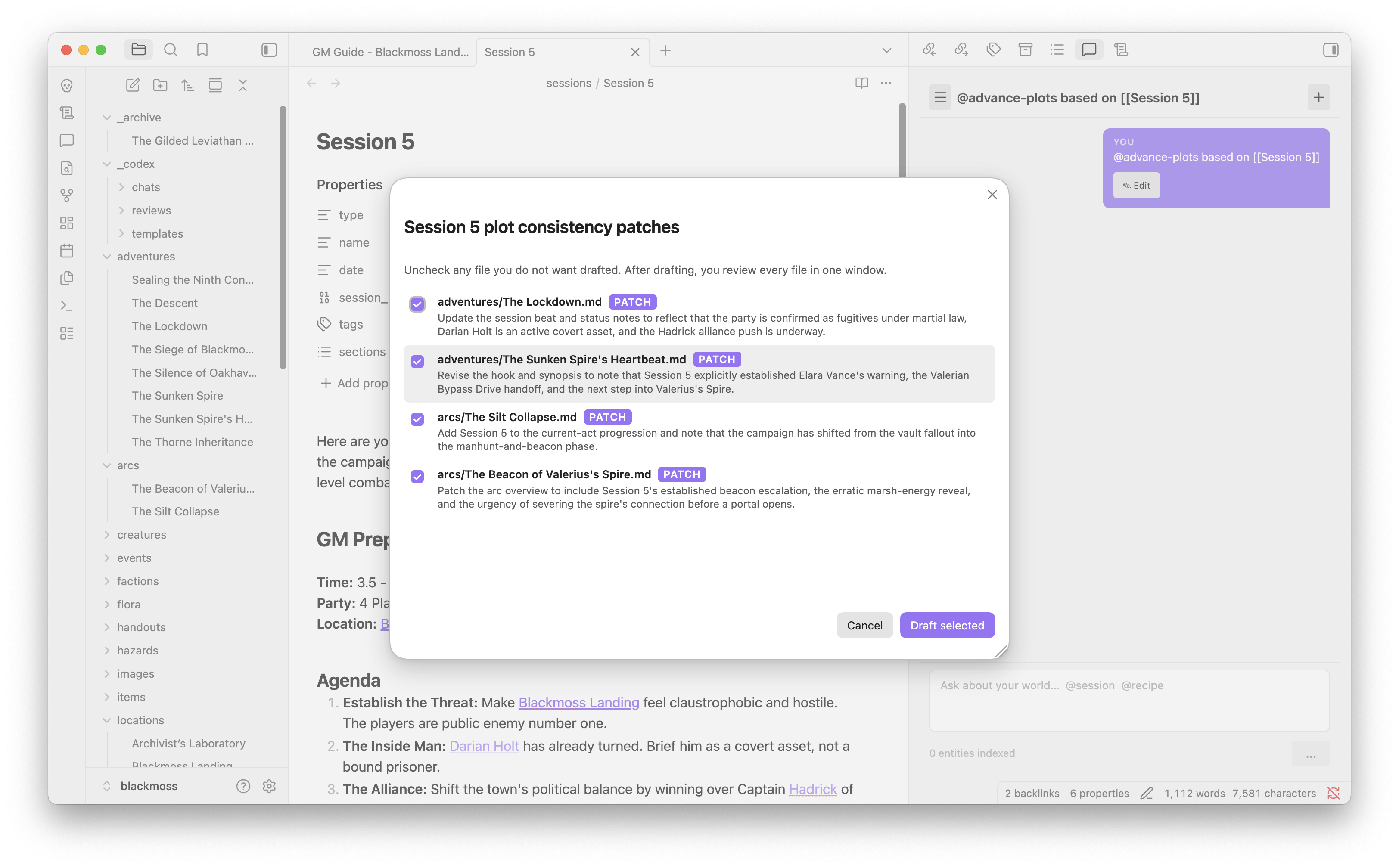
@to mention entities or invoke a recipe (@recipelists them). - Recipes — constrained campaign edits from Lore Chat. Codex plans the files, you check the boxes, then review a unified diff per file and apply only what you want.
@advance-plots from [[Session 5]]— patch linked adventures, quests, and arcs so they match the session.@npc-at-location at [[Blackmoss Landing]] into [[The Lockdown]]— create an NPC at a place and wiki-link them into the plot.@add-arc/@add-location— create a new arc or location note and wire it from the session or parent you named.
- Enhance Note — expands a stub entity into a fully fleshed-out note while preserving existing content.
- Generate Entity — creates a new NPC, location, item, or other entity from a short description, complete with frontmatter and optional stat block.
- Describe Scene — generates atmospheric read-aloud text for a location or session scene.
- Extract Entities — scans a session log or narrative note and creates individual entity files for each named NPC, location, or item.
- Revise Selection — select any text, give a natural-language instruction, and review the AI's changes in a diff before applying.
Documentation
| Guide | Description |
|---|---|
| Getting Started | Installation, vault setup, entity frontmatter, templates |
| Features | Detailed walkthrough of every world-management feature |
| AI Guide | Provider setup, Lore Chat, each AI command explained |
| Settings Reference | Every setting with its type, default, and description |
| Commands Reference | Every command, hotkey, context menu entry, and ribbon icon |
Installation
From Obsidian Community Plugins
- Open Settings > Community Plugins and turn restricted mode off
- Click Browse and search for Codex Narrative Engine
- Click Install, then Enable
Listed as Codex Narrative Engine in the directory.
Via BRAT (prereleases)
BRAT installs from GitHub and can follow prerelease tags on the beta branch.
- Install BRAT from Settings > Community Plugins (search "BRAT")
- Open Settings > BRAT > Add Beta Plugin
- Enter
djinnmind/codex-narrative-engineand click Add Plugin - Enable Download prereleases in BRAT if you want beta builds
- Enable Codex Narrative Engine in Settings > Community Plugins
Manual / Sideload
- Download
main.js,manifest.json, andstyles.cssfrom the latest release. - Create a folder in your vault:
.obsidian/plugins/codex-narrative-engine/ - Copy the downloaded files into that folder.
- Open Settings > Community Plugins, refresh the list, and enable Codex Narrative Engine.
Building from Source
Requires Node.js 18+.
git clone https://github.com/djinnmind/codex-narrative-engine.git
cd codex-narrative-engine
npm install
npm run build
The built plugin files will be at packages/codex-obsidian/main.js and packages/codex-obsidian/manifest.json.
To develop with hot-reload:
npm run dev
Running Tests
npm test
Runs the codex-core unit test suite (entity indexing, link resolution, diagnostic rules).
Project Structure
packages/
  codex-core/       Editor-agnostic narrative engine (indexing, diagnostics, link resolution)
  codex-obsidian/   Obsidian plugin (UI, commands, vault integration)
codex-core has no dependency on Obsidian and can be reused in other editors.
Feedback
Bugs, questions, and feature requests are welcome on GitHub Issues. There is no Discord yet — the issue tracker is the inbox.