Cluster
 lorens-osman-dev3k downloads
Make the notes clustering simpler on mobile devices and work well on PCs ether, Notes Clustering is the process of creating hierarchical notes structures.
- Overview
- Scorecard
- Updates22

Cluster plugin mainly designed to simplify the process of note clustering for Obsidian on mobile devices and work well on PCs ether.
Note Clustering
Note clustering is a way to create a hierarchy or structure among your notes, making it easier to navigate, search and understand the relationships between them.
Cluster Plugin
Provides parent-child hierarchy, commands, in-note buttons, and ribbon buttons to make clustering process easier on mobile devices and work well on PCs ether.
Simple Example: Imagine you have notes about different Programming topics. So you need organize your notes like:
- Programming (Main Note)
- JavaScript
- Array
- for loop
- functions
- if statements
- variables
- var
- const
- let
- Css
- ID
- Class
- Element
- JavaScript
With Cluster plugin you can make that easily .
Youtube Demo how to make Programming topics with Cluster plugin easily:
The Result :
Folder Structure :
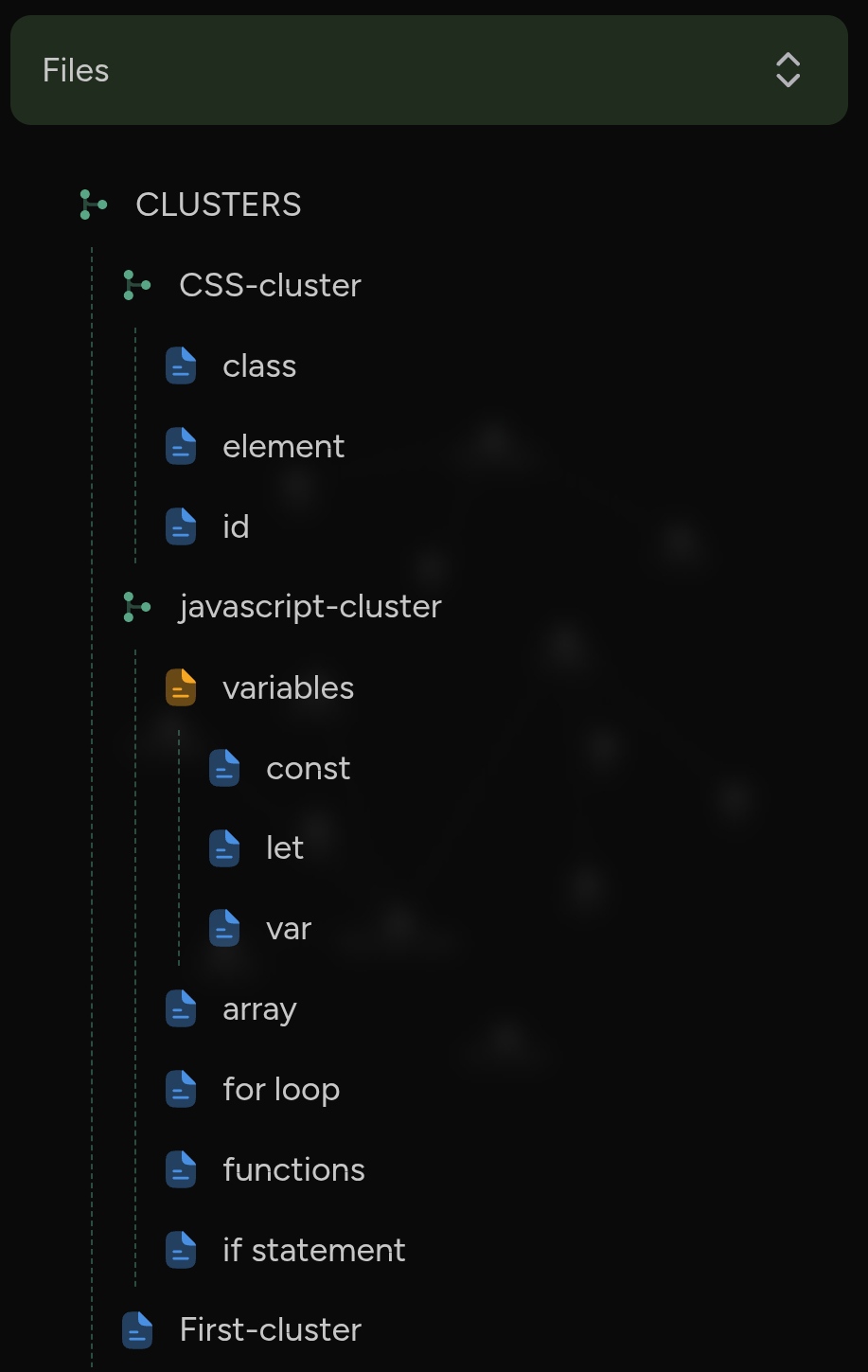
Don't be scared by the words!
I know this explanation might sound a bit technical and might make things sound complicated, But using the plugin is actually super easy, intuitive and straightforward. You'll learn the plugin much faster by giving it a try than by reading all the details first.
Before clustering your notes with Cluster plugin
You'll need two folders CLUSTERS and ORPHANS. The CLUSTERS folder will contain all linked notes, while the ORPHANS folder will contain notes that aren’t linked.
You can create these folders manually, or they will be created automatically if you click the Create new cluster button on the ribbon, this button will check if the CLUSTERS and ORPHANS folders exist, if these folders do not exist, it will create them before creating a new cluster inside the CLUSTERS folder.
Buttons
When you open a note from either the CLUSTERS or ORPHANS folder the Cluster plugin displays two sets of buttons, One set is specifically for notes in the CLUSTERS folder, while the other set is for notes in the ORPHANS folder.
CLUSTERS Buttons

ORPHANS Buttons


- This button creates new note inside
CLUSTERSfolder and the note's name will followed by-clusteradded to the end. - We refer to this note as the
cluster, and it's the main note. - The
clusterhas a generation value of0as property . - The
clusterhas a tag calledCluster. All main notes (also known ascluster) will have thisClustertag.

- This button creates a new note linked to the current note, we call it
childnote. childnote means the new created note will contains link to the current note and tag with cluster's name.- The generation property of the
childnote will be the current note's generation +1 - A new folder with the same name of current note will be created for all
childnotes of the current note.

- This button creates a new note beside the current note, we call it
siblingnote. siblingnote means the new created note will copy the parent link, the cluster's tag and the generation property from current note.

- This button creates a new note inside
ORPHANSfolder. orphannote has no parent link and no hierarchy.

- This button deletes current note.
- If the current note has no siblings the containing folder will be deleted.
- If the current note has children the children will be deleted along with their own folders.
- If the current note is
clusterall the cluster's files and folders will be deleted.

- Toggle extra buttons.

- This button deletes the current line.
- Very useful for phone users.
- Very useful to delete images and links when using phone device.
🤩🪄 Plugin Features
- Easy note clustering on phone devices and PCs.
- Intuitive folders: Group related notes into folders for maintain a clear hierarchy folder structure.
- Automatically generate useful note properties that's helps with search, graph view and maintain note clustering process.
⚙️ PC Recommendation
- Set
Ctrl+Shift+Shotkey to New sibling command. - Set
Ctrl+Shift+Chotkey to New child command. - Set
Ctrl+Shift+Dhotkey to Delete active note command.
If you like this plugin, feel free to support the development by buying a coffee:
Creditss
Thank you for everyone in the Obsidian community that have contributed to testing and bug reporting.
Some of our inspiration came from the following project https://github.com/vanadium23/obsidian-advanced-new-file