Clio
 Matthew Newton390 downloads
Manage quotes from your vault, generates a word of the day, this-day-in-history, word-of-the-day recaps, daily featured wikipedia article, on-this-day for your vault, reflection prompts, and more.
- Overview
- Scorecard
- Updates3
An Obsidian community plugin that turns your daily note into a small-but-rich daily ritual.
Upgrading from Muse or Almanac (pre-release)? Install this plugin as Clio (
clio). Existingmuse-quote,almanac-quote,muse-static, andalmanac-staticblocks still work; new quotes useclio-quote. Copyplugins/muse/data.jsonorplugins/almanac/data.jsontoplugins/clio/data.jsonif you had an older folder installed separately.
A daily ritual in your notes: a quote from your own vault, a word of the day with definition and examples, on this day in history (and optionally in your own vault), today's Wikipedia featured article and picture of the day, a reflection prompt, a one-line journal, daily intentions with streak tracking, and a sky card with the moon phase plus sunrise / sunset.
Screenshots
Quote of the day (from your vault):

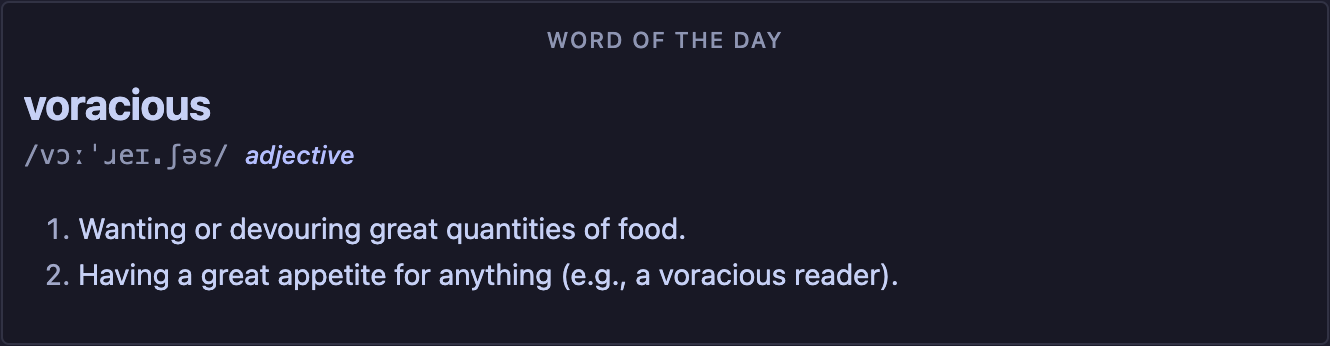
Word of the day with definition and examples:
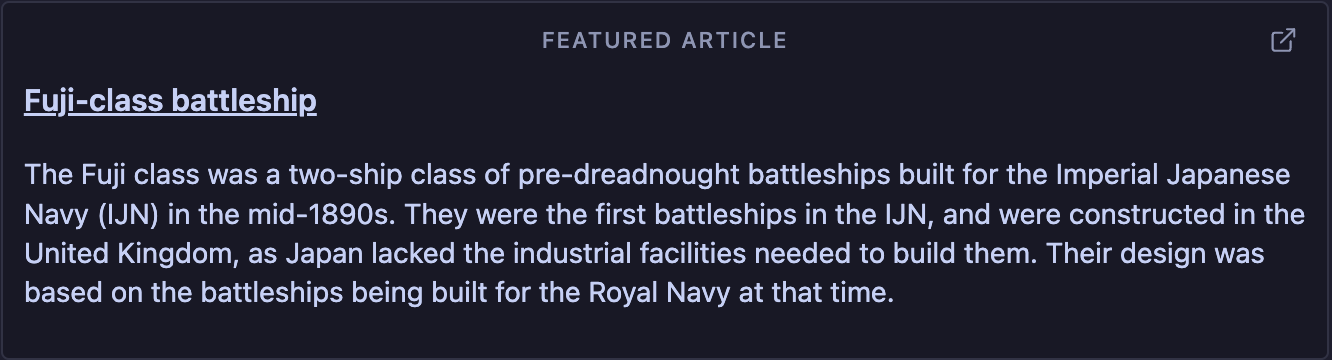
Today's Wikipedia featured article (text excerpt):
Reflection prompt of the day:

One-line journal:

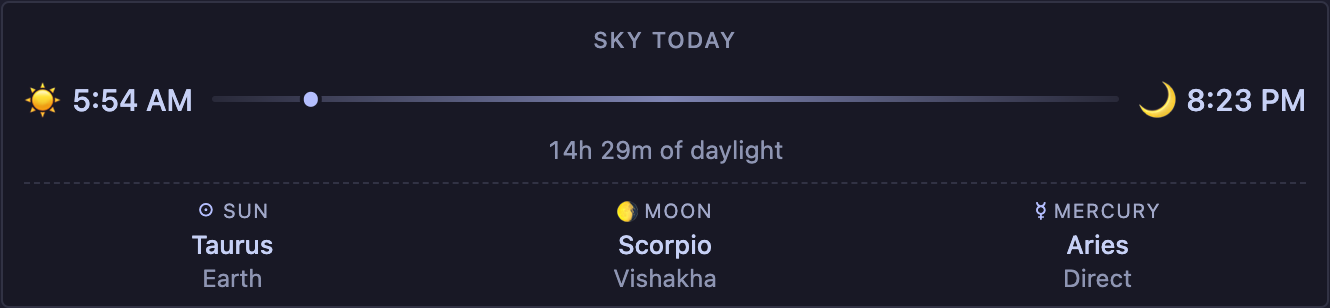
Sky today (moon phase and sunrise / sunset):
Features
Quote of the day, from your vault
- Scans configured folders (or your entire vault) for
clio-quotecode blocks (the canonical, opt-in format) and, optionally, markdown blockquotes / Obsidian[!quote]callouts. - Picks the same quote all day, deterministically. The next day rolls a new one.
- Renders inside any note via a
quote-of-the-daycode block, ideal for daily-note templates. - Tag-aware: filter the daily pick to a subset like
philosophyorprogramming.
Add and track quotes
- An Add quote modal captures text, author, source, and tags.
- Quotes are appended to a configurable inbox file as
clio-quoteblocks - editable like any other note, and immune to false positives from prose blockquotes. - A Quote library sidebar view lists every quote with search, tag filter, favorites, and one-click jump-to-source.
Word of the day
- Ships ~400 curated advanced English words (the kind you encounter on the GRE / in literary writing).
- Picks one word per day, deterministically.
- Looks up definition and example sentences from the free dictionaryapi.dev API and caches them locally.
- Skip a word to dismiss it forever (toggleable). Reroll today's word any time.
- Renders via a
word-of-the-daycode block. - Add your own words in Settings → Clio, and either merge with the built-in list or replace it.
Word recap (toggleable)
- Optionally tracks each day's word so you can review the last week or month.
- A
word-recapblock renders a flashcard-style list: word + part-of-speech, with the definition hidden until you click Reveal. - Off by default. Enable Track word-of-the-day history in settings to start collecting words.
On this day (Wikipedia)
- Pulls a curated set of significant historical events for today's date from the Wikimedia featured-content feed (the same data behind Wikipedia's homepage features).
- Picks one to display, with the year prominently shown and a link to the relevant Wikipedia article.
- The full pool of events for today is cached on the first fetch, so re-rolling or skipping cycles through the cached list locally - no extra API calls.
- Skip an event to dismiss it forever (toggleable). Show a different event any time.
- Renders via an
on-this-daycode block (or the legacyfact-of-the-dayalias).
Wikipedia featured article (toggleable)
- Today's Wikipedia "Today's featured article" — a short summary excerpt and a link to the full article.
- Text only. The article's lead image is intentionally not rendered, since Wikipedia featured articles can include sensitive imagery without warning.
- Off by default. Enable Show today's featured article in settings; piggybacks on the same Wikimedia request as on-this-day, so it costs nothing extra.
- Renders via a
featured-articlecode block.
On this day in your vault
- Scans your daily-notes folder for past notes whose filename matches today's calendar day in a previous year.
- Renders a list of "1 year ago", "2 years ago", … with a link to the note and a one-line preview.
- Pure-local; never makes a network call.
- Renders via a
vault-on-this-daycode block. Configure your daily-notes folder and filename format in settings.
Reflection prompt of the day
- A short, open question (~40 built-in prompts, plus any you add) to journal with each morning.
- Picked deterministically per day; rerolls and skips behave like the on-this-day card.
- Renders via a
prompt-of-the-daycode block. - Add or replace prompts in settings.
One-line journal
- A single short line per day, stored locally in Clio's data file.
- Inline, editable text input - press Enter or click away to save.
- Optionally lists the same calendar day's entries from past years right under the input ("on this day, two years ago you wrote …").
- Renders via a
one-line-journalcode block.
Daily intentions
- Configure up to 4 things you want to do every day (meditate, read, walk, etc.).
- A
daily-intentionscode block renders them as checkboxes inside any note. - Toggle the box to mark complete - state is saved per local day, so the same checks show up wherever the block is rendered.
- Per-intention streak and a 7-day completion % appear next to the list.
- History persists even if you rename or remove an intention later (it's tracked by id, not by text).
Sky today (toggleable)
- A pure-local card with the moon phase (with emoji + illuminated %) and, once you pick your country (and optionally state/region), sunrise, sunset, and day length.
- Off by default. Enable Show sky card in settings and pick your country - no need to know your coordinates. Power users can switch the country dropdown to Custom coordinates for pinpoint accuracy.
- Renders via a
sky-todaycode block. Never makes a network call.
Daily-note quickstart
Drop these into your daily-note template:
## Quote of the day

```quote-of-the-day
```

## Word of the day

```word-of-the-day
```

## On this day

```on-this-day
```

## Today's featured article

```featured-article
```

## On this day in your vault

```vault-on-this-day
```

## Reflection

```prompt-of-the-day
```

## One-line journal

```one-line-journal
```

## Sky today

```sky-today
```

## Today's intentions

```daily-intentions
```

## Word recap

```word-recap
limit: 7
```
Every block is opt-in: just include the ones you want.
Quote block options
```quote-of-the-day
mode: daily
tags: philosophy, ethics
```
mode: daily(default) - same quote all day.mode: randomre-rolls every render.tags: a, b- require the quote to have all listed tags.
A random-quote block is also available as a shorthand for mode: random.
Authoring a quote inline
To drop a self-contained quote anywhere in your notes (rendered as a card, indexed for the daily picker):
```clio-quote
quote: Make new mistakes.
author: Esther Dyson
tags: productivity
```
See Quote source format for the full field list.
Daily intentions block options
```daily-intentions
date: 2026-01-15
stats-days: 30
```
date: YYYY-MM-DD- render the checklist for a specific day instead of today (useful for backfilling).stats-days: N- completion-rate window for the footer. Default 7, max 365.
One-line journal block options
```one-line-journal
date: 2026-01-15
across-years: true
```
date: YYYY-MM-DD- edit the entry for a specific day. Defaults to today.across-years: true|false- show / hide entries from the same calendar day in past years. Defaults totrue.
Word recap block options
```word-recap
limit: 14
reveal: false
```
limit: N- how many recent entries to show. Default 7, max 30.reveal: true- show all definitions immediately instead of behind a "Reveal" button.
Commands
| Command | What it does |
|---|---|
| Add quote | Open the modal to capture a new quote. |
| Open quote library | Open the sidebar view listing every quote. |
| Insert quote of the day | Inserts today's quote at the cursor as a blockquote. |
| Insert random quote | Inserts a random quote at the cursor. |
| Insert quote-of-the-day block | Drops a quote-of-the-day code block. |
| Insert blank quote block | Drops a blank clio-quote block, ready to paste a quote into. |
| Insert word-of-the-day block | Drops a word-of-the-day code block. |
| Insert on-this-day block | Drops an on-this-day code block. |
| Insert featured article block | Drops a featured-article code block. |
| Insert vault on-this-day block | Drops a vault-on-this-day code block. |
| Insert reflection-prompt block | Drops a prompt-of-the-day code block. |
| Insert one-line journal block | Drops a one-line-journal code block. |
| Insert sky-today block | Drops a sky-today code block. |
| Insert word-recap block | Drops a word-recap code block. |
| Insert daily intentions block | Drops a daily-intentions code block. |
| Copy quote of the day to clipboard | Quick one-liner with attribution. |
| Copy on-this-day event to clipboard | Plain text + Wikipedia link. |
| Reroll word of the day | Pick a different word for today (no dismissal). |
| Skip today's word | Dismiss the current word and pick a new one. |
| Show a different on-this-day event | Cycle through today's cached events. |
| Skip today's on-this-day event | Dismiss the current event and pick a new one. |
| Show a different reflection prompt | Re-pick today's prompt. |
| Skip today's reflection prompt | Dismiss the prompt and pick a new one. |
| Refresh quote index | Re-scan the configured folders. |
| Convert blockquote quotes to structured blocks | Walks every blockquote / quote callout in scope - and every clio-quote block whose quote: field still has inline attribution - and lets you confirm one-at-a-time whether to migrate it. |
| Complete all of today's intentions | One-shot mark-everything-done. |
Quote source format
The recommended format is a clio-quote code block. It's explicit, immune to false positives, and renders as a styled card in reading mode:
```clio-quote
quote: Of all people only those are at leisure who make time for philosophy, only they truly live.
author: Seneca
source: On the Shortness of Life
tags: stoicism, time
```
Field rules:
quote:is the only required field.- Lines that don't start with a new
key:are appended to the previous field's value, so you can soft-wrap long quotes. tags:is comma-separated. The#prefix is optional.- Lines starting with
#are treated as comments.
Migrating existing quotes: run Convert blockquote quotes to structured blocks from the command palette. It walks every candidate one at a time, shows you the original, lets you edit the auto-detected author / source / tags, and previews the proposed clio-quote replacement live. Stop any time - already-converted quotes stay converted.
The migration covers two cases:
- Bare blockquotes and
[!quote]callouts that haven't been structured yet. - Existing
clio-quoteblocks whosequote:field still contains inline attribution likequote: "..." — Seneca. The tool offers to split the author (and source, if you wroteAuthor, Source) into their own fields.
For false positives in a blockquote (e.g. a > SFP = 1G world technical aside), click Mark as not a quote. That appends an invisible %%clio:ignore%% marker so Clio permanently skips it - both the migration tool and the daily / random pickers respect the marker. Any line containing the substring clio:ignore works (e.g. <!-- clio:ignore --> if you'd rather use an HTML comment).
For an already-structured clio-quote block you'd rather leave alone (e.g. you intentionally kept the attribution inline), click Keep as is. That inserts a # clio:keep comment line right after the opening fence so the migration tool stops flagging it. The block is still indexed as a quote.
To reverse either marker, just delete it from the source.
If you'd rather keep using markdown blockquotes / [!quote] callouts, switch Settings → Clio → Quote source away from "clio-quote blocks only". Attribution still works - if the last non-empty line begins with —, –, --, - (followed by a space), or by, it's parsed as the author (anything after the first comma becomes the source):
> The unexamined life is not worth living.
> — Socrates, Plato's Apology

> [!quote] Maxim
> Make new mistakes. #productivity
Inline #tags on quote lines are extracted and stored on the quote.
Settings
Available in Settings → Community plugins → Clio.
- Quotes - folders to scan, inbox file, source mode (clio-quote only / + blockquotes / + callouts / + both), require author, refresh, clear favorites.
- Word of the day - online definition lookup, dismissals, custom list, replace built-in, reroll, history tracking.
- Wikipedia daily - master
Fetch events onlineswitch, on-this-day dismissals, featured-article toggle (text-only). - Reflection prompts - custom prompts (one per line), replace built-in, dismissals.
- One-line journal - clear all entries.
- Daily notes - daily-note folder + filename format used by the vault on-this-day card.
- Sky today - master toggle plus country (and state/region for large countries). Coordinates are derived from a bundled offline dataset; pick Custom coordinates to enter your own. Everything stays local.
- Daily intentions - up to 4 things you want to do each day; clear history.
Templater integration
The plugin exposes an API at app.plugins.plugins["clio"].api. Every daily card has a matching *Markdown() helper that returns a self-contained, static markdown snapshot - perfect for Templater dropping the day's value into a daily note (it won't change tomorrow, since the markdown is baked into the file).
Each helper emits a clio-static code block with the day's data baked in as YAML. The plugin renders these blocks using the same DOM and CSS classes as the live quote-of-the-day / word-of-the-day / etc. codeblock cards, so the drop looks identical to the live block - except the data is frozen in your daily note forever. Reopen the same note tomorrow and you'll see the same word/quote/fact you saw the day you wrote it. Live-state-only controls (Skip, Show different) are omitted; "Copy" buttons and external "Read more" links are kept since they only need the baked data. The codeblock language is unique to static drops, so the indexer never picks them up - your daily-note quote won't show up as a duplicate in the quote library, and you don't need any extra ignore marker.
Drop everything you want with one block:
<%*
const clio = app.plugins.plugins["clio"]?.api;
tR += clio?.getQuoteOfTheDayMarkdown() ?? "";
tR += await clio?.getWordOfTheDayMarkdown() ?? "";
tR += await clio?.getFactOfTheDayMarkdown() ?? "";
tR += await clio?.getFeaturedArticleMarkdown() ?? "";
tR += await clio?.getPromptOfTheDayMarkdown() ?? "";
tR += clio?.getIntentionsMarkdown() ?? "";
tR += clio?.getJournalAcrossYearsMarkdown() ?? "";
%>
Each helper returns "" when there's nothing to show (feature disabled, fetch failed, no data) so the ?? "" guard never throws.
API surface:
getQuoteOfTheDay(): Quote | nullgetRandomQuote(): Quote | nullgetQuoteOfTheDayMarkdown(): stringgetRandomQuoteMarkdown(): stringgetWordOfTheDay(): Promise<DailyWordRecord>getWordOfTheDayMarkdown(): Promise<string>getRecentWords(limit?): WordHistoryEntry[]getFactOfTheDay(): Promise<DailyFactRecord>getFactOfTheDayMarkdown(): Promise<string>getFeaturedArticle(): Promise<FeaturedArticleRecord>(text only - no image)getFeaturedArticleMarkdown(): Promise<string>getPromptOfTheDay(): Promise<DailyPromptRecord>getPromptOfTheDayMarkdown(): Promise<string>getJournalEntry(date?): stringsetJournalEntry(text, date?): Promise<void>getJournalAcrossYears(): { date, year, yearsAgo, text }[]getJournalAcrossYearsMarkdown(): stringrefreshQuotes(): Promise<void>getIntentions(): Intention[]getIntentionsMarkdown(): stringgetIntentionsForDate(date?): IntentionStatus[]setIntentionDone(id, done, date?): Promise<void>getIntentionStreak(id, date?): number
Privacy
Clio makes only two kinds of network request, both to free, unauthenticated public APIs, and only when the corresponding feature is enabled:
GET https://api.dictionaryapi.dev/api/v2/entries/en/<word>to look up the daily word's definition.GET https://api.wikimedia.org/feed/v1/wikipedia/en/featured/<YYYY>/<MM>/<DD>to fetch Wikipedia's curated featured-content payload (on this day + today's featured article text). Both Wikipedia cards share this single request - one fetch per local day at most. The full payload is cached locally so re-rolls and skips never trigger another network call. The endpoint also returns Wikipedia's "picture of the day" and the featured article's lead image; the plugin deliberately ignores both and never displays any image from Wikipedia, since their daily images can include sensitive content without warning.
Both responses are cached locally in data.json and re-used for the rest of the day. To run fully offline, turn off Fetch definitions online and Fetch events online in settings - the plugin will keep working with the offline word list, your own quotes, intentions, prompts, journal, sky card, and vault on-this-day.
No vault contents, file paths, or personal information are ever sent to either service. The sky card runs entirely locally - your country / region pick (and the derived coordinates) are stored in data.json and never leave the device. The vault on-this-day card reads daily notes from disk only; nothing is uploaded.
Requests carry only a generic User-Agent: clio (Obsidian community plugin) header.
Development
npm install
npm run dev    # watch build
npm run build  # production build (also runs tsc check)
npm run lint   # eslint
Output is written to main.js at the plugin root.
License
This plugin is released under the GNU General Public License v3.0 or later. See LICENSE for the full text.