ChessView
 tuxitop1k downloads
Render interactive chess boards from PGN/FEN notation with puzzles, arrows, and move navigation.
- Overview
- Scorecard
- Updates8
An interactive chess board plugin for Obsidian. Render games from PGN, display positions from FEN, solve puzzles, draw arrows and circles, navigate moves with keyboard shortcuts, and analyze on Lichess or Chess.com — all inside your notes.
Features
- PGN Games — Paste any PGN and get a fully navigable game viewer
- FEN Positions — Display static or interactive positions from FEN strings
- Puzzle Mode — Create solvable puzzles with hints and solution reveal
- Move Annotations — NAG symbols (!, ?, !!, ??, !?, ?!) with colored overlays like Chess.com/Lichess
- Arrows & Circles — Draw annotations on the board using markers or PGN comments
- Comments — Display inline PGN comments with move highlighting
- Themes — 7 built-in board themes + custom colors
- Piece Sets — 20 piece set options
- Keyboard Navigation — Arrow keys, Home/End, Space for autoplay
- Analysis Links — One-click export to Lichess and Chess.com
- Mobile Friendly — Responsive layout that adapts to any screen size
- Dark Mode — Full support for Obsidian's dark theme
Screenshots
Game viewer
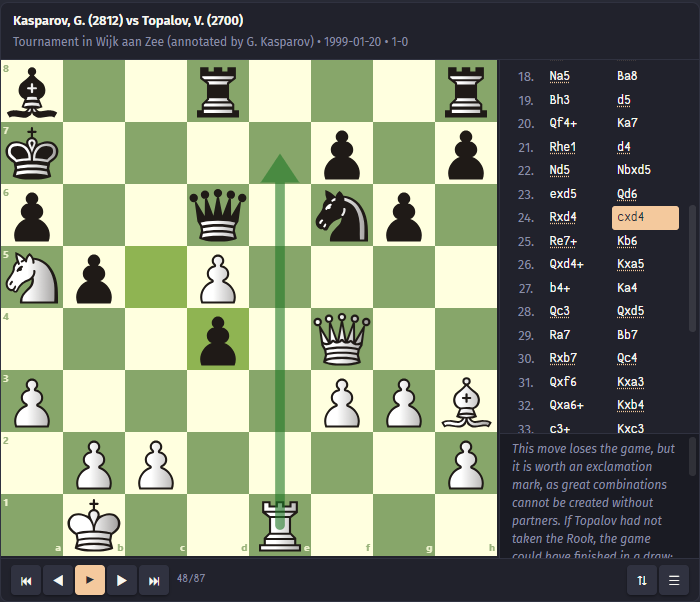
PGN game with move list, annotations, and navigation controls
Puzzle mode
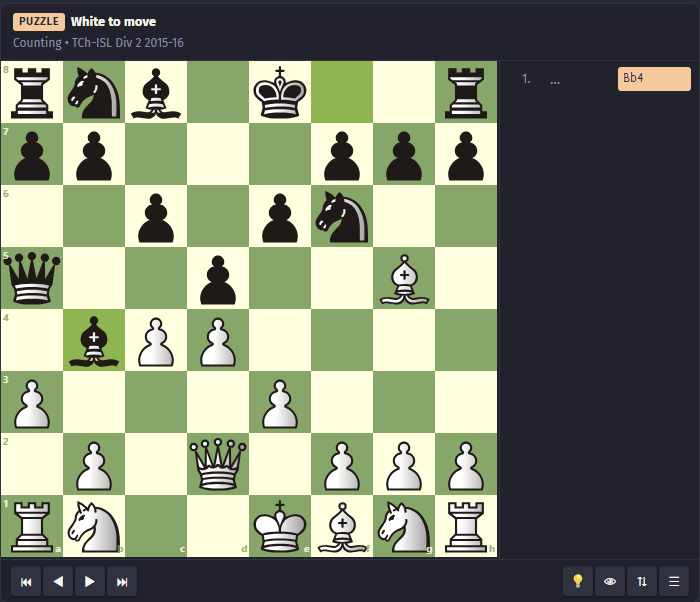
Interactive puzzle with hint and solution buttons
Arrows and circles
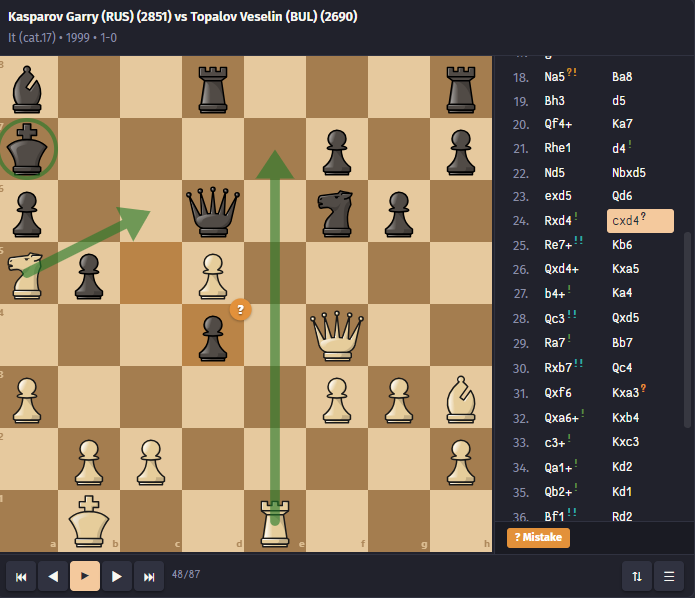
Board annotations using arrows and circle markers
Mobile view
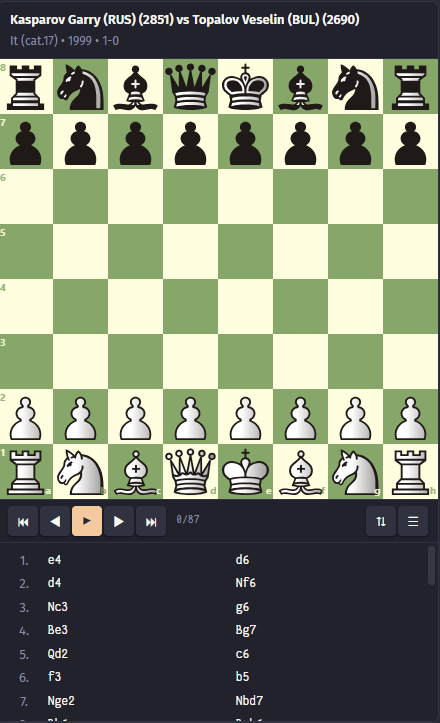
Responsive layout with move list below the board
Installation
From Obsidian Community Plugins (Recommended)
- Open Settings → Community Plugins → Browse
- Search for ChessView
- Click Install, then Enable
Manual Installation
- Download
main.js,manifest.json, andstyles.cssfrom the latest release - Create a folder
.obsidian/plugins/chessview/in your vault - Copy the three files into that folder
- Restart Obsidian and enable the plugin in Settings → Community Plugins
Usage
Create a fenced code block with the language chessview. Place optional ChessView markers at the top, then your FEN or PGN below. You can optionally separate markers from chess data with a --- line.
Display a PGN game
```chessview
[Event "It (cat.17)"]
[White "Kasparov, Garry"]
[Black "Topalov, Veselin"]
[WhiteElo "2851"]
[BlackElo "2690"]
[Date "1999.??.??"]
[Result "1-0"]

1. e4 d6 2. d4 Nf6 3. Nc3 g6 4. Be3 Bg7 5. Qd2 c6 6. f3 b5 7. Nge2 Nbd7 8. Bh6
Bxh6 9. Qxh6 Bb7 10. a3 e5 11. O-O-O Qe7 12. Kb1 a6 13. Nc1 $6 O-O-O $2 14. Nb3 $6
exd4 15. Rxd4 c5 16. Rd1 Nb6 17. g3 $6 Kb8 $6 18. Na5 $6 Ba8 19. Bh3 d5 20. Qf4+
Ka7 21. Rhe1 d4 $1 22. Nd5 Nbxd5 23. exd5 Qd6 24. Rxd4 $1 cxd4 $2 25. Re7+ $3 Kb6 26.
Qxd4+ Kxa5 27. b4+ $1 Ka4 28. Qc3 $3 Qxd5 29. Ra7 $1 Bb7 30. Rxb7 $3 Qc4 31. Qxf6
Kxa3 $2 32. Qxa6+ $1 Kxb4 33. c3+ $1 Kxc3 34. Qa1+ $1 Kd2 35. Qb2+ $1 Kd1 36. Bf1 $3 Rd2
2. Rd7 $3 Rxd7 38. Bxc4 bxc4 39. Qxh8 Rd3 40. Qa8 c3 41. Qa4+ Ke1 42. f4 f5 43.
Kc1 Rd2 44. Qa7 1-0
```
Display a FEN position
```chessview
rnbqkbnr/pppppppp/8/8/4P3/8/PPPP1PPP/RNBQKBNR b KQkq - 0 1
```
Using the separator
The --- separator is optional. It lets you clearly separate markers from chess data. These two blocks are equivalent:
Without separator:
```chessview
[black]
[Event "My Game"]

1. e4 e5 2. Nf3 Nc6 3. Bb5
```
With separator:
```chessview
[black]
---
[Event "My Game"]

1. e4 e5 2. Nf3 Nc6 3. Bb5
```
Board orientation
```chessview
[black]
[Event "Sicilian Defense"]

1. e4 c5 2. Nf3 d6 3. d4 cxd4 4. Nxd4 Nf6 5. Nc3 a6
```
[white]— white at bottom (default)[black]or[flip]— black at bottom
Static board (no interaction)
```chessview
[static]
---
rnbqkbnr/pppppppp/8/8/4P3/8/PPPP1PPP/RNBQKBNR b KQkq - 0 1
```
Non-editable board
Navigate moves but cannot make your own:
```chessview
[noeditable]
---
[Event "Italian Game"]

1. e4 e5 2. Nf3 Nc6 3. Bc4 Bc5
```
Arrows and circles
Using ChessView markers:
```chessview
[arrow: e2e4 green]
[arrow: d2d4 blue]
[circle: f3 red]
---
rnbqkbnr/pppppppp/8/8/8/8/PPPPPPPP/RNBQKBNR w KQkq - 0 1
```
Using standard PGN comment annotations:
```chessview
1. e4 {[%cal Ge2e4,Rd7d5] [%csl Gd4,Re5]} e5 2. Nf3
```
Color codes: G = green, R = red, B = blue, Y = yellow, O = orange, P = purple
Move annotations (NAGs)
Inline annotations:
```chessview
1. e4! e5 2. Nf3!! Nc6? 3. Bb5?! a6!? 4. Ba4 Nf6??
```
PGN standard NAGs:
```chessview
1. e4 $1 e5 $2 2. Nf3 $3 Nc6 $4 3. Bb5 $5 a6 $6
```
| Symbol | NAG | Meaning |
|---|---|---|
! |
$1 |
Good move |
? |
$2 |
Mistake |
!! |
$3 |
Brilliant move |
?? |
$4 |
Blunder |
!? |
$5 |
Interesting move |
?! |
$6 |
Dubious move |
X |
$9 |
Miss |
Comments
```chessview
1. e4 {The King's Pawn opening} e5 {A solid response}
2. Nf3 {Developing the knight toward the center} Nc6
```
Start at a specific position
Use [ply: N] to skip ahead N half-moves. In chess, a ply is one
player's move — so 1.e4 is ply 1, 1…e5 is ply 2, 2.Nf3 is ply 3,
and so on.
```chessview
[ply: 6]
---
[Event "Italian Game"]

1. e4 e5 2. Nf3 Nc6 3. Bc4 Bc5 4. c3 Nf6 5. d4 exd4
6. cxd4 Bb4+ 7. Nc3 Nxe4 8. O-O Bxc3 9. bxc3 d5
```
Puzzles
Add [puzzle] to enable puzzle mode. The position must include moves to solve:
```chessview
[puzzle]
[title: Scholar's Mate]
[rating: 1500]
---
[FEN "r1bqkb1r/pppp1ppp/2n2n2/4p2Q/2B1P3/8/PPPP1PPP/RNB1K1NR w KQkq - 4 4"]

1. Qxf7#
```
Puzzle with themes:
```chessview
[puzzle]
[rating: 2100]
[title: Find the winning combination]
[themes: sacrifice, fork]
---
[FEN "r2qr1k1/ppp2ppp/2np1n2/2b1p1B1/2B1P1b1/2NP1N2/PPP2PPP/R2QR1K1 w - - 0 1"]

1. Bxf7+ Kh8 2. Ng5
```
Puzzle without separator (also valid):
```chessview
[puzzle]
[title: Back rank mate]
[FEN "6k1/5ppp/8/8/8/8/5PPP/2R3K1 w - - 0 1"]

1. Rc8#
```
The board automatically orients to the solving side. Override with [white] or [black].
Marker reference
Display markers
These markers control how the board looks and behaves. They work in both game and puzzle mode.
| Marker | Description |
|---|---|
[white] |
White at bottom (default) |
[black] or [flip] |
Black at bottom |
[static] |
No interaction, view only |
[noeditable] |
Can navigate but cannot add moves |
[ply: N] |
Start display at half-move N |
[arrow: e2e4 color] |
Draw arrow (color optional) |
[circle: e4 color] |
Draw circle (color optional) |
Puzzle markers
These markers are only meaningful in puzzle mode.
| Marker | Description |
|---|---|
[puzzle] |
Enable puzzle mode (required) |
[rating: N] |
Puzzle difficulty rating |
[title: text] |
Puzzle title |
[themes: a, b, c] |
Puzzle themes (comma-separated) |
Keyboard Shortcuts
| Key | Action |
|---|---|
← |
Previous move |
→ |
Next move |
Home |
First move |
End |
Last move |
Space |
Play / Pause autoplay |
F |
Flip board |
Click on the board first to focus it for keyboard shortcuts.
Settings
Access via Settings → Community Plugins → ChessView → ⚙️
- Board Theme — Brown, Blue, Green, Purple, Gray, Wood, Marble, or Custom
- Board Size — Small (280px), Medium (360px), Large (480px), or Auto
- Piece Set — 20 options including Cburnett (default), Merida, Alpha, California, and more
- Notation Style — Figurine (♞f3) or Letter (Nf3)
- Coordinates — Show/hide rank and file labels
- Colors — Customize last move highlight, check highlight, arrows, circles
- Animation Speed — 0–500ms
- Autoplay Speed — 200–3000ms
- Move List Position — Right of board or below
- Analysis Links — Show/hide Lichess and Chess.com links
- Default Orientation — White, Black, or Auto (based on side to move)
- Puzzle Hints — Enable/disable hint button in puzzle mode
Compatibility
- Obsidian — v1.1.9 and above
- Platforms — Desktop (Windows, macOS, Linux) and Mobile (iOS, Android)
- Themes — Works with both light and dark themes
Credits
- Chessground — Chess board UI by Lichess
- chess.js — Chess logic library