Chemtrails
 Altarok478 downloads
Renders SMILES chemical notations as crisp SVG diagrams.
- Overview
- Scorecard
- Updates15
Chemtrails is a lightweight, zero-overhead Obsidian plugin that renders SMILES (Simplified Molecular Input Line Entry System) chemical notations into crisp, responsive vector SVG diagrams natively within your notes.
Huge credit goes to smilesDrawer of the reymond-group. My contribution simply serves to bridge the gap to Obsidian.
For a full documentation on how your molecules get drawn, read their README.md. Feel free to read their original paper published by the Journal of Chemical Information and Modeling: 10.1021/acs.jcim.7b00425
Features
- Native SVG Rendering:
- Renders molecules directly inside your notes using
smiles— no external image generation servers or APIs required.
- Renders molecules directly inside your notes using
- Molecule Playground:
- Draws your SMILES input as you type.
- Ribbon Icon:
- Optional, may be deactivated in settings.
- Command:
- Optional, may be deactivated in settings.
- Dynamic ViewBox Framework:
- Small molecules (like Methane) remain naturally small, while large structures (like Caffeine) scale down smoothly to fit your active pane width.
- Themes:
- Integrates cleanly with light and dark themes using secondary background color matching. Offers additional integrated themes.
- Settings:
- Lots of global and optional local settings let you design each molecule in a different way.
- Clipboard:
- A right-click context menu allows you to copy the smiles notation or the entire code block (as text) or the image ( as PNG). The plugin will not read from your clipboard!
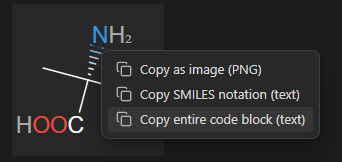
Usage
Simply wrap any standard SMILES string inside a smiles Markdown code block:
```smiles
CN1C=NC2=C1C(=O)N(C(=O)N2C)C
```
Installation
Community Marketplace
- Chemtrails in the Obsidian Community Plugins directory, install and Enable.
Manual Installation
- Download main.js, manifest.json, and styles.css from the latest release.
- Move the files into your vault's plugin directory: /.obsidian/plugins/chemtrails/
- Reload Obsidian plugins and enable Chemtrails.
Changelog / Roadmap
- 0.1.0: Make it work.
- 0.2.0: Add settings, including renaming of Markdown code block identifier and most of the original smilesDrawer options parameters.
- 0.3.0: Add option to copy SVG as PNG.
- 0.4.0:
- Add integrated themes.
- Add option to copy SMILES notation as text.
- 0.4.1:
- Add code block creator utility.
- Add ribbon icon.
- Add plugin command.
- Add option to copy entire code blocks as text.
- Add optional local settings to each image, overwriting global settings.
- 0.4.2: Update external smiles-drawer version
- 0.5.0: Added utility to test SMILES rendering live whilst changing settings
- 0.6.0: Adapted to Obsidian's new settings API
HealthExcellent
ReviewPassed
About
Render SMILES strings as native vector SVG diagrams directly inside notes without external servers. Auto-crop empty whitespace, scale molecules to fit your pane, and match Obsidian light/dark themes for consistent appearance.
This plugin serves as a bridge to the Smiles-Drawer of the Reymond Group.Details
Current version
0.6.4
Last updated
2 months ago
Created
3 months ago
Updates
15 releases
Downloads
478
Compatible with
Obsidian 1.13.0+
Platforms
Desktop, Mobile
License
MIT
Author