Chemical Structure Renderer
 xaya10016k downloads
Render chemical structures from SMILES strings into PNG or SVG format using Ketcher and Indigo Service.
- Overview
- Scorecard
- Updates3
This plugin, empowered by Ketcher, Indigo, and inspired by Obsidian-Chem, enable visualization of chemical structures right in your Obsidian notes. Also, a special thank you to OpenAI's GPT-4 for contributing to this project.
Functionality
This plugin allows you to represent chemical compounds in your notes using the SMILES notation. By simply writing the SMILES string inside a code block tagged with 'smiles', the plugin will render a visual representation of the chemical structure in the live preview mode.
Usage
- Install the plugin in Obsidian.
- In your markdown note, create a new code block.
- Tag the code block with 'smiles'.
- Inside the code block, write down the SMILES string of the chemical compound you wish to visualize.
Examples:
```smiles
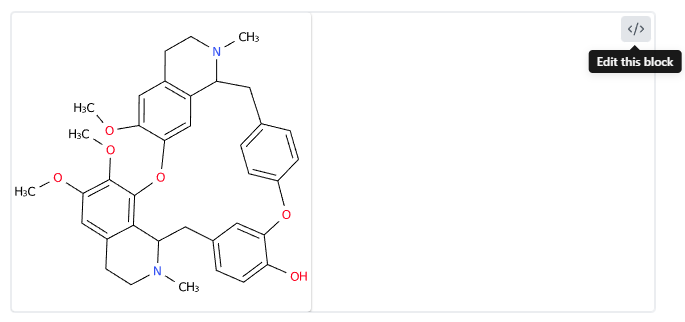
OC1=CC=C(CC2N(CCC3=CC(OC)=C(C(OC4=CC5=C(C=C4OC)CCN(C)C5C6)=C23)OC)C)C=C1OC7=CC=C6C=C7
```
```smiles
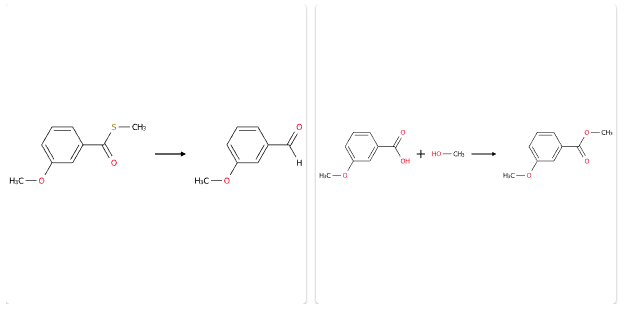
COC1=CC=CC(C(SC)=O)=C1>>COC2=CC=CC(C([H])=O)=C2
COC1=CC=CC(C(O)=O)=C1.OC>>COC2=CC=CC(C(OC)=O)=C2
```
```smiles
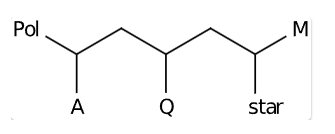
*C(*)CC(*)CC(*)* |$;;Pol_p;;;Q_e;;;star_e;M_p$|
```
- Switch to live preview mode or read mode to see the structure.
Compatibility Note
Due to overlapping functionalities, please be aware that this plugin may conflict with the Obsidian-Chem plugin, as both plugins transform 'smiles' code blocks. Therefore, we recommend not enabling both plugins simultaneously to avoid any potential issues.
Settings
In the plugin settings, you can specify the width and format of the rendered image and the server address to use for rendering.
Render service
In the settings, the 'server' field is set to a ketcher + indigo service hosted by epam.
server: https://lifescience.opensource.epam.com
ketcher demo page: https://lifescience.opensource.epam.com/KetcherDemoSA/index.html
If you have privacy concerns and wish to switch to your own service, you can set up a service following the tutorial in the link below. Once you have set up your service, you can change the 'server' field to your own domain URL.
tutorial link: in progress
official documentation is available at: https://lifescience.opensource.epam.com/indigo/service/index.html and https://github.com/epam/ketcher/blob/master/DEVNOTES.md#simple-server
License
This plugin is licensed under the MIT License.
Acknowledgements
Ketcher and Indigo were developed by EPAM.
Thanks to EPAM for their open-source contributions to the field of chemical informatics, which made this plugin possible.
EPAM's HOME page: https://lifescience.opensource.epam.com/index.html
Many thanks to Obsidian-Chem.
Support
For any issues or suggestions related to this plugin, please open an issue in the GitHub repository.