Search...Search plugins and themes...
⌘K
Sign in
  • Get started
  • Download
  • Pricing
  • Enterprise
  • Account
  • Obsidian
  • Overview
  • Sync
  • Publish
  • Canvas
  • Mobile
  • Web Clipper
  • CLI
  • Learn
  • Help
  • Developers
  • Changelog
  • About
  • Roadmap
  • Blog
  • Resources
  • System status
  • License overview
  • Terms of service
  • Privacy policy
  • Security
  • Community
  • Plugins
  • Themes
  • Discord
  • Forum / 中文论坛
  • Merch store
  • Brand guidelines
Follow us
DiscordTwitterBlueskyThreadsMastodonYouTubeGitHub
© 2026 Obsidian

Cerebro Mycelium

colorpulse6colorpulse626 downloads

Render your vault as an animated 2D living fungal network.

Add to Obsidian
  • Overview
  • Scorecard
  • Updates1

Cerebro Mycelium is an Obsidian community plugin that renders your vault as a 2D living fungal network. Markdown notes become soft kind-clusters, wikilinks become curved hyphae, recently edited notes glow as fruiting bodies, and clicking a node sends a light cascade through its nearby graph.

The animated preview below uses synthetic demo vault data.
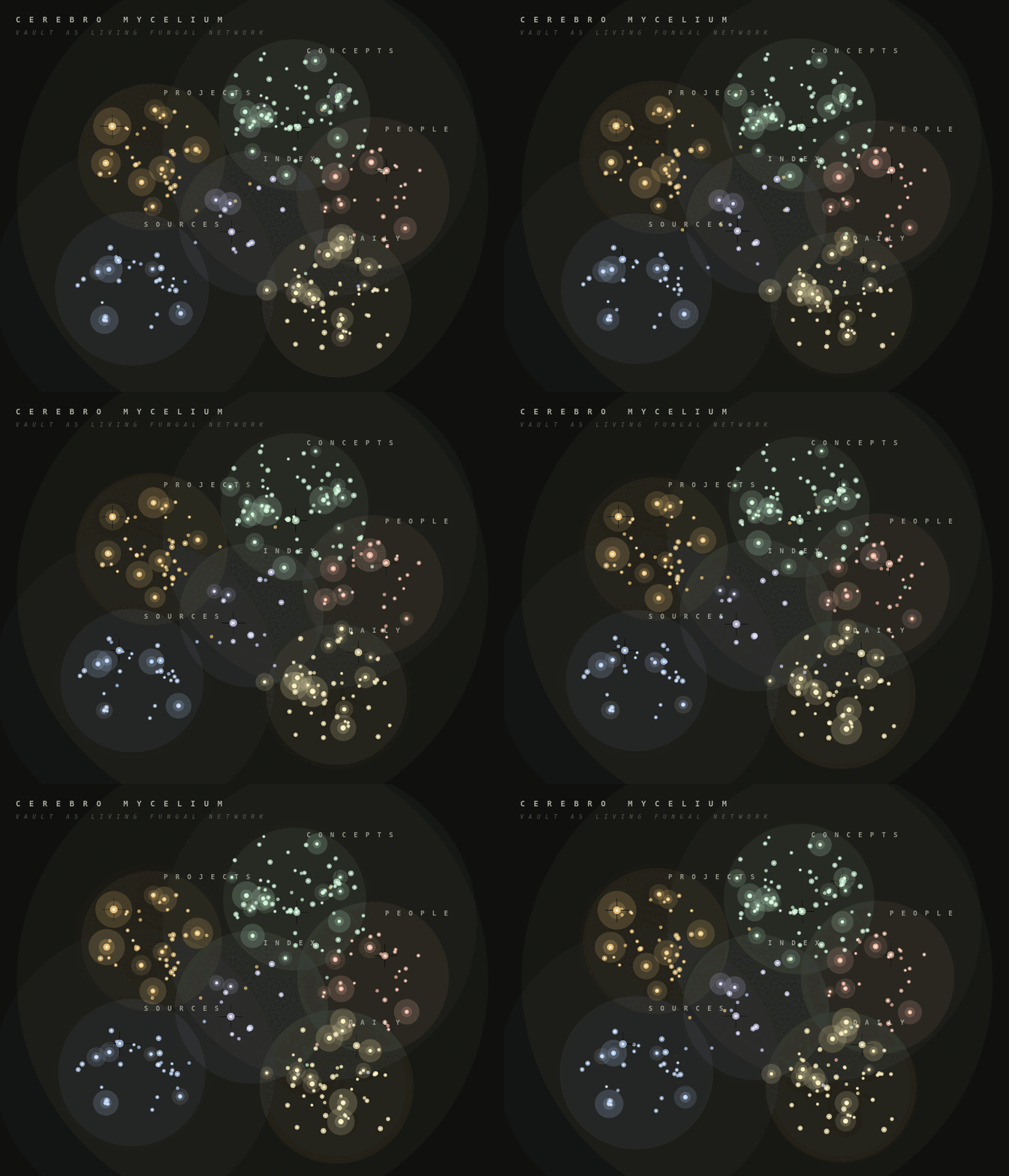
Cerebro Mycelium vault graph rendered as a living fungal network

Features

  • Native Obsidian custom view, no separate app required.
  • Read-only vault adapter built from metadataCache and vault.getMarkdownFiles().
  • Kind classification from frontmatter, tags, folders, and date-style daily notes.
  • Curved multi-fibre hyphae for wikilinks.
  • Recent-note fruiting halos driven by file.stat.mtime.
  • Hover blooms, click cascades, shockwaves, drag pan, and scroll zoom.
  • Drag notes to pin them into persistent positions, with a reset command when you want to return to automatic layout.
  • Settings for palette, recency window, spore density, cluster haze, decorative micro-leaves, and click behavior.

Install

Cerebro Mycelium is available in Obsidian's community plugin directory:

https://community.obsidian.md/plugins/cerebro-mycelium
  1. Open Settings -> Community plugins.
  2. Search for Cerebro Mycelium.
  3. Install and enable the plugin.
  4. Run Cerebro Mycelium: Open mycelium from the command palette.

Manual Installation

  1. Run npm install.
  2. Run npm run build.
  3. Copy manifest.json, main.js, and styles.css into:
<your-vault>/.obsidian/plugins/cerebro-mycelium/
  1. In Obsidian, enable community plugins, then enable Cerebro Mycelium.
  2. Run Cerebro Mycelium: Open mycelium from the command palette.

Development

npm install
npm test
npm run build
npm run demo:gif

The plugin does not make network requests and does not modify notes. It enumerates markdown files so it can build the vault graph locally.

99%
HealthExcellent
ReviewPassed
About
Render your vault as a living 2D fungal network that turns notes into clusters and wikilinks into curved hyphae. Interact with glowing recent-note halos, click nodes to send cascades, drag to pan or pin, and open as a native Obsidian view that builds the graph locally without changing files.
VisualizationLinks
Details
Current version
0.1.0
Last updated
2 days ago
Created
2 days ago
Updates
1 release
Downloads
26
Compatible with
Obsidian 1.5.0+
Platforms
Desktop, Mobile
License
MIT
Report bugRequest featureReport plugin
Sponsor
Buy Me a Coffee
Author
colorpulse6colorpulse6colorpulse6
nichalasbarnes.com/
GitHubcolorpulse6
nic-barnes-a3297217
  1. Community
  2. Plugins
  3. Visualization
  4. Cerebro Mycelium

Related plugins

Excalidraw

Visual PKM powerhouse. Create and edit Excalidraw drawings.

Breadcrumbs

Visualise the hierarchy of your vault using a breadcrumb trail or matrix view.

Strange New Worlds

Reveal networked thought and the strange new worlds created by your vault.

Leaflet

Interactive maps inside your notes.

Smart Connections Visualizer

View your Smart Connections in a visualized format.

Graph Link Types

Link types for graph view.

Advanced Canvas

Supercharge your canvas experience. Create presentations, flowcharts and more.

Mermaid Tools

Improved Mermaid.js experience: visual toolbar with common elements and more.

Maps

Adds a map layout to bases so you can display notes as an interactive map view.

Smart Connections

AI link discovery copilot. See related notes as you write. Lookup using semantic (vector) search across your vault. Zero-setup local model for embeddings, no API keys, private.