CalendarZ
 Kecheng Zhang393 downloads
A visual calendar with heatmap & dots tracking for your daily notes.
- Overview
- Scorecard
- Updates7
A visual calendar plugin for Obsidian with heatmap & dots tracking for your daily notes.
I love obsidian-calendar-plugin, but the last update was 4 years ago, and I want some new features.
So, I made a new calendar plugin, CalendarZ.
Features
Visual Note Tracking
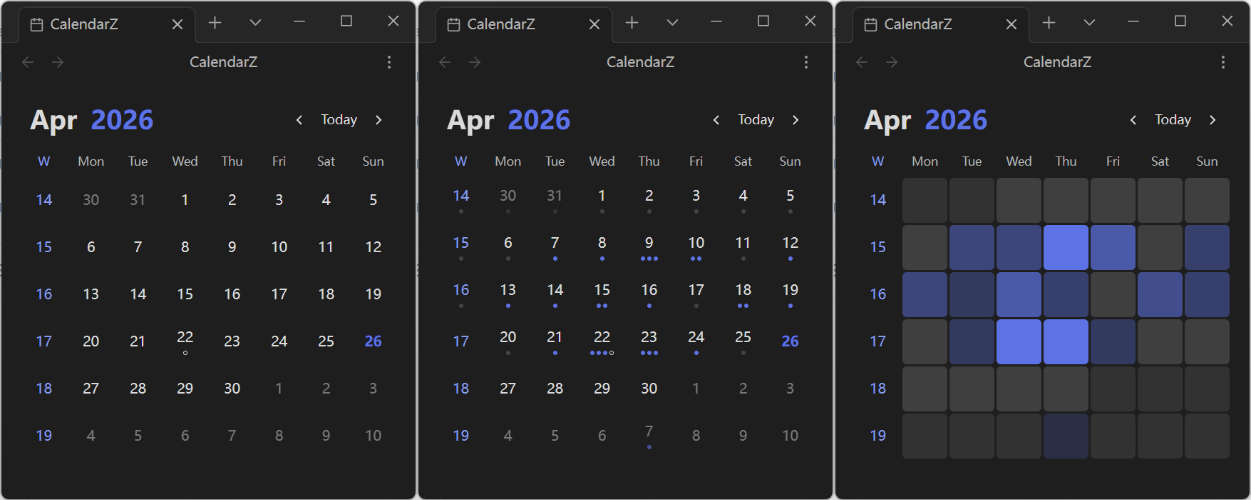
- Heatmap Mode: Display varying color intensities based on note count or word count, giving you an instant overview of your writing activity
- Dots Mode: Each dot represents a configurable number of notes or words, providing a clean visual representation of daily output
- None Mode: Clean calendar view focused purely on date navigation
Flexible Date Recognition
- YAML Frontmatter: Extract dates from note frontmatter with customizable field names
- Filename Parsing: Parse dates from filenames, supporting various date formats
- Both YAML and Filename: Automatically detect and use dates from both sources
Periodic Note Integration
- Daily Notes: Click any date to open or create the corresponding daily note
- Weekly Notes: Enable weekly notes and click week numbers to create or open weekly notes
- Monthly Notes: Enable monthly notes and click month headers to create or open monthly notes
- Yearly Notes: Enable yearly notes and click year headers to create or open yearly notes
- Customizable Naming: Configure naming formats for all note types (e.g.,
YYYY-[W]WW,YYYY-MM,YYYY) - Template Support: Use templates and custom folder paths for all periodic note types
- Confirmation Prompt: Optional confirmation before creating new notes to prevent accidental creation
Todo Status Indicators
- Visual indicators show todo completion status on calendar dates
- Quickly identify dates with pending or completed todos at a glance
- Option to hide completed todos for a cleaner view
Statistics Options
- Note Count: Track the number of notes per day
- Word Count: Track total word count per day
Customization
- Week Start: Sunday or Monday
- Month Display Format: Numeric, short, or long format
- Title Format: Year-Month or Month-Year order
- Ignored Folders: Exclude specific folders from note statistics
- Week Numbers: Optionally display week numbers on the left side of the calendar
Usage
- Settings → Community Plugins → CalendarZ → Open Calendar View
- Use the Command Palette (
Ctrl/Cmd + P) and search for "CalendarZ: Open Calendar"
Supported Languages
- English (en-US)
- 简体中文 (zh-CN)
- Português Brasileiro (pt-BR)
Contributing
Issues and Pull Requests are welcome!
Special Thanks
- liamcain for the obsidian-calendar-plugin.
- All the contributors who have helped me improve this plugin.
If you find this plugin helpful, please consider giving it a ⭐️
HealthExcellent
ReviewPassed
About
Display a visual calendar with heatmap and dots that track daily note or word counts, or switch to a clean None view for pure date navigation. Recognize dates from YAML frontmatter or filenames, open or create daily/weekly/monthly/yearly notes with templates, and show todo completion and per-day statistics.Details
Current version
2.3.0
Last updated
4 months ago
Created
5 months ago
Updates
7 releases
Downloads
393
Compatible with
Obsidian 1.12.3+
Platforms
Desktop only
License
MIT
Sponsor