Blades in the Dark Clocks
 Alex Riviere24 downloads
Render Blades in the Dark style progress clocks from YAML code blocks.
- Overview
- Scorecard
- Updates2
An Obsidian plugin that renders Blades in the Dark–style progress clocks right inside your notes. Clock state lives in plain YAML inside a clock code block, so your notes stay readable and portable.
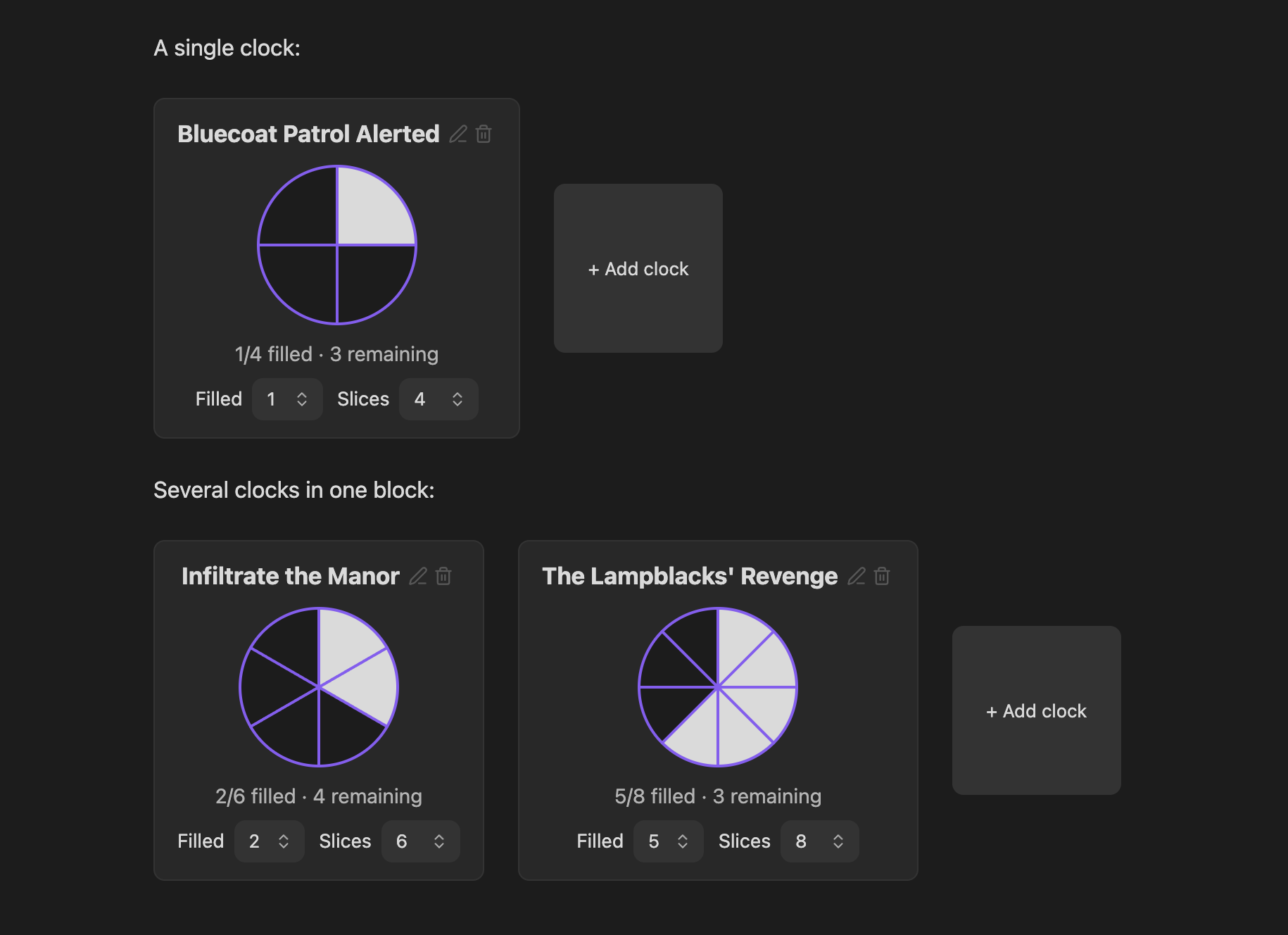
Usage
Add a clock code block to any note:
```clock
name: Bluecoat Patrol Alerted
slices: 4
filled: 1
```
Or put several clocks in one block with a YAML list:
```clock
- name: Infiltrate the Manor
  slices: 6
  filled: 2
- name: The Lampblacks' Revenge
  slices: 8
  filled: 5
```
| Key | Description | Default |
|---|---|---|
name |
Label shown above the clock (supports Markdown & wiki links) | Clock |
description |
Optional details shown below the clock (supports Markdown & wiki links) | (none) |
slices |
Total number of slices (1–12) | 4 |
filled |
Number of filled slices (0–slices) |
0 |
[!tip] When writing YAML by hand, wrap values containing
[[wikilinks]]or[Markdown](links)in quotes (e.g.name: "[[Bluecoats]] Patrol") so YAML doesn't parse[as a list.
Features
- Pie-style clock with dividers for each slice, plus a "filled · remaining" readout.
- Optional description & Markdown links — both
nameanddescriptionrender Markdown and internal[[wikilinks]](with click navigation and hover previews). - Dropdowns to change the filled count and total slices — changes are written straight back to the YAML.
- Add clocks without touching YAML
- Command palette: Blades in the Dark Clocks: Insert clock inserts a new block at the cursor.
- The + Add clock button on any block appends another clock to it.
- Edit (pencil) and delete (trash) buttons on each clock.
- Configurable line colour for the outline and dividers (Settings → Blades in the Dark Clocks). Defaults to your theme's accent colour.
- Works in Reading view and Live Preview, on desktop and mobile.
[!note] When the plugin saves a change it re-serialises the block's YAML, so comments inside a
clockblock are not preserved.
Installation
From Community Plugins
Once published: Settings → Community plugins → Browse → search for Blades in the Dark Clocks.
Manual
- Download
main.js,manifest.jsonandstyles.cssfrom the latest release. - Copy them into
<your vault>/.obsidian/plugins/bitd-clocks/. - Reload Obsidian and enable the plugin under Settings → Community plugins.
Development
The plugin is plain JavaScript — no build step required.
To develop against a vault, symlink this repo into the vault's plugins folder:
ln -s /path/to/obsidian-bitd-clocks "/path/to/vault/.obsidian/plugins/bitd-clocks"
Then toggle the plugin off/on (or use the Hot Reload plugin) after making changes.
Releasing
- Bump
versioninmanifest.json, and add a matching entry toversions.json("<plugin version>": "<minAppVersion>"). - Commit, then tag with the exact version number (no
vprefix) and push the tag:git tag 1.0.1 git push origin 1.0.1 - The GitHub Action creates a draft release with
main.js,manifest.jsonandstyles.cssattached. Review it and publish.
Credits
This work is based on Blades in the Dark (found at bladesinthedark.com), product of One Seven Design, developed and authored by John Harper, and licensed for our use under the Creative Commons Attribution 3.0 Unported license.
This plugin is not affiliated with or endorsed by One Seven Design or Evil Hat Productions.