Beautiful Contact Cards
 seth102k downloads
Renders "contact" code blocks with tappable links for phone, social media, etc.
- Overview
- Scorecard
- Updates14
This is a plugin for Obsidian (https://obsidian.md). It renders a contact card with tappable links from a note's properties, or from a contact code block.
Properties
Add contact fields to a note's properties/frontmatter and a card is rendered at the top of the note, before all other content, in both Reading view and Live Preview.
---
name: First Last, "The Big Cheese"
birthday: 2000-02-01
phone: 5551234567
email: [email protected]
insta: username
steam: username
beli: username
beliName: Display Name
NSO: Nintendo Switch Online name
NSOfriendCode: SW-1234-5678-9012
discord: <username|1234567890123456789>
---

The rest of your note.
Except for the single-value legalName field, any value may also be a YAML list, e.g. name: [First Last, "The Boss"] (extra names show up under their primary name) or phone: [5551234567, 5559876543]. The card renders on any note that has at least one recognized field. On those notes the raw Properties panel is hidden by default so the contact card is the only top panel (toggle this in settings).
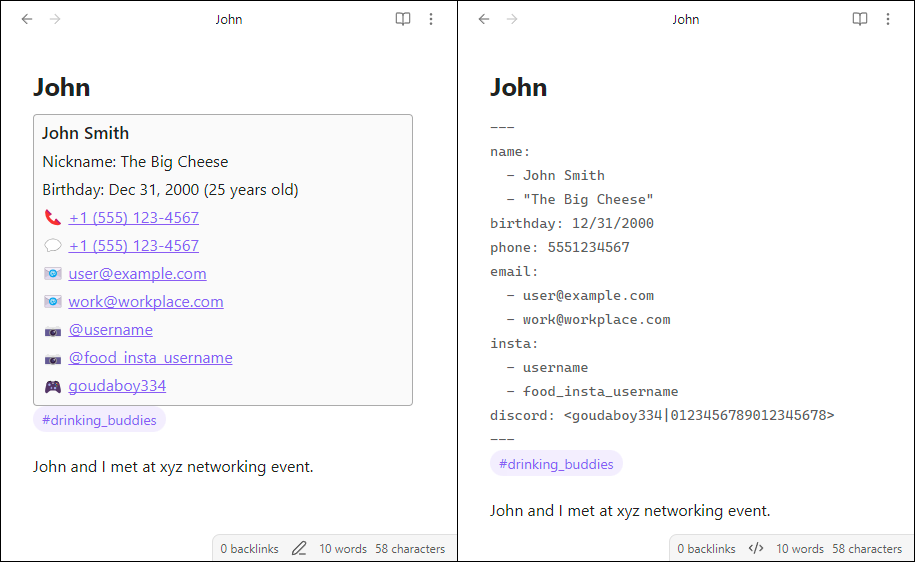
Code block
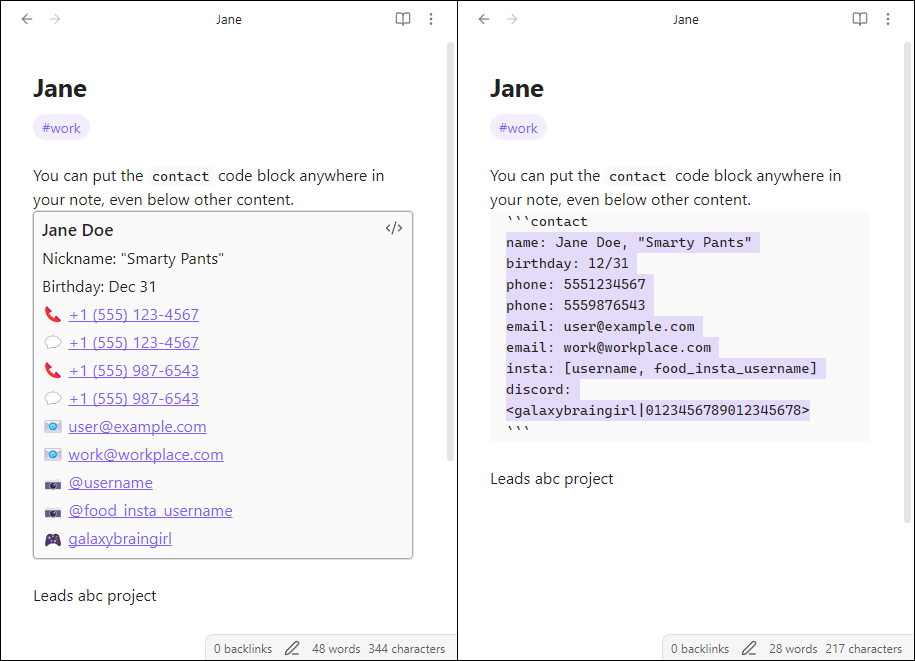
The original contact code block implementation is still supported and can be used anywhere in a note. These also support repeated fields, unlike properties where you must use lists.
Some other text in your note.

```contact
name: First Last
phone: 5551234567
phone: 5559876543
```

Some further text in your note.
Supported fields
namelegalName(single value; rendered below names)birthdayphoneemailinstasteambelibeliName(pairs by index withbeli; rendered in parentheses after its Beli username)NSO(Nintendo Switch Online name)NSOfriendCode(pairs by index withNSO; rendered in smaller, reduced-emphasis parentheses)discordaddress(see Addresses)employer,title,department,manager,employmentStarted(see Employment)
Formatting details
Fields and their values are separated by a colon. Any value may be a list, denoted by one or more commas. Brackets are optional. Extra commas or whitespace will be ignored. You can also provide additional phone numbers, emails, etc. on separate lines as long as each starts with the field name and a colon.
If you provide multiple names, any subsequent names after the first will be listed as nicknames.
Use legalName for one legal name. It is rendered below the display name and nicknames, before the other contact details, at reduced emphasis.
If you provide a valid birthday, it will be formatted and a calculated age will be displayed. If not, the provided birthday will be displayed as-is. You can set your preferences for how formatted dates are displayed in the "Beautiful Contact Cards" community plugin settings. Birthdays without a year are also supported.
Phone numbers may include a country code, but if it's excluded then +1 will be assumed. Formatting like +, (), and - may be included or excluded, but will be rendered in this standard format regardless. Each phone number will render two links: one to call, and one to message.
Emails won't be rendered if they don't appear to be a valid email address.
Instagram usernames may include or exclude the preceding @ sign.
Steam values are linked to their Steam Community profile. Use a custom profile name (for example, steam: username), a numeric SteamID64, or a full Steam Community profile URL. Custom names use Steam's /id/ URL form; numeric IDs use its permanent /profiles/ URL form.
Beli usernames and Beli names may both be lists. Each beliName is paired with the beli username at the same list index; Beli usernames without a matching name render without parentheses.
Nintendo Switch Online names and friend codes may both be lists. Each NSOfriendCode is paired with the NSO name at the same list index; names without a matching friend code render without parentheses.
You may provide Discord username(s); or, if you would like a convenient link directly to your DM with that user (works on Desktop and Mobile), you can further provide that channel ID after a pipe symbol. Angle brackets surrounding this pair are optional. To obtain the channel ID, see https://wiki.discord.id/obtain-ids/desktop. In the "Beautiful Contact Cards" community plugin settings you can decide whether you want links to open in your native client or a browser.
Employment
Use the following top-level properties for a contact's current role:
---
employer: "[[Acme Corp]]"
title: Senior Engineer
department: Platform
manager: "[[Jordan Lee]]"
employmentStart: June 2024
---
Employers and managers can be normal text or Obsidian links. Linked values are clickable on the card. employmentStart (and the existing employmentStarted alias) accepts YYYY-MM, YYYY-MM-DD, or a full or abbreviated English month and year such as June 2026 or Jun 2026; the card shows the start date and elapsed years/months.
Record former roles in an employmentHistory list. Each entry requires an employer; title, department, and manager are optional. Use started or employmentStarted for the start date and ended or employmentEnded for the end date. Employment dates accept the same formats as employmentStart. The card keeps this history collapsed until you expand it.
---
employmentHistory:
  - employer: "[[Old Co]]"
    title: Engineer
    department: Infrastructure
    manager: "[[Casey Morgan]]"
    started: 2021-06
    ended: 2024-02
---
The same current fields and employmentHistory: YAML block work in a contact code block. Employment history is directly queryable in Obsidian Bases. For example, use this advanced filter to find people who currently work for, or previously worked for, Acme:
employer == link("Acme Corp") || (employmentHistory && employmentHistory.filter(value.employer == link("Acme Corp")).length > 0)
Replace employer with manager and value.employer with value.manager to query current or former reporting relationships. If the Base is embedded in an employer's note, compare against this.file instead of link("Acme Corp").
Addresses
Type an address the way you'd write it on an envelope — one line, with commas. No need to break it into separate street/city/state/zip fields.
---
name: First Last
address: 123 Main St, Apt 4, Seattle WA 98101
building: The Pinnacle
---
building is the building or apartment complex name. It's shown above the address and can be toggled off in settings.
If you want to save only the approximate location or a general area, use the near + radius keys, or area.
Past addresses and approximate places
To record more than one place, such as an archive of previous addresses, use the addresses list. Each item is either a plain address string or an object:
---
name: First Last
addresses:
  - 123 Main St, Apt 4, Seattle WA 98101   # current (a bare string)
  - address: 789 Old Ave, Portland OR 97201
    until: 2023-08                            # archived — moved out
  - area: Greenlake, Seattle                  # a named area, not a precise spot
  - near: Greenlake Park                      # lives near a landmark...
    radius: 3 blocks                          # ...with this much uncertainty
---
- An entry is treated as past/archived if it has an
untildate orarchived: true. By default the card shows only current addresses; toggle "Show only current addresses" in settings to show the full history. arearecords a neighborhood/region rather than a precise street address.nearrecords a reference point the person lives near, andradiusrecords how uncertain that is (free text like3 blocks,0.5 mi,500m).- All this works in a
contactcode block too. You can repeat address fields in code blocks, or use a quoted bracket list (address: ["123 Main St, Seattle", "456 South St, Portland"]). - Note: Obsidian's Properties panel might flag the
addresseslist with an orange!and offer to "Display as multitext". Don't accept, or it will flatten your addresses to "[object Object]" and you will lose data. Edit in source mode if you see this warning. If/when Obsidian adds a property type for a list of objects, this caveat will go away on its own.
A note on updates
If you changed any plugin settings before upgrading to 2.0.0, the "Render from properties" option is disabled upon upgrade. This is to avoid a surprising behavior change, where your existing notes with name, email, etc. properties start displaying a contact card when you might not expect it. To opt in, go to Settings → Community plugins → Beautiful Contact Cards and enable "Render from properties".
Given this can only be detected for users who saved a setting at least once, this upgrade to 2.0.0+ might enable "Render from properties" by default as with fresh installs. If you have existing notes with a recognized property (such as name) and don't want to display contact cards, simply disable "Render from properties" in the plugin settings.
Statement on AI
If you're staunchly against AI, remain at version 1.6.2. This version and all before were entirely hand-coded.