Backtest Blocks
 chauduyphanvu102 downloads
Write a trading strategy (long, short or leveraged) as readable rules in a note and see its backtest drawn underneath.
- Overview
- Scorecard
- Updates17
Test a trading strategy in an Obsidian note.
Write the rules in a strategy code block. The plugin runs the rules on past prices and shows the result in place of the block.
name: Trend following
universe: SPY
from: 2005-01-01
costs: 5 bps

buy  when close > sma(200)
sell when close < sma(200)
This block holds SPY while SPY closes above its 200-day average, and sells when SPY closes below it. The test starts in 2005, and each trade costs 0.05%.
The note shows this:

What you get
- The position now, and the next order: one line under the title, such as "Long SPY since 2026-04-09" and "Sells unless it closes above 730.27 · 0.01% away". It shows in amber when an order is near.
- A short verdict: the result of the strategy, compared with buy and hold.
- The main figures side by side: return per year, total return, worst drawdown (the largest decrease from a peak), Sharpe ratio, volatility, time invested and trades, each with a mark that shows who did better.
- A chart of the strategy and buy and hold, with the large market crashes shaded. Move the pointer on a figure to see where it comes from on the chart.
- All the trades. Click the arrow at the start of a trade row to see why that trade occurred.
- Tools to test the idea: numbers that you drag in the rules, sliders, a sweep over a range of values that colours the sliders, and a Was it luck? check.
- More views: the result in each market regime and crisis, a price chart with the trades, and the values of each rule, bar by bar.
The full guide is docs/reference.md.
Install
- From Obsidian: Settings → Community plugins → Browse, when the plugin is in the list. Before that, install it with BRAT and
chauduyphanvu/obsidian-backtest. - Manual installation: Download
main.js,manifest.jsonandstyles.cssfrom the latest release. Put them in<vault>/.obsidian/plugins/backtest-blocks/. Then set Backtest Blocks to on in Community plugins.
Obsidian 1.11.4 or later is necessary. Tested on desktop (macOS). The phone layouts were examined only in the mobile emulation of Obsidian.
Quick start
- Open the command palette and run Insert strategy block. Select one of the ten starter strategies, or type a
strategyblock. - Move the cursor out of the block. The result shows.
- If the plugin underlines a word, move the pointer to it to see the problem. One click corrects many problems. A block that cannot run shows its problem on its line, with a button that corrects it.
- Drag a number in the rules, or move a slider. The result changes.
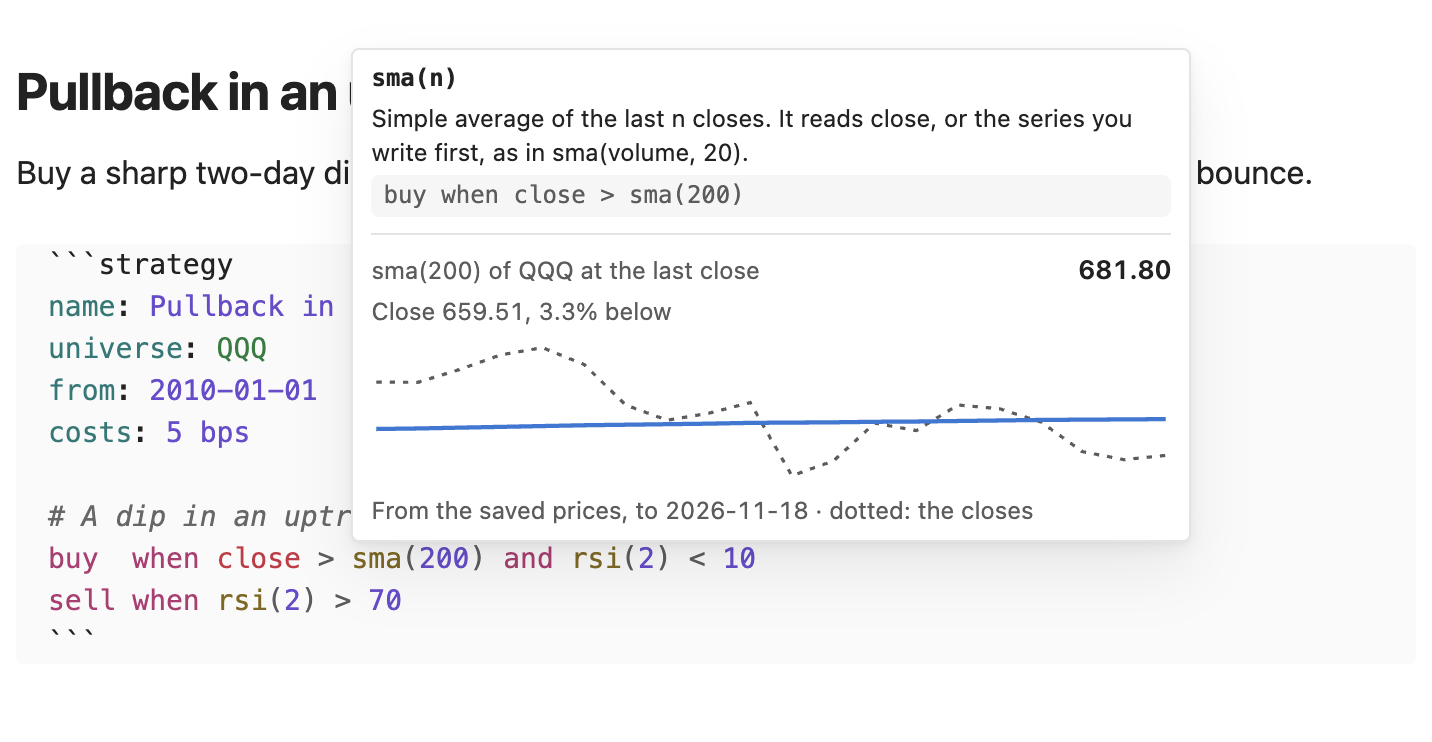
Move the pointer to a word in a block to see what it means. On an indicator, you also see its value at the last close:
Write a strategy
A block has settings and rules. You can also add parameters and definitions. Only two items are necessary: universe (what to trade) and a buy when or short when rule.
name: Three funds
universe: SPY 50%, TLT 30%, GLD 20%
from: 2010-01-01
rebalance: quarterly
costs: 5 bps
stop loss: 10%

n = 200 in 100..300 step 20

buy  when close > sma(n)
sell when close < sma(n)

for GLD:
  buy when close > sma(100) and rsi(14) < 70
Settings
| To set | Write |
|---|---|
| What to trade, and how much of each ticker | universe: SPY 60%, TLT 40% |
| The dates of the test | from: 2010-01-01 · to: 2024-12-31 |
| A date that divides the results, to test on data that you did not use to tune the rules | test from: 2019-01-01 |
| The source of the prices | data: yahoo (or binance, tiingo) |
| Bar size | interval: 1d (Binance has bars down to 1m) |
| Start capital | capital: 10k |
| Trading costs | costs: 5 bps · slippage: 2 bps · commission: 0.005 per share, min 1 |
| Interest on cash | cash rate: 4% |
| How much to invest | size: 80% · weighting: inverse volatility(60) · risk per trade: 1% at 2 atr(14) |
| Set the weights again on a schedule | rebalance: monthly |
| Buy a position in steps | entries: 3 (with an add when rule) |
| Hold only the best tickers | hold: top 3 by roc(126) |
| Exits | stop loss: 8% · trailing stop: 3 atr(14) · take profit: 20% |
| When orders fill | fill: close (the default is the next open) · magnify: 1h (examine the stops in each bar) |
| Fees for shorts and for borrowed money | borrow fee: 0.5% · margin rate: 6% |
| A title, and the benchmark | name: My strategy · benchmark: QQQ |
Rules
buy whenandsell whenopen and close a position.short whenandcover whendo the same for a short.add whenadds to a position.- A rule can continue on the next lines. Start each new line with
andoror. - Rules below
for TLT:(orfor SPY, QQQ:) apply only to those tickers.for all:starts the shared rules again.
Conditions
| Write | Meaning |
|---|---|
close > sma(200) |
The close is above its 200-day average. You can also use < >= <= == !=, above, below. |
close crosses above sma(50) |
The close is above the average on this bar, and was at or below it on the previous bar. Also crosses below, or crosses for the two directions. |
rsi(2) between 10 and 30 |
The value is from 10 to 30, with 10 and 30 included. |
close > sma(50) for 3 bars |
True on each of the last 3 bars. |
close > sma(50) within 3 bars |
True on one or more of the last 3 bars. |
close[1] |
The close one bar before. |
sma(50) of SPY |
A value from a different ticker. |
Join conditions with and, or and not. Use + - * / and brackets for calculations.
Rules can read prices (open, high, low, close, volume), many indicators (for example sma and rsi), calendar values (for example month_end) and values of the open position (for example bars held). Move the pointer to a word in the editor to see what it means. The reference has a list of all of them.
Parameters
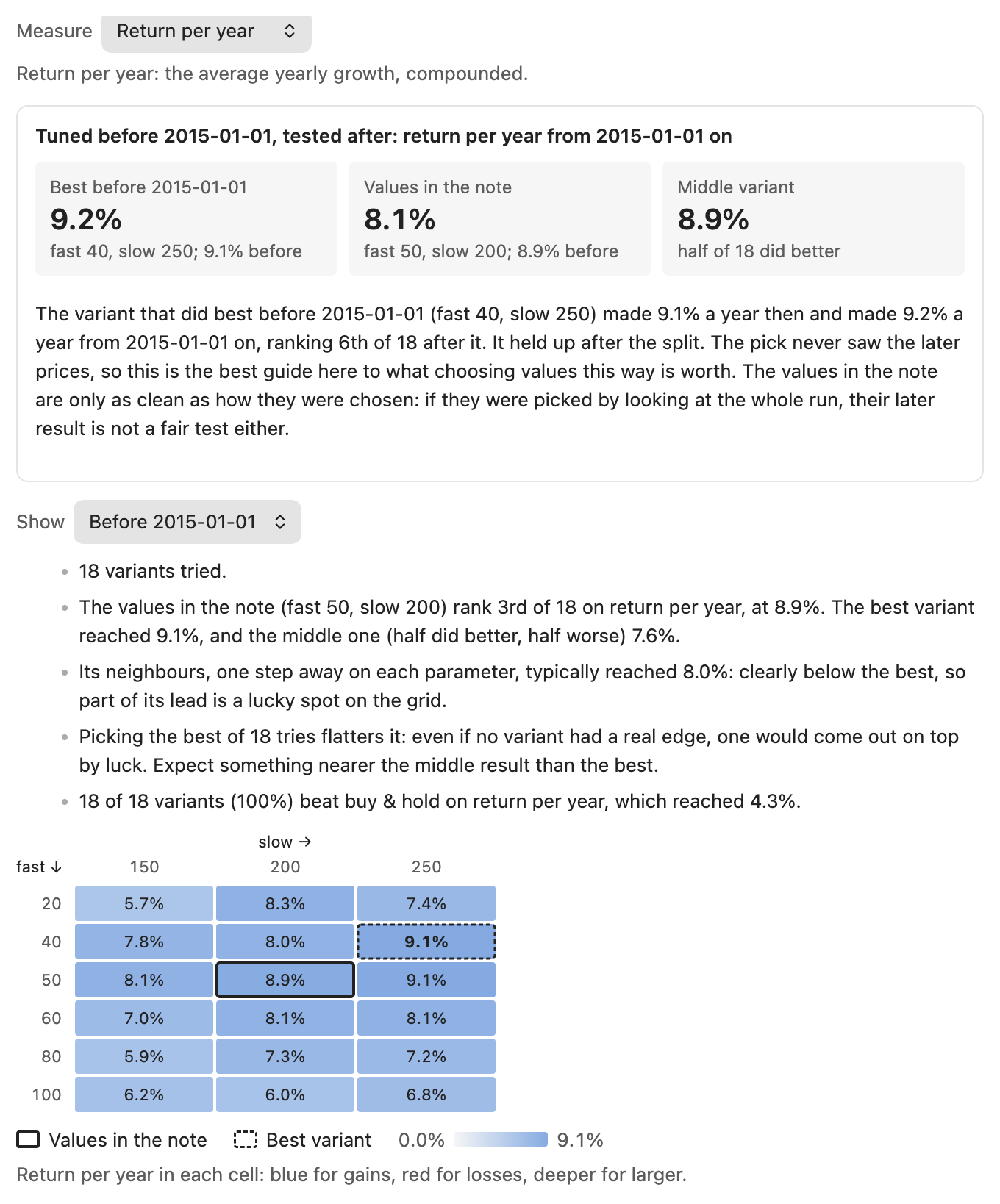
fast = 50 in 20..100 step 10 makes a number that you can change with a slider, or by dragging it in the rules. Try other values runs the strategy for each value in the range:
Definitions
uptrend = close > sma(200) gives a name to a condition or a number. Then use the name in rules: buy when uptrend and rsi(2) < 10.
Tickers
| Write | Prices from |
|---|---|
SPY |
Yahoo Finance |
binance:BTCUSDT |
Binance |
tiingo:SPY |
Tiingo (an API key is necessary) |
fred:T10Y2Y |
FRED, an economic series. Read it in rules with of. |
csv:Data/gold.csv |
A CSV file in your vault |
Weights are optional. Their total can be up to 200%.
Shorts and leverage
name: Trend, long or short
universe: SPY
from: 2005-01-01
costs: 5 bps

buy   when close > sma(200)
short when close < sma(200)
short whenopens a short.cover whencloses it. If a ticker has a buy rule and a short rule, one signal moves it from one side to the other.- Weights above 100% borrow money, up to 2 times your equity, with longs and shorts together.
- Shorts pay a borrow fee: 0.5% a year by default. Borrowed money pays interest: 6% a year by default.
- If your equity decreases below 25% of your positions, a margin call closes all positions at the next open. If a run loses all its money, it stops.
A block with no short rule and weights of 100% or less does not borrow, and pays none of these fees.
Other block types
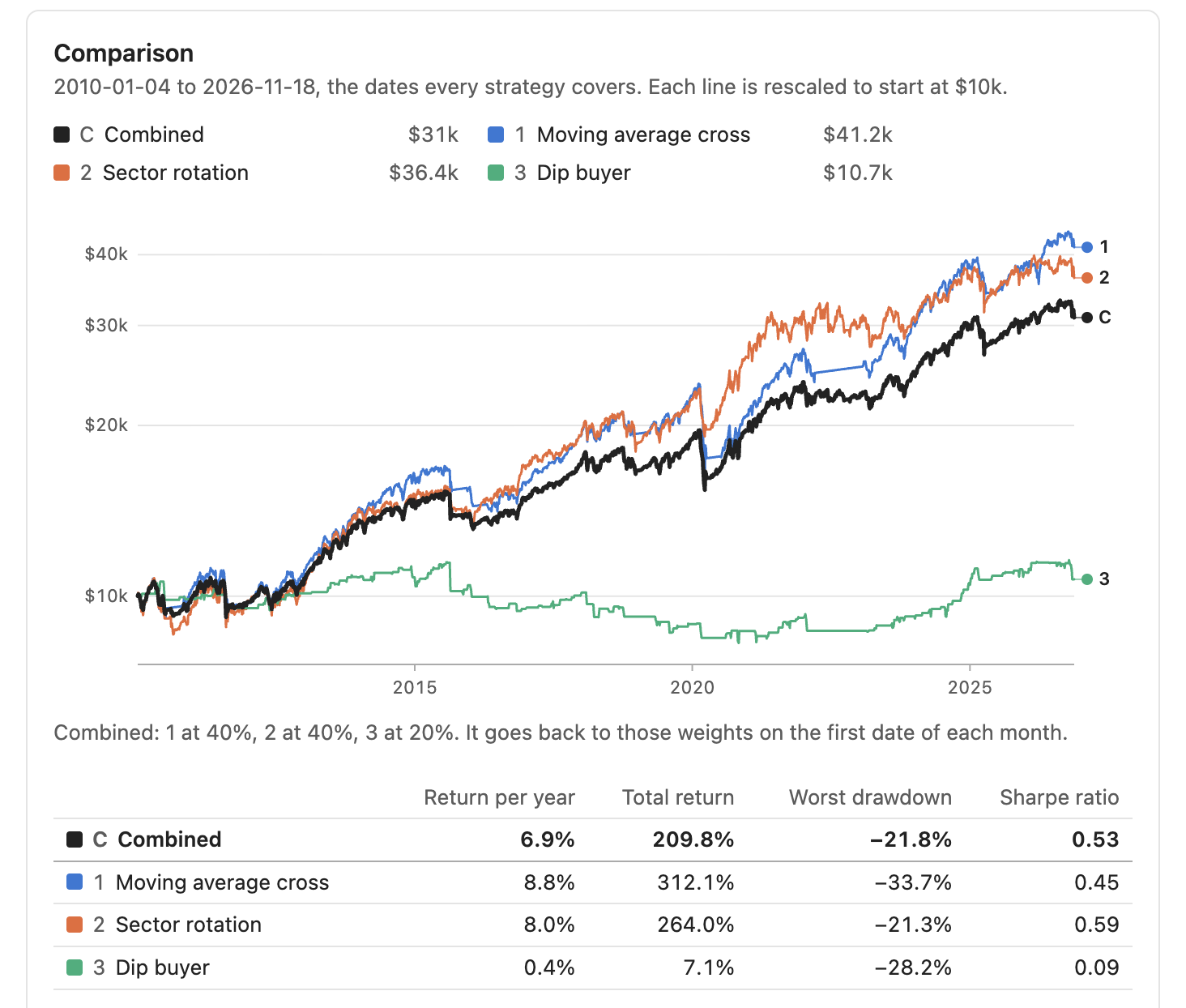
compare shows strategies from other notes side by side. If you write weights, it also shows the strategies together and suggests how to divide money between them:
[[Trend following]] 50%
[[Pullbacks#QQQ RSI pullback]] 50%
backtests shows all your strategies in one table, with their figures and next orders. The command Insert strategy dashboard adds one:
sort: return
account changes your strategies into share orders for a real account. It also compares the fills of your broker with the signals. It reads exports from Schwab, Fidelity, Interactive Brokers, or a CSV file of a different format:
name: Main brokerage
holdings: SPY 120, TLT 50
cash: 4,200

[[Trend following]] 60%
[[Pullbacks#QQQ RSI pullback]] 40%
Forward tests: Click Start a forward test at the end of a result, or in its menu. The plugin copies the rules into a new note. After that, it counts only new prices.
Today's orders
Run Show today's orders, or click its ribbon icon. The plugin runs all the strategies in your vault and shows:
- what to buy or sell at the next open or close;
- which closes to monitor, nearest first, with how near each one is;
- the orders for each account;
- the blocks that cannot run, with a button that corrects many problems.
The status bar shows the number of orders. To keep the list open while you trade, click Keep in the sidebar. The plugin does not place orders. You place the trades yourself.
Commands
| Command | What it does |
|---|---|
| Insert strategy block | Adds one of ten starter strategies. |
| New strategy note | Makes a new note with one of the starter strategies. Works with no note open. |
| Use a CSV file in a strategy | Changes a CSV file into a ticker, a column or a small strategy. |
| Write a strategy from a description | A language model writes a strategy from plain English. First, select a provider in the settings. |
| Open strategy preview | Shows the result of the block that you edit, in the sidebar. |
| Correct the problem at the cursor | Applies the suggested correction. |
| Make the number at the cursor a parameter | Changes a number such as the 200 in sma(200) into a parameter with a range. |
| Insert strategy dashboard | Adds a backtests block. |
| Show today's orders | Opens the orders window. |
| Show today's orders in the sidebar | Keeps the list of orders open in the sidebar. |
| Save this note's results to its properties | Writes the figures of each strategy to bt_ properties. |
| Refresh all strategies in this note | Gets new prices for every strategy in the note. |
| Fold all results in this note | Folds every result of the note to one line. |
| Open all results in this note | Opens every result of the note. |
| Refresh the strategy at the cursor | Gets new prices for the strategy that you edit. |
| Keep the strategy at the cursor as a note | Saves its result as a note. |
| Start a forward test for the strategy at the cursor | Starts a forward test of the strategy that you edit. |
| Rename the strategy at the cursor | Gives the strategy a new name. Its count of tries and the links to it stay correct. |
| Delete saved prices | Deletes the saved prices. |
With an AI assistant
Files for models. Give a model llms.txt or llms-full.txt. They contain the full language with worked examples. The docs/ folder also has:
language.json: each word and its meaning;corpus/: worked examples, and frequent errors with their corrections;grammar/: Lark and GBNF grammars, for models that generate text with a grammar.
A command line and MCP server. Each release includes backtest-blocks.mjs. It must have Node.js 20 or later. With it, an assistant can examine and run strategies outside Obsidian:
node backtest-blocks.mjs check note.md           # show each problem with its line; exit code 1 if there are errors
node backtest-blocks.mjs check --fix note.md     # write each correction that is the only one into the note
node backtest-blocks.mjs run note.md --block 2   # backtest one block on live prices (--json for data)
node backtest-blocks.mjs explain "stop loss"     # what a word means
node backtest-blocks.mjs mcp                     # the same, as MCP tools
To add it to Claude Code:
claude mcp add backtest-blocks -- node /path/to/backtest-blocks.mjs mcp
In Claude Desktop or Codex, add an MCP server with the command node and the arguments /path/to/backtest-blocks.mjs mcp.
The server has four tools: check_strategy, run_backtest, explain_word and list_words. It also gives the guide, the word list, the examples and the grammars as resources, and a write_strategy prompt.
run uses the plugin settings of the vault that holds the note, so it gives the same result as Obsidian. Prices are saved in ~/.cache/backtest-blocks. Tiingo and FRED read their API keys from TIINGO_API_KEY and FRED_API_KEY.
Settings
In the plugin settings, you can set:
- the default start capital, costs, slippage, commission, interest on cash, borrow fee and margin interest;
- the source of the prices for plain tickers;
- how long the plugin keeps saved prices;
- the API keys for Tiingo, FRED and the strategy writer, from the secret storage of Obsidian (the plugin does not keep the keys itself);
- if the plugin examines the orders at start-up, and if it finds tickers while you type.
Network and privacy
The plugin connects only to these hosts:
query1.finance.yahoo.comandquery2.finance.yahoo.com: Yahoo prices, and the ticker search while you type;data-api.binance.vision: Binance prices, and its list of markets for the ticker search;api.tiingo.comandapi.stlouisfed.org: Tiingo prices and FRED series, only with your API key;api.anthropic.com, or a server address that you enter: only when you write a strategy from a description.
The plugin sends only two types of request that you did not start. You can set each one to off in the settings: the order check some seconds after start-up, and the ticker search.
- Requests contain tickers, not the text of your notes.
- There is no telemetry, analytics or remote code.
- Prices are saved in the folder of the plugin.
The reference shows all the requests.
Limits
- A backtest on past prices does not predict the future. This is not financial advice.
- Orders fill at the next open, or at the close, with the costs, slippage and commission that you set. The plugin does not model taxes, market impact or partial fills.
- Yahoo and Tiingo adjust prices for dividends and splits. Thus, compare a price with an average of prices, not with a fixed number.
- Yahoo shows only the tickers that exist at this time. A basket of the tickers of today does not include the companies that closed. Thus, the basket looks better than it was.
- Shorts are simple: one borrow fee for all stocks. There are no hard-to-borrow lists, recalls or short-sale restrictions.
- If you test more variants on the same prices, the best variant looks better by chance. Was it luck? counts your tests and shows how much luck can explain.
Unit tests examine the engine with cases calculated by hand, and a second, independent backtester also examines it. The reference shows what was examined and what was not.
Development
npm install
npm test           # unit tests
npm run build      # type check, then bundle into dist/
npm run check      # all the checks that a push or a release must pass
The project uses Node 26. The release steps and the source layout are in the reference.
Licence
MIT. Refer to LICENSE.