Auto Tasks
 jamiefdhurst7k downloads
Combine periodic notes with tags and tasks to automatically manage your daily, weekly and project TODO lists. Requires the Periodic Notes and Tasks plugins.
- Overview
- Scorecard
- Updates32
Combine periodic notes with tags and tasks to automatically manage your daily, weekly and project TODO lists.
Designed to work with Obsidian 1.13.0 or later. The Periodic Notes, Tasks and Kanban plugins are all optional.
When the Periodic Notes plugin is installed, this plugin respects its settings, using the templates, format and location you have selected. Without it, daily and weekly notes are created using Obsidian's own defaults - YYYY-MM-DD for daily and gggg-[W]ww for weekly (or your Calendar plugin settings, if you have it), each in the vault root with no template. This is provided through an abstract provider for the plugin.
This plugin works well with the Auto Periodic Notes plugin.
Features
- Reads tasks from previous periodic notes and carries over any incomplete ones
- Optionally marks the carried over tasks in the note they came from, so they stop reading as outstanding
- Adds the header for tasks when creating the note
- Searches all or specific headers within the periodic note so you can separate a daily list from other areas
- Adds a due date to copied tasks so they can be appropriately tracked in the Tasks plugin
- Collects tasks from the whole vault and adds them to a central Kanban board automatically
Carrying over your tasks
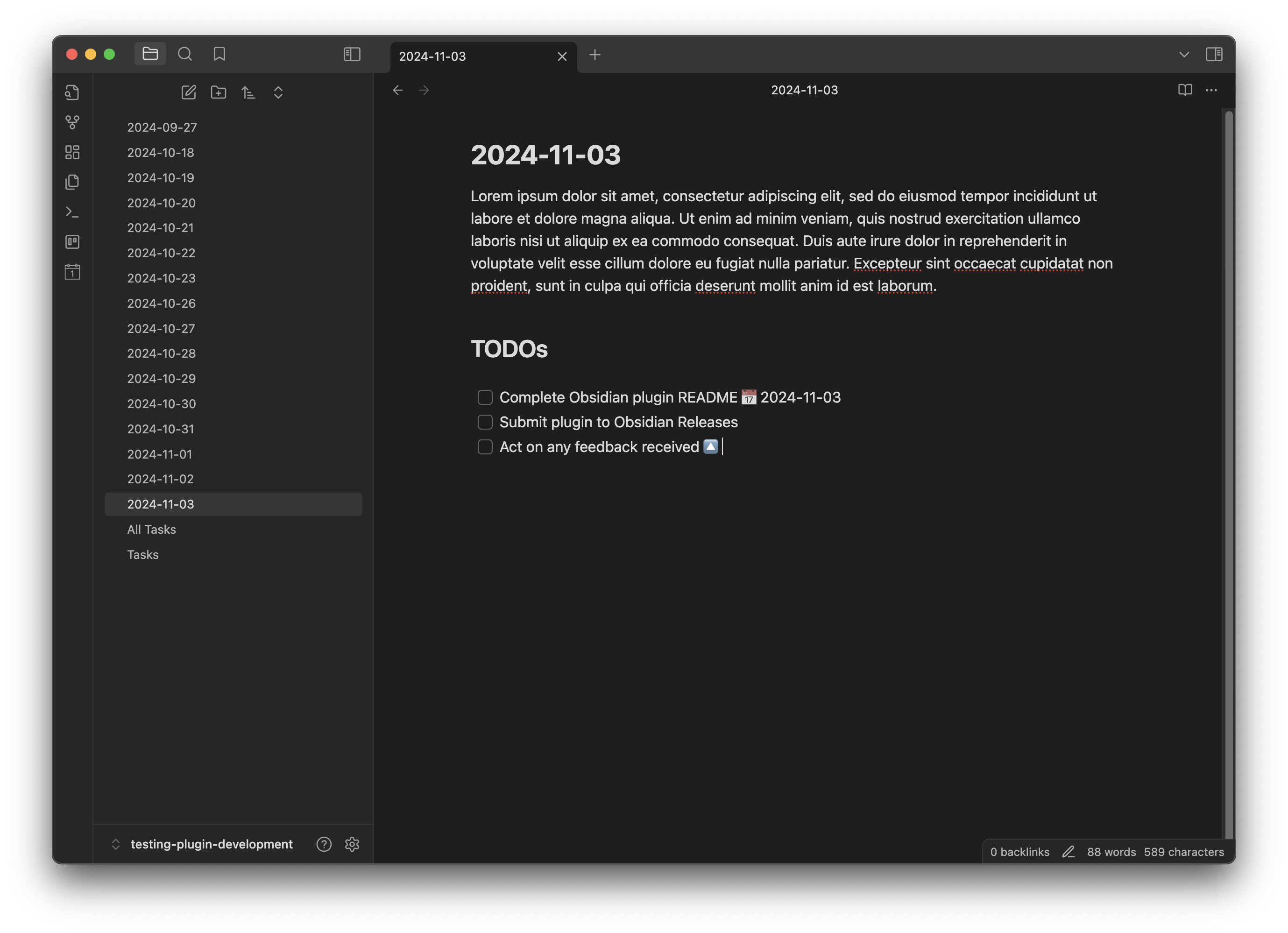
For daily and weekly notes, if you maintain a task list within your periodic notes, any incomplete tasks will be automatically copied over to the next day or week's note, so you can easily track and maintain your current TODO list.
The new header for tasks will be added to the end of the new note, with any tasks added under that header.
YTou can specify in the settings whether to search through the whole note for all tasks, or to restrict your search to specific headers (e.g. ## TODOs in the example above).
Only a plain, untouched checkbox is carried over. Tasks that are complete ([x]), not needed ([n]) or carry any other custom status are left where they are.
Marking the previous note
By default the previous note is left exactly as it was, which means a carried over task appears as outstanding in both notes and shows up twice in queries such as Dataview. Setting a carry over status changes that - once a task has been copied forward, the copy in the previous note has its status character rewritten:
<!-- Yesterday, before -->

- [ ] Write the release notes

<!-- Yesterday, after, with a carry over status of ">" -->

- [>] Write the release notes

<!-- Today -->

- [ ] Write the release notes
Any single character other than a digit can be used - > to mark the task as forwarded, or x to complete it outright. Only the status character changes; the rest of the line, including any due dates, priorities and other metadata, is left untouched.
Due date support
When copying over tasks, you can choose to add a due date automatically onto the task, which will be preserved when tasks are copied, showing the original date that it was added.
Kanban support
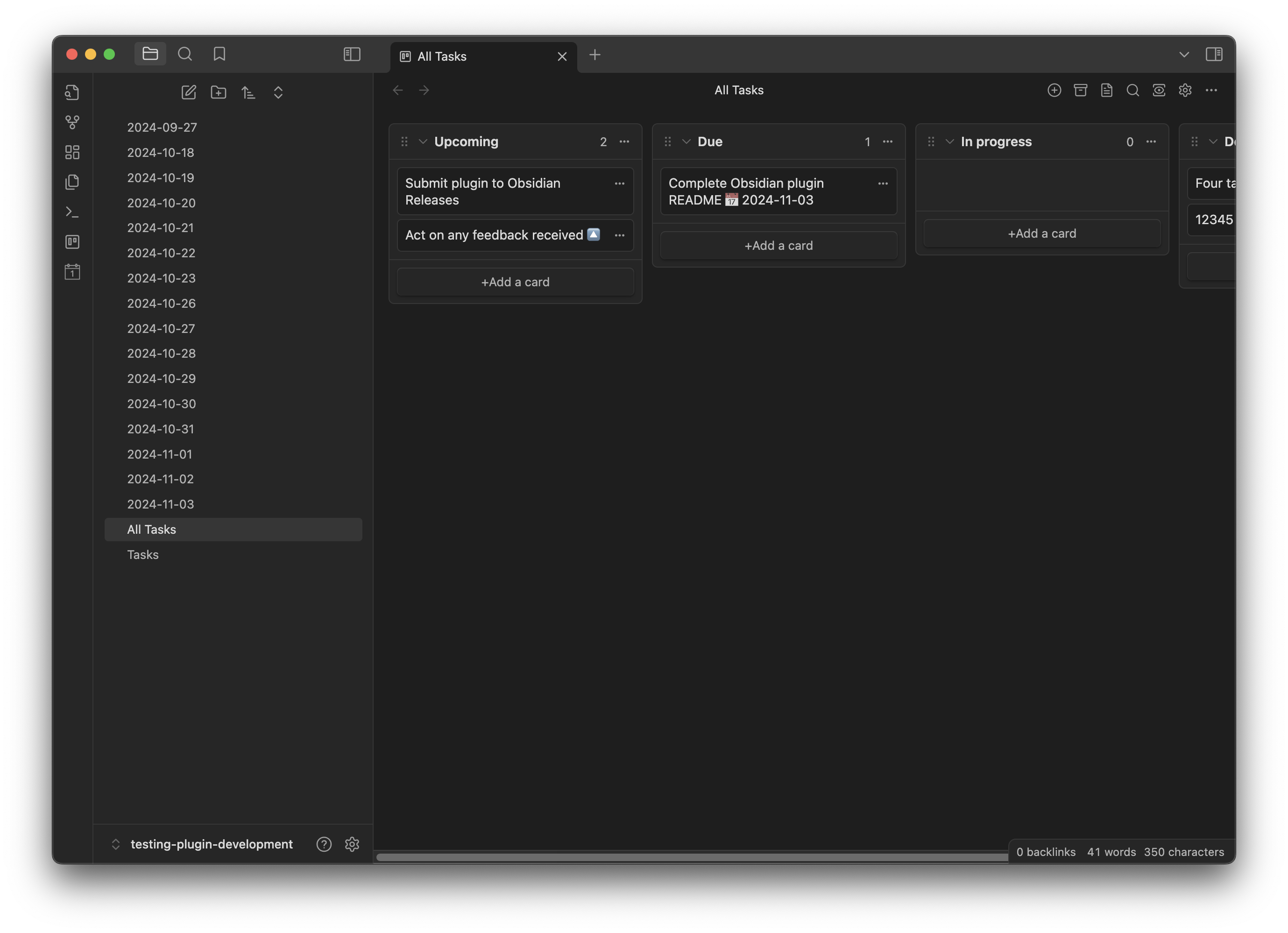
All the tasks within the periodic notes and elsewhere in the vault can be collated and centralised into a Kanban board, where they are synced automatically and isolated by task name.
Settings
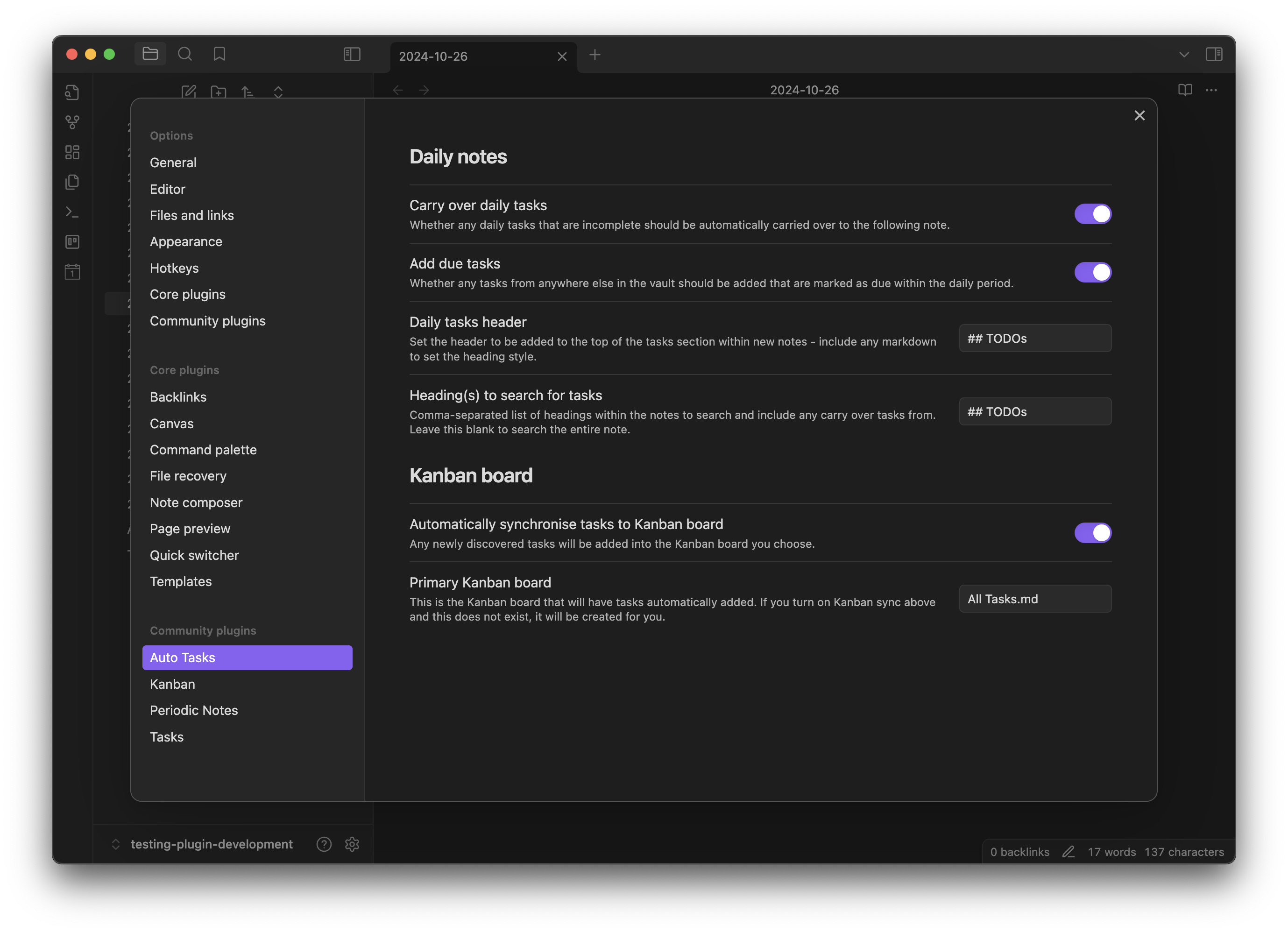
The plugin supports working with both daily and weekly notes. If you have the Periodic Notes plugin installed, only the note types you have enabled there appear; without it, both are available. For each type of note you can choose to carry over your daily tasks, whether to automatically add any tasks from anywhere in your vault that are due either that day or week, and how to read the tasks from your existing periodic note.
Under "All tasks" there are two separate ways to mark a carried over task, which can be used together. Both are blank by default, and both take exactly what you type - nothing is added around your value.
Prefix for carried over tasks is free text, placed in front of the task name in the new note. It is not a checkbox, so if you want it to look like one you have to type the brackets yourself:
| You enter | The new note reads |
|---|---|
[<] |
- [ ] [<] Write the notes |
< |
- [ ] < Write the notes |
carried: |
- [ ] carried: Write the notes |
Mark carried over tasks in previous note as is a single character, written inside the checkbox in the previous note. Here you enter the character on its own, with no brackets:
| You enter | The previous note reads |
|---|---|
> |
- [>] Write the notes |
x |
- [x] Write the notes |
Setting the prefix to [<] and the status to > gives you the full round trip: yesterday's task is marked as sent forward, and today's is marked as having come from before.
When the Kanban plugin is available, you can choose to sync all of the tasks within your vault automatically to a board, which will be created for you.
Development
This plugin has been developed using Typescript with the Obsidian and Periodic Notes APIs, and Jest for testing.
Once you've cloned the repository, to speed up plugin development it is recommended to symlink the location of the plugin directly into your local Obsidian:
ln -s obsidian-auto-tasks ~/.obsidian/plugins/
You can then run the plugin build automatically to pick up any changes:
npm run dev
To test the plugin using Jest, you can run it with or without coverage:
npm run test
npm run coverage
When submitting a PR, the plugin will be automatically tested, and when merged into main this will be built and released using GitHub Actions.
Thanks
Many thanks to Liam Cain for the Periodic Notes plugin, and to Clare Macrae and the Obsidian Tasks Group for their Tasks plugin!