
- Overview
- Scorecard
- Updates7
An Obsidian plugin that streamlines academic literature management by automatically fetching paper information and downloading PDFs. Adapted from this repository.
这是一个 Obsidian 插件,通过自动获取论文信息和下载 PDF 来简化学术文献管理。改编自 repository。
Features
- 🔍 Automatic Paper Detection: Detects paper IDs in your notes using customizable patterns
- 📝 Rich Metadata Fetching: Retrieves comprehensive paper information including title, authors, journal, and publication date
- 📥 Smart PDF Management: Automatically downloads and organizes PDF files with flexible naming and storage options
- 🎯 Multiple ID Support: Works with various paper identifiers:
- arXiv ID (e.g., 2310.12567)
- DOI (e.g., 10.1038/s41586-021-03819-2)
- medRxiv/bioRxiv ID (e.g., 10.1101/2023.01.01.12345)
Installation
From Obsidian Community Plugins
- Open Obsidian Settings
- Navigate to Community Plugins and enable them
- Search for "AutoLiterature" and click Install
- Enable the plugin
From Source Code
- Clone this repository to your vault's
.obsidian/pluginsdirectory - Enable Community Plugins in Obsidian settings
- Enable AutoLiterature
Usage
Basic Usage
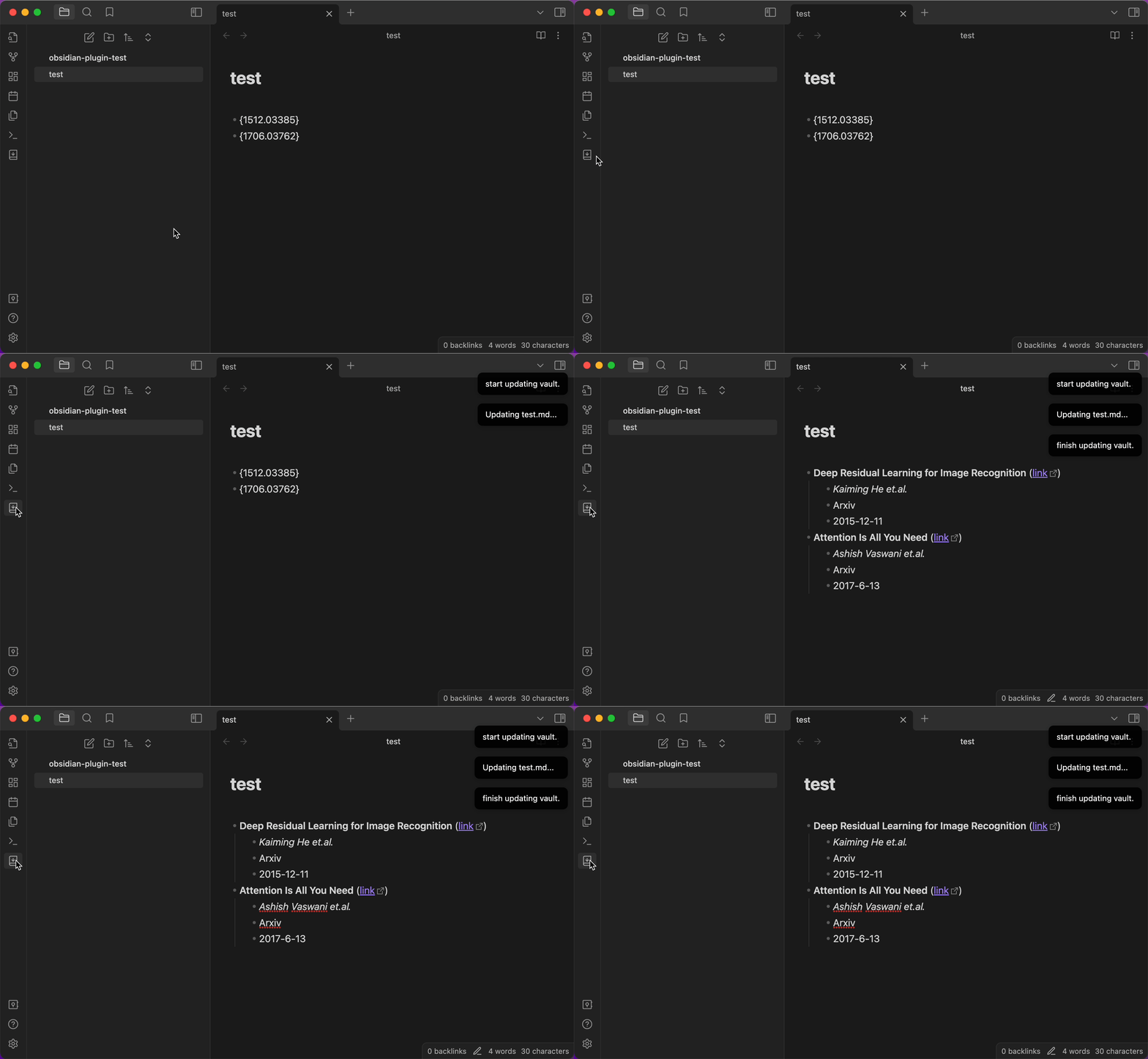
- Write a paper ID in your note using the pattern:
- {paperID} - Click the AutoLiter icon in the left ribbon or use the command
- The plugin will:
- Replace the ID with formatted paper information
- Download the PDF file (if enabled)
Demo
Configuration
Literature Detection
Regular Expression
- Default:
- \{.{3,}\} - Customizable to match your note-taking style
- The plugin uses this pattern to find paper IDs in your notes
Output Format
- Customize how paper information is displayed
- Available variables:
${title}: Paper title${url}: Paper URL${author}: First author${journal}: Journal name${pubDate}: Publication date
- Supports markdown formatting
- Use
\nfor new lines and\tfor tabs
Example formats:
Default format:
- **${title}** ([link](${url}))
    - *${author} et.al.*
    - ${journal}
    - ${pubDate}
Alternative format:
------
**${title}** ([link](${url}))
    - *${author} et.al.*
    - ${journal}
    - ${pubDate}
------
PDF Management
Auto Download PDF
- Enable to automatically download PDFs when updating literature information
- Papers must have accessible PDF links
PDF Storage Path Base
vault: Store PDFs relative to your vault rootmdFile: Store PDFs relative to the current markdown file
PDF Storage Path Examples:
- Base:
vault, Path:pdfs→vault/pdfs/paper.pdf - Base:
mdFile, Path:pdfs→current_folder/pdfs/paper.pdf
PDF File Name Format
Paper Title: Use the paper's title (default)Paper ID: Use the paper's identifier (e.g., arXiv ID, DOI)Custom: Create custom names using variables
Custom PDF Name Format Available variables:
${title}: Paper title${id}: Paper ID${author}: First author${journal}: Journal name${pubDate}: Publication date
Notes:
- Different themes will affect how the formatted text appears in your notes. The same output format may look different with different Obsidian themes
- When trying to add tabs (
\t) in the output format settings, note that pressing Tab in Obsidian's settings will switch focus to the next setting. To add tabs, copy the format from a text editor first- PDF filenames:
- Illegal characters are replaced with "-"
- Names are limited to 100 characters
- The .pdf extension is added automatically
Commands
The plugin provides three ways to update literature information:
Left Ribbon Icon: Click the AutoLiter icon in the left ribbon to update the active note
Update Selection: Process only selected text
- Select the text containing paper IDs with your cursor
- Press
Command/Ctrl + Pto open command palette - Type and select "AutoLiterature: Update selected text"
Update Vault: Process all markdown files in the vault
- Press
Command/Ctrl + Pto open command palette - Type and select "AutoLiterature: Update the whole vault"
- Press
Contributing
Suggestions and contributions are welcome! Feel free to:
- Report bugs
- Suggest new features
- Submit pull requests
License
MIT License