Auto Card Link Enhanced
 KreNtal2k downloads
Automatically convert URLs into beautiful card-styled or Markdown links with metadata, thumbnails and favicons.
- Overview
- Scorecard
- Updates26
Automatically generate beautiful card-styled links from URLs by fetching their metadata, thumbnails and favicons, and turning them into a YAML cardlink code block or into a compact inline Markdown link carrying the fetched title.
It includes tailored handling for over twenty sites — YouTube, Vimeo, Reddit, X, GitHub, GitLab, npm, Wikipedia, arXiv, Spotify, Stack Exchange, LinkedIn, Hacker News, Bluesky, IMDb, Notion, Discord and more — plus options for thumbnail quality, local image saving and multiple card styles.
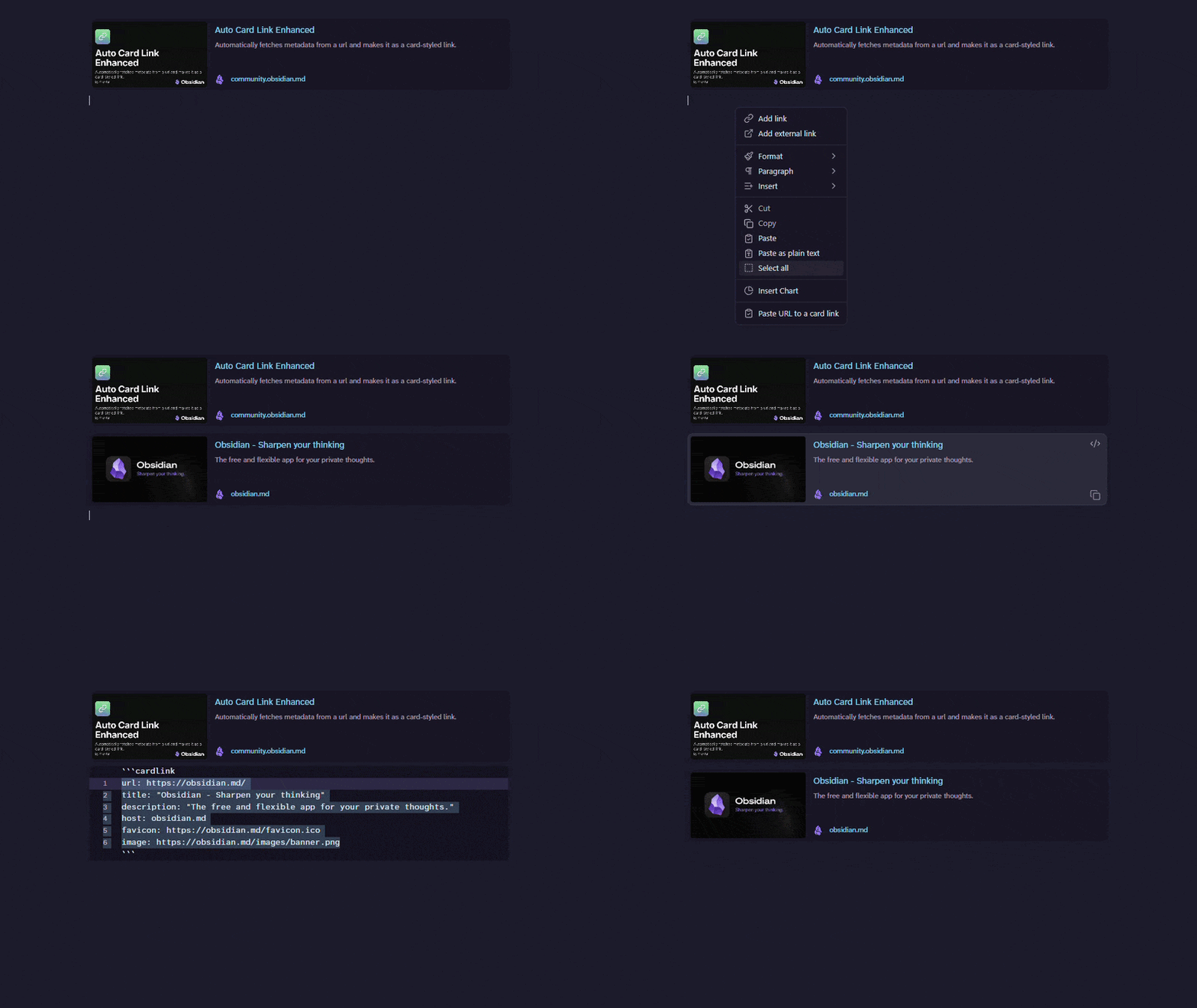
Features
- Paste or drop a URL and turn it into a card, or into an inline Markdown link (
[title - Site](url)) carrying the title fetched from the page. - Convert URLs already written in a note, one or several at once, from the right-click menu or a hotkey.
- Right-click a card to refresh, delete, add a line after it, or turn it back into a Markdown link.
- Right-click a Markdown link to refresh its title or turn it into a card.
- Cards and Markdown links have separate commands, so each can have its own hotkey and both can be used side by side.
- Support for local images through internal links (
image: "[[image.png]]"). - Links to content that is gone — a deleted post, a removed video, an expired invite — produce a card built from the URL, instead of a confident-looking card describing the site's own error page or sign-in wall. The card is marked
status: not-found, and its title is marked the way the settings say.
Settings
- Choose what pasting or dropping a URL produces, independently for each: a plain URL, a Markdown link, or a card link.
- Add the commands to the right-click menu.
- Save images and favicons locally (with configurable folders).
- Choose the card style.
- Show the thumbnail on the left or right of the card.
- Choose thumbnail quality (best looking vs. max resolution).
- Use an external service as a fallback for blocked sites (off by default).
- Mark links that are not found: strike the title through (default), put a text of your choice before it, or leave it as it is. Cards follow the setting as it is now, including cards already in your notes; Markdown links keep the mark they were written with.
Network use
This plugin needs internet access to fetch link metadata. To be transparent about what it sends and where:
- By default, it fetches metadata directly from the site you are linking to (the same request your browser would make to load that page). Nothing is sent to any other third party.
- Optionally, if you enable "Use external service for blocked sites" in the settings, the plugin will — only when a direct fetch fails — send the link's URL to the third-party service microlink.io to retrieve metadata from sites that block direct access (e.g. Cloudflare-protected pages). This setting is off by default, and no data is ever sent to microlink.io unless you turn it on.
[!IMPORTANT] No analytics, telemetry, or personal data are collected by this plugin.
Cardlink syntax
The code block cardlink uses YAML syntax for displaying card-styled link.
attributes
| name | required | description |
|---|---|---|
| url | true | url to open when you click the link |
| title | true | title of the link |
| description | false | description of the link |
| host | false | host of the link |
| favicon | false | favicon of the link |
| image | false | thumbnail image to show in the card link |
| author | false | channel or author (if present) |
| duration | false | duration time for videos |
| status | false | not-found when the site says the page is not there; the title is then marked as the settings say |
example
```cardlink
url: https://obsidian.md/
title: "Obsidian - Sharpen your thinking"
description: "The free and flexible app for your private thoughts."
host: obsidian.md
favicon: https://obsidian.md/favicon.ico
image: https://obsidian.md/images/banner.png
```
A link the site says is not there:
```cardlink
url: https://github.com/obsidianmd/nonexistent-repo
title: "obsidianmd/nonexistent-repo"
host: github.com
favicon: https://github.com/favicon.ico
status: not-found
```
Customizing Style
Card-styled link is styled by styles.css. To customize, you can try making CSS snippets.
For example:
.auto-card-link-author {
    display: none;
}
To hide the author.
Motivation
- Wanted to show beautiful links in my notes
- Didn't want to mess up my notes with HTML tags
- Wanted to keep the original plugin updated (KreNtal)
Credits
This is a fork of the original obsidian-auto-card-link by Nekoshita Yuki.
Auto Card Link Enhanced maintained by KreNtal since 2026-05-04.