Atoms
 Tai Hartman428 downloads
Classify past daily-note captures into linked atomic notes via the Anthropic API.
- Overview
- Scorecard
- Updates109
Get stuff out of your head into Obsidian — then have it filed, linked, and gently brought back so you can expand on it later.
The loop is simple:
- Dump — capture a thought instantly (Capture Atom on iPhone, Atoms Capture on Android, or a bullet in Daily Notes). No filing UI, no folders, no “where does this go?”
- File — Atoms classifies past captures into flat notes under
Atoms/(title, tags, reason-bearing links). Your original words stay verbatim as the body. - Recall — home resurfaces filed notes (For you / mind-change / library) so you’re not stuck in a guilt task list. Open any atom in Obsidian and keep writing.
It’s a second brain inside your vault, not a separate app and not a CRM. Person hubs you already keep get real links and backlinks.
Paid services notice. Atoms needs a paid AI service to file anything. Pick one: bring your own Anthropic API key and Anthropic bills you directly for your usage, or subscribe to Atoms Plus (hosted, no key to set up) from Settings inside the plugin. Asking Claude or ChatGPT about your atoms uses a cloud mirror: hosted Plus, or run
plus-serviceyourself (Settings → Advanced → DIY Ask guide). Pricing and a free trial are at tryatoms.app. The plugin code itself is MIT and free.
Plugin id: atoms · Version: see manifest.json · Requires: Obsidian ≥ 1.11.4, core Daily Notes, and either an Anthropic API key or Atoms Plus
Coding agents: start at AGENTS.md (claim rules + constitution). Humans do not need to memorize process — agents must.
Privacy & cost
- Each classify run sends vault note titles, tags, person-hub titles, and the capture text to the Anthropic API over TLS.
- Filing costs money either way. With your own key (stored in SecretStorage, never
data.json) Anthropic bills you for the usage. With Atoms Plus you pay a monthly or yearly subscription instead, and requests go through the Atoms service. The plugin code is free (MIT); the AI behind it is not. - The model never rewrites your hand-authored daily bullets. It creates flat atom files, appends markers, and (only when you choose Update notes) refreshes titles/links/tags on existing linker atoms — never the capture body.
- On Process title collision, existing atom files are not overwritten (protect-existing).
- Automatic filing (device-local, default off) requires a one-time privacy acknowledgment. Unattended passes only file from the day you turn it on, forward, and never today’s daily. Older unmarked captures are a priced Backfill offer on home, not a background sweep.
What it does
| Step | Behavior |
|---|---|
| Capture | Instant dump — iOS Shortcut or typing bullets (- thought) in Daily Notes. Capture UI is not this plugin. |
| Classify | Anthropic structured output: keepable atom vs logistics noise (task soft-retired). Title, tags, reason-bearing links. |
| Write | New flat files (default Atoms/) + append markers under past captures so nothing reprocesses. |
| Update notes | Optional: re-run the same AI path on older atoms so titles/links match newer filing quality; body stays put. |
| People | Vault-aware person hubs + structural tags — no AI folders, no CRM. |
| Home | Mobile-first leaf: wait to file, library, first-day setup, For you resurface (incl. mind-change), progress while Preview/Process runs. |
| Ask | Optional cloud copy of flat Atoms/*.md so Claude and ChatGPT can search. Vault stays the source of truth. Never writes atom bodies back. Hosted Plus, or DIY Ask. |
| Open loops | Intention notes stay open until a later atom redeems them. Command palette: Open loops: notes left for later and Open loops: review proposals. |
| Atom graph | Command palette → Open atom graph. Global Graph filtered to atoms and notes they connect to (not the whole vault hairball). |
Non-negotiables
- Body of every atom = capture text verbatim
- Never move files or invent folders
- Automatic filing never processes today’s daily, and never reaches history from before the day you enabled it (manual “Preview/Process today” exists for testing; Backfill is the attended history path)
- API key in SecretStorage (or device-local fallback), never in
data.json - Write types: new atom files · append-only markers · user-initiated Update notes (model surfaces only)
- Second brain, not a task app — no due-date queue
Install
Community plugins
Atoms is in Obsidian's community directory. That is the usual way to install.
- Settings → Community plugins → Browse → Atoms → Install → Enable.
- Updates come from the community plugin channel.
- Continue with First-run setup.
BRAT (dogfood / beta)
Use BRAT if you want prerelease builds before they hit the directory.
- Install BRAT.
- BRAT → Add beta plugin →
taihartman/obsidian-atoms. - Enable Atoms. Check for updates after each GitHub Release.
Stable vs beta (GitHub tags):
| Channel | Tag / version shape | GitHub Release | Who gets it |
|---|---|---|---|
| Stable | 0.7.10 (no suffix) |
not marked prerelease | Community plugins · BRAT with betas off |
| Beta | 0.7.11-beta.1 or -rc.1 |
marked prerelease | BRAT only if Enable betas is on |
- Dogfooders: BRAT → turn on Enable betas → Check for updates.
- Everyone else: Community plugins, or BRAT with betas off.
Manual (GitHub Release)
If you cannot use the directory:
- Download
main.js,manifest.json, andstyles.cssfrom the latest stable Release (skip “Pre-release” unless you want beta). - Put them in
<Vault>/.obsidian/plugins/atoms/. - Settings → Community plugins → refresh → enable Atoms.
Optional integrity check (after a CI-built release): download SHA256SUMS.txt from the same release, then:
shasum -a 256 -c SHA256SUMS.txt
gh attestation verify main.js -R taihartman/obsidian-atoms
First-run setup
- Settings → Atoms. File with Atoms Plus (Email → Start free trial or Send sign-in link), or paste an Anthropic key under Your API key (optional) (SecretStorage).
- Confirm core Daily Notes is enabled.
- Settings → Capture → install the iOS shortcut (or use the default iCloud link).
- Capture bullets in daily notes, then use Atoms home → Preview → Process on past days (or the “including today” commands only for testing).
How to use (walkthrough)
Empty vault → dump into Daily → file into a linked library → open notes in Obsidian whenever you want to expand them. Screenshots are phone-frame product UI with synthetic dogfood (not personal notes).
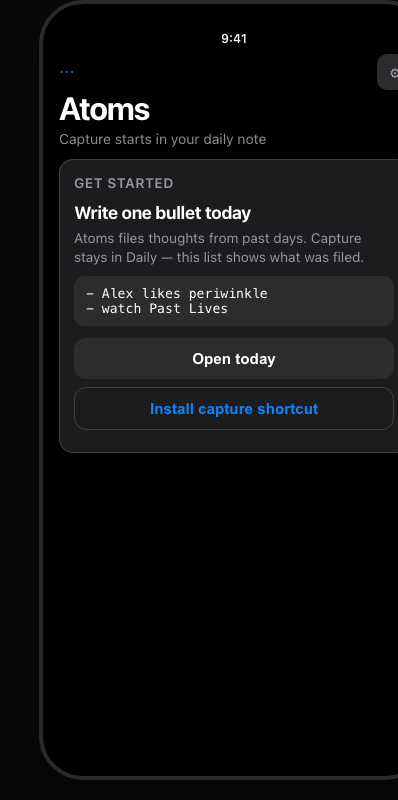
1. First open — empty home
Open Atoms from the ribbon (library icon) or command palette → Open home. With no filed atoms yet, you get a setup card: write one bullet today, open today’s daily, install the capture shortcut.
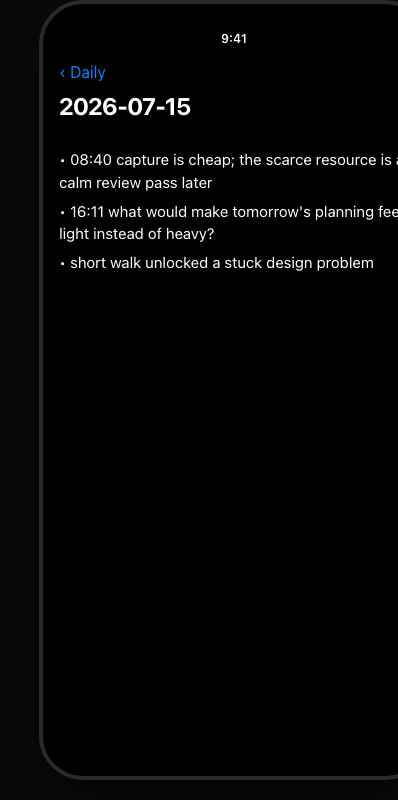
2. Capture as daily bullets
Get it out of your head: top-level bullets in a past daily note (or today’s note if you only want to test later with “including today”). Phone shortcut or desktop typing both work.
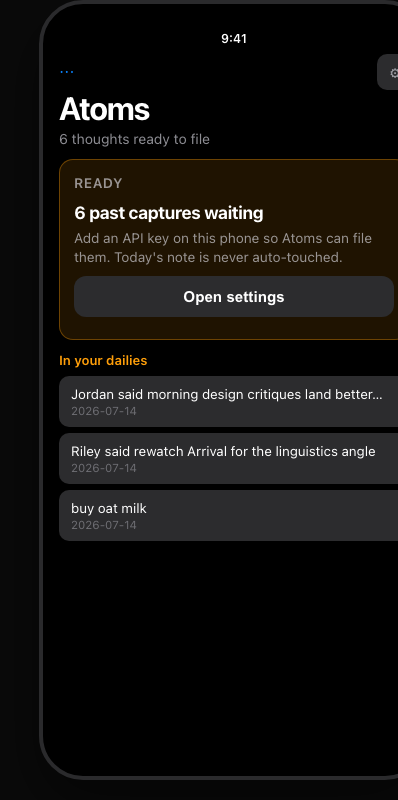
3. Waiting to file
When past days have unmarked bullets, home shows a waiting card (and a queue peek). Today’s daily is never auto-processed. Sign in to Plus or add an API key if prompted, then Preview / Process (or enable automatic filing after the privacy ack).
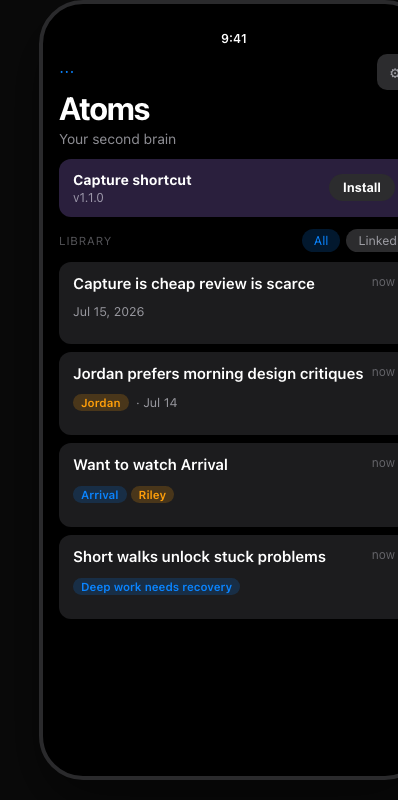
4. Library after filing
Filed claims land as flat notes under Atoms/. Home lists them with optional person / work chips. Tap a row to open the atom in Obsidian and keep writing.
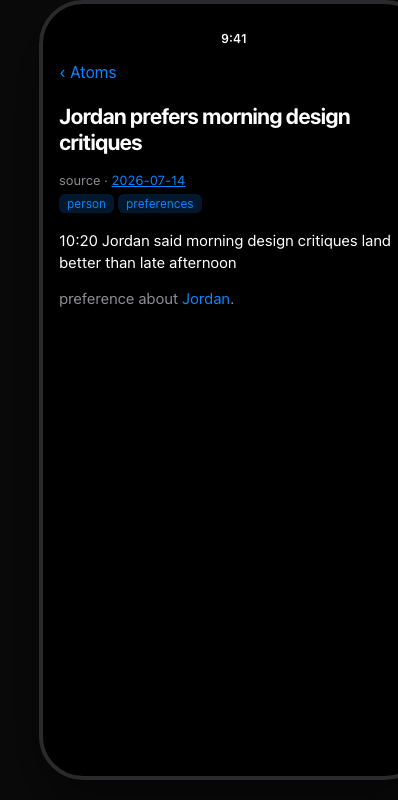
5. An atom note
Each atom keeps your capture text verbatim, plus frontmatter (created, source, tags, generated-by, quality stamps) and reason-bearing links the model proposed. Expand the note like any other Obsidian file.
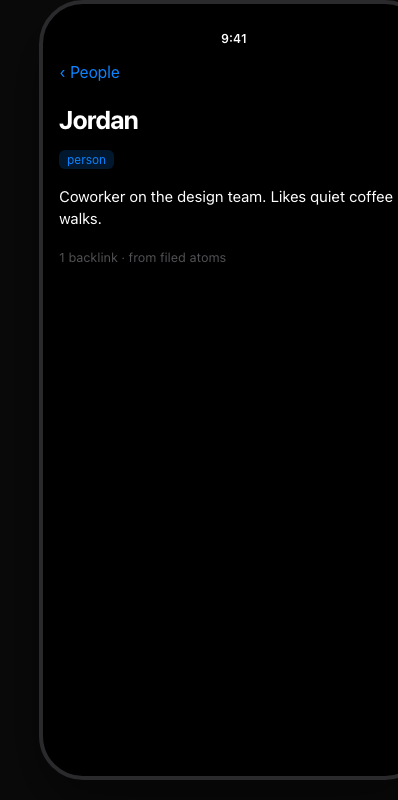
6. Person hubs
Link to a person note you already keep (e.g. People/Jordan). Backlinks surface preferences and related atoms without a separate CRM.
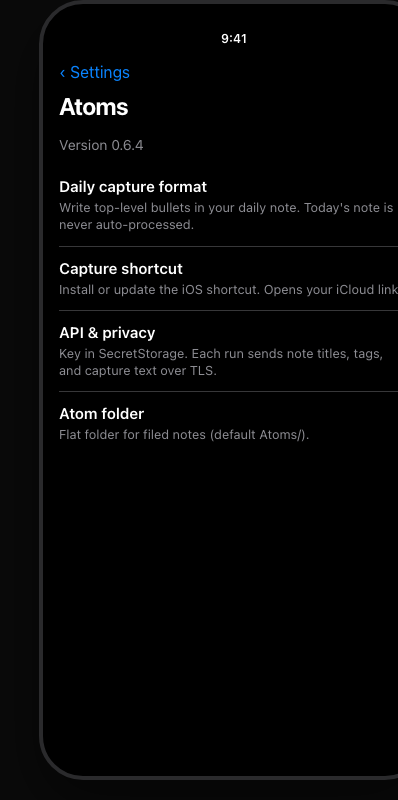
7. Settings
Settings → Atoms: Plus account (or your own API key), Ask mirror, capture shortcut URL, model, atom folder, vocabulary. Version is at the top of the tab.
After you’re set up
- For you on home gently resurfaces filed atoms (calendar day, connections, quiet spacing) and mind-change pairs when you revised yourself: stream, not a review queue.
- Update notes (home strip or command) refreshes older atoms to current filing quality when the pipeline improves; original capture text still never changes.
- Automatic filing (home, after the privacy ack) files new past captures on this device from the day you turn it on. Today stays untouched. Older history is Backfill on home (or the command), priced before it runs.
- Ask mirror (Settings) keeps a cloud copy of
Atoms/current while Obsidian is open, so Claude and ChatGPT can ask. Wipe and Sync now live there too. - Open loops (command palette) lists intention notes that are still open.
Capture (phone)
Android: install Atoms Capture from Play, or open Settings → Atoms → 1 · Capture → Atoms Capture and press Get Atoms Capture. Link the vault in the app.
iPhone:
- Open Obsidian with Atoms once so it creates
Atoms System/Inbox.mdand the Atoms Inbox bookmark. - Settings → Atoms → 1 · Capture → Capture on your phone → Install Capture Atom.
- Lock once: Shortcuts → Capture Atom → edit → Append to Bookmark → Atoms Inbox (not Ask Each Time) → Done.
- Run it to append a stamped line to the inbox.
When Obsidian next opens (or via the Drain inbox command), each line files into the daily for its stamp date. Then Preview / Process past days from Atoms home as usual.
The iPhone path uses Obsidian's Capture to Bookmark, which appends with the app force-quit. See docs/capture-shortcut.md. The Android app writes the same inbox.
Development
npm install
npm run dev          # watch-build main.js
npm test
npm run build
./scripts/install-to-vault.sh   # copy build into the throwaway vault
node scripts/seed-demo-vault.mjs           # synthetic README dogfood (full library)
node scripts/seed-demo-vault.mjs --empty   # first-day empty
node scripts/seed-demo-vault.mjs --waiting # past captures pending
Throwaway vault: test_vault/test vault/. Prefer that over a personal vault until dry-run looks right.
README screenshots use docs/media/demo-vault/ with fictional sample notes only (seed-demo-vault.mjs). Do not seed personal vault content into that folder.
Useful command palette entries
- Open home
- Dry-run: preview classifications / including today (test)
- Process unprocessed captures / including today (test)
- Update notes (refresh older atoms to current quality)
- Test connection
- Backfill: estimate cost & confirm batch
- Open loops: notes left for later / Open loops: review proposals
- Sync everything now
Docs
| Doc | Purpose |
|---|---|
| CLAUDE.md | Agent rules / non-negotiables |
| docs/architecture.md | System map |
| docs/how-atoms-works.html | Visual walkthrough of capture → file → resurface |
| docs/capture-shortcut.md | iOS shortcut + iCloud link |
| docs/ask-self-host.md | DIY Ask (run plus-service yourself) |
| docs/design-handoff/atoms-view/ | Home UI mocks |
| docs/plans/ | Implementation plans |
Repo
Releases ship main.js, manifest.json, and styles.css (plus SHA256SUMS.txt) for the Community directory and for manual install. Assets are built in GitHub Actions when a new version lands on master, with artifact attestations.
Cut a release (maintainers): bump manifest.json + package.json (+ versions.json via npm version / version-bump.mjs) and merge to master. CI creates the matching GitHub Release and tag. Do not hand-tag after a normal version-bump merge.
The Release workflow builds, attests, and attaches assets. Tag must equal package.json / manifest.json version. Stable: version 0.7.10 on master → ordinary Release. Beta: bump to 0.7.11-beta.1 on the feature branch and push that tag — do not merge the -beta version. A prerelease on the default branch delists the Community plugin. docs/runbooks/plugin-release-beta-stable.md. Do not upload laptop-built main.js for production tags.
(Previously obsidian-ai-linker; renamed with the product.)
License
MIT — see LICENSE.