AQL Syntax Highlighting
 Poorvi Acharya91 downloads
ANNIS Query Language (AQL) syntax highlighting for code blocks.
- Overview
- Scorecard
- Updates1
ANNIS Query Language (AQL) syntax highlighting for Obsidian code blocks.
Current release: v1.0.0
What Is ANNIS?
ANNIS (ANNotation of Information Structure) is an open-source search and visualization platform for richly annotated linguistic corpora.
- Official ANNIS repository: https://github.com/korpling/ANNIS
- ANNIS documentation homepage: http://corpus-tools.org/annis/
Features
- Registers an AQL CodeMirror mode for fenced code blocks.
- Supports token highlighting for strings, operators, metadata, node references, and node classes.
- Ships styling in
styles.css, so highlighting works out of the box after install.
Install
Community plugins (easiest)
- Open Settings -> Community plugins.
- Turn off Safe mode (if needed).
- Search for AQL Syntax Highlighting.
- Install and enable.
Manual install
- Download the latest GitHub release (
v1.0.0). - Copy
manifest.json,main.js, andstyles.cssinto:<your-vault>/.obsidian/plugins/aql-syntax-highlighting/
- In Obsidian, open Settings -> Community plugins and enable AQL Syntax Highlighting.
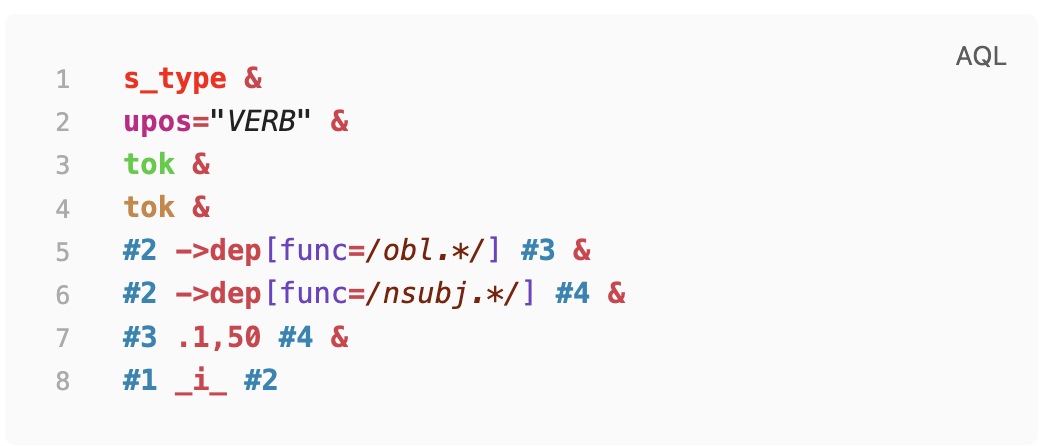
Screenshot
Highlighted AQL example in an Obsidian code block:
Usage
Use fenced code blocks with the language tag aql:
```aql
cat="PP" & cat="NP" & #1 > #2
```
Another example:
```aql
tok="learning" & pos="NN" & #1 . #2
```
Update
Community plugins
- Use Settings -> Community plugins -> Check for updates.
Manual install
- Replace
manifest.json,main.js, andstyles.csswith files from the latest GitHub release (v1.0.0for now). - Reload Obsidian (or disable and re-enable the plugin).
Development
Requirements:
- Node.js 16+
- npm
Install and build:
npm ci
npm run build
Watch mode during development:
npm run dev
Visual validation screenshots (before/after):
npm run test:visual
If Playwright is missing, install it once:
npm install --save-dev playwright
Artifacts are written to:
tests/artifacts/validation-before.pngtests/artifacts/validation-after.png
Optional Customization
If you want to override the default colors:
- Create a file in your vault at
.obsidian/snippets/aql-highlighting-custom.css. - Paste your CSS overrides (example below).
- In Obsidian, go to Settings -> Appearance -> CSS snippets.
- Enable
aql-highlighting-custom. - Reload Obsidian if changes do not appear immediately.
Example snippet:
/* AQL token overrides */
.cm-s-obsidian .cm-string {
   color: #2aa198;
   font-style: italic;
}

.cm-s-obsidian .cm-operator {
   color: #dc322f;
   font-weight: 700;
}

.cm-s-obsidian .cm-node_1 {
   color: #268bd2;
   font-weight: 700;
}
Release Checklist
- Update
manifest.jsonversion. - Update
versions.jsonwith the new version to minAppVersion mapping. - Build with
npm run build. - Create a GitHub release tagged with the same version as
manifest.json. - Upload release assets:
manifest.jsonmain.jsstyles.css
License
MIT. See LICENSE.
HealthExcellent
ReviewSatisfactory
About
Highlight ANNIS Query Language (AQL) in Obsidian fenced code blocks. Register a CodeMirror AQL mode and provide token highlighting for strings, operators, metadata, node references, and node classes, with an optional CSS snippet for ANNIS-style node colors.Details
Current version
1.0.0
Last updated
3 months ago
Created
3 months ago
Updates
1 release
Downloads
91
Compatible with
Obsidian 0.12.0+
Platforms
Desktop only
License
MIT