AI Rewrite
 masaki39783 downloads
Local-first, line-level AI rewriting: proofread, translate, or your own custom modes. Shows a ghost preview below the line; Tab to apply.
- Overview
- Scorecard
- Updates4
Line-level AI rewriting for Obsidian — proofread, translate, or run your own modes. Tuned to run well on small, local models (Ollama by default), so it stays fast, private, and easy on your machine. ✨
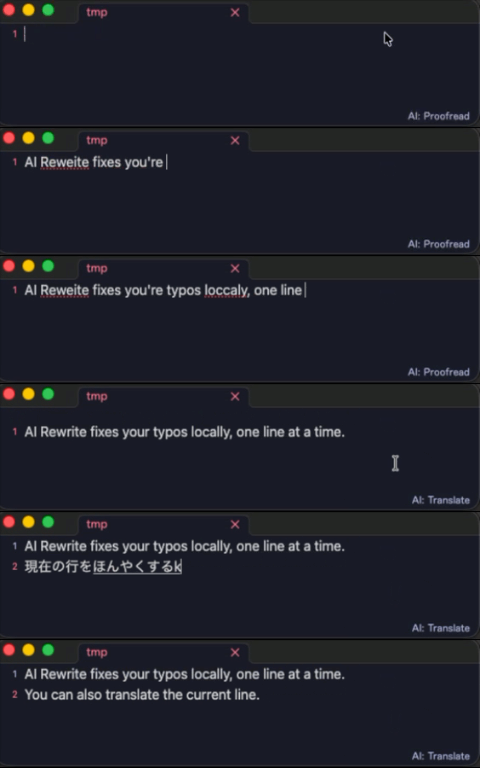
- ✍️ Rewrites the current line or selection on demand — not next-word autocomplete.
- 👻 Shows the result as a ghost preview below the line. Tab applies, Esc dismisses.
- 🎛️ Ships with Proofread and Translate modes — add your own.
- 🔌 Works with any OpenAI-compatible server: Ollama, LM Studio, OpenAI, OpenRouter…
[!TIP] Why line-level? Correcting one line is easy work for a small model like
gemma3, and triggering on demand keeps your machine cool — that's the whole design.
🚀 Quick start
- Install Ollama and pull a model:
ollama pull gemma3 - Make sure Ollama is running (
ollama serve— usually automatic). - Install and enable AI Rewrite. It defaults to
http://localhost:11434/v1with modelgemma3. - Put the cursor on a line, run Correct current line or selection from the command palette, and press Tab to accept.
[!NOTE] Using a different model? Set it under Settings → AI Rewrite → Model.
⚙️ How it works
i beleive their going too the meeting     ← your line (typos)
        ↓  trigger (hotkey · on leave · while typing)
I believe they're going to the meeting    ← ghost preview  ·  Tab applies  ·  Esc dismisses
- Reads the current line (or your selection) and shows the model's reply as a ghost preview.
- Markdown prefixes are preserved — indentation,
-,>,#,1.,- [ ]— so the model only sees the prose. - Blank lines are skipped. With a selection, the whole selection (multiple lines) is rewritten and replaced on accept.
🎛️ Modes
A mode is just an editable instruction sent to the model. Two ship by default:
| Mode | What it does |
|---|---|
| Proofread | Fix spelling, grammar, punctuation and typos — same language, same meaning |
| Translate | Translate into your target language |
Switch modes
- Click the active mode in the status bar and pick from the menu.
- Run Cycle mode to jump to the next one (bind it to a hotkey).
- Each mode also gets an Apply … command — bind it in Settings → Hotkeys to switch mode and rewrite in one press.
Add your own
Create modes under Settings → Modes (name + prompt). Put {targetLang} in a prompt to fill in the Target language setting. Adding or removing a mode takes effect after a reload.
⚡ Triggers
Set under Settings → Trigger:
| Trigger | When it fires | Best for |
|---|---|---|
| On demand (default) | Only when you run a command/hotkey | Least noise, lowest CPU |
| When leaving a line | After you move off a line | Hands-off proofreading |
| While typing | After a short pause | Most eager |
🔗 Auto-link existing notes
Off by default. When enabled, the plugin wraps text matching an existing note title or alias in [[wiki links]] after a rewrite.
- Case-insensitive; links the first occurrence per note.
- Skips code, URLs, and existing links.
- Leaves ambiguous names (claimed by more than one note) alone.
Turn it on under Settings → Auto-link existing notes.
⌨️ Keys
| Key | Action |
|---|---|
| Tab / → | Apply the suggestion |
| Esc | Dismiss |
Keys only intercept while a preview is showing; otherwise they behave normally. Change them under Settings → Accept keys / Dismiss keys (space-separated CodeMirror key names).
🌐 Other servers
AI Rewrite talks to any OpenAI-compatible endpoint — set the Base URL under Settings → Connection.
| Setup | What to set | Privacy |
|---|---|---|
| Local, no auth — Ollama, LM Studio, vLLM | Base URL | Stays fully local |
| Remote, authenticated — OpenAI, OpenRouter | Base URL + API key | Note content leaves your machine |
[!WARNING] Pointing the Base URL at a remote service sends your note content to that service — it's no longer local-only. The API key is sent as a
Bearertoken.
[!NOTE] A
⟳shows in the status bar while a request runs. Each request gives up after the Request timeout (default 30s) so a stalled model can't jam later suggestions — raise it if a slow model's first response gets cut off.
📋 Commands
Run from the command palette or bind a hotkey:
- Correct current line or selection — rewrite with the active mode
- Apply <mode> to current line or selection — switch to that mode, then rewrite
- Cycle mode — switch to the next mode
- Toggle suggestions — turn the plugin on or off
- Test connection — send a short request with the current settings
💾 Manual install
Copy main.js, manifest.json (and styles.css if present) into your vault:
<Vault>/.obsidian/plugins/ai-rewrite/
Then reload Obsidian and enable the plugin in Settings → Community plugins.
Key name reference
Accept/dismiss keys use CodeMirror key names:
- Key name = the value of
event.keyfor that key — look it up by pressing the key on keycode.info (e.g.Tab,Enter,Escape,ArrowRight,a,1). The space bar is writtenSpace. - Modifiers prefix the key, joined with
-:Mod-(Cmd on macOS, Ctrl elsewhere — best for cross-platform),Ctrl-,Shift-,Alt-,Cmd-/Meta-. - Multiple bindings are separated by spaces.
Examples: Tab ArrowRight · Escape · Ctrl-Space · Mod-Enter · Shift-Tab
[!NOTE] Full format: CodeMirror key bindings.
🛠️ Development
This project uses pnpm.
pnpm install   # install dependencies
pnpm dev       # development build (non-minified, inline sourcemaps)
pnpm build     # production build -> main.js (minified)
📄 License
MIT