Search...Search plugins and themes...
⌘K
Sign in
  • Get started
  • Download
  • Pricing
  • Enterprise
  • Account
  • Obsidian
  • Overview
  • Sync
  • Publish
  • Canvas
  • Mobile
  • Web Clipper
  • CLI
  • Learn
  • Help
  • Developers
  • Changelog
  • About
  • Roadmap
  • Blog
  • Resources
  • System status
  • License overview
  • Terms of service
  • Privacy policy
  • Security
  • Community
  • Plugins
  • Themes
  • Discord
  • Forum / 中文论坛
  • Merch store
  • Brand guidelines
Follow us
DiscordTwitterBlueskyThreadsMastodonYouTubeGitHub
© 2026 Obsidian

Agents

tsilvatsilva22 downloads

Launch AI agents from your vault — right-click any file or folder to open a terminal with context. Supports Claude, Codex, and other AI CLI tools.

Add to Obsidian
  • Overview
  • Scorecard
  • Updates2
Agents

Agents

🚀 Launch AI agents from your vault — right-click any file or folder to open a terminal with context 🤖

Agents is a macOS-only Obsidian plugin that adds an Open with agent action to the file explorer context menu. Right-click a note or folder and it opens your configured AI CLI in Terminal.app or iTerm2, already pointed at the right vault location.

Files launch the agent from the parent folder with a short file-context prompt. Folders launch the agent directly in that folder.

Install

From Obsidian, install Agents in Settings -> Community Plugins -> Browse, then enable it.

For local development:

git clone https://github.com/tsilva/obsidian-agents-plugin.git
cd obsidian-agents-plugin
pnpm install
pnpm run build
pnpm run install-plugin

Reload Obsidian, then right-click a file or folder in the file explorer and choose Open with agent.

Commands

pnpm install             # install dependencies
pnpm run dev             # watch-build main.js during development
pnpm run build           # type-check and build the production plugin
pnpm run install-plugin  # build if needed, symlink into a vault, and enable the plugin
pnpm run version         # sync package version into manifest.json and versions.json

Notes

  • macOS desktop only. The plugin exits early on non-Darwin platforms.
  • Obsidian v1.0.0 or newer is required by manifest.json.
  • The default agent command is claude; settings can change it to another CLI such as codex.
  • Terminal.app is the default terminal. The settings toggle switches launches to iTerm2.
  • The first launch may require macOS Automation permission for Obsidian to control Terminal.app or iTerm2.
  • pnpm is the expected package manager for this repo.
  • The plugin runs locally through AppleScript and osascript; it does not use a backend service.

Architecture
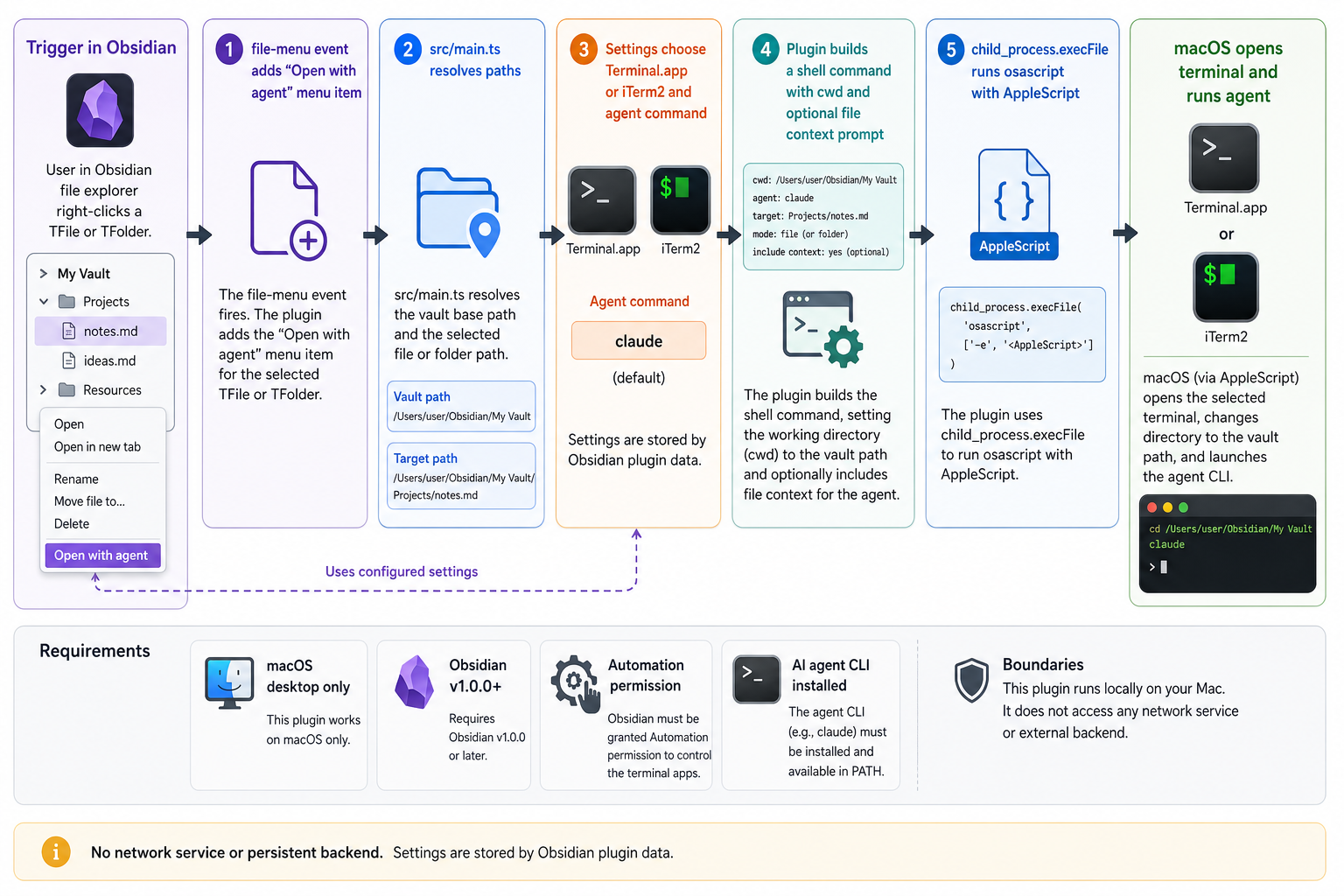
Agents architecture diagram

License

MIT

86%
HealthExcellent
ReviewSatisfactory
About
Launch AI agents from your vault with a right-click on any file or folder to open a terminal preloaded with the file or folder path. Run agents in Terminal.app or iTerm2 on macOS and configure the agent command to execute instantly in the correct directory.
AIFilesAutomation
Details
Current version
1.0.0
Last updated
3 months ago
Created
3 months ago
Updates
2 releases
Downloads
22
Compatible with
Obsidian 1.0.0+
Platforms
Desktop only
License
MIT
Report bugRequest featureReport plugin
Author
tsilvatsilva
github.com/tsilva
GitHubtsilva
  1. Community
  2. Plugins
  3. AI
  4. Agents

Related plugins

QuickAdd

Quickly add new notes or content to your vault.

Claudian

Embeds Claude Code/Codex as an AI collaborator in your vault. Your vault becomes agent's working directory, giving it full agentic capabilities: file read/write, search, bash commands, and multi-step workflows.

Advanced URI

Control everything with URI.

Gemini Scribe

Allows you to interact with Gemini and use your notes as context.

Vault Changelog

Maintain a changelog of recently edited notes.

ChatGPT MD

A seamless integration of ChatGPT, OpenRouter.ai and local LLMs via Ollama into your notes.

Notebook Navigator

A better file browser and calendar inspired by Apple Notes, Bear, Evernote and Day One.

Local REST API & MCP Server

Unlock your automation needs by interacting with your notes over a secure REST API.

Templater

Create and use dynamic templates.

Homepage

Open a note, base, or workspace on startup, or set it for quick access later.