Agent Threads
 buckethead55 downloads
Share note threads with your coding agents on Markdown files, stored as plain JSON in your vault.
- Overview
- Scorecard
- Updates3
An Obsidian plugin for note threads that you and your coding agents share on markdown files. You leave a note on a passage in Obsidian. An agent working in the same folder reads it, answers in the thread and resolves it. The threads live in plain JSON files beside your notes, so there is no server and no account.
Your notes stay untouched. Some comment plugins write the discussion into the note itself as CriticMarkup, while Agent Threads keeps every thread in its own file and gives your agent a skill with verbs to read and answer them.
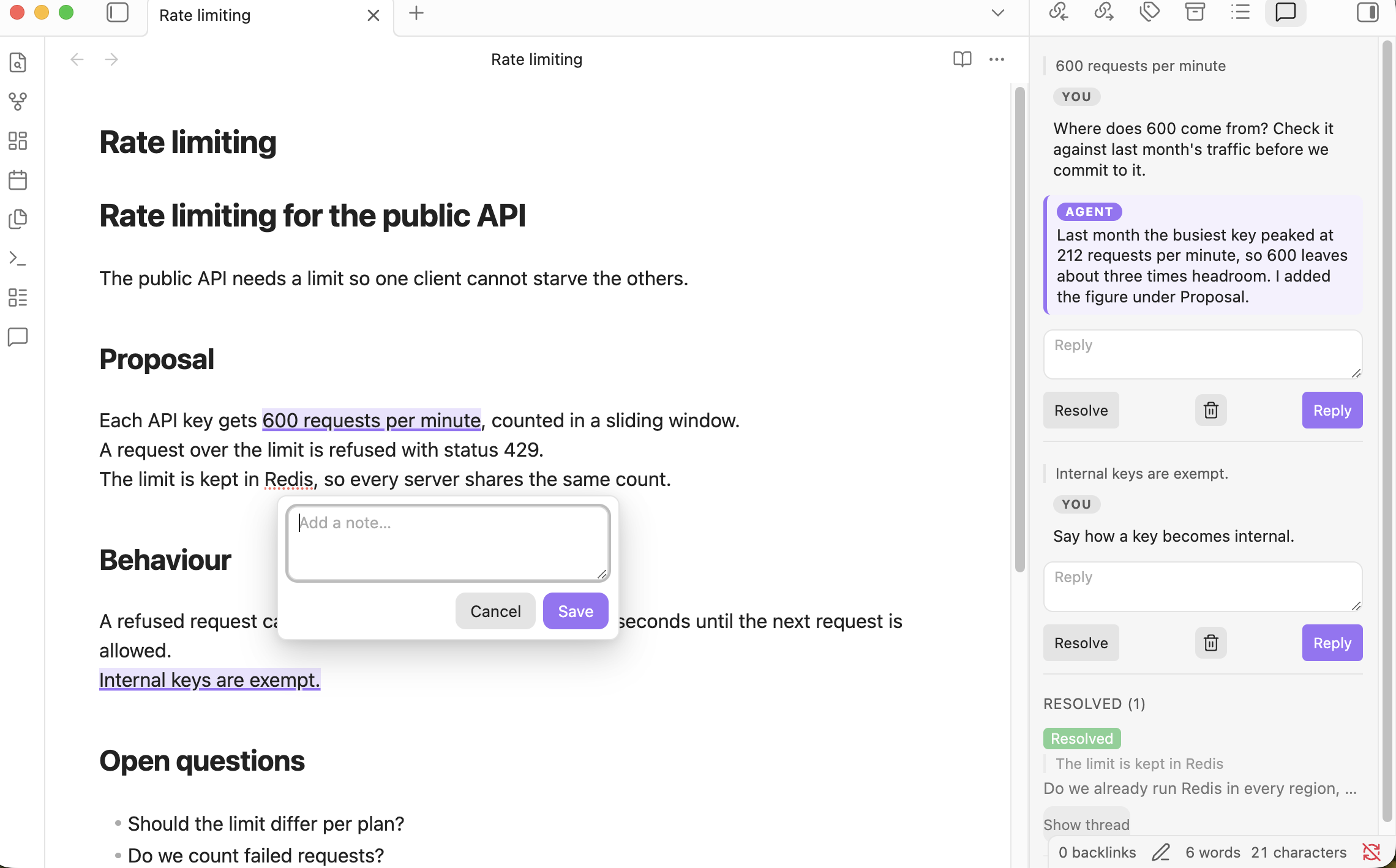
What it does
- Select text in the editor (Live Preview or source mode) or in reading view. Click the "Add note" button that appears near the end of the selection and save a comment anchored to that span.
- A side panel lists the active file's threads. Open threads come first. Resolved ones are collapsed and dimmed.
- Each thread shows the comment, its replies (yours and the agent's styled apart), a reply box, resolve and reopen, and delete behind a confirm step.
- An open note's span is underlined and tinted in the editor and in reading view. Clicking it opens the thread.
- Clicking a thread's quoted span scrolls the editor to it. When the text no longer exists, the thread is labeled "Anchor lost".
- When an agent or any other tool changes a thread file on disk, the panel refreshes within three seconds.
- Links can resolve by a note's frontmatter
idandaliaseswhen no file name matches. So[[design-2026-q3]]opens the note whose frontmatter saysid: design-2026-q3, whatever its file is called. This is off by default. Turn on "Resolve links by frontmatter ID" in the plugin's settings to use it.
Install
With BRAT: add the beta plugin BucketHeadP65/agent-threads, then enable "Agent Threads" under Community plugins.
By hand: download main.js, manifest.json and styles.css from a release and copy them into:
<vault>/.obsidian/plugins/agent-threads/
Then enable "Agent Threads" under Community plugins. It does not run on mobile.
The agent skill
The plugin carries an agent skill: a SKILL.md and a scripts/notes.py.
It tells a coding agent what the threads are.
It gives the agent verbs to list, show, reply to, resolve and reopen threads, so it never edits a thread file by hand.
The script needs only python3 and its standard library.
The plugin writes nothing into your vault until you ask it to.
Turn on "Install the agent skill" in the plugin's settings to install the skill.
While it is on, the plugin writes the two files into an agent-threads folder in each skill folder, at every load and when you close its settings.
A file is written only when it is missing or differs from the copy the plugin carries, so a hand edit does not survive.
The settings page lists the folders the skill goes to right now.
Where the skill goes
When "Skill folders" is empty, the plugin picks the folders.
It always writes to .agents/skills/, the shared folder of the Agent Skills standard.
It also writes to the skills folder of each agent that does not read the shared folder, when that agent's own folder already exists at the vault root.
It never creates a folder for an agent that is not there.
| Folder | When it is written | Read by |
|---|---|---|
.agents/skills/agent-threads/ |
Always | Codex, Pi, oh-my-pi, Hermes, Gemini CLI, OpenCode, Cursor, GitHub Copilot, Amp and Goose |
.claude/skills/agent-threads/ |
When .claude/ exists at the vault root |
Claude Code |
Pi reads a project's .agents/skills/ only when you trust the project.
Hermes reads project skills only from a root listed in its skills.trusted_project_dirs setting.
Some agents read both .agents/skills/ and .claude/skills/: oh-my-pi, OpenCode, Cursor, GitHub Copilot, Amp and Goose.
In a vault that has .claude/, they find two copies of the same skill.
If that matters, list one folder in "Skill folders".
Choosing the folders
"Skill folders" takes one folder per line, relative to the vault root.
The skill goes into an agent-threads folder inside each one.
When the list has at least one usable line, it replaces the automatic folders entirely.
Blank lines are ignored.
This list writes the skill to .claude/skills/agent-threads/ and tools/skills/agent-threads/, and nowhere else:
.claude/skills
tools/skills
A line is refused when it is absolute or has a .. segment.
Absolute means it starts with /, \, ~ or a drive letter such as C:.
A line that names the vault root itself, such as ., is refused too.
A refused line is never written to, and the settings page shows it with the reason.
When every line is refused, the automatic folders apply.
Changing the folders or turning the install off removes nothing. A copy in a folder the plugin no longer writes to stays until you delete it.
The plugin reads and writes only inside your vault. It never uses the network, and it never installs or updates itself. The skill is plain files that the plugin copies from its own bundle.
The plugin lists the vault's Markdown files only while "Resolve links by frontmatter ID" is on.
It needs that list to find the note whose frontmatter id or aliases match a link.
It reads the frontmatter from Obsidian's metadata cache.
To use the skill without the plugin, copy skills/agent-threads/ from this repository into your project's .agents/skills/, or into your agent's own skills folder, such as .claude/skills/ for Claude Code.
The format
A file's threads live at <home>/.agent-threads/<path under home>.threads.json.
The home is the nearest ancestor folder that holds a .agent-threads/ folder, else the vault root.
Each thread file is one compact JSON object with a version and a list of notes, and every writer produces the same bytes for the same content.
FORMAT.md has every field, the read and write rules, and how a note's span is found again after edits.
Build and test
npm install     # a .npmrc sets legacy-peer-deps for the obsidian and @codemirror peer ranges
npm run lint    # eslint with the Obsidian plugin rules
npm test        # vitest, including a check that runs notes.py and compares its bytes with the plugin's
npm run build   # tsc --noEmit, then esbuild to main.js
npm run dev     # esbuild in watch mode
The notes.py check is skipped when python3 is not on the path.
License
MIT. See LICENSE.