Accretion Atlas
 azu72 downloads
Explore notes, headings, and links as a 3D galaxy with global and local views and vault search.
- Overview
- Scorecard
- Updates5
Explore your notes as stars orbiting a black hole. An Obsidian plugin that draws your vault as a 3D galaxy: notes are stars, their headings smaller stars around them, folders become clusters with their own nebula, and links are the lines between them.
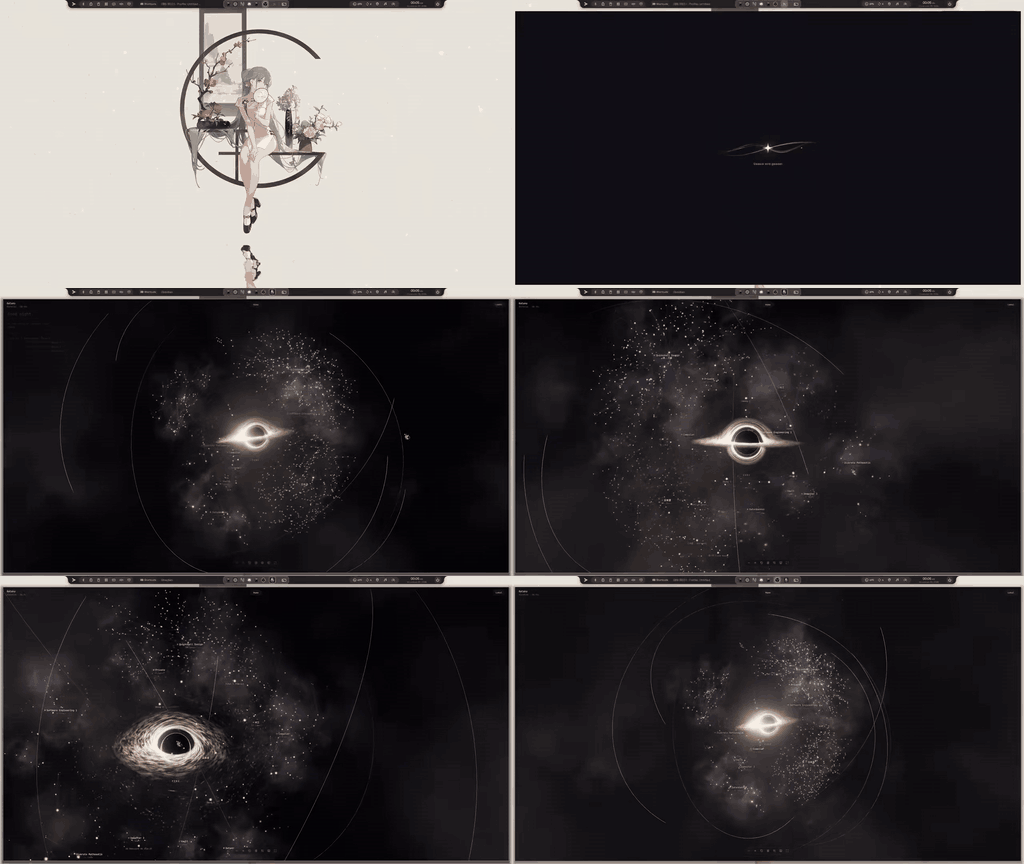
Download the 19-second demo (720p MP4, 1.7 MB)
- What it shows
- Controls
- Dashboard
- Settings: colors, clusters, tasks, desktop launcher
- How it is drawn
- Install
- Build
What it shows
- Global galaxy. Every note is a star. Headings of level 1 to 3 are smaller stars, joined to their note in the order of the document like a constellation. Linked attachments are faint points. Notes are grouped into clusters by folder; notes at the vault root share a cluster of their own.
- Local galaxy. The active note sits in the middle, its sections circle it, and the notes it links to lie further out, up to two steps away. It follows the note you have open.
- Preview. Hover over a star to see the title at once and, after a moment, the start of the note or section.
- Dashboard. Search, activity and an overview of the vault in a panel on the right.
Open the galaxy from the ribbon, or run Open global galaxy or Open local galaxy from the command palette. The local galaxy opens in the right sidebar.
Controls
| Action | Result |
|---|---|
| Drag, scroll | Rotate, zoom |
| Click a star | Open the note or heading (Ctrl + click: in a new tab) |
| Double-click a star | Fly to it |
| Click a cluster name | Fly into the cluster |
| Hover over a star | Title, then a preview |
| Click the black hole | Back to the starting view |
| Home at the top | Open or close the dashboard |
| Local / Global at the top right | Switch between the two views |
| Bar at the bottom | Zoom, reset the view, pause the motion, full screen |
Esc |
Close the dashboard |
With tasks turned on, the bar at the bottom gets a button that shows only open tasks. A counter then appears at the top; click it to fly to the next one.
Dashboard
Home opens a panel on the right, and the galaxy moves aside to make room.
- Search across note names, headings and the text of your notes. Arrow keys and
Enterwork; choosing a result opens the note and flies to its star. - Activity of the last 12 weeks as a ring. Each bar is a day and shows how many notes you edited; an inner dot marks new notes. Select a day to list its notes. The swatches next to the title set the color of the ring, which is also the accent of the panel.
- Vault: notes, ideas (the headings of your notes, at least one per note) and links, counted.
- Tasks, when turned on: how many are overdue, open and partly done, and what is due next.
- Clusters by size. Click one to fly there.
- Most connected and recently edited notes.
Settings
Everything is under Settings → Accretion Atlas.
Colors
By default the galaxy uses your Obsidian theme. Use pywal colors reads RGB triplets from the CSS variables --ctp-accent and --wal-graph-1 through --wal-graph-7; enable your pywal CSS snippet in Obsidian so these variables exist. Changes apply to open views.
With pywal colors off, all nebulae share one muted gray, which you can change under Nebula color. With them on, each cluster's nebula takes its pywal color.
Clusters
Each top-level folder is one cluster. To split a folder into several clusters, name the deeper folders under Cluster folders, one pattern per line. * stands for any folder name:
School/Year */*
Projects/*
The first line makes every subject folder of every year a cluster, the second every folder inside Projects. The first pattern that fits a note wins, so put the deeper ones first.
Tasks
Off by default. With Show tasks, notes that carry a state in their properties become tasks:
---
status: open
due: 2026-12-01
---
- Open tasks get their own color in the galaxy, and overdue ones pulse.
- The preview of a star shows its state and due date.
- A button in the bar at the bottom shows only open tasks.
- The greeting and the dashboard list what is due next.
The names of the properties and the values that mean open, partly done and done are set in the settings, so your existing notes do not need to change. An optional label property, such as a subject or project, is put in front of the title in the list of what is due next.
Desktop launcher
Linux only, off by default. Add the galaxy to the app launcher writes an entry "Galaxy" that opens this vault's galaxy as a window of its own, without Obsidian's sidebars and tabs.
- Clicking a note turns the same window back into regular Obsidian, opening from the star you clicked. The book button in the bar at the bottom does the same without choosing a note.
- Starting "Galaxy" again brings the galaxy back.
- With Quickshell and Hyprland, a loading screen covers the start of Obsidian and opens from the black hole once the galaxy is drawn. Without them the entry simply opens the galaxy.
- Turning the setting off removes the entry again.
The plugin writes the launcher's files into its own folder inside the vault and one desktop entry into ~/.local/share/applications.
How it is drawn
- Black hole. For every pixel a ray of light is traced through the Schwarzschild field. That gives the shadow, the photon ring and the image of the far side of the disk bent over the shadow. The disk is thin glowing gas whose strands rotate at Kepler speeds, brighter on the side moving towards you.
- Gravitational lens. Stars and dust behind the hole are pushed outwards and stretched into arcs, and a second pass draws their counter-image.
- Orbits. Dust and comets follow Kepler orbits; of a comet you see only a short fading tail.
- Layout. The stars fill a sphere around the hole. Each cluster gets a cone of that sphere, sized by how much it holds, and its stars spread inside it.
- Depth. Each cluster has layers of smoke where its stars are. Stars, dust and lines soften in front of and behind the plane of focus and dim with distance.
Install
Requires desktop Obsidian 1.5.0 or newer and WebGL 2.
Download main.js, manifest.json and styles.css from the latest release, put them into <vault>/.obsidian/plugins/accretion-atlas/, reload Obsidian and enable Accretion Atlas under Community plugins.
Build
npm ci
npm run build
The plugin is built into dist/. ./install.sh <vault> copies it into a vault; settings already there are left alone.
A release is built and published by the workflow in .github/workflows/release.yml when a branch release/<version> is pushed whose version matches manifest.json. The build embeds the license notices of Three.js and the D3 libraries in the JavaScript bundle.
Credits
The accretion disk shader adapts plasma and column integration from second-brain-black-hole. Its MIT license is included in the distributed plugin.