
- Overview
- Scorecard
- Updates10
This plugin allow you to make flashcards in Obsidian and sync them to Anki.
This project has been inspired from Obsidian_to_Anki. However, this is not a fork and hence, this plugin uses a different and more powerful markup based syntax for making flashcards.
Examples
<!-- replaceblock-start -->
<!-- replace id="1" text="Opposite" -->
$$\sin \theta = \frac{Opposite}{Hypotenuse}$$
<!-- replaceblock-end -->
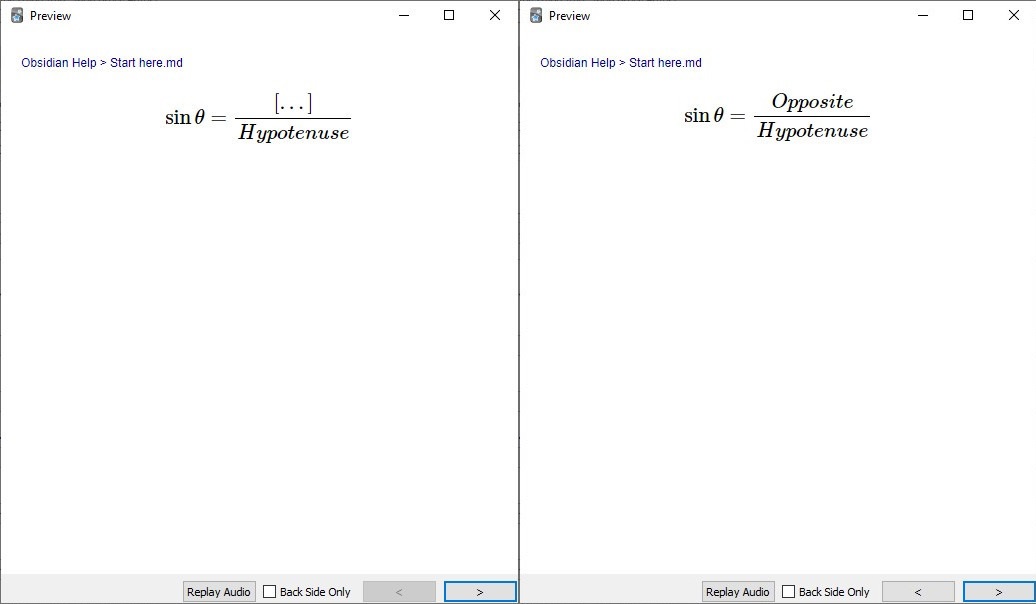
There are many other ways to create cards using this plugin. See Tutorial for details and more examples.
Features
- 🖼 Rendering of markdown Math, Code, Images, Tables etc...
- 🔏 Auto Backup Anki Decks before every sync.
- 📘 Adding cards to user-specified deck on a per-file or per-block basis.
- 📂 Ignore template folders.
- ❔ Cloze within Latex Math and Code Blocks by using replaceblock.
- ❔ Cloze by using highlights or anki's cloze syntax by using clozeblock.
- ♻ Syncing is done by creating, updating, deleting of anki-sync-blocks from obsidian to anki.
- 🥳 Many other features like extra field, tags etc...
Installation
Download the plugin from Obsidian's Comunity Plugin section which can be accessed from the Settings pane under Third Party Plugins. Make sure safe mode is off to do so.
Download Anki if not installed.
Install AnkiConnect on Anki.
Open Anki.
Select
Tools>Add-ons. Now a Anki addon's dialog will open.Now click
Get Add-ons...in addon's dialog and enter 2055492159 into the text box labeledCodeand press theOKbutton to proceed.Restart Anki.
Now, you can use the plugin by clicking Sync to Anki button.
NB: Always make sure the anki is running before clicking the Sync to Anki button in obsidian.If you receive the message bellow, click
Yes.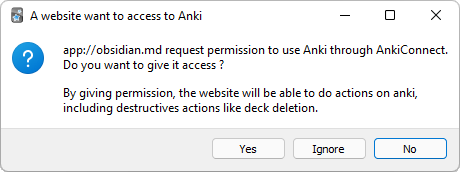
Documentation
See Tutorial for basics.
For detailed documentation on blocks see:
basicblock replaceblock clozeblock
FAQ
Why yet another plugin for obsidian to anki sync?
The existing two plugins have a major limitation to implement my workflow 💢. It had no way of creating clozes inside math and code blocks.This plugin was made with the aim of creating a way to do so.
How does auto deletation work?
First, each card in anki is marked as "created by plugin from this vault" and "not created by plugin from this vault". A card is marked as "created by plugin" if it contains the name of vault as tag, as well as ObsidianAnkiSync tag, as well as the type of note of the card must be of type ObsidianAnkiSyncModel.Now, if a card is marked "created by plugin from this vault" but it is not available in the vault, then the card is deleted.
Can i delete or modify the auto-generated oid attribute?
No! Please dont do that.The plugin uses the oid to track the cards in anki. Deleting it will cause the plugin to delete the old card and create a new one in Anki. This means that the scheduling information for the card gets deleted if you remove or modify oid.
Where is the auto anki backup taken before every sync stored?
In Windows 11, it is stored at:C:\Users\{WindowsUserName}\AppData\Roaming\Anki2\{AnkiProfileName}
NB: The backup files are stored in a per-deck basis with name ObsidianAnkiSync-Backup-${timestamp}_${deck}.apkg
Do the auto anki backup also store scheduling information?
Yes.I found a bug. What to do?
Please create a issue hereSupport
Loved the tool? Please consider donating 💸 to help it improve! You can also help by spreading the word.
This project is tested with BrowserStack.