Zacess

Read-only copy of the Zacess Obsidian theme for Obsidian's theme directory. Made in zacesshq/themes.
- Overview
- Scorecard
- Updates3
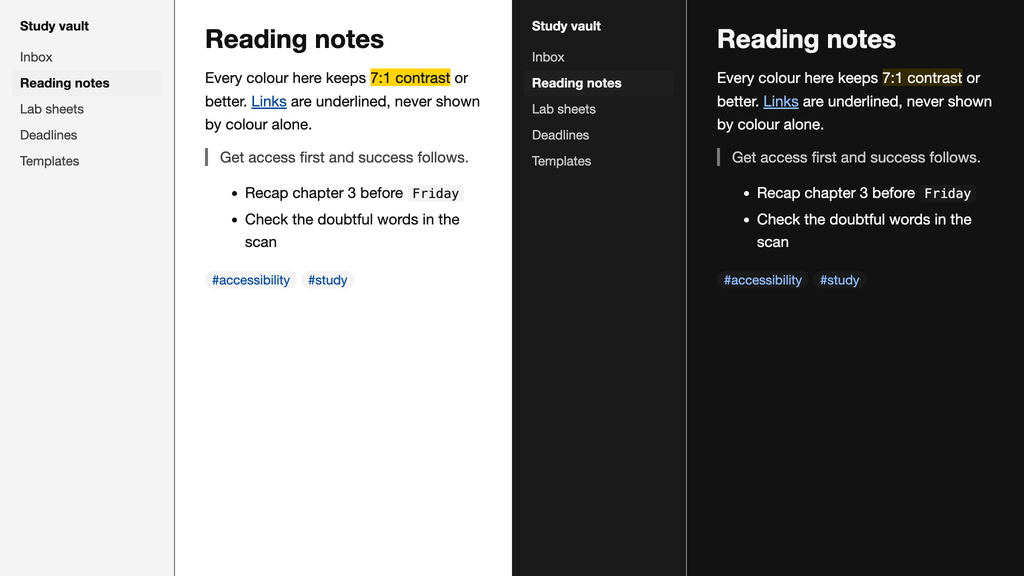
An Obsidian theme with Zacess Light for light mode and Zacess Dark for dark mode, plus the Yellow on Black and Cream themes through the Style Settings plugin. Body text, muted text, links and code colours all keep at least 7:1 contrast. Links are underlined and every control shows a focus ring.
The colours match the Zacess reader's contrast themes, so a page looks the same in the reader and in your vault.
Install
Open Settings, then Appearance, select Manage under Themes, search for Zacess and select Install and use. Obsidian's own Base color scheme setting switches between Zacess Light and Zacess Dark.
To install by hand, put manifest.json and theme.css from this repository in a folder named
Zacess inside your vault's .obsidian/themes/ folder.
Yellow on Black and Cream
Install the community plugin Style Settings, open its settings and choose Contrast theme under Zacess. Yellow on Black and Cream replace both the light and the dark mode while they are chosen.
Where the theme is made
[!NOTE] This repository is a read-only copy for Obsidian's theme directory. The theme is generated from one palette in zacesshq/themes, which also has the same themes for VS Code, JetBrains IDEs, Neovim, Zed and terminals. Issues, ideas and pull requests go there.