Ravenloft
 circkumflexx2k downloads
Parchment‑warm gothic dual‑mode theme for Obsidian.md
- Overview
- Scorecard
- Updates2
Ravenloft
A parchment-bound gothic theme for Obsidian
Version 2.0.1 // The Mists Are Still Here
aged parchment by day · midnight library by night · Cyrillic + Latin
Imagine candle soot, wandering storytellers, forbidden marginalia, and mists creeping past the window. Picture yourself among long-forgotten archives and candlelit libraries, with the peculiar confidence of a scholar who has just opened an obviously cursed folio. Then get to work.
Ravenloft is a dual-mode Obsidian theme inspired by classic gothic role-playing games.
It aims for atmosphere without losing sight of what themes are for: comfortable reading and writing over long sessions.
2.x — a refactor, not a resurrection spell
The original Ravenloft theme was written against an older Obsidian interface. Ravenloft 2.x is a ground-up refactor of that original theme. The 2.0.1 patch refines its typography for long-form reading.
The visual covenant remains intact:
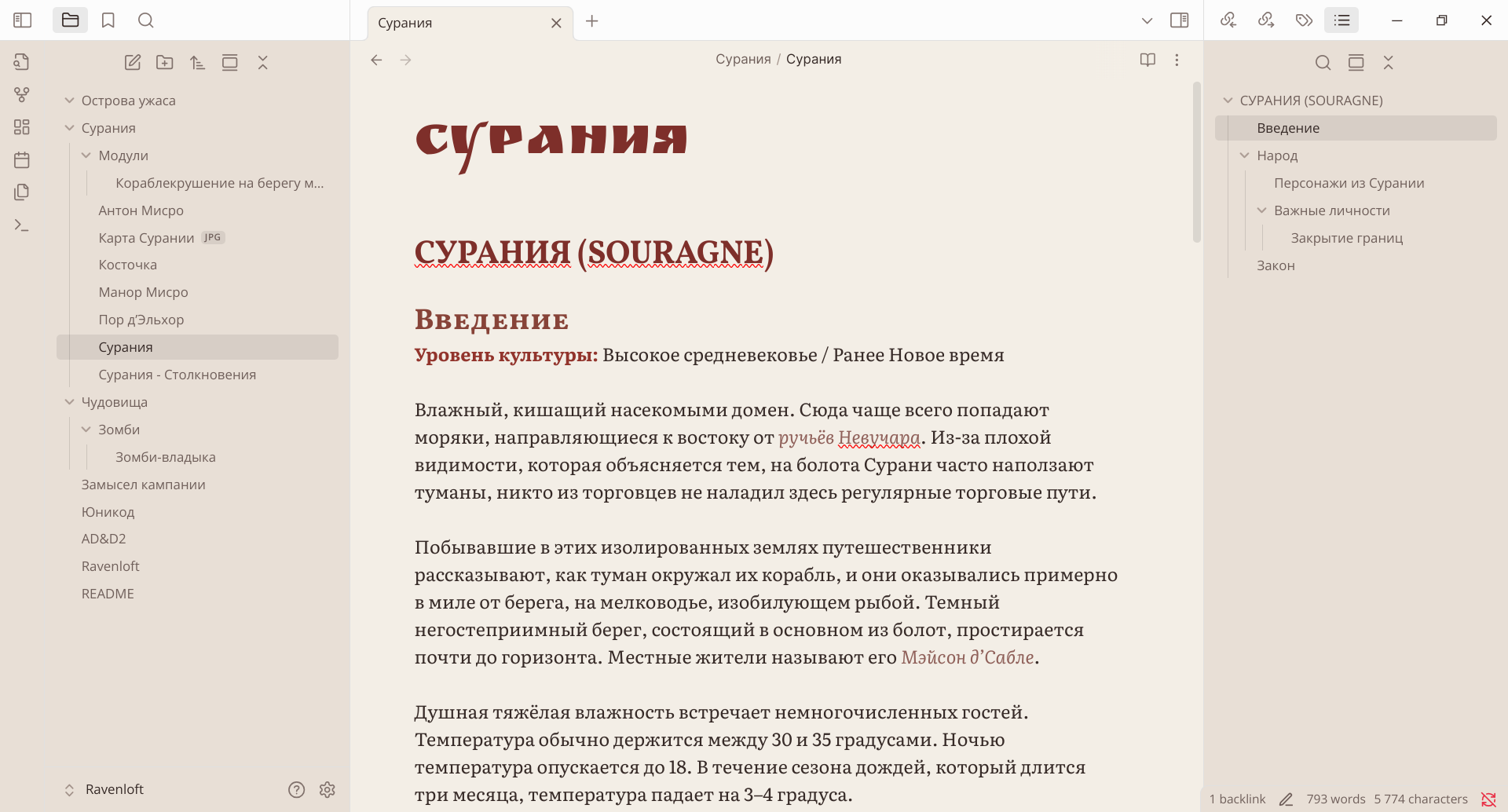
- warm, aged parchment in Light mode;
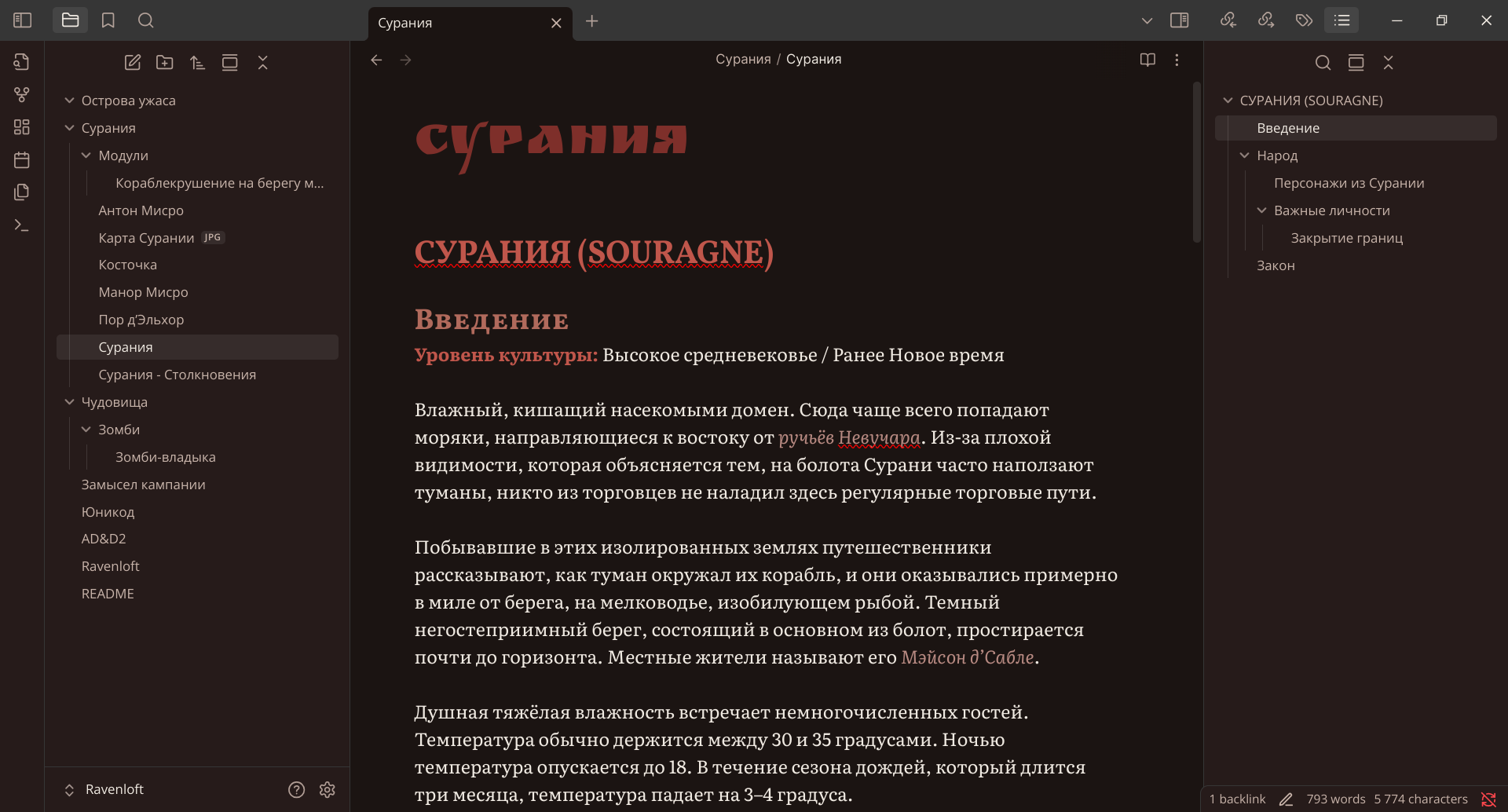
- a brown-black midnight library in Dark mode;
- muted blood-red accents rather than neon colour;
- bookish body text, heraldic headings, and a theatrical inline title;
- full Cyrillic and Latin coverage;
- restrained gothic ornament that never wins a fight against legibility.
Under the vellum, however, nearly everything has been rebuilt around modern Obsidian CSS variables.
See the changelog for the complete release history.
Screenshots
Aged Parchment
Midnight Library
Style Settings support
Style Settings is optional. Ravenloft works without it, but installing the plugin reveals a bilingual control panel labelled in English and Russian.
Colours
- themed accent colour;
- higher-contrast secondary text and borders.
Typography
- reading font;
- interface font;
- heading font;
- inline-title font;
- text size;
- line height;
- readable line width.
Atmosphere and focus
- parchment atmosphere:
Plain,Subtle, orHaunted; - optional heading ornaments;
- Focus mode, also exposed as a command;
- comfortable or compact interface density;
- reduced motion.
To find the controls:
- Install and enable the Style Settings community plugin.
- Open Settings → Style Settings → Ravenloft.
- Adjust the ritual parameters. The Mists will comply within normal CSS cascade latency.
Ravenloft-themed callouts
Alongside Obsidian's standard callouts, the theme defines two theme-specific variants.
> [!mist] The road is no longer where the map left it
> Every traveller remembers a different milestone.

> [!lore] From the thirteenth folio
> A bell without a clapper still requires a name to ring.
mistuses the cyan semantic colour and a fog icon.loreuses the purple semantic colour and an open-book icon.
Field guide to the mists
Dual-mode palette
- Aged Parchment — warm ivory paper, sepia structure, ink-brown text, restrained crimson accents.
- Midnight Library — near-black umber surfaces, warm ivory text, ember-red highlights, no cold grey void.
- Six colour-graded heading levels remain distinct without turning a note into a rainbow.
- Selection, highlights, borders, active states, links, tags, and callouts derive from the same semantic palette.
Typography grimoire
Ravenloft embeds its typefaces directly in theme.css. The theme makes no font requests at runtime and remains visually intact offline.
| Duty | Typeface | Character sheet |
|---|---|---|
| Long-form reading and editing | Literata | Literary serif, Cyrillic and Latin |
| Interface and navigation | Open Sans | Quiet, highly legible sans-serif |
| Headings | Vollkorn SC | Small-caps authority without ornamental excess |
| Inline note title | Ruslan Display | One deliberate flourish at the entrance |
All bundled font files retain their own SIL Open Font License terms. Exact copyright notices and licence sources are recorded in Font licences and attribution.
Modern Obsidian coverage
The refactor includes deliberate styling for:
- Live Preview and Reading view;
- inline titles and all six heading levels;
- tabs, stacked tabs, title bar, ribbon, status bar, menus and prompts;
- file navigation, search results and active states;
- Properties and metadata;
- links, blockquotes, lists, task checkboxes, tags and embeds;
- inline code, fenced code blocks and syntax tokens;
- Markdown tables;
- callouts;
- modals and form controls;
- native Bases table and card views;
- desktop, mobile, reduced-motion and print contexts.
Compatibility matrix
| Component | Status |
|---|---|
| Minimum Obsidian version | 1.10.6 |
| Primary refactor target | Obsidian 1.13+ |
| Light mode | ✓ |
| Dark mode | ✓ |
| Desktop | ✓ |
| Mobile | ✓ responsive pass |
| Print / PDF | ✓ clean-paper pass |
| Style Settings | ✓ optional |
| Native Bases | ✓ |
| Network connection | Not required |
Installation
Community Themes
Ravenloft is available in the Obsidian Community Themes catalogue. Open
Settings → Appearance → Themes → Manage, search for Ravenloft, then
choose Install and use.
Manual installation
To test a release before the catalogue has picked it up, or to install the theme without using the Community Themes catalogue:
Download
theme.cssandmanifest.jsonfrom the repository or the latest release assets.Create this folder inside your vault:
.obsidian/themes/Ravenloft/Place both files in that folder:
Ravenloft/
├── manifest.json
└── theme.css
In Obsidian, open Settings → Appearance → Themes and select Ravenloft.
If the theme was already active, briefly select another theme and switch back, or reload Obsidian.
Maintenance notes for fellow archivists
Ravenloft 2.x follows a few strict rules:
prefer semantic variables
    ↓
prefer low-specificity selectors
    ↓
follow Obsidian's component model
    ↓
do not summon !important unless the walls are already bleeding
- No JavaScript.
- No telemetry.
- No remote assets required at runtime.
- No
!importantdeclarations. - No deprecated
--interactive-accent-hsldependency. - CSS is checked with
stylelint-config-obsidianmd. - The Style Settings YAML block is machine-validated.
To run the same CSS quality gate locally (Node.js is needed for development, not for installing the theme):
npm install
npm run lint
AI-assisted development
Ravenloft 2.x was developed with OpenAI Codex under human direction and review. See the AI assistance disclosure for the scope of that assistance and the maintainer's responsibilities.
Licence and provenance
- Theme source code and repository documentation are released under the MIT License.
- Embedded fonts are distributed under their respective SIL Open Font License 1.1 terms; see Font licences and attribution.
- Ravenloft, Dungeons & Dragons, and related marks belong to their respective rights holders. This is an independent community theme and is not affiliated with or endorsed by Wizards of the Coast or Hasbro.
- OpenAI, Codex, and related names and marks belong to OpenAI. Their mention acknowledges the AI assistance described above and does not imply sponsorship, affiliation, or endorsement by OpenAI.
Acknowledgements
- The Obsidian community, whose CSS archaeology saves countless doomed expeditions.
- The authors of Literata, Open Sans, Vollkorn SC, and Ruslan Display.
- Every game master who knows that the handout becomes more suspicious when it is typeset beautifully.
Write carefully. Cross-link obsessively. And please... Do not lose yourself in the Mists.