Paper Ember
 Eone453 downloads
A restrained Obsidian theme with warm paper tones and terracotta accents.
- Overview
- Scorecard
- Updates24
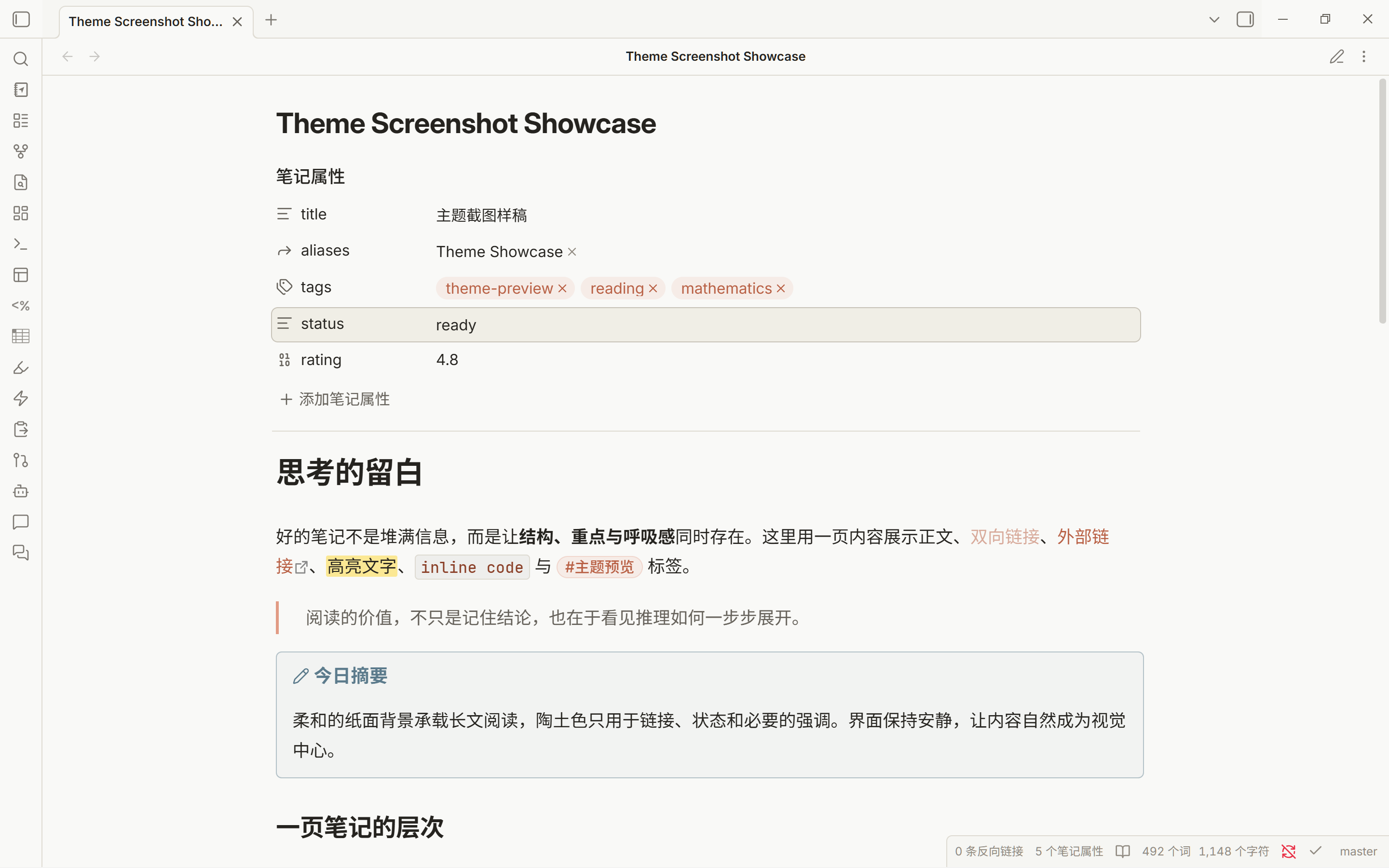
A warm, restrained Obsidian theme inspired by Claude, made for long reading sessions, study notes, and everyday writing. Soft paper backgrounds in light mode and charcoal surfaces in dark mode keep headings, text, and controls easy to distinguish without heavy decoration.
Reading and writing
- Light and dark appearances. Separate palettes for backgrounds, text, and code syntax, with accent colors that follow Obsidian’s Appearance settings.
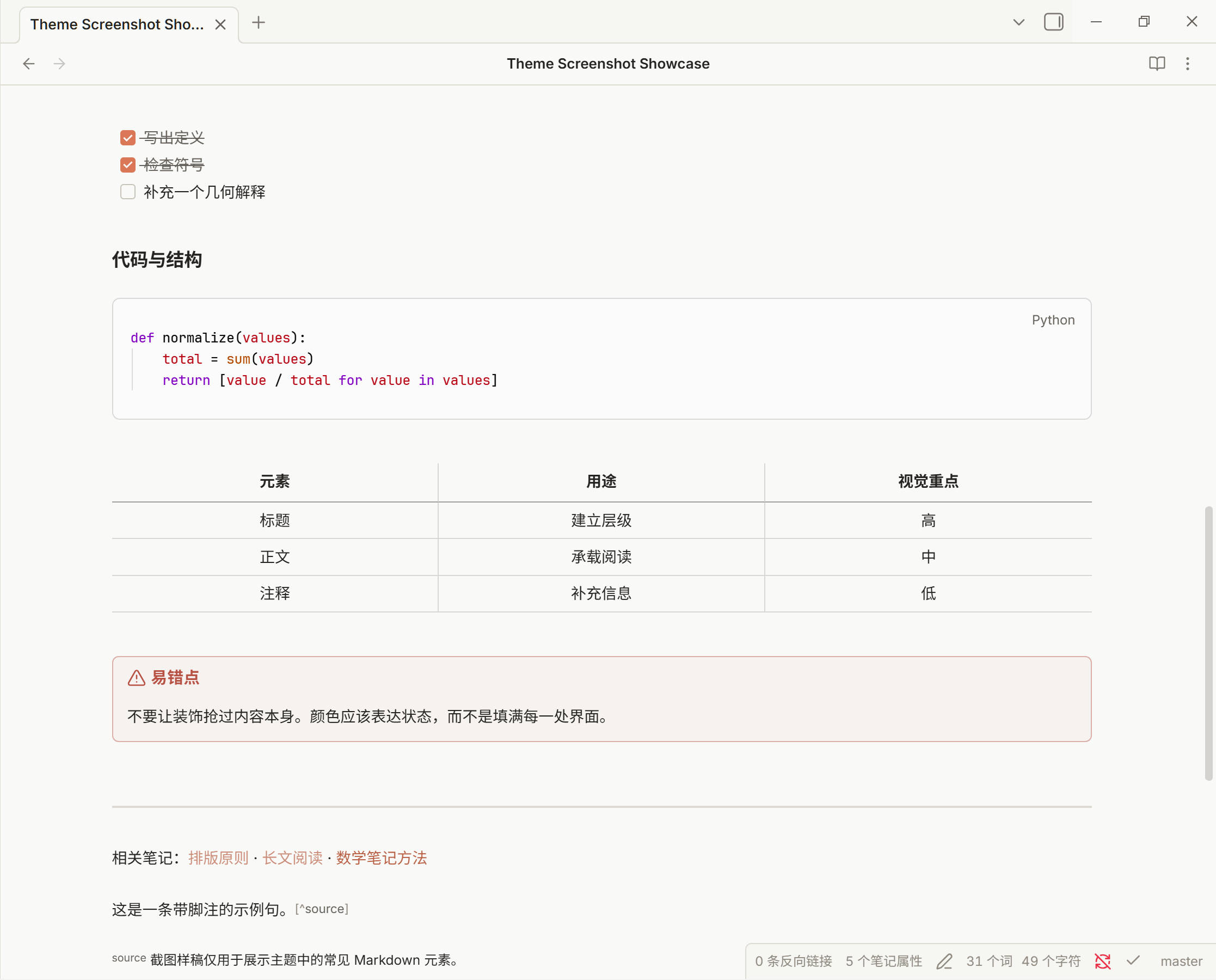
- Chinese and English typography. Font fallbacks for mixed-language notes, adjustable line height and reading width, and a consistent visual style across Live Preview and Reading View.
- Structured notes. Styling for Properties, headings, lists, links, quotes, callouts, tasks, tables, math, and code blocks.
- Quiet interface details. Subtle borders and hover states, adjustable sidebar density, and visible keyboard focus. Theme motion is reduced when your system requests reduced motion.
Installation
Requires Obsidian 1.13.0 or later, as declared in the theme manifest.
- Download
manifest.jsonandtheme.cssfrom the same version on the Releases page. - Create a
Paper Emberfolder inside your vault’s.obsidian/themes/directory and place both files there. - Open Settings → Appearance in Obsidian and select Paper Ember.
your-vault/.obsidian/themes/Paper Ember/
├─ manifest.json
└─ theme.css
To update manually, replace both files with those from a newer release.
Make it yours
Set the accent color and your preferred interface, text, and monospace fonts in Obsidian’s Settings → Appearance. Fonts chosen there take priority over the theme’s font defaults.
For additional controls, install the optional Style Settings plugin and open its Paper Ember section. The theme also works without plugins.
| Area | Available controls |
|---|---|
| Colors | Light-mode and dark-mode background colors |
| Typography | Text size, line height, reading width, and default interface, text, and code font stacks |
| Appearance | Global and code-block corner radii, comfortable or compact sidebars, table stripes, and H2 decoration |
| Chat panels | A shared font size for Claudian and Qoderian, or an option to follow the editor’s current font size |
Fonts
The default interface and text font stacks prefer locally installed Inter Variable / Inter, followed by Noto Sans SC and platform Chinese fonts. Code uses Cascadia Code, Cascadia Mono, JetBrains Mono, or a system monospace fallback, depending on what is installed.
No font installation is required. The theme uses local fonts and does not download fonts or other resources at runtime.
Plugin styling
Paper Ember includes targeted color, typography, and layout adjustments for these plugins:
- Claudian and Qoderian: conversation spacing, message typography, input areas, history menus, and shared chat font controls. Both plugins share the “Claudian 与 Qoderian” section in Style Settings.
- Notebook Navigator: navigation and file lists, selection states, buttons, and calendar colors.
- Dataview, Tasks, Calendar, and Kanban: tables, task details, calendars, and board surfaces.
- Excalidraw, Image Converter, Obsidian Git, Editing Toolbar, Outliner, and Advanced Tables: selected interface colors, controls, and borders.
These adjustments vary in scope by plugin; they do not add the plugins’ features to the theme. Install each plugin separately if you want to use it.
Acknowledgements
Some component designs were inspired by Cupertino. Thanks to aaaaalexis for sharing that work.
License
简体中文
Paper Ember 是一套受 Claude 启发的 Obsidian 主题,适合长篇阅读、学习笔记和日常写作。浅色模式采用温和的纸面背景,深色模式采用炭黑色背景,通过留白、细边框与柔和配色区分正文、标题和界面控件。
阅读与写作
- 浅色与深色外观:分别调整背景、文字和代码语法配色,强调色跟随 Obsidian 的外观设置。
- 中英文排版:为混排笔记提供字体回退,可调整行高和阅读宽度;实时预览与阅读视图采用一致的视觉风格。
- 结构化笔记:覆盖笔记属性、标题、列表、链接、引用、Callout、任务、表格、数学公式与代码块。
- 克制的界面细节:轻量边框与悬停反馈,可调侧边栏密度,清晰的键盘焦点;跟随系统的减少动态效果偏好,缩短主题动效。
安装
主题清单声明的最低版本为 Obsidian 1.13.0。
- 从 Releases 页面 下载同一版本的
manifest.json和theme.css。 - 在笔记库的
.obsidian/themes/下创建Paper Ember文件夹,将两个文件放入其中。 - 打开 Obsidian 的 设置 → 外观,选择 Paper Ember。
你的库/.obsidian/themes/Paper Ember/
├─ manifest.json
└─ theme.css
手动更新时,用新版本的这两个文件替换旧文件即可。
自定义
在 Obsidian 的 设置 → 外观 中调整强调色,以及界面字体、正文字体和等宽字体。这里选择的字体优先于主题默认字体。
需要更多调整项时,可安装可选插件 Style Settings,打开其中的 Paper Ember 分组。主题本身不依赖插件。
| 分类 | 可调整内容 |
|---|---|
| 颜色 | 浅色与深色模式的背景颜色 |
| 排版 | 正文字号、行高、阅读宽度,以及默认界面、正文和代码字体列表 |
| 外观 | 全局与代码块圆角、舒适或紧凑的侧边栏、表格隔行背景、H2 装饰 |
| 聊天面板 | Claudian 与 Qoderian 共用的独立字号,或跟随编辑器当前字号 |
字体
默认界面与正文字体优先使用本机已安装的 Inter Variable / Inter,随后回退到 Noto Sans SC 和系统中文字体。代码字体按本机安装情况依次使用 Cascadia Code、Cascadia Mono、JetBrains Mono 或系统等宽字体。
无需额外安装字体。主题使用本地字体,不会在运行时联网下载字体或其他资源。
插件适配
Paper Ember 为以下插件提供了针对性的配色、排版或布局调整:
- Claudian 与 Qoderian:对话间距、消息排版、输入区域、历史菜单和共用的聊天字号设置。两个插件共用 Style Settings 中“Claudian 与 Qoderian”分组的设置。
- Notebook Navigator:导航与文件列表、选中状态、按钮和日历配色。
- Dataview、Tasks、Calendar 与 Kanban:表格、任务细节、日历和看板背景。
- Excalidraw、Image Converter、Obsidian Git、Editing Toolbar、Outliner 与 Advanced Tables:部分界面配色、控件和边框。
各插件的适配范围不同。主题不包含这些插件的功能,需要时请单独安装对应插件。
致谢
部分组件设计灵感来自 Cupertino,感谢 aaaaalexis 的开源分享。