
- Overview
- Scorecard
- Updates7
A writing theme for Obsidian.
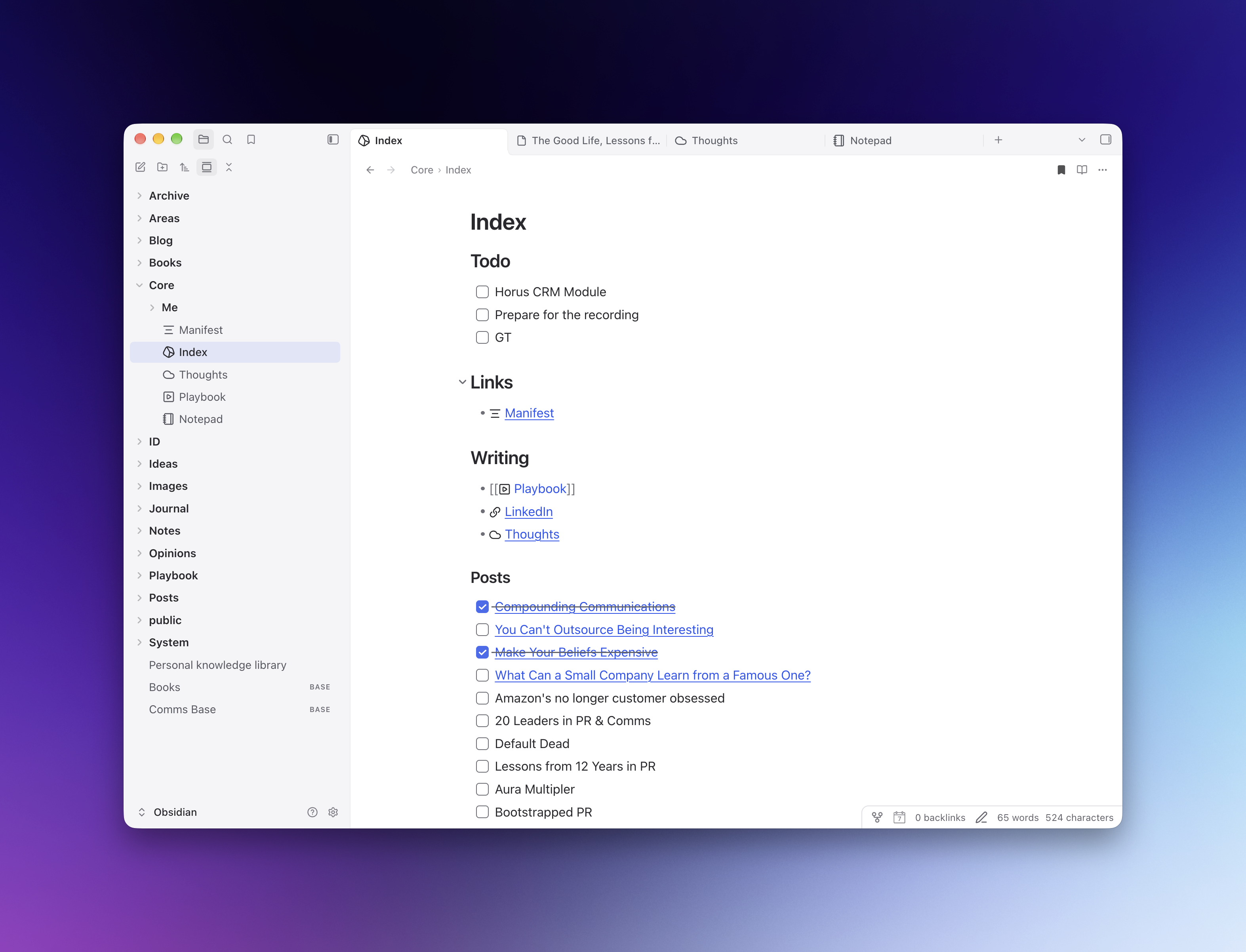
Lathe is designed to make Obsidian feel pleasant and modern.
It features minimal borders, soft colors, but preserves the contrast where it matters.
A lathe is an ancient and foundational machine tool, often referred to as the "Mother of All Machine Tools". It's designed to shape materials like metal, wood, and glass, and as a name, it feels very fitting to Obsidian.
It is a fork of Verso by Fabrizio Rinaldi that adjusts elements such as tabs, menus, and the sidebar to add contrast and make Obsidian easier to use.
Features
- Light and dark palettes with opaque sidebars, menus, and dialogs.
- Attached tabs with soft curves, clear selection, and backgrounds that match the sidebar.
- Bold folder names and readable file labels.
- Large note titles and consistent spacing after headings in Live Preview and Reading view.
- A compact status bar attached to the bottom-right corner.
- Your chosen fonts and accent color, with brighter accent colors in dark mode.
- Optional controls through Style Settings. No plugins, bundled fonts, or remote assets are required.
Install
Requires Obsidian 1.13.7 or later.
- Download Lathe.zip from the latest release.
- Extract the
Lathefolder into your vault’s.obsidian/themes/directory. - In Obsidian, open Settings → Appearance and select Lathe from the theme dropdown.
The final layout should be:
Your vault/
└── .obsidian/
    └── themes/
        └── Lathe/
            ├── manifest.json
            └── theme.css
If Lathe does not appear, restart Obsidian. To update, replace the files in the same folder with the latest release.
You can also download theme.css and manifest.json directly from a release and place them in that folder. Lathe is not yet listed in Obsidian’s community theme browser.
Customize
Choose your fonts, accent color, and light or dark mode in Obsidian’s Appearance settings.
The optional Style Settings plugin adds controls for title size, folder weight, line height, reading width, workspace borders, status-bar styling, and media layout.
For CSS changes, edit theme.css; there is no build step. Use a CSS snippet for personal overrides you want to retain across theme updates.
Compatibility
Developed on macOS with Obsidian 1.14.4. Light and dark styles have also been checked in browser specimens using Obsidian’s stylesheet. Other operating systems, mobile layouts, and plugin interfaces may need further adjustments.
The screenshot includes user-installed plugin icons; Lathe does not bundle those icons or plugins.
Contribute
Issues and pull requests are welcome. For visual bugs, include your Obsidian version, operating system, light/dark mode, and a screenshot with private information removed. Mention any CSS snippets or plugins that affect the view.
Credits and license
Lathe adapts Verso by Fabrizio Rinaldi, including its Minimal-derived foundation by Steph Ango.
Early visual inspiration: Bircharoo by Matt Birchler.
Copyright © 2026 Yury Molodtsov. Released under the MIT License. Upstream notices are preserved in THIRD-PARTY-NOTICES and the stylesheet.