gogoga
 jackweigogoga265 downloads
An Obsidian theme that replicates Tolaria's design language.
- Overview
- Scorecard
- Updates6
English | 简体中文
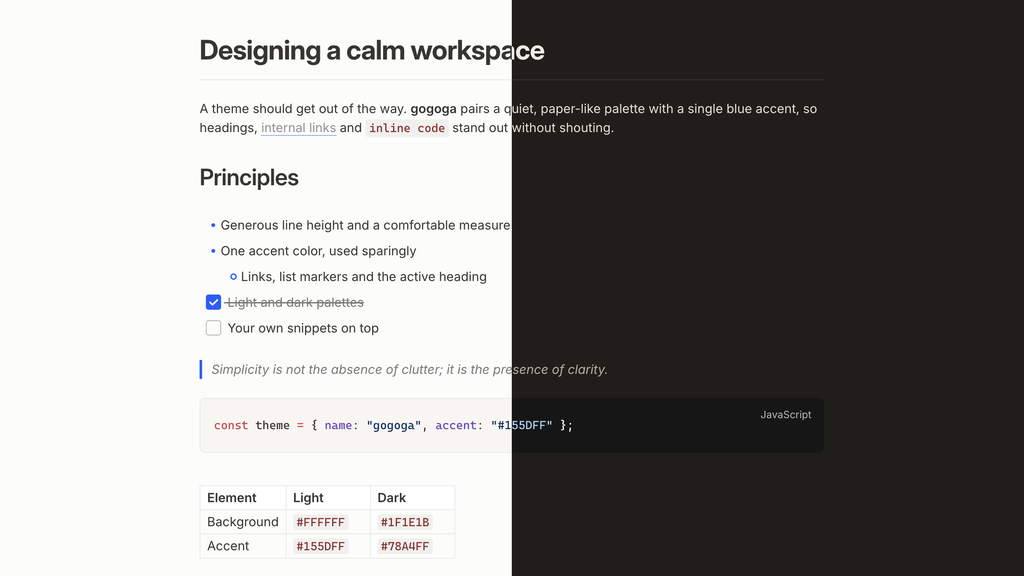
An Obsidian theme that replicates the design language of
Tolaria: Notion-flavored light
palette, warm charcoal dark palette, #155DFF accent, Inter typography, blue
list markers, and an H1-as-title layout with a divider.
Features
- Two palettes ported from Tolaria's design tokens: light
(
#37352Fon white,#F7F6F3sidebar) and warm dark (#E6E1D8on#1F1E1B), accent#155DFF/#78A4FF. The accent follows Settings → Appearance → Accent color, so you can change it without any plugin - Editor typography: Inter, 15px/1.5 scale, 740px measure, Tolaria's heading ladder (32/27/20/17) with negative letter-spacing, H1 and inline titles underlined by a divider
- Details: blue list markers, 18px checkboxes, dotted-underline wikilinks, accent-rail blockquotes, near-black dark code blocks, quiet gray property chips
- Notebook Navigator adaptation: full styling for the
Notebook Navigator
plugin's note list — edge-to-edge rows, Tolaria selection states, quiet
tag chips — via the plugin's
--nn-theme-*API - Companion plugins:
gogoga-iconsswaps Obsidian's Lucide UI icons for Phosphor (the set Tolaria uses), andgogoga-outlinepins a Codex-style heading rail to the edge of the editor — dashes that rise in a dock-like wave under the cursor, with section previews and click-to-scroll.gogoga-youtubemanages grouped YouTube channel subscriptions, recent uploads, read state, and opt-in video notes using public RSS feeds, with a generated native Bases view. - Style Settings support: accent and inline-code colors (per light/dark), body font and body text weight, text measure, and table column floor, plus opt-in toggles to hide the H1 divider, use one bullet shape at every nesting level, fall back to the system's font rendering (macOS only), highlight the line under the mouse (with its own color), show H1–H6 heading level markers, and a focus mode that fades everything but the paragraph you're writing (in reading view, the one under the mouse). Every toggle is off by default, so the theme keeps its intended look without the plugin. Option labels follow Obsidian's language: English, or Simplified Chinese when Obsidian is set to Chinese.
- Writing aids without plugins: focus mode, hover highlight and heading level markers also switch on with Obsidian's own features — see below.
- Built-in file explorer in Tolaria's style: folder icons instead of chevrons, Tolaria's row size and indent, and a connector line under each open folder — so the theme looks right without Notebook Navigator too.
Install
Theme (manual)
Copy theme.css and manifest.json into
<vault>/.obsidian/themes/gogoga/, then select gogoga under
Settings → Appearance → Themes.
Recommended setup
- Install the Inter font locally (the theme falls back to system fonts otherwise).
- Set the base font size to 15px (Settings → Appearance) to match Tolaria's editor scale; heading sizes are relative to this base.
- For the three-pane Tolaria layout, install Notebook Navigator and the gogoga-icons companion plugin.
Writing aids
- Focus mode: while typing, only the paragraph with the cursor stays bright and the rest fades; in reading view the block under the mouse stays bright.
- Hover highlight: a light accent tint on the line or paragraph under the mouse.
- Heading level markers: a small H1–H6 tag in the margin left of each heading.
Ways to switch them on; the first two need no plugin:
Per note: add the built-in
cssclassesproperty to a note, e.g. to focus only on long-form drafts:--- cssclasses: [gogoga-focus, gogoga-hover, gogoga-heading-level] ---Every note: copy any of
snippets/gogoga-focus-mode.css,snippets/gogoga-hover-highlight.css,snippets/gogoga-heading-level.cssinto<vault>/.obsidian/snippets/, then turn them on in Settings → Appearance → CSS snippets.Style Settings: gogoga → Features → 悬停行强调 (Highlight the line under the mouse) / 标题等级标记 (Heading level markers) / 聚焦模式 (Focus mode).
Hotkey: the companion plugin gogoga-outline adds
Toggle focus modeandToggle hover line highlightcommands; bind them in Settings → Hotkeys.
Full setup guide
docs/setup.md (Chinese) walks through building a whole vault around this theme from scratch: core-plugin choices, folder layout, Notebook Navigator settings, Templater automation for auto-populated properties, daily notes with date subfolders, plus the non-obvious gotchas found along the way.
Development
The theme is a single hand-written theme.css: Tolaria's tokens
(src/index.css) and typography spec (src/theme.json) translated onto
Obsidian's CSS variable system. Section comments in the file map each block
back to its Tolaria source.
Sync helpers for working against a live vault:
scripts/dev-install.sh <vault-path>    # repo -> vault
scripts/sync-from-vault.sh <vault-path> # vault -> repo
Support
gogoga is free and open source. If this theme helps you, you can support its development on afdian (爱发电). Obsidian also shows a support button for it in the community directory. Bug reports and ideas help just as much.
License and trademarks
Distributed under AGPL-3.0-or-later (see LICENSE), as a derivative of Tolaria's design system. This project is not affiliated with or endorsed by the Tolaria project; "Tolaria" is a trademark of its authors and is used here only to describe provenance.