Elementra
 CosmicSeaFox312 downloads
A visual Obsidian theme built around six elemental worlds, each with its own colour, atmosphere, visual language, and design system.
- Overview
- Scorecard
- Updates1
A visual Obsidian theme built around elemental worlds — each with its own colour, atmosphere, visual language, and design system.
Elementra transforms your vault into an elemental environment where notes, links, properties, tables, code, and graphs become part of a living visual system.
Designed for students, researchers, developers, writers, designers, creators, knowledge workers, planners, and anyone who wants their Obsidian vault to feel more immersive and personal.
Preview
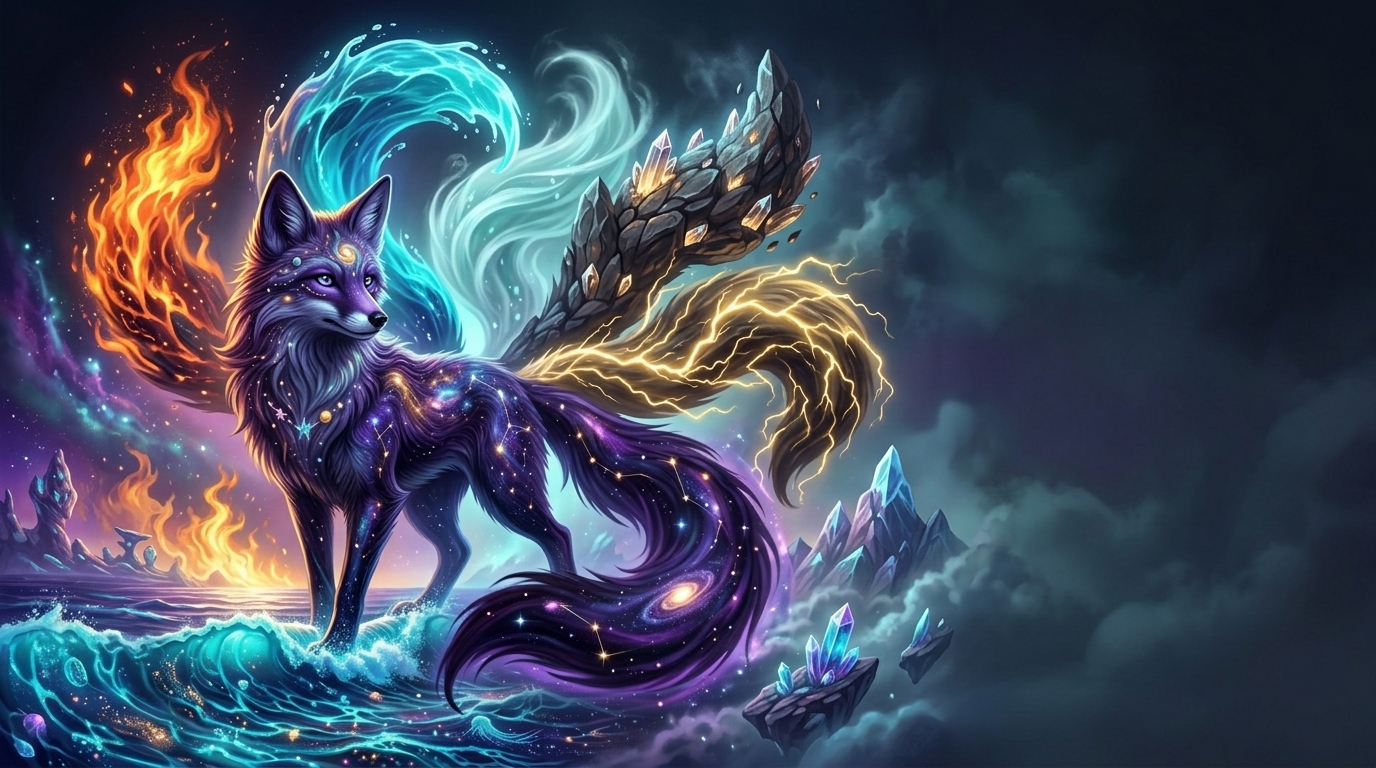
One vault. Six elements. A workspace shaped by the power of the elements.
The Six Elements
Elementra contains six distinct elemental worlds.
They are not simply colour presets. Each element has its own visual atmosphere and artwork designed around its elemental identity.
| Element | Colour | Elemental Character |
|---|---|---|
| 🔥 Fire | Ember Orange | Energy, heat, movement, intensity |
| 💧 Water | Cyan Blue | Flow, waves, fluidity, calm |
| 🌪️ Wind | Sky Blue | Air, clouds, movement, freedom |
| 🪨 Earth | Stone Brown | Rock, structure, stability, nature |
| ⚡ Lightning | Electric Yellow | Electricity, energy, speed, power |
| 🕳️ Void | Violet / Black | Gravity, space, darkness, mystery |
Each element shares the same Elementra foundation while creating a completely different visual environment.
Screenshots
Elementra — Dark Mode
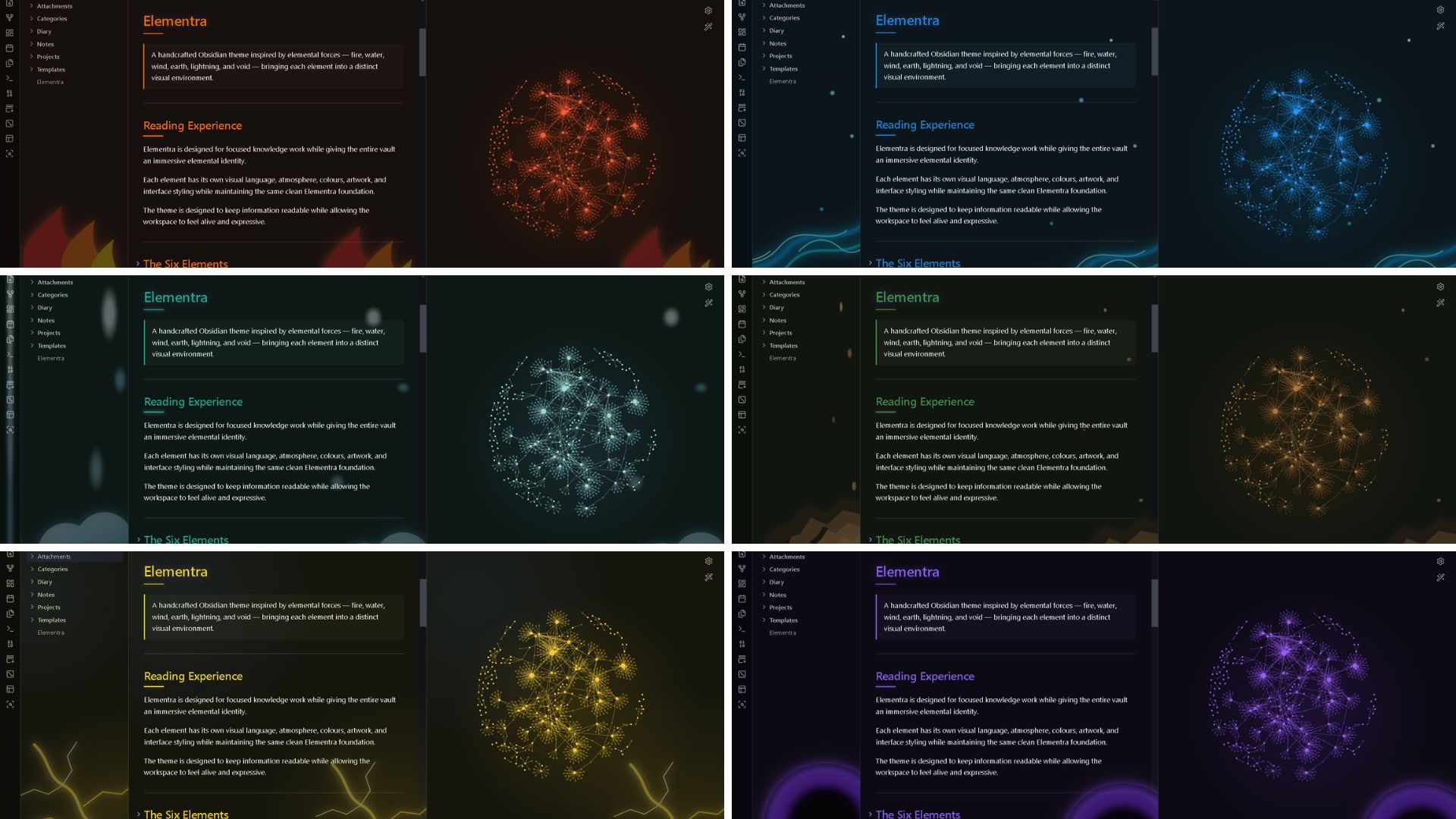
A dark elemental environment showcasing the Elementra visual system.
Elementra — Light Mode
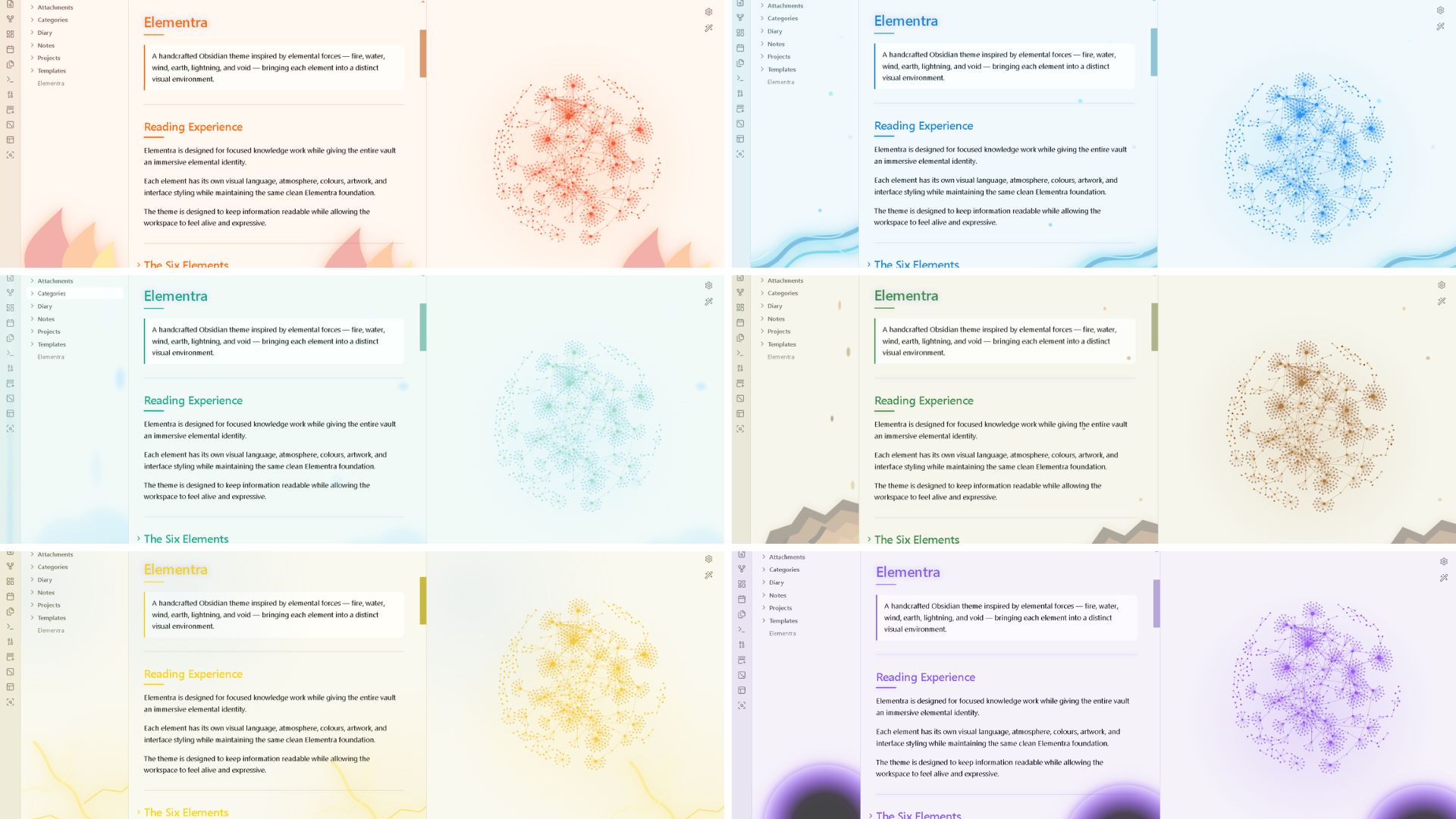
A clean light environment designed around the elemental system.
Features
| Feature | Description |
|---|---|
| 🔥 Fire Element | Flowing flames, ember glow, and energetic visual effects |
| 💧 Water Element | Large flowing waves, droplets, and aquatic atmosphere |
| 🌪️ Wind Element | Cloud-like forms, air movement, and atmospheric shapes |
| 🪨 Earth Element | Rock, stone, geological forms, and natural textures |
| ⚡ Lightning Element | Branching lightning, electric glow, and energy effects |
| 🕳️ Void Element | Spinning black-hole inspired orb, vortex, and cosmic atmosphere |
| 🎨 Elemental Systems | Each element has its own visual environment |
| 🌑 Dark Mode | Immersive elemental dark workspace |
| ☀️ Light Mode | Dedicated light-mode environment |
| 🔗 Graph View | Elemental graph styling and visual atmosphere |
| 📊 Tables | Structured and readable data presentation |
| 💻 Code Blocks | Technical and programming surfaces |
| 🗂️ Properties | Clean metadata and property presentation |
| 🏷️ Tags | Compact visual classification |
| ☑️ Tasks | Clear task and project states |
| 📐 Canvas | Visual workspace for diagrams and planning |
| 📱 Mobile | Responsive mobile interface |
Elementra Is More Than a Colour Theme
The six elements are not six simple colour schemes.
Each element represents a different visual world.
Changing the element can affect:
- Interface colours
- Background and panel surfaces
- Typography
- Borders and separators
- Buttons and interactive elements
- Tables and data presentation
- Code surfaces
- Properties
- Navigation
- Graph View
- Elemental artwork
- Background atmosphere
- Visual hierarchy
Choose the element that matches your mood, workflow, or imagination.
The Six Elemental Worlds
| Element | Colour | Character |
|---|---|---|
| 🔥 Fire | Ember Orange | Energy, heat, movement |
| 💧 Water | Cyan Blue | Flow, waves, calm |
| 🌪️ Wind | Sky Blue | Air, clouds, freedom |
| 🪨 Earth | Stone Brown | Rock, stability, structure |
| ⚡ Lightning | Electric Yellow | Speed, electricity, power |
| 🕳️ Void | Violet / Black | Space, gravity, mystery |
Six elements. One Elementra system.
Changing the Element
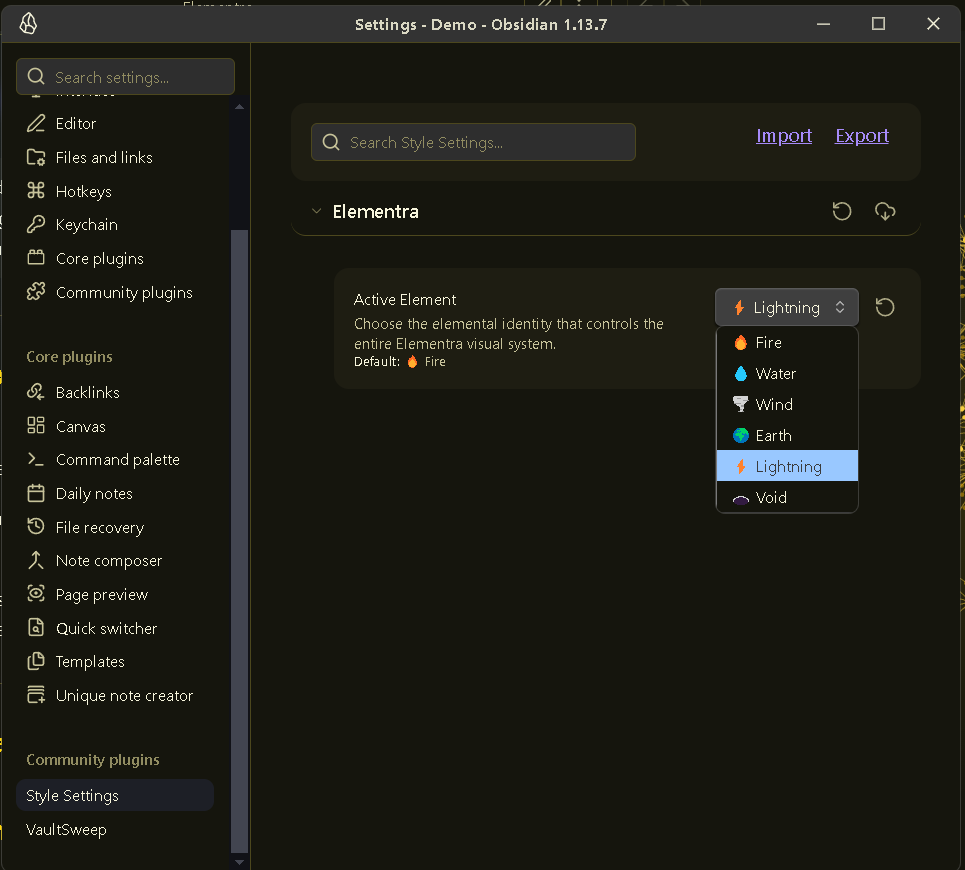
Elementra uses the Style Settings community plugin to control its elemental system.
The Style Settings plugin is required to switch between the six Elementra elements or customize the theme.
Install Style Settings
- Open Obsidian.
- Open Settings.
- Select Community plugins.
- Click Browse.
- Search for Style Settings.
- Select Style Settings.
- Click Install.
- Click Enable.
Style Settings is a separate Obsidian community plugin. It is not included with the Elementra theme.
Select an Element
- Open Settings.
- Go to Style Settings.
- Find the Elementra section.
- Locate Elementra Element.
- Select your preferred element.
Elementra will apply the selected elemental environment.
Changing the element changes the overall Elementra atmosphere, not just its colour.
Your notes, files, content, and vault structure remain unchanged.
Built for Creative Thinkers
Elementra is suited for:
- 🎓 Students
- 🔬 Researchers
- 💻 Developers
- 🧑💻 Programmers
- ✍️ Writers
- 🎨 Designers
- 📚 Knowledge Managers
- 🧠 Researchers
- 📋 Project Planners
- 🗺️ Worldbuilders
- 🎮 Game Designers
- 🛠️ Makers
- 🌌 Creative Thinkers
- 📝 Note-taking enthusiasts
- ⚡ Anyone who wants a more immersive Obsidian workspace
Designed for anyone who enjoys visual environments, elemental themes, creativity, organization, exploration, and immersive knowledge systems.
Design Philosophy
Elementra is built around a simple idea:
Your workspace should feel like a world.
Different parts of the vault become part of an elemental environment.
- Notes become knowledge.
- Folders become territories.
- Links become connections.
- Tags become classifications.
- Properties become information.
- Tasks become actions.
- Tables become structured data.
- Canvas becomes a visual space.
- Code becomes the technical layer.
- Graph View becomes the elemental network.
- Elements become different worlds.
Structure meets atmosphere.
Elementra System
                           ELEMENTRA
                               │
              ┌────────────────┼────────────────┐
              │                │                │
            FIRE             WATER             WIND
           Energy             Flow              Air
              │                │                │
              └────────────────┼────────────────┘
                               │
              ┌────────────────┼────────────────┐
              │                │                │
            EARTH          LIGHTNING            VOID
           Structure          Power             Space
              │                │                │
              └────────────────┼────────────────┘
                               │
                          ELEMENTRA
                       One visual system
Each element has its own identity while remaining part of the same Elementra design system.
Elemental Visual Language
Elementra takes visual inspiration from:
- 🔥 Flames and combustion
- 💧 Waves and flowing water
- 🌪️ Clouds and atmospheric movement
- 🪨 Rocks and geological formations
- ⚡ Branching electrical discharges
- 🕳️ Black holes and cosmic vortices
- 🌌 Space and cosmic environments
- ✨ Energy and natural phenomena
The goal is immersive elemental atmosphere without sacrificing usability.
Typography
- Body: IBM Plex Sans
- Headings: IBM Plex Sans
- Technical: IBM Plex Mono
Typography is designed to remain clean, readable, modern, and compatible with the elemental visual system.
Installation
- Download the Elementra theme.
- Copy the theme folder to:
YourVault/.obsidian/themes/
- Open Obsidian → Settings → Appearance.
- Select Elementra.
- Install and enable Style Settings if you want to change the Elementra element.
Compatibility
| Feature | Status |
|---|---|
| Desktop | ✅ |
| Mobile | ✅ |
| Dark Mode | ✅ |
| Light Mode | ✅ |
| Live Preview | ✅ |
| Properties | ✅ |
| Tables | ✅ |
| Code Blocks | ✅ |
| Dataview | ✅ |
| Tasks | ✅ |
| Canvas | ✅ |
| Excalidraw | ✅ |
| Graph View | ✅ |
Screenshots
screenshots/
├── dark.png
└── light.png
The Dark and Light screenshots showcase the Elementra visual system and its elemental environments.
Support ☕
If you enjoy Elementra and want to support development:
Credits
Fonts
- IBM Plex Sans
- IBM Plex Mono
Visual Inspiration
Elementra is inspired by natural and cosmic phenomena including fire, water, wind, earth, lightning, black holes, atmospheric formations, geological structures, electrical discharges, and cosmic environments.
Made for the Obsidian community.
License
MIT License
Elementra — Six elements. One world.