Desert
 Dallin Jones47 downloads
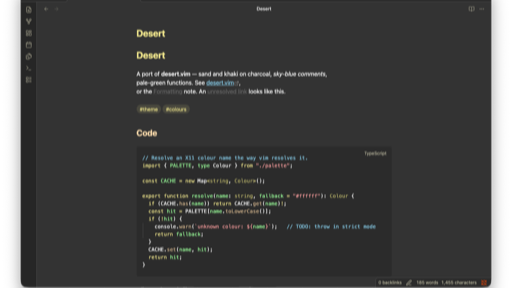
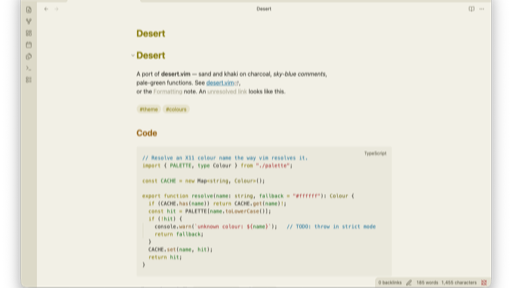
A port of Hans Fugal's [desert.vim](https://github.com/fugalh/desert.vim) to Obsidian — warm sand and khaki on soft charcoal, sky-blue comments, pale-green functions, olive selections. Supports both dark and light mode.
- Overview
- Scorecard
- Updates1
A port of Hans Fugal's desert.vim to Obsidian — warm sand and khaki on soft charcoal, sky-blue comments, pale-green functions, olive selections. Supports both dark and light mode.
Install
From Obsidian — Settings → Appearance → Themes → Manage → browse for Desert, then select it. This is the normal route once the theme is in the community directory.
From a release — download manifest.json and theme.css from the
latest release into a folder named Desert inside
your vault:
<vault>/.obsidian/themes/Desert/
    manifest.json
    theme.css
Then pick it under Settings → Appearance → Themes. The folder name must match
the name in manifest.json exactly.
While developing — copy the two files into that same folder. Obsidian
watches theme.css and reloads on change, so edits show up without a restart.
Layout
manifest.json and theme.css sit at the repository root, which is where
Obsidian's community directory and the release workflow expect them.
manifest.json                  name, version, minAppVersion, author
versions.json                  theme version -> minimum Obsidian version
theme.css                      the whole theme
LICENSE                        MIT, plus attribution for the vim original
package.json                   lint + version scripts, stylelint dev deps
version-bump.mjs               writes manifest.json and versions.json
screenshots/dark.png           512x288 listing image
screenshots/light.png          512x288 listing image
screenshots/demo.md            the note both are captured from
.stylelintrc.json              extends stylelint-config-obsidianmd
.editorconfig                  tabs, LF, UTF-8
.github/workflows/lint.yml     stylelint on push and PR
.github/workflows/release.yml  tag -> draft GitHub release
.github/dependabot.yml         daily npm + actions updates
This mirrors the layout of obsidian-sample-theme.
Dark and light
Dark is desert.vim, transcribed. Backgrounds, syntax colours and
selections are the vim values, with X11 names resolved exactly as vim resolves
them (khaki → #f0e68c, grey20 → #333333).
Light is derived, not transcribed. desert.vim is set background=dark and
has no light counterpart — every colour in it is a light tint chosen to sit on
charcoal, and khaki on white is unreadable. Each light hue here is its dark
sibling pulled to roughly 30–40% lightness, holding hue and role constant:
comments stay sky blue, keywords stay khaki, functions stay green. The page
background is desert's sand #c2bfa5 lightened to parchment, so light mode
still reads as desert rather than as a generic light theme.
Code colours
The --code-* variables follow desert.vim's highlight groups:
| Role | Dark | Light | vim group |
|---|---|---|---|
| comment | #87ceeb |
#1c7099 |
Comment (SkyBlue) |
| string, number, boolean | #ffa0a0 |
#a63030 |
Constant |
| keyword, operator, tag | #f0e68c |
#8a7d0f |
Statement (khaki) |
| function | #98fb98 |
#22701f |
Identifier (palegreen) |
| class, type, attr-name | #bdb76b |
#6f6a1e |
Type (darkkhaki) |
| escape, regex, entity | #ffdead |
#9a6a1b |
Special (navajowhite) |
| directive, at-rule | #cd5c5c |
#93372c |
PreProc (indianred) |
| punctuation, plain variables | #ffffff |
#2b2a22 |
Normal |
| property, field | #d2b48c |
#8a6230 |
tan |
Each role is a --desert-* variable defined once per colour scheme, so the
token rules at the bottom of theme.css are written once and work in both.
Reading view runs Prism and the editor runs CodeMirror, and they use different class names for the same tokens. Both are styled, so a code block looks identical either way — if you add a token rule, add it to both lists or the two views will drift.
Plain variables stay uncolored on purpose. Identifier is pale green in vim,
but vim's syntax files apply it almost only to function names — colouring
every variable would look nothing like desert.
Chrome
Two accents:
- Sand (desert.vim's
StatusLine) — buttons, toggles, focus rings, active states, blockquote borders. - Sky blue — links, internal and external. Unresolved links go grey.
Headings run a warm gradient, brightest first: khaki → navajowhite → tan → sand → darkkhaki → dimmed sand.
Tweaking
Everything is a variable in the .theme-dark and .theme-light blocks at the
top of theme.css. Copy the file into your vault's theme folder to see
changes; Obsidian reloads it automatically.
- Syntax colours — change a
--desert-*role once and every token using it follows, in both reading and editing view. - Bold and italic are left uncoloured; weight and slant do the work. Set
--bold-color/--italic-colorif you'd rather they were tinted. - Heading gradient —
--h1-color…--h6-color.
Screenshots
The listing image is 512 x 288. screenshots/demo.md is the note used to
produce it — one screen that exercises every element the theme colours:
headings h1-h6, a TypeScript block hitting all ten syntax roles, inline code, a
callout, blockquote, table, checkboxes, tags, internal/external/unresolved
links, highlight, strikethrough and a footnote.
To retake them:
Open Obsidian's sandbox vault — Help -> Open sandbox vault. It's disposable, so nothing here touches a real vault. On macOS it lives at
~/Library/Application Support/obsidian/Obsidian Sandbox.Copy the theme and the demo note into it:
SB="$HOME/Library/Application Support/obsidian/Obsidian Sandbox"
mkdir -p "$SB/.obsidian/themes/Desert"
cp manifest.json theme.css "$SB/.obsidian/themes/Desert/"
cp screenshots/demo.md "$SB/Desert.md"
Settings -> Appearance: set Themes to Desert, and turn Show inline title off so the filename and the
# Desertheading don't both appear.Open
Desert.md, hide both sidebars withCmd+\, and wait for the "This is a sandbox vault" notice to fade — it will show up in the capture otherwise.Capture the window:
Cmd+Shift+4, thenSpace, then click it.Switch Base color scheme to Light and capture again, without moving the window.
Then crop to size. A window capture is always taller than 16:9, so resample to width and centre-crop the height:
sips --resampleWidth 512 ~/Desktop/dark.png --out screenshots/dark.png
sips -c 288 512 screenshots/dark.png
sips -c takes height before width, and crops from the centre. Don't use
sips -Z — it fits the image inside the box rather than covering it, so a
window that isn't already 16:9 comes out the wrong size.
Capture large and downscale, never the reverse; downscaling is what keeps the text crisp at 512 wide.
Linting
npm install     # once
npm run lint    # stylelint, using Obsidian's own config
.github/workflows/lint.yml runs the same check on every push and pull
request across Node 22, 24 and 26. It uses npm ci, so package-lock.json
is committed and must stay in step with package.json.
stylelint-config-obsidianmd is opinionated about notation — short hex,
modern rgb() syntax, percentage alpha, no blank line before a custom
property. npm run lint -- --fix handles all of it.
Versioning and release
Bump with npm rather than by hand:
npm version patch # or minor / major
That runs version-bump.mjs through npm's version hook, which writes the
new version into manifest.json, appends a {version: minAppVersion} entry
to versions.json, and stages both.
versions.json is a compatibility history — manifest.json records
minAppVersion only for the current release, while versions.json records it
for every release, so someone on an older Obsidian can be served the newest
version they can actually run instead of one that requires a newer app.
Then tag and push:
git push && git push --tags
.github/workflows/release.yml picks up the tag and creates a draft
release with manifest.json and theme.css attached.
Publish the draft. A draft is not visible outside the repository, so Obsidian cannot see it — the community tool reports "No release matches your manifest version" until it is published.
gh release edit 1.0.1 --draft=false
Three things have to line up or the directory will not find the release:
| Requirement | Why |
|---|---|
Tag has no v prefix |
Obsidian matches manifest.json's version string exactly. .npmrc sets tag-version-prefix="" so npm version produces 1.0.1, not npm's default v1.0.1. |
| Release is published, not draft | Drafts are private to the repo. |
Workflow has permissions: contents: write |
Repositories default to read-only tokens; without it gh release create fails with HTTP 403: Resource not accessible by integration. |
The workflow checks the first of these itself and fails the job with a clear message rather than creating a mismatched release. Publish the draft when you're happy with the notes.
Credit
Original colour scheme by Hans Fugal [email protected], distributed with vim.
Light mode and all Obsidian-specific colours are adaptations; see the notes in
theme.css for which is which.