
- Overview
- Scorecard
- Updates15
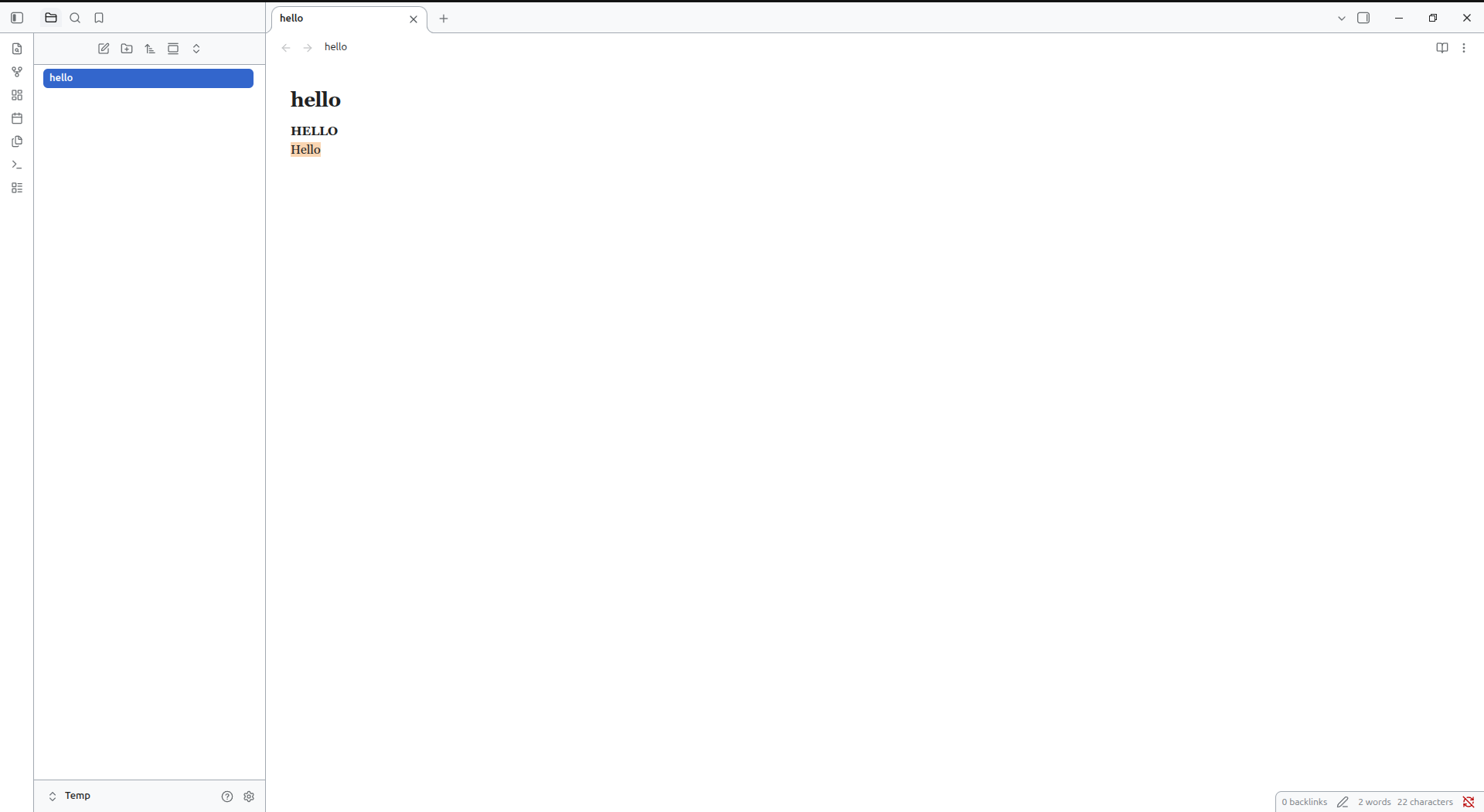
Cozy Journal
A clean, minimalist reading and journaling theme for Obsidian inspired by the Wikipedia design language. Features a dual-palette system: a crisp Wikipedia Light Mode and a high-contrast OLED Pure Black Dark Mode with soft blue accents — no plugins required.
Version: 1.2.5 · Author: OmkarShirse · License: MIT
✨ Features
- Dual-Theme Wikipedia Aesthetic:
- Light Mode: Classic Wikipedia paper
#ffffffbackground,#f8f9fasecondary panels,#a2a9b1borders, and Wikipedia blue (#3366cc) links. - Dark Mode: Pure OLED black (
#000000) base, high-contrast crisp text (#eaecf0), and soft blue (#81a8f8) links.
- Light Mode: Classic Wikipedia paper
- High-Contrast & Legible UI: Form fields, dropdowns, command palettes, and modals feature subtle elevation and defined borders so text never blends into the background.
- Minimalist List Bullets: Clean
➤arrow markers in subtle muted tones. - Cozy Typography: Elegant serif reading font (Georgia / Iowan Old Style) for long-form writing, paired with JetBrains Mono / Fira Code for code blocks.
- Clean Link Styling: Underline-free links for cleaner reading; underlines appear smoothly on hover. Unresolved internal links stand out in classic Wikipedia red (
#ba0000in light,#ff6e6ein dark). - Subtle Image Hover Zoom: Images feature rounded corners (
15px) and smooth scale-up zoom on hover with no intrusive borders. - Redesigned Sidebar & Tabs: Rounded tiles with clean hover states and navy/blue active highlights.
- Justified Text: Evenly balanced paragraphs and lists in both Reading View and Live Preview.
- Hidden Frontmatter Box: Note properties/metadata panel hidden by default for a clutter-free reading experience.
- Lightweight & Fast: Respects Obsidian native heading scales and readable line lengths without bloated CSS or
!importanthacks.
🚀 Installation
- Download
manifest.jsonandtheme.css. - In your vault, create the folder:
.obsidian/themes/Cozy Journal/ - Place both files inside.
- In Obsidian: Settings → Appearance → Themes → select Cozy Journal.
- Switch freely between Light and Dark in Settings → Appearance → Base color scheme.
🛠 Customization
You can customize core CSS variables at the top of theme.css:
| Variable | Light Default | Dark Default | Purpose |
|---|---|---|---|
--background-primary |
#ffffff |
#000000 |
Main editor background |
--background-secondary |
#f8f9fa |
#000000 |
Sidebar & tabs background |
--text-normal |
#202122 |
#eaecf0 |
Main body text |
--link-color |
#3366cc |
#81a8f8 |
Internal and external links |
--link-unresolved-color |
#ba0000 |
#ff6e6e |
Missing / unresolved note links |
--interactive-accent |
#3366cc |
#21426e |
Active tab and selection highlight |
--font-text |
Georgia, serif | Georgia, serif | Body text font |
--font-monospace |
JetBrains Mono | JetBrains Mono | Code block font |
📋 Changelog
v1.2.5
- Dual Mode Overhaul: Added complete Wikipedia Light Theme and redesigned Dark Theme.
- Soft Blue Links: Wikipedia blue links (
#3366ccin light,#81a8f8in dark) with red unresolved link indicators. - Fixed Dark Contrast: Redesigned inputs, modals, menus, and dropdowns with distinct borders and crisp typography so text is never invisible.
- Minimalist Bullets: Updated list bullet markers to clean
➤arrows. - Cleaner Images: Removed white image borders; retained smooth 15px radius and hover zoom.
- Zero Lint Warnings: Removed all
!importantoverrides for optimal Obsidian theme compliance.
v1.2.2
- Neutral dark palette improvements and removal of warm yellow casts.
v1.2.0
- Initial Cozy Journal dark theme release.
📄 License
MIT
HealthExcellent
ReviewPassed
About
Create a warm, dark journaling workspace with a pure black background, amber-brown accents, and a serif reading font for cozy long-form writing. Style the UI with redesigned sidebar, tabs, rounded blockquotes/code/tags, and built-in Notion-style gradient banners without a plugin while honoring readable line length.Details
Current version
1.2.6
Last updated
7 days ago
Created
2 months ago
Updates
15 releases
Downloads
342
License
MIT