Aino
 leyang314 downloads
A warm, focused theme for Obsidian with complete light and dark modes.
- Overview
- Scorecard
- Updates6
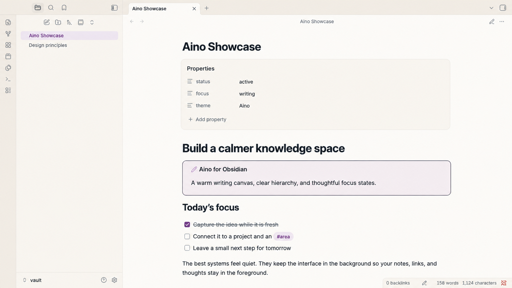
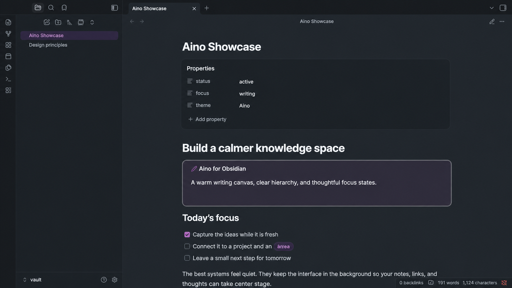
Aino is a warm, focused theme for Obsidian, shaped around a calm semantic color system.
It brings Aino's cream writing surfaces, cool slate text, soft purple accents, and restrained elevation to Obsidian while keeping the interface familiar and accessible.
Continue with Aino and LifeOS
Aino theme is part of a broader local-first Markdown ecosystem:
- Aino — an AI-first Markdown workspace for notes, tasks, calendar planning, reviews, and custom AI apps. Open your existing Obsidian vault directly and keep your files local.
- LifeOS for Obsidian — a complete Obsidian productivity system with tasks, calendars, periodic notes, AI-assisted knowledge workflows, and ready-to-use example vaults.
Highlights
- Complete light and dark modes.
- A warm writing canvas with clearly separated sidebars and elevated surfaces.
- Accessible link, button, selection, and keyboard-focus states.
- Polished Markdown, metadata, callouts, tables, tags, Canvas, and graph colors.
- System fonts and local CSS only: no external font, image, or network dependency.
- Reduced-motion support and no
!importantor expensive:has()selectors.
Manual installation
- Download
manifest.jsonandtheme.cssfrom the latest release. - Create
<your-vault>/.obsidian/themes/Aino/. - Copy both files into that folder.
- In Obsidian, open Settings → Appearance → Themes and choose Aino.
Development
npm install
npm run check
The manifest requires Obsidian 1.10.6 or later. The theme uses CSS variables wherever Obsidian exposes them and keeps its small selector layer limited to Aino-specific polish.
Release checklist
- Run
npm version patch,npm version minor, ornpm version major. - Verify that
manifest.json,versions.json, andpackage.jsonshare the intended version. - Run
npm run checkand test light and dark modes in Obsidian on desktop and mobile. - Push a tag that exactly matches the manifest version.
- Review and publish the draft GitHub release created by the included workflow.
- Confirm that the release contains
manifest.jsonandtheme.cssas binary attachments.
See the official Obsidian theme submission guide before submitting or updating the community-directory entry.
中文说明
Aino 是一款为 Obsidian 打造的温暖、专注的主题,支持完整深浅色模式。它采用暖米白内容面、灰蓝文字、柔和紫粉强调色和克制的层级阴影,同时优先保证长时间书写、键盘导航和正文可读性。
探索更多
- Aino:本地优先的 AI Markdown 工作空间,覆盖笔记、任务、日历规划、复盘和自定义 AI 应用,可直接打开现有 Obsidian 仓库。
- LifeOS for Obsidian:完整的 Obsidian 效率系统,提供任务、日历、周期笔记、AI 知识工作流和可直接使用的示例库。
手动安装时,将 manifest.json 与 theme.css 放入 <你的仓库>/.obsidian/themes/Aino/,然后在 Obsidian 的 设置 → 外观 → 主题 中选择 Aino。
License
MIT © 2026 quanru