
- Overview
- Scorecard
- Updates34
一个专为小说创作者设计的 Obsidian 插件,提供强大的文本标注、变体管理和大纲导航功能。帮助你轻松管理小说中的不同版本、分支剧情和角色变体。
我在小红书发布了许多obsidian的教程和插件开发进度,你的关注就是对我最大的支持
简体中文 | 用法 | 备份系统 | English | Usage | Backup
简体中文
核心功能
1. 智能标注系统
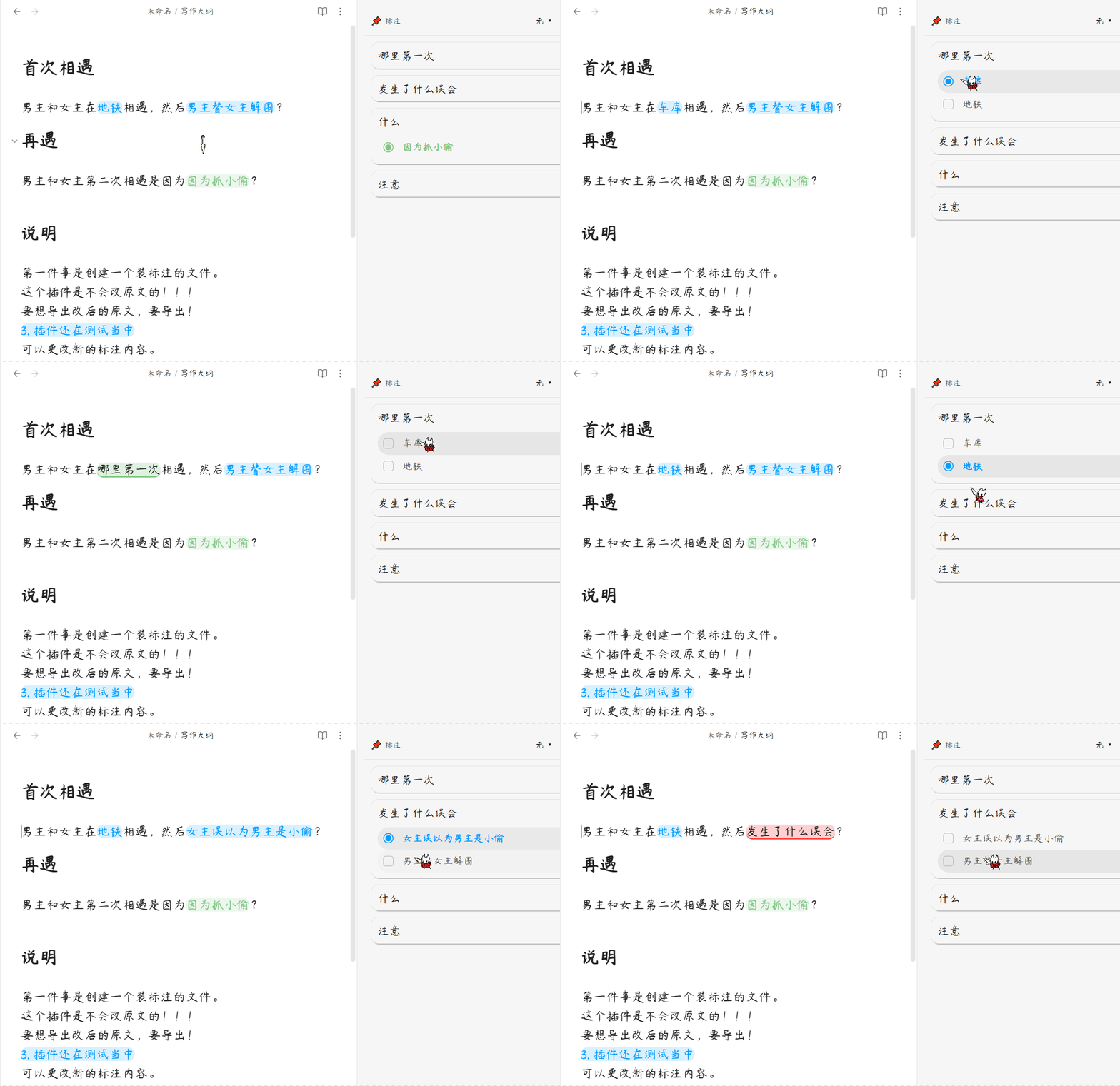
选中任意文本右键即可添加标注,为每个标注创建多个变体版本(如不同剧情走向、角色台词等),切换变体时正文中的文本会实时替换显示,支持为标注和变体设置不同颜色。
2. 侧边栏大纲导航
在侧边栏展示当前文档的所有标注,支持按 H1-H6 标题层级分组显示,点击标注卡片即可跳转到正文对应位置,滚动正文时侧边栏会自动高亮当前视野内的标注。
3. 数据安全保障
后台静默备份,支持自定义备份间隔和保留份数。开启锁定保护后被标注的原文不可直接删除,防止误操作。删除的标注可移至回收站支持恢复或彻底删除,文件移动或重命名后支持重新关联标注数据。
4. 高级编辑功能
复制包含变体的文本时自动复制显示的变体内容(所见即所得),支持为标注添加 Obsidian 内置图标增强视觉识别,一键导出当前所有选中变体的完整文本。
用法
- 安装插件后,无需任何配置即可开始工作。
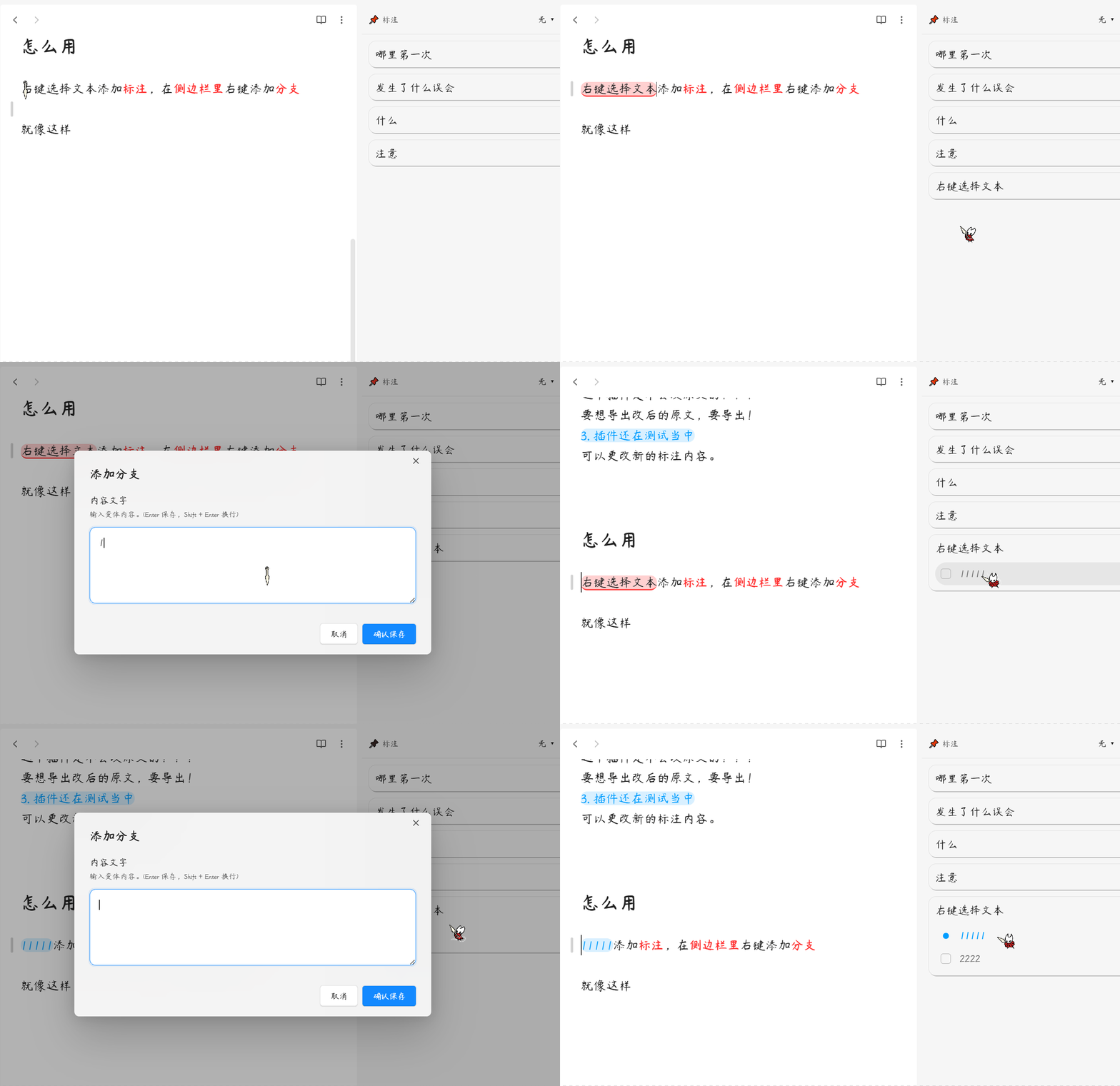
- 在 Markdown 文件中选中要标注的文本,右键点击选择"添加分支标注"。
- 在侧边栏的标注卡片上右键选择"添加分支"创建新变体,点击变体前的复选框即可切换显示。
- 点击标注卡片可跳转到正文对应位置,滚动正文时侧边栏会自动高亮当前视野内的标注。
备份系统
专为小说大纲等高价值数据设计的保命机制。插件会在后台静默记录您的历史版本,以防误删或同步盘引发的文件损坏。
自动备份机制
- 静默运行:每次标注数据有变更时,插件自动检查是否需要备份,完全无需手动操作
- 冷却时间:可自定义两次备份之间的最小间隔(1-60分钟),避免频繁写入
- 滚动覆盖:始终保留最近N份备份(默认40份,可设置20-100份),超出时自动删除最老的备份
- 带时间戳命名:每份备份文件名包含精确到秒的时间戳(如
大纲备份_2026-05-24_17-30-15.md),方便定位
数据安全保障
- 原子写入:使用 Obsidian 官方的
vault.processAPI 进行安全原子写入,防止写入中断导致数据损坏 - 防清空拦截:插件内置智能检测机制,当发现异常数据清空时会自动拦截保存操作,保护你的数据不被意外覆盖
- 自愈搜索:当文件内容发生变化导致标注位置偏移时,插件会自动搜索并修复标注定位
- 回收站机制:删除的标注可移至回收站,支持反悔恢复或彻底删除
备份文件位置
备份文件存储在 Obsidian 配置目录下的安全位置:
.obsidian/plugins/footnote-compass/backups/
在设置页面点击 "📂 打开备份文件夹" 按钮可直接打开备份目录。
赞赏支持
🎁 如果觉得有用,请作者喝杯咖啡

安装方法
方法一:社区插件安装(推荐)
待插件通过审核并上架社区市场后:
- 打开 Obsidian 设置 > 社区插件 > 浏览。
- 搜索并选择
Footnote Compass。 - 点击 安装 并选择 启用。
方法二:手动安装
- 前往 Releases 页面下载最新的
main.js和manifest.json文件。 - 打开您的 Obsidian 库所在的本地文件夹。
- 进入
.obsidian/plugins/目录,并创建一个名为footnote-compass的文件夹。 - 将下载的两个文件放入该文件夹中。
- 在 Obsidian 设置 > 社区插件 中重新加载并开启该插件。
QQ 交流群:1094620986
English
Footnote Compass — A powerful Obsidian plugin designed for novel writers, offering advanced text annotation, variant management, and outline navigation. Easily manage different versions, branching plots, and character variations in your stories.
Features
1. Smart Annotation System
Select any text and right-click to add annotations. Create multiple variants for each annotation (e.g., different plot directions, character dialogues). Switch variants and see text replaced in real-time with customizable colors.
2. Sidebar Outline Navigation
Display all annotations for the current document in the sidebar. Group annotations by H1-H6 heading levels. Click annotation cards to jump to the corresponding position. Auto-highlight annotations in the sidebar as you scroll through the document.
3. Data Safety
Silent background backup with customizable interval and retention count. When lock protection is enabled, annotated text cannot be directly deleted. Deleted annotations can be moved to trash supporting recovery or permanent deletion. Re-associate annotation data after file moves or renames.
4. Advanced Editing
When copying text with variants, automatically copies the displayed variant content (WYSIWYG). Add Obsidian built-in icons to annotations for visual identification. Export complete text of all selected variants with one click.
Usage
- After installing the plugin, it works without any configuration.
- Select text in a Markdown file, right-click and choose "Add Branch Annotation".
- Right-click on an annotation card in the sidebar to select "Add Branch" and create a new variant. Click the checkbox before a variant to switch display.
- Click annotation cards to jump to the corresponding position. Auto-highlight annotations in the sidebar as you scroll through the document.
Backup
A life-saving mechanism designed specifically for high-value data like novel outlines. The plugin silently records your historical versions in the background to prevent data loss from accidental deletion or sync drive corruption.
Automatic Backup Mechanism
- Silent Operation: Every time annotation data changes, the plugin automatically checks if a backup is needed, completely hands-free
- Cooldown Period: Customize the minimum interval between backups (1-60 minutes) to avoid frequent writes
- Rolling Retention: Always keep the most recent N backups (default 40, configurable 20-100), automatically deleting the oldest when exceeded
- Timestamped Naming: Each backup filename includes a timestamp精确到秒 (e.g.,
备份_2026-05-24_17-30-15.md) for easy identification
Data Safety
- Atomic Write: Uses Obsidian's official
vault.processAPI for safe atomic writes, preventing data corruption from interrupted writes - Anti-clear Interception: Built-in smart detection automatically intercepts save operations when abnormal data clearing is detected, protecting your data from accidental overwrites
- Self-healing Search: When file content changes cause annotation position drift, the plugin automatically searches and fixes annotation positioning
- Recycle Bin: Deleted annotations can be moved to trash, supporting recovery or permanent deletion
Backup File Location
Backup files are stored in a secure location within the Obsidian config directory:
.obsidian/plugins/footnote-compass/backups/
Click the "📂 Open Backup Folder" button in settings to directly open the backup directory.
Installation
Method 1: Community Plugins (Recommended)
Once the plugin is reviewed and listed on the community marketplace:
- Open Obsidian Settings > Community plugins > Browse.
- Search for and select
Footnote Compass. - Click Install and then Enable.
Method 2: Manual Installation
- Go to the Releases page to download the latest
main.jsandmanifest.jsonfiles. - Open your Obsidian vault folder on your computer.
- Navigate to the
.obsidian/plugins/directory and create a folder namedfootnote-compass. - Place the downloaded files into this folder.
- Reload and enable the plugin in Obsidian Settings > Community plugins.
QQ Group: 1094620986