U+13080 Weather
 alas, poor ophelia1k downloads
Extensible studio and API for deterministic, data-driven weather for fantasy/TTRPG worldbuilding utilizing stochastic generation.
- Overview
- Scorecard
- Updates6
Deterministic, data-driven weather for TTRPG or fictional worldbuilding in Obsidian.
This plugin lets you define a world. Worlds have regions, regions have climates. Give a Worlds have seeds, and every day has weather: specifically the same weather every time you ask, for anyone who shares the seed. So, look ahead a year, look back a decade, and then you can pin the day the party got caught in the blizzard (exceptions to the forecast).
And it has a TypeScript API+an adapter system so other plugins can integrate with it, if they want.
This is stochastic generation, as opposed to true simulation. "Stochastic" meaning driven by
probabilities. Each zone is a statistical portrait of a real climate (taken from public weather station data): how often it rains, how much, how warm the seasons run, etc and the plugin rolls those odds forward one day at a time. It does not move air masses around, track moisture across your map, or read your heightmap, and two zones next to each other do not know about each other. See NON-GOALS.md for the full list of things it will not do.
During alpha, capabilities may change somewhat, but broadly I plan on the above staying true
Requires Obsidian 1.13 or later. Desktop; mobile is not marked unsupported but has not been tested extensively, yet (alpha).
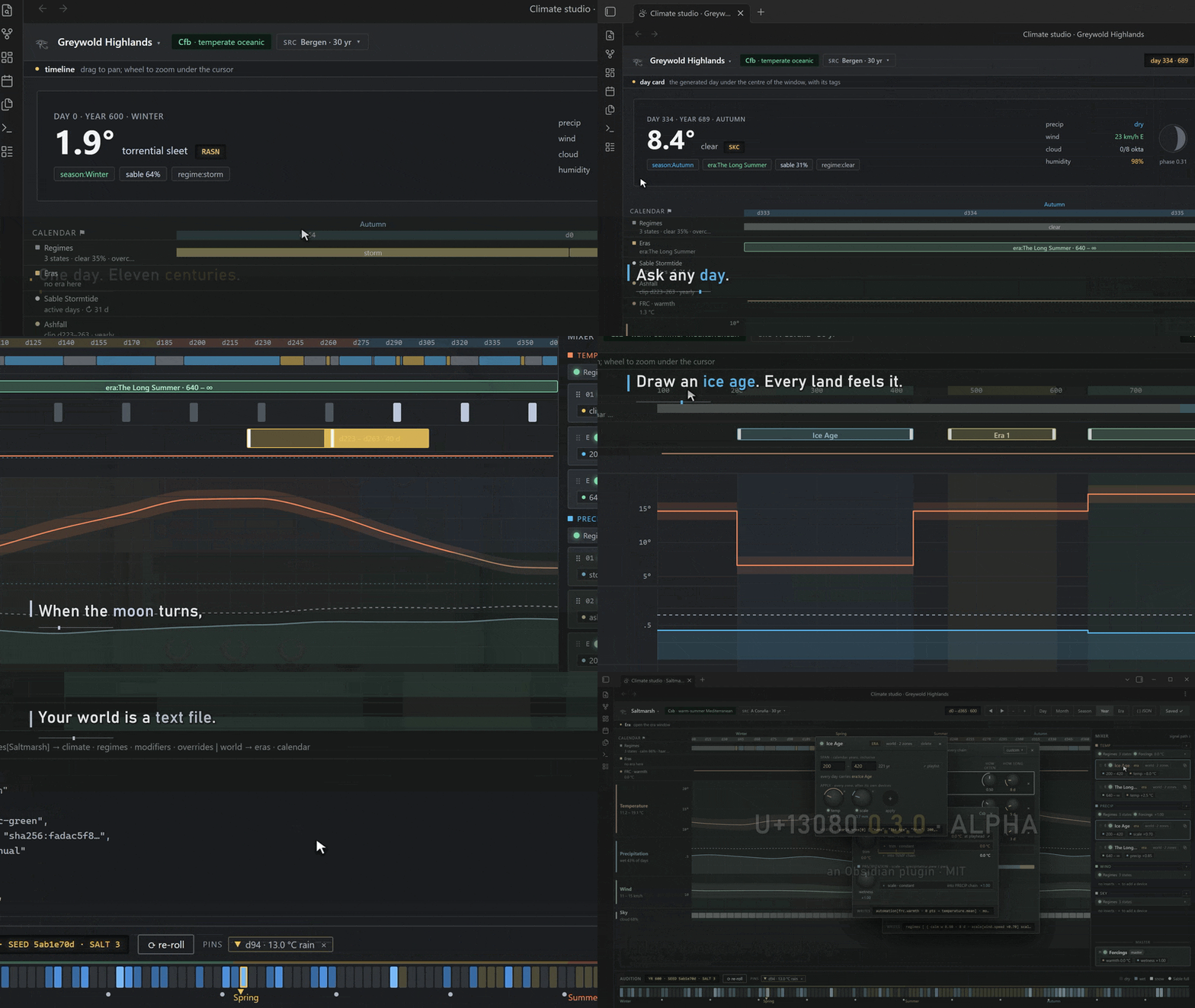
Thirty seconds of it end to end; the overview below walks the same ground slowly.
▶ Watch the two-minute overview of the Climate Studio
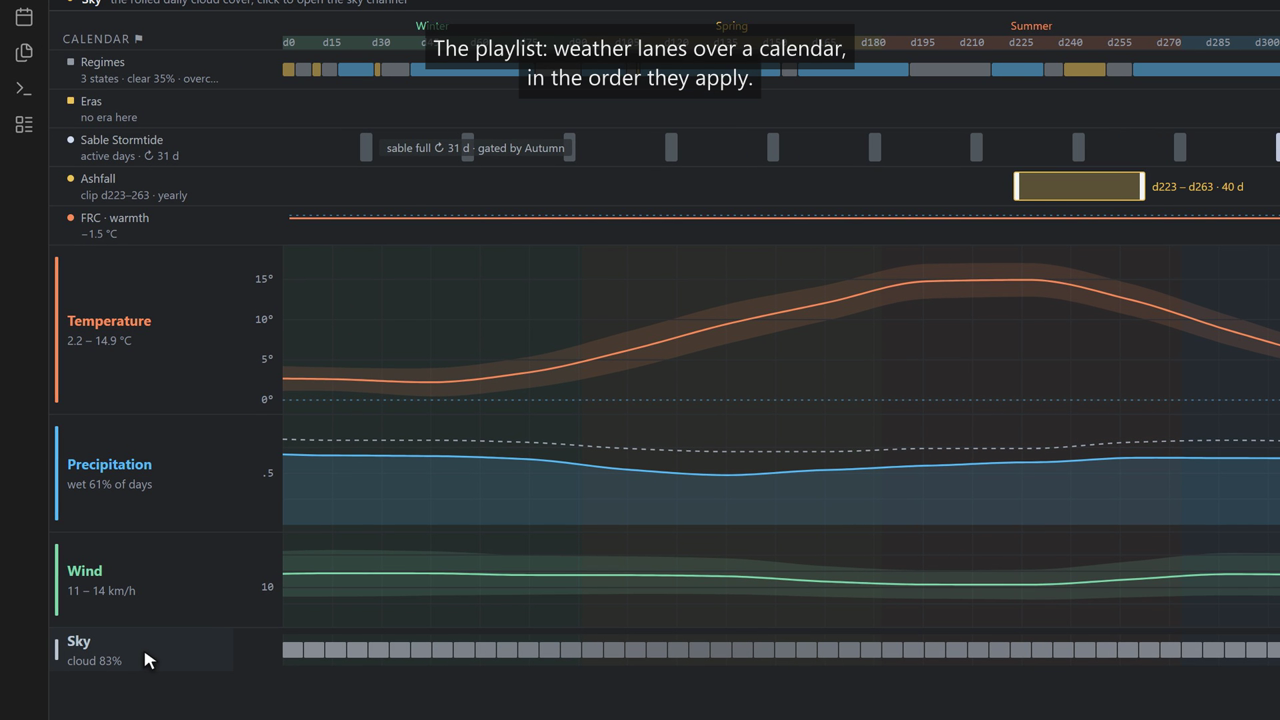
A pass through the whole studio: the playlist and its lanes, the mixer's channel chains, regimes, devices, forcings, eras, pinned days, and Save. It is silent, with captions on screen.
How does it work?
U+13080 Weather uses a model called WGEN (and its descendants). This is the same model that agricultural scientists have used since the 1980s to make synthetic weather for crop and erosion studies. For each day:
- Wet or dry? A weighted coin flip, where the odds depend on whether yesterday was wet. Rain tends to follow rain. The two odds (wet-after-wet, wet-after-dry) change through the year, so the wet season is ensured wet and the dry season is guaranteed dry.
- How much? On a wet day the amount is drawn from a skewed distribution: most wet days are light, a few will be deluges. Its shape also changes through the year.
- How warm? Temperature is drawn around the seasonal average, with a "memory" of yesterday so hot spells and cold snaps cluster rather than jitter. Wet days run cooler.
- Everything else (wind, humidity, cloud, visibility) is derived in the same way, some of it conditioned on wet or dry.
All these odds are drawn from a real weather station's thirty-year record (see Data). What makes the plugin deterministic is where the "random" numbers come from: every draw is a hash of (world seed, zone, day number, what is being drawn).
Install
The best way to install U+13080 is direct from the Obsidian Community Plugin store. However, you can also install in the following ways.
- BRAT: add
https://github.com/alas-poor-ophelia/u13080-weatheras a beta plugin. - Manual: download
main.js,manifest.jsonandstyles.cssfrom the latest release into<vault>/.obsidian/plugins/wadjet/, then enable U+13080 Weather in Settings → Community plugins.
Quick start
Settings → U+13080 Weather → Zones → Add zone. Name it, pick a climate (or describe the place with latitude, altitude, terrain, and the nearest climate is picked and adjusted).
Put a block in a note:
```wadjet
zone: greywold-highlands
date: today
style: card
```
Advance the calendar with the Advance the calendar one day command, or set Current day in settings. The block will update accordingly.
The code block
```wadjet
zone: greywold-highlands   # the zone id; omit to use the first zone
date: today                # today | +3 | -1 | 412 (a day number) | 3-14 (year-day)
hour: 14                   # optional; adds the temperature at that hour and whether rain is falling
style: card                # card | line | prose | table | value
range: 7                   # table only: days from `date`
field: precipitation.amount   # value only: which number (or word) to show
units: imperial            # optional; otherwise the setting
format: long               # optional; a calendar definition's format for this block's dates
```
- card — icon, summary sentence, and a temperature / precipitation / wind / sky / humidity / visibility grid.
- line — one line:
🌧 Year 3, day 14: Cold, steady rain, breezy from the WSW, overcast. 1.1 to 7.8 °C. - prose — a short paragraph for reading aloud (extremely rough for the alpha)
- table — one row per day for
rangedays; pinned days are marked with a 📌. - value — just one field, bare, in the chosen units:
field: precipitation.amountgives4.2(mm) or0.17(in). Fields:temperature.high/low/mean/current,precipitation.type/amount/intensity/active,humidity,cloudCover,wind.speed/directionDeg,visibility,regime,conditions,descriptors.temperature/precipitation/wind/sky.
Day numbers count from the first day of year 1 (which is day 0). Dates like 3-14 are
year-day in a plain calendar (a new world's, or the legacy calendar): year 3, the 14th day. A
world on a calendar with months writes its own dates. When its definition has more than one format,
Settings → Calendar → Date display picks the one blocks, command messages and the settings lists show
dates in (typed dates keep the default), and a block's format: line overrides it for that block; a
name the definition does not have falls back quietly. Units (metric or imperial) are a setting.
Commands
Access these through Obsidian's Command Palette to access various shortcuts and pieces of functionality.
| Command | Does |
|---|---|
| Advance / Rewind the calendar one day | moves the world's current day |
| Insert today's weather | writes a one-line summary at the cursor |
| Insert a weather codeblock | inserts a ```wadjet block for the first zone |
| Pin today's weather | freezes today's generated weather for the first zone as a pinned day |
| Refresh weather blocks in this note | re-renders the active note |
Pinned days
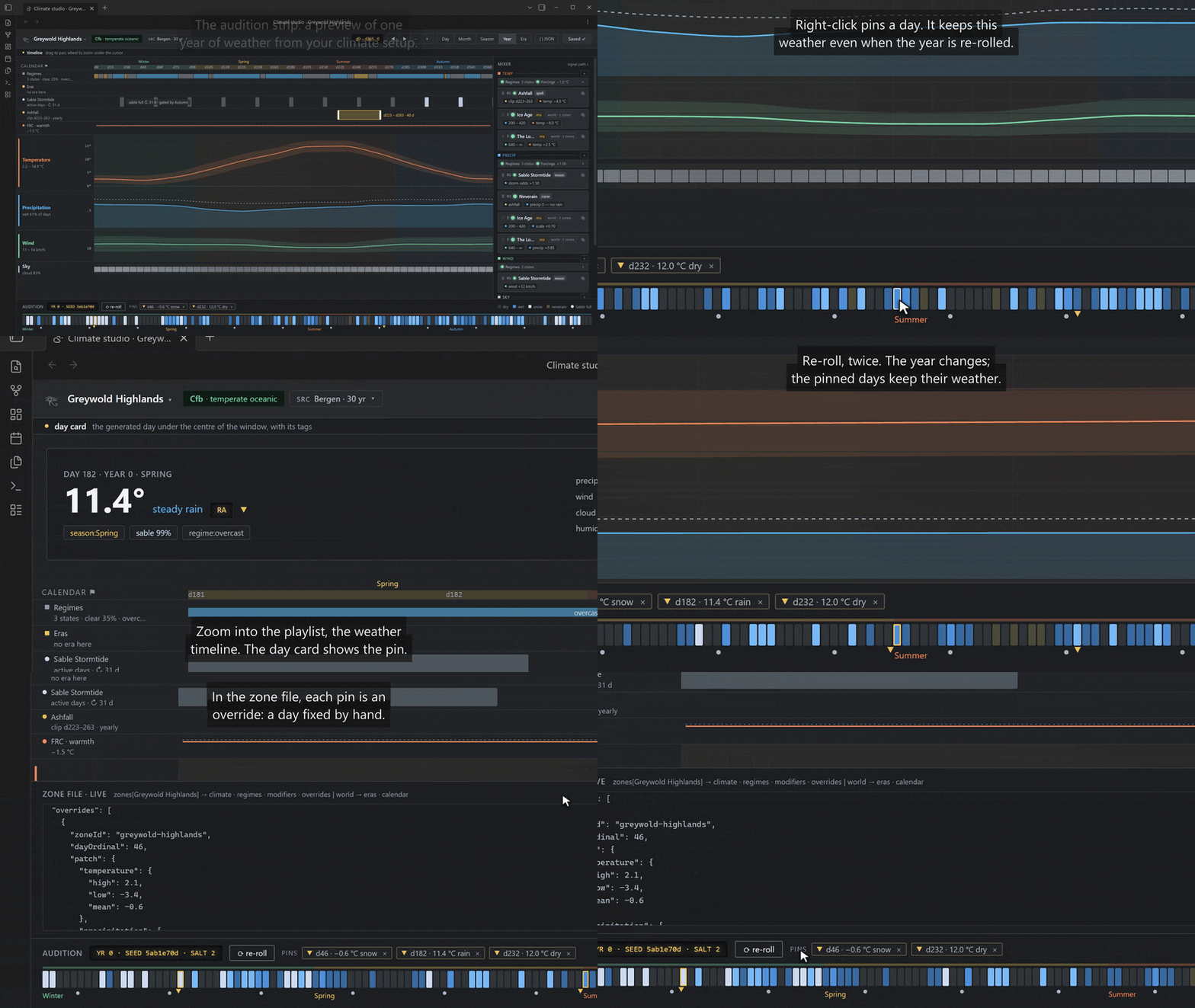
For various reasons, generated weather is never stored, rather it is recomputed on demand from the seed. The only weather the plugin saves is what you “pin”. A pinned day always wins over generation, survives seed and generator changes, and can be edited from Settings → Pinned days: temperature, precipitation, wind, and a note.
This is for one off storytelling events. Party got lost in a blizzard, the moon fell and there was a bunch of dust…. Etc.
Pinning from the studio is a right-click on a day in the audition strip; the day card takes the edits and its tags, a re-roll leaves the pinned days where they are, and the JSON drawer lists them as overrides.
Zones and climates
A zone is a climate you define. When you pick a preset it is copied into the zone, so if a plugin update changes the climate data (which shouldn’t really happen, but if it does), your pre-existing weather won’t change.
Every zone row shows its Köppen class, which is the standard shorthand geographers use for climates, computed from the zone's own numbers.
The first letter is the broad/high level climate descriptor: A tropical, B dry, C temperate, D continental (cold winters), E polar.
The next letters say when the rain comes (f all year, s dry summer, w dry winter, or for dry climates W desert / S steppe) and how warm it gets (a hot summer, b warm, c cool, d brutally cold winter; h hot / k cold for dry climates). So Cfb is "temperate, rain all year, warm summers" (Bergen, or London); Dfc is "cold winters, rain all year, short cool summers" (the taiga). It’s purely informational, and will change when you change the climate of a region.
Also I’m not an expert, even remotely on all this, so if you spot an error, let me know!
Presets
Built from thirty-year station records (see Data below). The name is a flavour label so you can better understand what you’re picking (no association with the original data), but the station is the source of truth for any of the numbers.
| Preset | Köppen | Station |
|---|---|---|
| Alpine Pass | Dfc | Fremont Pass, United States (3475 m) |
| Altiplano | Cwb | Toluca, Mexico (2638 m) |
| Atlantic Green | Csb | A Coruña, Spain |
| Bayou | Cfa | Ponchatoula, United States |
| Birch Heartland | Dfb | Kolomna, Russia |
| Equatorial Rainforest | Af | Singapore Changi |
| Fjord Coast | Cfb | Bergen, Norway |
| Frozen Heartland | Dfc | Hatyryk-Homo, Russia |
| Hill Station | Cwa | Shimla, India (2202 m) |
| Kulunda Steppe | Dfb | Slavgorod, Russia |
| Monsoon Coast | Af | Kuantan, Malaysia |
| Monsoon Taiga | Dwb | Pogranichnyj, Russia |
| Olive Coast | Csa | Jerez de la Frontera, Spain |
| Pamir Plateau | ET | Sajmak, Tajikistan (3840 m) |
| Prairie | Dfa | Valley, United States |
| Rain-Shadow Vale | Dfc | Rösta, Sweden |
| Red Desert | BWh | Undoolya, Australia |
| Savanna | Aw | Darwin, Australia |
| Sertão | Aw | Icó, Brazil |
| Silk Road Basin | BSk | Lanzhou, China (1518 m) |
| Southern Oceanic | Cfb | Hobart, Australia |
| Storm Isle | ET | Jan Mayen, Norway |
| Taiga | Dfc | Sodankylä, Finland |
| Tundra | ET | Ny-Ålesund, Norway |
| Wet Tropics (windward) | Am | Kuranda, Australia |
| Tableland (leeward) | Aw | Mareeba, Australia |
Choosing by geography
If none of the names fits what you’re picturing, you may attempt to define the place instead and the plugin will pick the nearest preset and adjusts it:
- Latitude sets the baseline warmth: hot at the equator, colder toward the poles. The curve is borrowed from Azgaar's Fantasy Map Generator, so theoretically the weather in here will agree with the weather in there.
- Altitude cools things down by 6.5 °C for every 1000 m of height, which the standard atmospheric lapse rate (mountain tops are cold).
- Southern hemisphere flips the seasons, so a zone at −40° has its winter in the middle of the year.
- Terrain windward slopes face the prevailing wind and catch its rain; leeward slopes sit behind a range in its rain shadow. This only steers which preset is chosen.
- Continentality (optional) — how far from the sea, on a 0–1 scale. Water stores heat, so coasts generally have mild winters and cool summers while deep interiors will swing hard between the two. Turn on Adjust the seasonal swing to scale the summer–winter swing accordingly; leave it off and the zone keeps the swing of the station it was matched to.
The notice after adding tells you exactly what was done and which station you ended up with.
The first-region tutorial adds a zone this way and then matches it in the Atlas.
Modifiers
Zones can carry modifiers: It’s worldbuilding detail, allowed to bend the rules, a way to hopefully support a wide variety of settings and worlds without needing to add in specific support for everything. They are how you get a stormy moon, a volcano's ash season, or a cursed valley where it never rains.
The zone editor (Zones → Edit) has a folded card with the full grammar and two examples you can add with one click; the same two are below.
Q: Really, I have to edit JSON? A: Yes, for now. I'll worry about a UI when all this is more cemented.
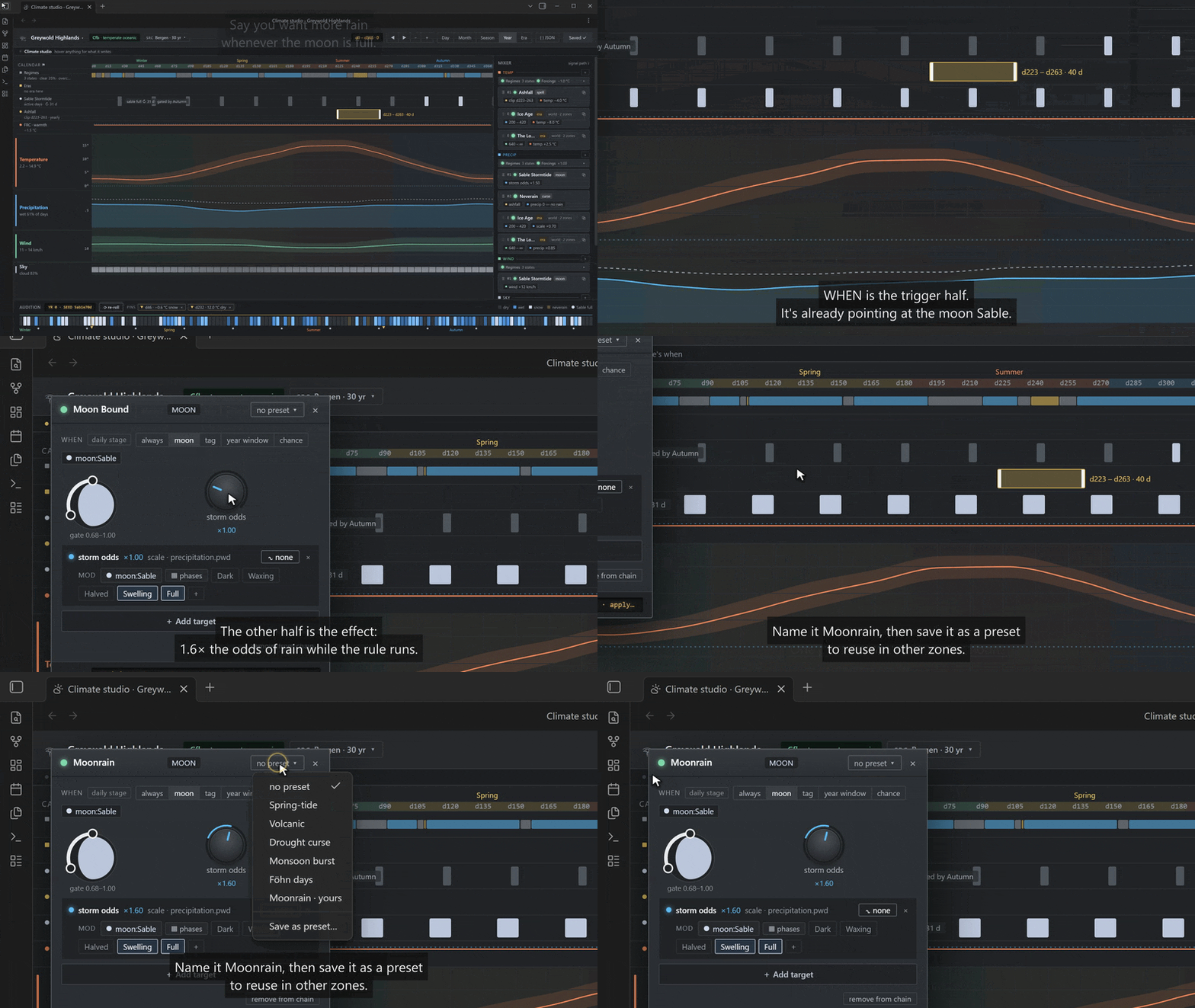
A stormy spring tide whenever the moon Sable is near full (add a moon called "Sable" in Settings → Calendar first):
{
  "id": "sable-stormtide",
  "stage": "daily",
  "when": { "moon": { "name": "Sable", "phase": [0.88, 1.0] } },
  "apply": [
    { "param": "precipitation.pwd", "op": "scale", "value": 1.5 },
    { "param": "wind.speed", "op": "offset", "value": 12 }
  ],
  "tag": "stormtide"
}
Ashfall spells: dry, dark runs of days that start about once a year in late summer and last a couple of weeks:
{
  "id": "ashfall",
  "stage": "daily",
  "when": { "yearPhase": [0.61, 0.72] },
  "spell": { "meanStartsPerYear": 0.6, "meanDurationDays": 18 },
  "apply": [
    { "param": "precipitation.pwd", "op": "set", "value": 0 },
    { "param": "precipitation.pww", "op": "set", "value": 0 },
    { "param": "cloud.dry", "op": "set", "value": 0.95 }
  ],
  "tag": "ashfall"
}
Reading them:
whenis the condition. A moon phase runs 0 (new) → 0.5 (full) → 1 (new again);yearPhaseis how far through the year you are, 0 to 1, so[0.61, 0.72]is roughly August–September in a northern-hemisphere year. Ranges wrap around the end. Conditions can also test a day-of-year range, a tag, the current regime, or a seededchance, and combine withall/any/not.applyis what changes: aparamis one of the climate's dials —precipitation.pwdis the chance a dry day is followed by a wet one,precipitation.pwwthe chance a wet day is followed by another,wind.speed,cloud.dry(cloudiness on dry days),temperature.mean, and so on, andopis how:setit,offsetit by an amount,scaleit by a factor, orclampit between limits.spellturns a condition into an event with duration: instead of applying on every qualifying day, spells start now and then (meanStartsPerYear) and run for a while (meanDurationDays). Usechancefor a single freak day,spellfor a run of days.tagis added to the day's conditions while the rule is active, so it shows in the card and other rules can react to it. A modifier with a tag and noapplyis pure flavour.
The studio builds the same rules without the JSON. The stormtide above, inserted on PRECIP as a moon-bound device, given the phases it fires on, and saved as a preset:
Under the modifiers sits a regime layer you normally never touch: a few background weather patterns (settled, unsettled, stormy…) that persist for days at a time and nudge the odds, so weather arrives in stretches the way real weather does.
The complete grammar, with every parameter path and the exact rules for each predicate, is in docs/API.md.
Eras
Seasons repeat; eras don't. Settings → Calendar → Eras is the world's long history as a list of year spans (JSON, comments allowed):
[
  { "name": "Ice Age", "from": 1200, "to": 1900,
    "apply": [
      { "param": "temperature.mean", "op": "offset", "value": -8 },
      { "param": "precipitation.scale", "op": "scale", "value": 0.7 }
    ] },
  { "name": "Thaw", "from": 1901, "to": 1950 },
  { "name": "Long Summer", "from": 1951 }
]
- Years are the calendar's own year numbers, both ends inclusive; leave out
tofor "until the end of time". Eras chain by listing them; overlapping eras all apply. - Every day inside an era carries the tag
era:<name>, so a zone's modifiers can react to it ({ "tag": "era:Thaw" }) — a valley that floods in the Thaw while the mountains merely drip. apply(optional) bends every zone for the era's span with the same ops a modifier uses. Era ops run after the zone's own modifiers.- Eras are steps, not cycles: you write the arc of history and the generator follows it. Nothing drifts on its own. Changing eras changes past weather (they are part of the calendar hash).
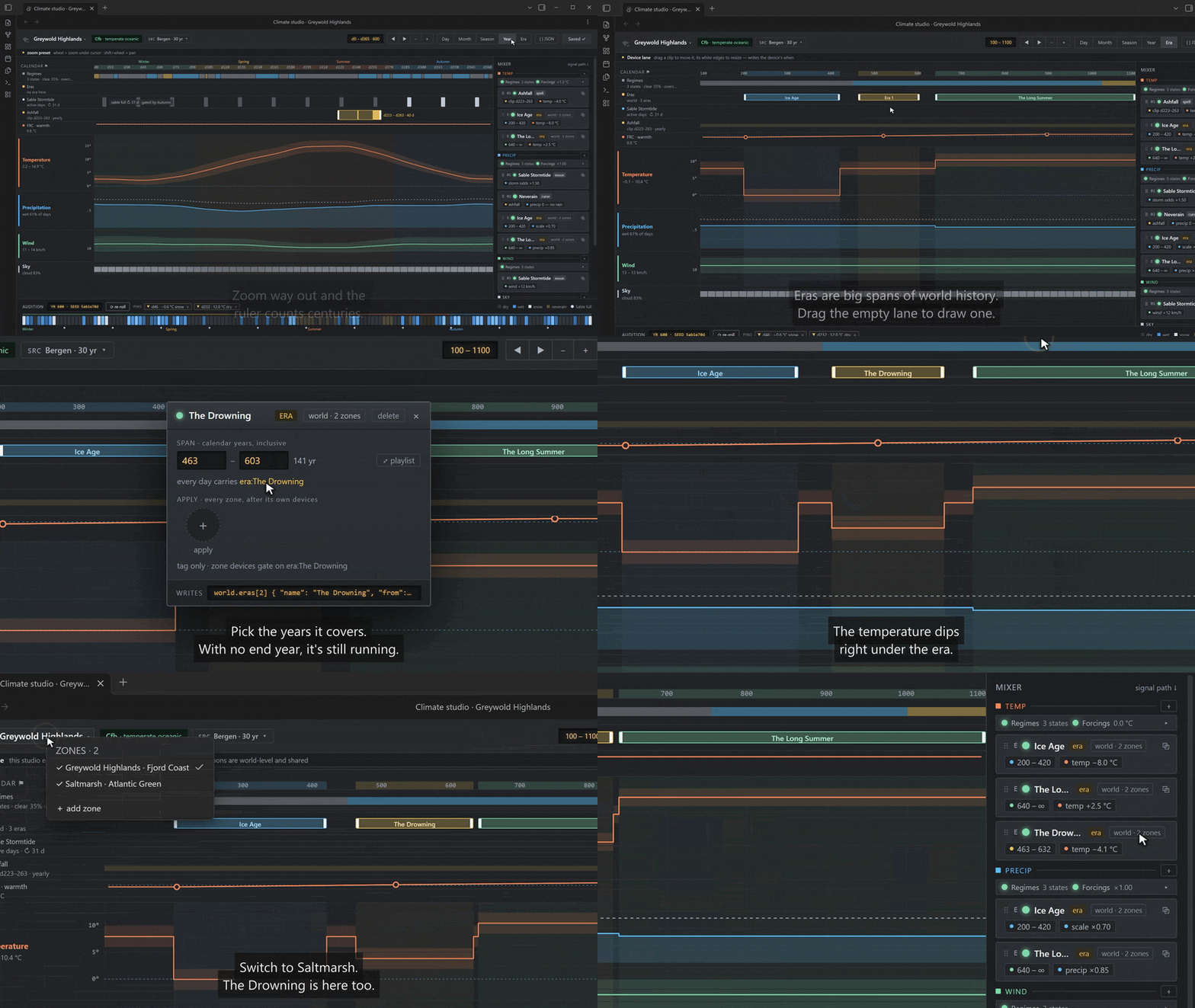
Eras can be drawn instead of typed. At the studio's Era zoom they are clips on their own lane: drag one out, name it, give it a span, apply it, and the temperature curve drops for its years.
More recipes — seasons, moons, eras, curses — in docs/EXAMPLES.md.
Climate studio
If you'd rather not hand-write the JSON above, the studio is a DAW-style editor for one zone's climate: a playlist of lanes over a calendar ruler you can zoom from a two-day window out to eleven centuries, a mixer with a chain per channel (TEMP, PRECIP, WIND, SKY) plus a MASTER, floating editor windows for whatever you clicked, and a live audition strip along the bottom showing one seeded year rolled through the whole path.
Clicking a channel row opens its editor: offset, swing and jitter, scoped to the whole year or to one season, with the Writers stack underneath listing everything else already touching that channel.
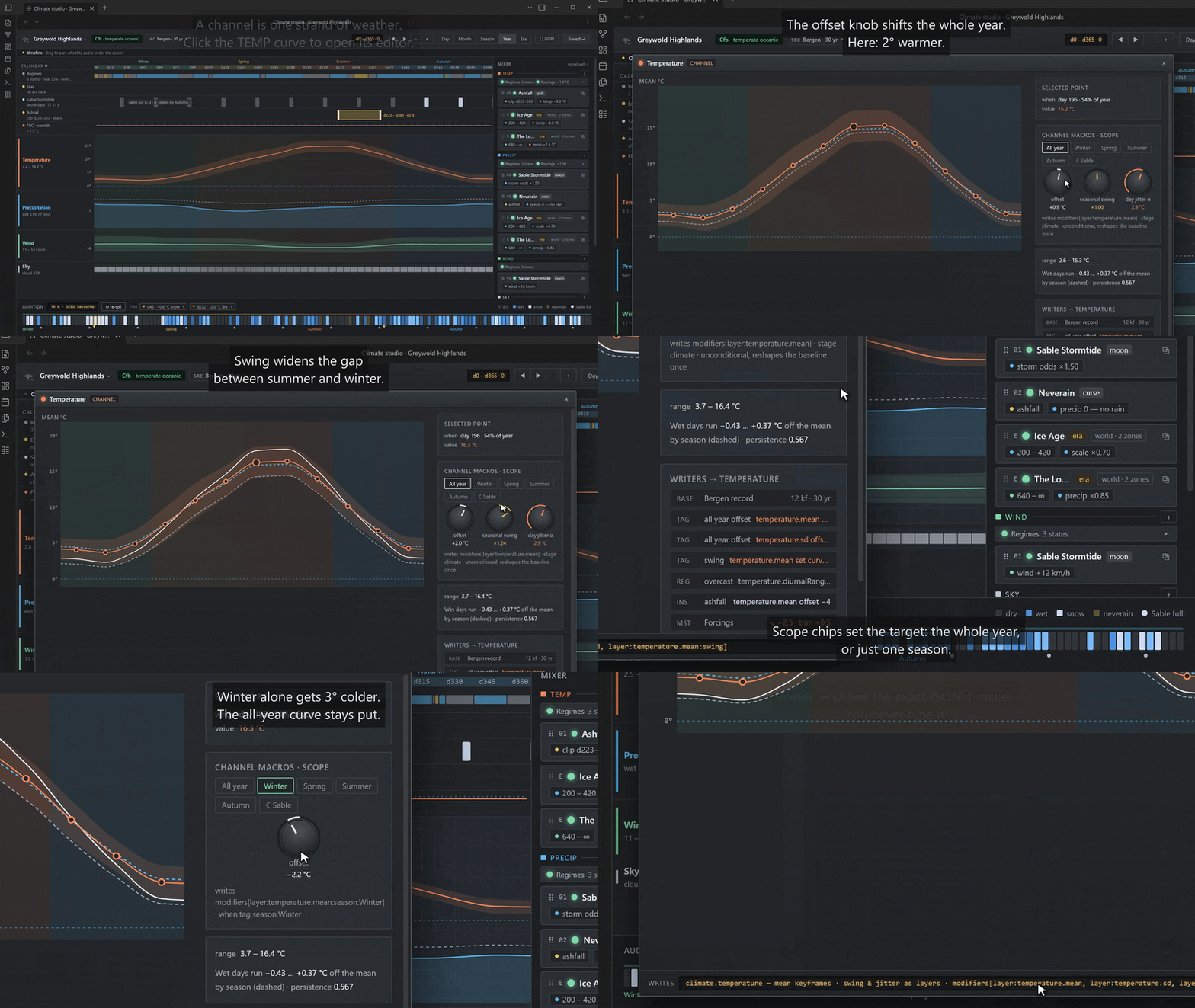
It is an editor, not a simulator. It writes the same zone JSON the settings editor does — anything you build in it you could have typed by hand, and Zones → Edit is still there for when you'd rather type. It invents nothing: every climate number still comes from the shipped station presets and the edits you make on top of them. And it changes past weather only where the JSON already would — the same knobs, the same rules, and the same warning that you are doing it.
Opening it. Settings → U+13080 Weather → Zones → Open in studio on a zone row, or the Open climate studio command (which asks which zone if you have more than one). There is one studio tab; opening another zone re-points it rather than piling up tabs.
Your first region. The tutorial below builds one from nothing: add a zone by describing its geography, match it to a station in the Atlas, lay in a regimes preset and rename its moods, insert three device presets, audition the year, and Save.
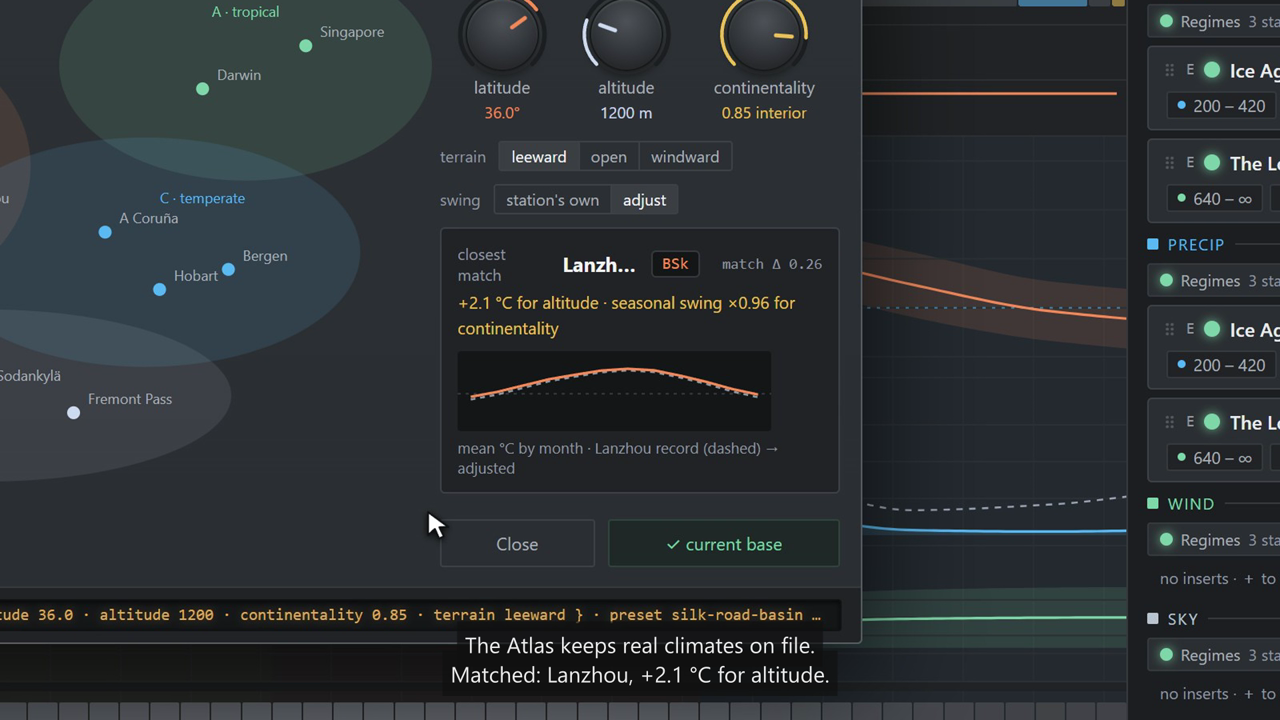
The signal path. The lanes and the chains are laid out in the order the generator runs:
- Station — the preset copied into the zone. The
SRCchip opens the Atlas, where you re-base the zone on another station or match one by geography. - Baseline curves — the four channels as yearly curves.
- Climate-stage layers — unconditional edits to those curves: the channel editor's offset, scale, swing and drawn keyframes.
- Regimes — the sticky background states, slot
00in every chain. - Devices — your modifiers, in rack order:
when×apply, plus optional spells, mod gates and an onset envelope carried on a moon. - Forcings — the zone's master: a temperature trim, a wetness factor, and the
FRC · warmthlane that walks a value across the years. - Eras — the world's spans of history, which bend every zone.
- Pins — days you fixed by hand (right-click a day in the audition strip).
- The roll — the weather itself. Audited, never drawn on.
Step 4 has a window like anything else. A mood is added, told how often it comes up and how long it holds, given what it changes, and muted per channel with the lamp on its row; the share bar keeps the whole set adding up.
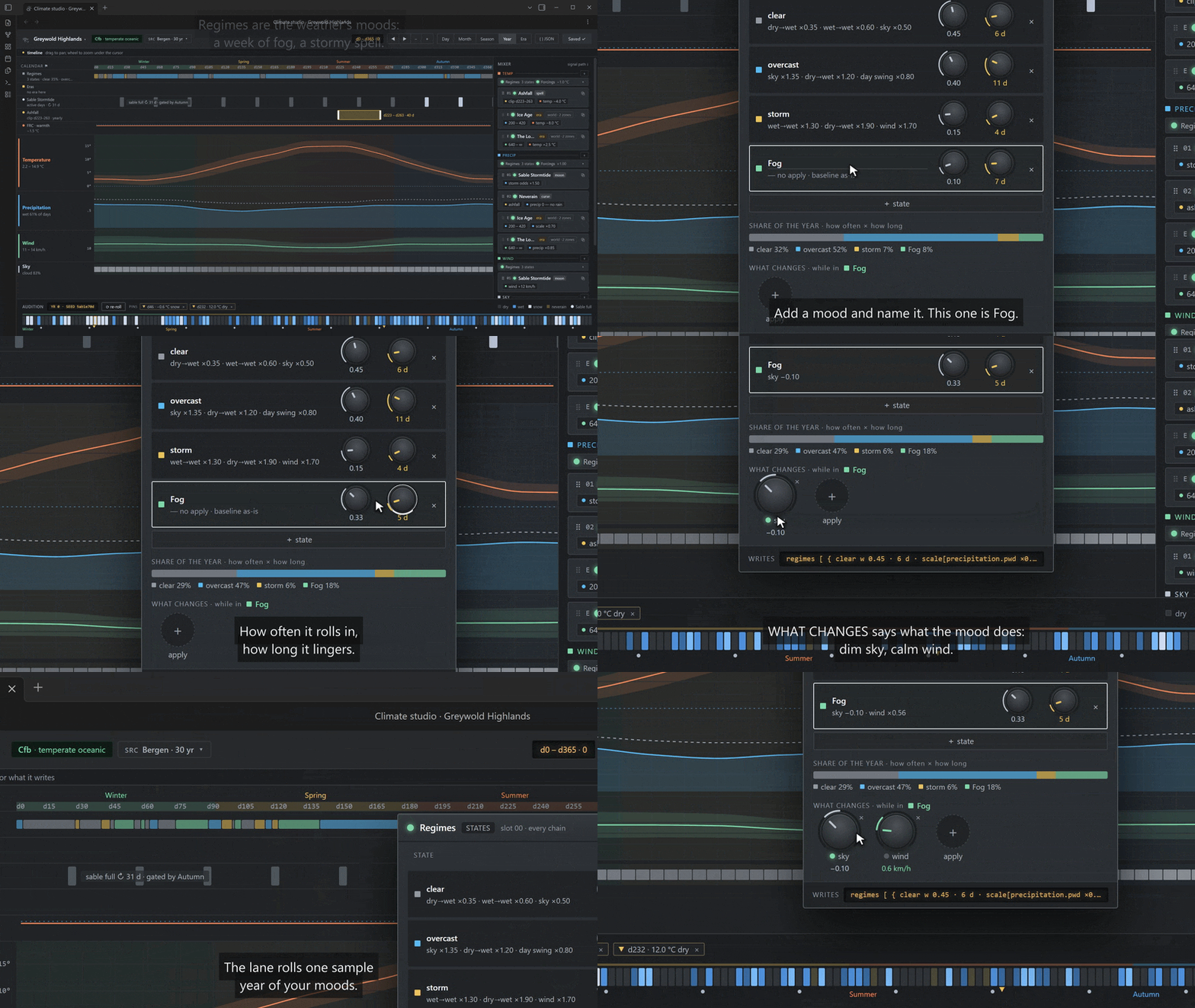
Every window shows what it writes. Each editor window carries a Writes → footer with the
exact JSON it produces, and { } JSON in the header opens a read-only drawer with the whole zone
file beside the world's eras, seasons and moons. The file is derived; you never type it.
Undo and Save. ↶ / ↷ step back and forward one edit (one per knob drag). Nothing reaches disk
until you press Save, which reads Saved ✓ when there is nothing to write, Save ● when there
is, carries a ⚠ count for warnings, and turns red with a count when something is actually wrong.
Errors block saving; the offending unit's LED and its window's footer say what is wrong.
Calendars. A world runs on a calendar definition. A new world starts on a plain one: 365-day years from year 1, one moon, no seasons. Settings → Calendar → Change calendar… switches to another: a real-world one (Gregorian, Hebrew, tabular Islamic, Coptic, Ethiopian, French Republican, Baháʼí, Roman, Harptos) or your own, written as Seshat text, with months, leap years and named holidays that modifiers can match as tags. Keep day numbers or anchor today to a date.
Edit a definition in the Studio's Calendar window (the ruler's Calendar ⚑ button). It opens on the Orrery, the calendar drawn as a working machine: select a part, watch it turn, and edit it in the inspector. A week can skip festival days there, as can the seasons. The Orrery can't add a new cycle or slot unit or edit a named rule; Edit as text does those. The window's Form view has tabs for the seasons, the year (its length, its first year, its leap rules), the months, the week, and the exceptions, the calendar's one-off corrections: name a single day, cancel one day of a named rule, move one year's first day, set one year's month lengths. A part the fields cannot show (a year that follows the moon, a month with its own leap rule) says so and offers Edit as text. A change to a definition just saves. If it moves where years start, today's date moves with it, and today is on the Orrery's year puts today back on its date. Undo the last calendar change (Settings → Calendar) steps back through the last 10 changes, and Redo puts them back.
In the text, a definition can also tie its calendar to its sky and to itself: a month or year can follow
a moon (CROSSING:BODY=moon-1;MARK=0, starting on the day of the new moon or the first day after it);
seasons can start on dates (MARK:Spring=month:3.20); a rule can name a moon phase (NAME=Full), read
another rule's tag, look at the day before (SHIFT) or find the first day after another
(FIRST, enough for the first full moon after the equinox, and Easter). Removing a moon or phase a
calendar depends on is refused. docs/CALENDARS.md builds a calendar step by step
and lists every part of the text, its limits and its messages.
A world made before calendar definitions runs on the legacy calendar: one year length, seasons as fractions of the year, moons, edited in Settings. It runs exactly as it always did. Change calendar… can move it to a definition (its own days, seasons and moons, as a definition), and offers the way back; a world that started on a definition is not offered the legacy calendar.
A new world is one with no settings file at all. It is saved only when you change something yourself (another plugin or a script moving the day changes it in memory, and that change is saved with yours), and its seed comes from the vault's name, so an unsaved new world shows the same weather on every start, and on devices whose vault has the same name. Before that first save the plugin reads the disk again; if Obsidian Sync has delivered the plugin's settings by then, it saves nothing and asks you to reload Obsidian to use them. A synced copy that arrives while that first save is being written is detected and reported, not prevented: reload to use the synced copy.
A world on a definition needs this version of the plugin or later; an older one would quietly run it on the legacy calendar's settings again. It is a calendar, not an almanac: it does not compute real sunrise, solstices or moon phases for Earth, and a definition's moons are the ones you give it. The Studio measures such a world's years exactly: a leap year has its 366 days on the ruler, in its lanes and in the header readout, and a lane that names day 365 shows it only in the years that have one.
Third-party calendars. Seasons and moons come from whichever calendar is active. If a calendar
plugin describes its own (see the CalendarDescription
contract), the Seasons and cycle windows mirror it read-only — the badge reads
<plugin> · read-only and points you back at that plugin to edit it. A definition and the legacy
calendar stay editable in place. When a calendar plugin gives every day its year number, the Studio places its
years exactly too, however their lengths vary; otherwise it draws a year of the length the plugin
describes.
The ids the studio writes into modifiers[] (layer:*, forcings:*) and its frc.warmth
automation lane are documented in docs/API.md. A hand-written
zone can ignore all of it; anything the studio does not recognise it leaves alone and shows as an
ordinary device.
On Determinism
A day's weather is a pure function of five things: the world seed, the generator version, the zone profile, the calendar and the day number, and nothing else. Nothing runs in the background and nothing is cached (except pinned events).
- Same seed === same weather. Any two vaults with the same seed/same generator version are guaranteed to be the same. A "real" feeling weather system is pretty useless for a consistent world if it can change at random.
- Generator changes are never silent. Only the current generator ships, so a plugin update that changes the numbers changes past weather too. When that happens, Wadjet tells you on load and in settings until you press Acknowledge.
- Pinned days survive everything.
Changing the seed, the year length, a zone's climate, the calendar's moons or the eras does change past weather; I have tried to make it clear where this is the case.
Q: So will the generator just constantly be getting breaking changes? Can I not take advantage of new features without risking my weather changing?
A: During the alpha, honestly.... yeah, probably. I'll do my best, but there may be some flex out of necessity. After the alpha, I expect it to be very rare. Pinned days keep the values you pinned through any generator change.
Other Plugins (API)
Another plugin can read weather and move the day, and since apiVersion 2 it can also use the world's calendar: read its whole
structure, ask it any date question, replace its definition, open its editor and keep marks of its own. See api.seshat in
docs/API.md §1b. Your plugin's users need U+13080 installed. Seshat isn't a package you can import on its own.
The API is app.plugins.plugins.wadjet.api (also window.Wadjet). It exists once the plugin has
loaded and is usable once ready is true:
const wadjet = () => (this.app as any).plugins.plugins.wadjet?.api;
if (wadjet()?.ready) init(wadjet());
else this.registerEvent(this.app.workspace.on("wadjet:ready", () => init(wadjet())));
interface WadjetAPI {
  version: string;
  apiVersion: 2;                                                // bumps when members are added
  ready: boolean;
  schemaVersion: 0;
  generatorVersion: string;
  rngVersion: string;

  getReport: (zoneId: string, time?: TimeContext | { dayOrdinal: number; hour?: number }) => WeatherReport; // time defaults to today
  getRange: (zoneId: string, fromDay: number, toDay: number) => WeatherReport[];
  now: () => TimeContext | null;
  listZones: () => Array<{ id: string; name: string }>;
  timeAt: (dayOrdinal: number, zoneId?: string) => TimeContext; // the day as the generator sees it
  format: (dayOrdinal: number) => string;                       // the active calendar's date text
  parse: (text: string) => number | null;

  canSetNow: () => boolean;                                     // can the active calendar's day be moved?
  setNow: (dayOrdinal: number) => Promise<boolean>;
  advance: (days: number) => Promise<boolean>;

  registerTimeAdapter: (adapter: TimeAdapter) => () => void;    // your calendar supplies "now"
  registerZoneResolver: (resolver: ZoneResolver) => () => void; // your map says which zone a hex is in
  resolveZone: (locator: ZoneLocator) => string | null;
  resolveZoneAsync: (locator: ZoneLocator) => Promise<string | null>;

  calendar: () => CalendarDescription | null;
  listTimeAdapters: () => Array<{ id: string; label: string; active: boolean }>;

  describe: (report: WeatherReport, style?: "short" | "prose") => string;
  units: () => Units;                                           // the display setting, "metric" | "imperial"
  convert: (report: WeatherReport, units?: Units) => ConvertedReport; // keys without unit suffixes

  classify: (report: WeatherReport) => Classification;          // Beaufort, oktas, visibility, precipitation class, feels-like
  glyphKey: (report: WeatherReport) => GlyphKey;
  glyph: (keyOrReport: GlyphKey | WeatherReport, opts?: { size?: number; title?: string }) => string; // SVG

  registerInterpreter: (interpreter: WeatherInterpreter) => () => void; // your rules for what weather means
  listInterpreters: (facet?: string) => InterpreterInfo[];
  getInterpreter: (id: string) => WeatherInterpreter | null;
  interpret: <T = unknown>(id: string, report: WeatherReport, options?: Record<string, unknown>) => T;

  seshat: SeshatAPI;                                            // the calendar definition: docs/API.md §1b

  on: <E extends WadjetEvent>(event: E, cb: (payload: WadjetEventPayloads[E]) => void) => () => void;
}
WeatherReport is a plain object, always metric. It holds temperature (low, high, mean, and
current when an hour is given), precipitation (type, mm, intensity, and active when an hour is
given), wind (km/h, and the direction it blows from in degrees), cloud cover, humidity, visibility,
descriptor words, conditions, overridden, and provenance (seed, versions, zone and calendar
hashes). Values are rounded to fixed steps (0.1 °C, 0.1 mm, whole km/h, 0.01 for fractions) so
results match across JavaScript engines. convert(report) returns the same report in the user's
units, with plain key names (precipitation.amount, wind.speed, visibility) and a labels
object for display.
A time adapter gives the plugin a calendar: now(), toContext(dayOrdinal), and optionally
parse and format. A zone resolver answers "which zone is this note, hex or point in?" for the
locator kinds it declares. Each register… call returns a function that unregisters it.
Wadjet reports weather and standard classes: Beaufort force, oktas, visibility, rainfall class and
feels-like temperature. It does not decide what weather does in a game. Interpreters do that: a
game-system plugin registers one, such as a travel-pace ruling, and any note can show its result
with interpret: <id> in a wadjet code block. A note can name its own zone with a
weather-zone frontmatter key.
For typings, copy types/wadjet.d.ts into your plugin. When the plugin is disabled or reloaded it
fires wadjet:unload, and the old API object stops working. Get the new one on the next
wadjet:ready and register again.
docs/API.md is the full reference: every API member, the WeatherReport schema,
the adapter and resolver contracts, the zone profile schema and the modifier grammar.
Q: Can I use this with Meta Bind/JS Engine/Templater/DataviewJS/etc, rather than writing or installing a whole other plugin? A: Sure, so long as whatever solution you're using has the ability to import U+13080, it's all just JS.
Data
The presets are derived from CLIGEN station files. CLIGEN is the U.S. Department of Agriculture's weather generator (the same family of model as this plugin); each of its station files distills a real station's daily record (thirty years, in the set used here) down to the monthly odds and averages the generator needs. The plugin reads those files and converts them to its own units and curves.
Fullhart, A.; Nearing, M. A.; Armendariz, G.; Weltz, M. A. (2020). International Climate Benchmarks and Input Parameters for a Stochastic Weather Generator, CLIGEN. Ag Data Commons. https://doi.org/10.15482/USDA.ADC/1518706 — U.S. Public Domain. Companion paper: Fullhart et al. (2021), Earth Syst. Sci. Data 13, 435–446.
Each preset records its station, record length and this DOI in its source field. The
generator's output is checked against the raw station files (bun run validate, report in
docs/VALIDATION.md): it generates many years of weather for each station and compares the statistics — wet days, rainfall, temperatures — with the station's own numbers.
There are two caveats:
- Wind directions for stations outside the United States are interpolated from US analogue stations in the source data, so a Norwegian coast gets an Alaskan coast's wind rose. Speeds and calm days are plausible; prevailing directions are not actually local. Just using the data I have.
- Cloud cover is not directly in the station files; it is estimated from how much sunshine the station recorded (derived via the FAO-56 Ångström relation; basically, less sunshine, more cloud). The extra cloud and humidity on wet days are rules of thumb.
Known limitations (alpha)
- No spatial correlation between zones; no accumulated ground state (snow depth, mud); no frontmatter writer; no sidebar.
insert-todayandpin-todayact on the first zone.- No hail, thunder or fog as distinct precipitation types (fog is a condition derived from humidity and wind).
- Regime-gated
spellmodifiers use the current regime for their lookback.
Licence
MIT — see LICENSE.