Understory


Local-first knowledge layer for relationship discovery, ER facts, graph analysis, and optional model-powered insights.
- Overview
- Scorecard
- Updates25
Machine discovery proposes related notes; human review turns the right ones into lasting Obsidian knowledge.
English · 中文 — Engineering ›

Understory is a knowledge-maintenance loop for Obsidian. It finds likely relations, notices when old suggestions need another look, and surfaces conflicts before they become expensive to untangle.
The core rule is simple: machine discovery is advisory; human discovery and confirmed structure have higher authority. Understory can suggest, refresh, and warn, but your accepted links, ignored suggestions, manual wiki links, and maintained entity relationships are the durable memory.
The default experience starts with Continue with Bondie. Sign in once, use the managed Understory service, and generate suggestions without choosing a model provider, pasting API keys, installing Python, or configuring endpoints.
Let the machine find candidate relations
Open a Markdown note and choose Generate suggestions. Understory looks at the current note, narrows the eligible vault notes, and returns a sidebar review queue.
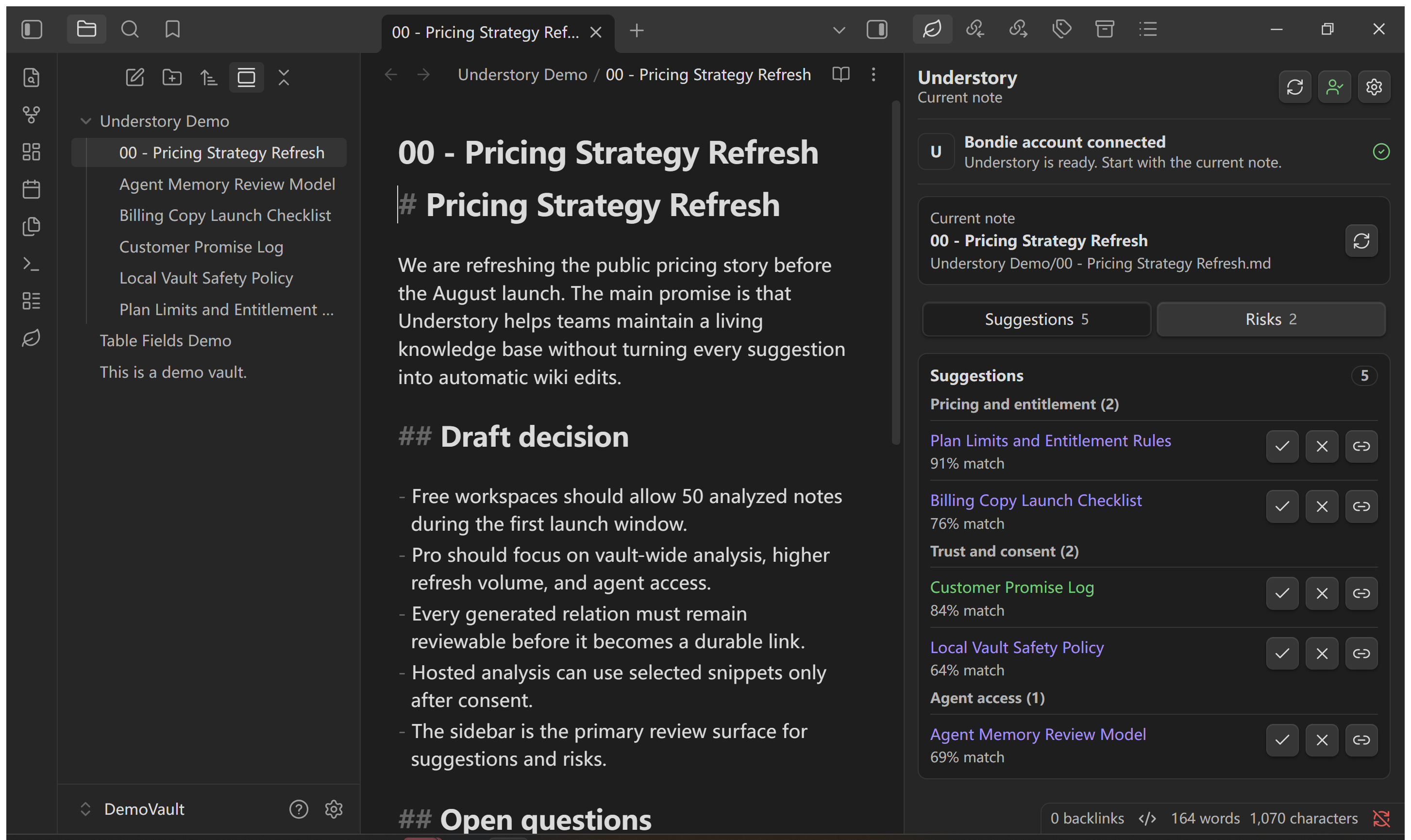
- It starts from the note you are reading, then considers scoped folders, existing links, backlinks, title overlap, content overlap, and recent edits.
- Hosted mode sends only bounded note snippets after consent; advanced local mode can use the bundled graph engine.
- New results enter as suggestions, not truth.
- The sidebar stays the review point; refreshing suggestions does not silently rewrite your note body.
Make human decisions outrank future runs
Every relation has a human decision state. You can open it, accept it, ignore it, or insert it as a normal Obsidian link.
- Accept marks a relation as reviewed and trusted in Understory's local state.
- Ignore records a deletion memory for the relation, so the same machine suggestion does not immediately reappear after the next scan.
- Insert writes a plain wiki link into the note and marks the relation accepted.
- Manual links outside generated blocks are preserved by design.
- If you manually add a link back later, that human action clears the earlier deletion memory.
This is the important product behavior: Understory can discover a relation, but you decide whether it becomes part of the vault.
Keep relations fresh as notes change
Relation discovery is not a one-time import. Understory stores a snapshot of each analyzed note and can tell when suggestions were made against older content.
- Edited notes can schedule a background relation update after a quiet window.
- Manual Update suggestions runs the active note immediately.
- Weekly or monthly refresh can walk the selected vault scope one note at a time.
- Include and exclude folders let you keep drafts, archives, private folders, and generated files out of the update loop.
- If a target note moves or disappears, Understory flags the relation instead of silently repairing the cache.
Discover conflicts beside related notes
The Risks tab is the other half of the review loop. It is for vault maintenance work: the things that become hard to fix only after they spread across many notes.
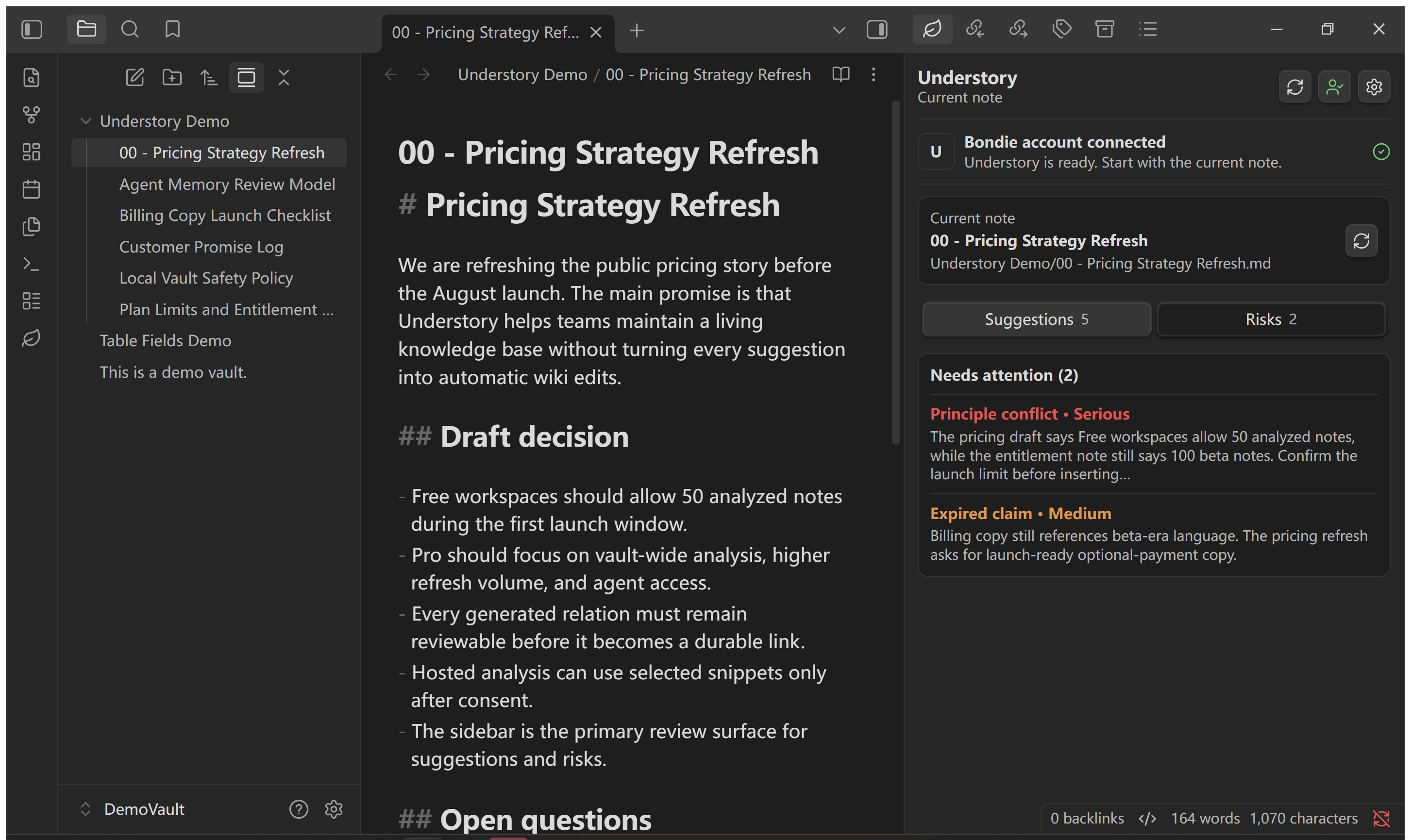
- Possible conflicts where two notes may be making incompatible claims.
- Stale suggestions where stored relations predate the current note text.
- Broken links that no longer resolve to a note.
- Orphan notes with no resolved outgoing links or backlinks.
- Extracted principles or claims that can be reviewed during broader vault analysis.
The result is a maintenance queue, not an alert storm. Understory keeps serious items visible, sorts them by severity, and lets you refresh, open, or revise the underlying notes.
Use human-maintained structure as stronger evidence
Understory can also use an entity-relationship layer when your vault contains maintained structure. This helps it find relations that pure text similarity can miss.
- User-defined, frontmatter, imported, and API-created relationships are treated as authoritative structure.
- LLM extraction, name matching, and similarity are candidate discovery channels until reviewed.
- The local engine can extend discovery through one-hop entity relationships, then merge that evidence with semantic and keyword matches.
- When maintained structure changes, affected relation discovery can be refreshed instead of trusting old suggestions forever.
Machine discovery helps Understory notice possibilities. Human-maintained structure tells it which relationships are allowed to count as stronger evidence.
Let agents use the same review rules
Open Settings -> Understory -> AI agents when Claude, ChatGPT, Codex, or another assistant should query the current vault.
- Export a vault-specific MCP server file.
- Copy a ready-to-use MCP configuration.
- Choose Query-only for explicitly requested search, citations, summaries, and business knowledge maps; it stays read-only.
- Choose Agent memory model when the agent should retrieve relevant context early and propose durable memory updates after work. It still must ask before changing local vault state.
- Let tools accept, reject, refresh, or insert relations only through explicit write actions.
Agent reads return scoped snippets, note briefs, relation metadata, graph summaries, and diagnostics by default. The agent sees the same stale flags and relation states that the sidebar sees.
Trust, privacy, and account model
Hosted mode is account-first and managed. Continue with Bondie starts browser sign-in and returns to the same vault. Hosted AI routing and service credentials stay on the Understory server; provider and model choices are not returned to the plugin.
- Selected-snippet consent is required before hosted relation or vault analysis sends note snippets.
- Hosted collection excludes hidden folders, Obsidian configuration, trash paths, and Understory working files.
- Session state, settings, relation cache, ignored suggestions, and reports are stored locally in the vault or plugin data.
- Existing local-mode users stay local after upgrading.
- Self-hosted and bring-your-own-key workflows remain under Advanced.
Understory is free to install and the current hosted membership is Free. The Obsidian Community listing should show Optional payments because Understory connects to a managed service and advanced modes can connect to paid APIs.
Start from any Markdown note
- Install and enable Understory in Obsidian desktop.
- Click the leaf icon, select Continue with Bondie, and complete sign-in.
- Open a Markdown note and select Generate suggestions.
- Review Suggestions and Risks.
- Accept, ignore, open, or insert only the relations you trust.
Current release: 1.13.12. Understory targets Obsidian 1.8.7 or newer and is desktop-only.
Good to know
- Understory is not a fully automatic wiki writer; the default workflow keeps generated relations in the sidebar until you act.
- Ignored suggestions can return later when the deletion memory expires or when the target content changes enough to deserve another look.
- Local engine workflows are advanced and can require Python runtime health checks.
- Read the full data-flow in PRIVACY.md, report security issues through SECURITY.md, and see the implementation map in the Engineering README ›.