Uncertainty Calculator
 Masoud Masoumi76 downloads
Spreadsheet-style calculator that propagates measurement uncertainty: input forms, significant figures, expanded uncertainty, uncertainty budgets, and Monte Carlo, following the GUM and its Supplement 1.
- Overview
- Scorecard
- Updates1
A spreadsheet-style calculator that propagates measurement uncertainty through your notes. Write a calc block, assign measured quantities with their uncertainties, and reference them in later formulas — the plugin tracks correlations, significant figures, expanded uncertainty, an uncertainty budget, and (when you ask) a full Monte Carlo propagation of distributions.
It fills a gap: Obsidian has unit-aware calculators (Numerals), symbolic math (LaTeX Math), and plotting, but nothing that carries a ± through a calculation the way Python's uncertainties, R's errors, or LaTeX's siunitx do.
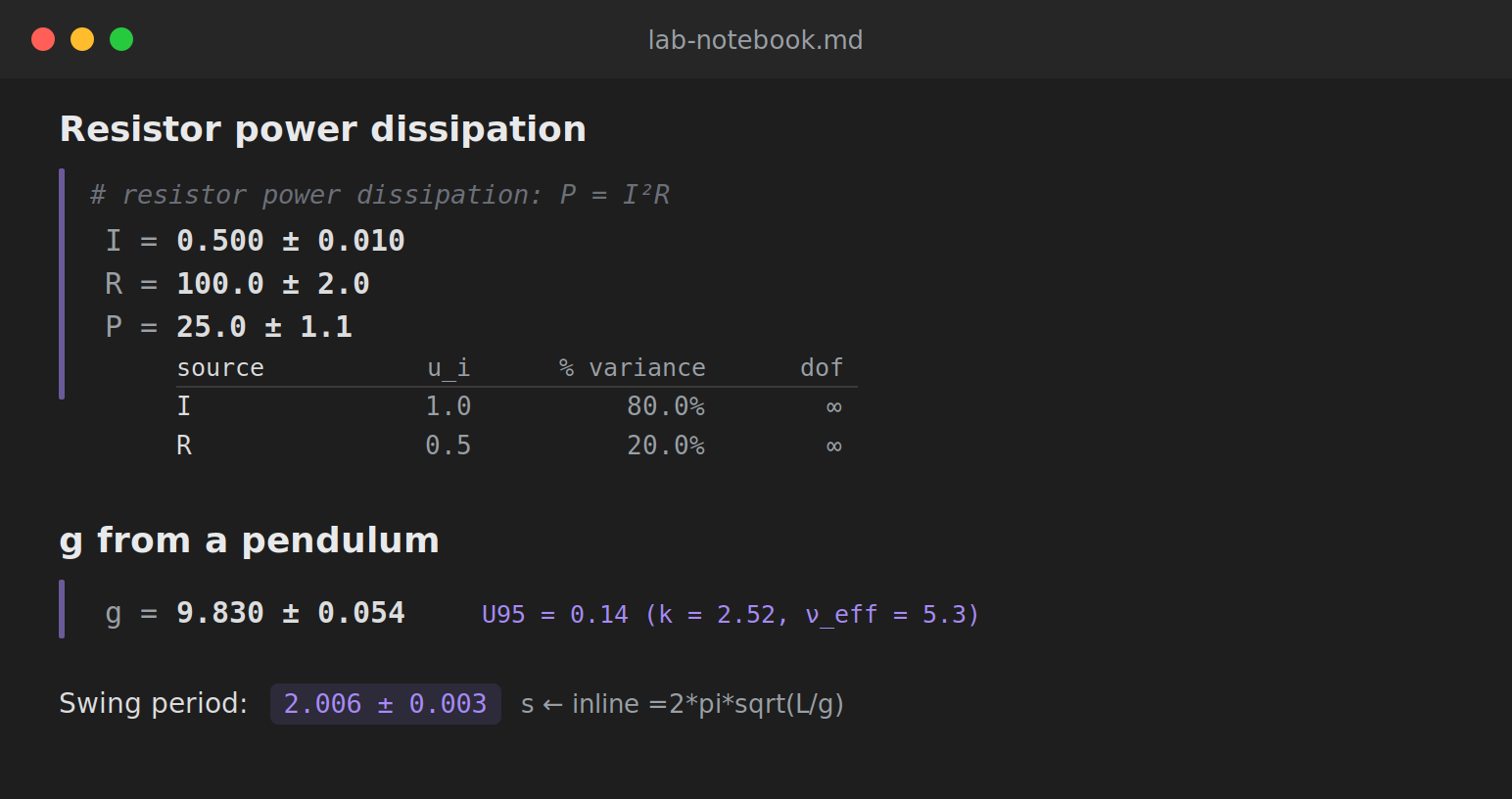
The calc block
```calc
# resistor power: P = I²R   (lines beginning with # are comments)
I = 0.50 ± 0.01
R = 100 ± 2
P = I**2 * R
P | budget
```
renders each line with its result, builds a running scope so P can use I and R, and shows the uncertainty budget (here I contributes ~80% because it is squared).
Writing measured quantities
| form | meaning |
|---|---|
9.81 ± 0.02 |
value with standard uncertainty (also 9.81 +- 0.02) |
200 ± 2% |
relative uncertainty (→ ±4) |
1.234(12) |
compact notation (→ 1.234 ± 0.012) |
typeA(2.01, 2.00, 2.02, 1.99) |
Type A: mean ± standard error, with dof = n−1 |
5.0 ± 0.1 [rect] |
Type B rectangular bound (÷√3); also [tri], [k=2], [normal] |
Operators + - * / **, parentheses, the constants pi and e, and the functions sin cos tan asin acos atan exp log ln log10 sqrt sinh cosh tanh are supported. Two separate ± literals are independent; a reused named variable stays correlated (so x - x is exactly 0, while (5 ± 1) - (5 ± 1) is not).
Detail flags
Append | flag to any line for more than the bare value:
expr | budget— per-source contribution table (u_i, % of variance, dof)expr | expandor| expand 0.99— expanded uncertaintyU = k·u_cwith the coverage factor from the Student-t at the Welch–Satterthwaite effective degrees of freedomexpr | mcor| mc 200000— Monte Carlo (GUM Supplement 1): mean, standard deviation, coverage interval, and skewness, correct for strong nonlinearity and non-Gaussian inputs where the linear method fails
Inline =expr
In ordinary text, an inline code span that begins with = is replaced by its value: writing `=2*pi*sqrt((1.0 ± 0.002)/(9.81 ± 0.02))` renders as 2.006 ± 0.003.
Why propagate distributions?
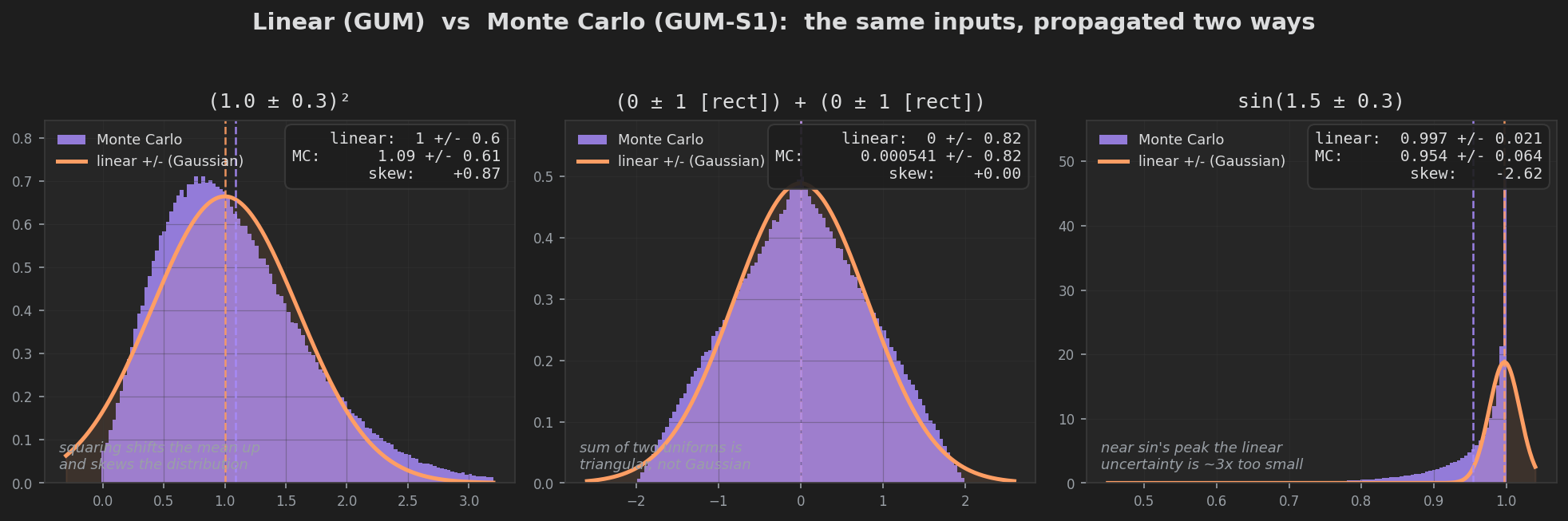
The linear (GUM) method approximates the function by its slope at the estimate. That is exact for sums and scalings, but for a nonlinear function it can get both the value and the width wrong. The | mc flag runs a Monte Carlo propagation of the full input distributions instead, and the difference can be large:
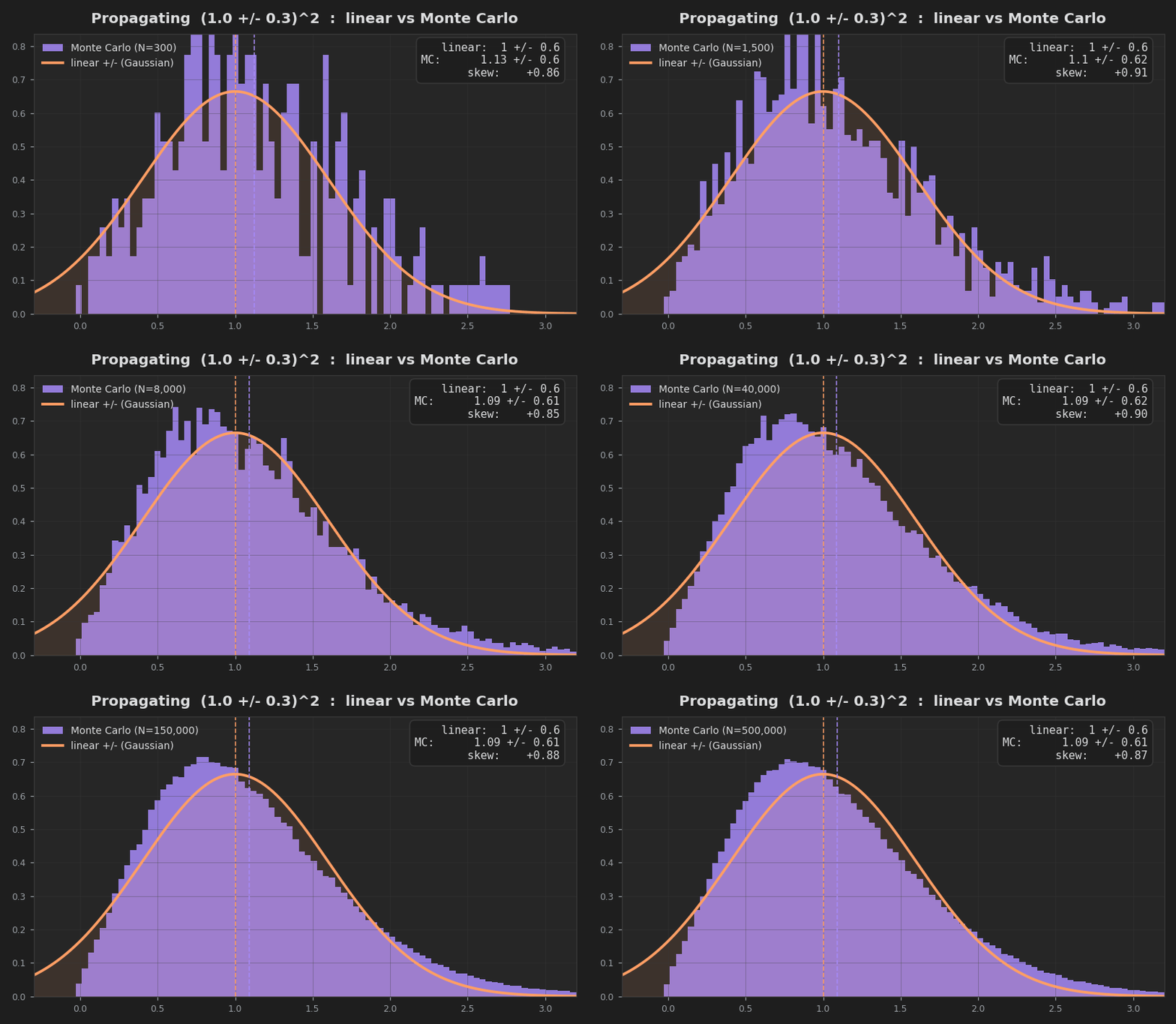
Squaring a measurement, for instance, shifts the mean upward by σ² and skews the result — neither of which a symmetric ± can express. Three cases where the linear approximation visibly fails, each compared against the Monte Carlo distribution from the same inputs:
Settings
Default coverage probability, significant figures on the uncertainty, Monte Carlo trial count, and an inline-evaluation toggle.
Install (manual)
Copy main.js, manifest.json, and styles.css into <vault>/.obsidian/plugins/uncertainty-calc/, then enable the plugin in Settings → Community plugins. See EXAMPLE.md for ready-to-paste blocks.
Build from source
npm install
npm run build      # bundles src/ → main.js
The numerical core under src/ (propagation, units, formatting, statistics, budget, Monte Carlo, and the sheet engine) is an independent TypeScript implementation that is cross-checked test-for-test against Python's uncertainties, pint, scipy, and numpy (212 checks). The Obsidian layer (main.ts, render.ts, settings.ts) only wraps that core.