Transfer LaTeX from AI
 zhibin52 downloads
Convert LaTeX formulas generated by AI (ChatGPT, DeepSeek, Gemini, etc.) into Obsidian's MathJax format.
- Overview
- Scorecard
- Updates3
One-click conversion of LaTeX formulas in AI responses (ChatGPT, DeepSeek, Gemini, etc.) into MathJax syntax that renders correctly in your notes.
English description | 中文说明
English
Convert LaTeX formulas copied from AI chats into Obsidian-compatible MathJax syntax with a single command.
Why this plugin
When you copy AI answers directly into your notes, formulas often fail to render. Two common forms appear:
| Form | Example | Typical source |
|---|---|---|
| Standard delimiters | \( E=mc^2 \), \[ \int_0^1 f(x)\,dx \] |
Default output of ChatGPT and other AIs |
| Double-escaped | \\( E=mc^2 \\), \\[ ... \\] |
Web copy or JSON / API output that escapes backslashes |
This plugin converts both into the inline $ ... $ and block $$ ... $$ syntax.
Conversion rules
| Input | Output |
|---|---|
\( ... \) |
$ ... $ |
\[ ... \] |
$$ ... $$ |
\\( ... \\) |
$ ... $ |
\\[ ... \\] |
$$ ... $$ |
- Idempotent: content already in
$ ... $/$$ ... $$is left untouched, so running the command twice is safe. - Robust: unclosed delimiters (e.g. a
\(without its matching\)) are kept as-is instead of swallowing the rest of the document. - Scope: only delimiters are rewritten; environments such as
\begin{align}are already supported natively.
Installation
Manual
Requires Node.js (18+ recommended) and npm
git clone https://github.com/crazy5/obsidian-transfer-latex-from-AI
cd obsidian-transfer-latex-from-AI
npm install
npm run build
Copy main.js, manifest.json, and styles.css into:
<your vault>/.obsidian/plugins/transfer-latex-from-ai/
Then enable the plugin in Settings → Community plugins (turn off Restricted mode first).
BRAT
- Install the BRAT plugin
- Open BRAT settings → Beta plugin list → Add Beta plugin
- Enter the repository:
crazy5/obsidian-transfer-latex-from-AI - Enable Transfer LaTeX from AI in Community plugins
The original upstream plugin, Transfer LaTeX from GPT, is available in the community directory but does not include
\\( ... \\)support.
Before you use
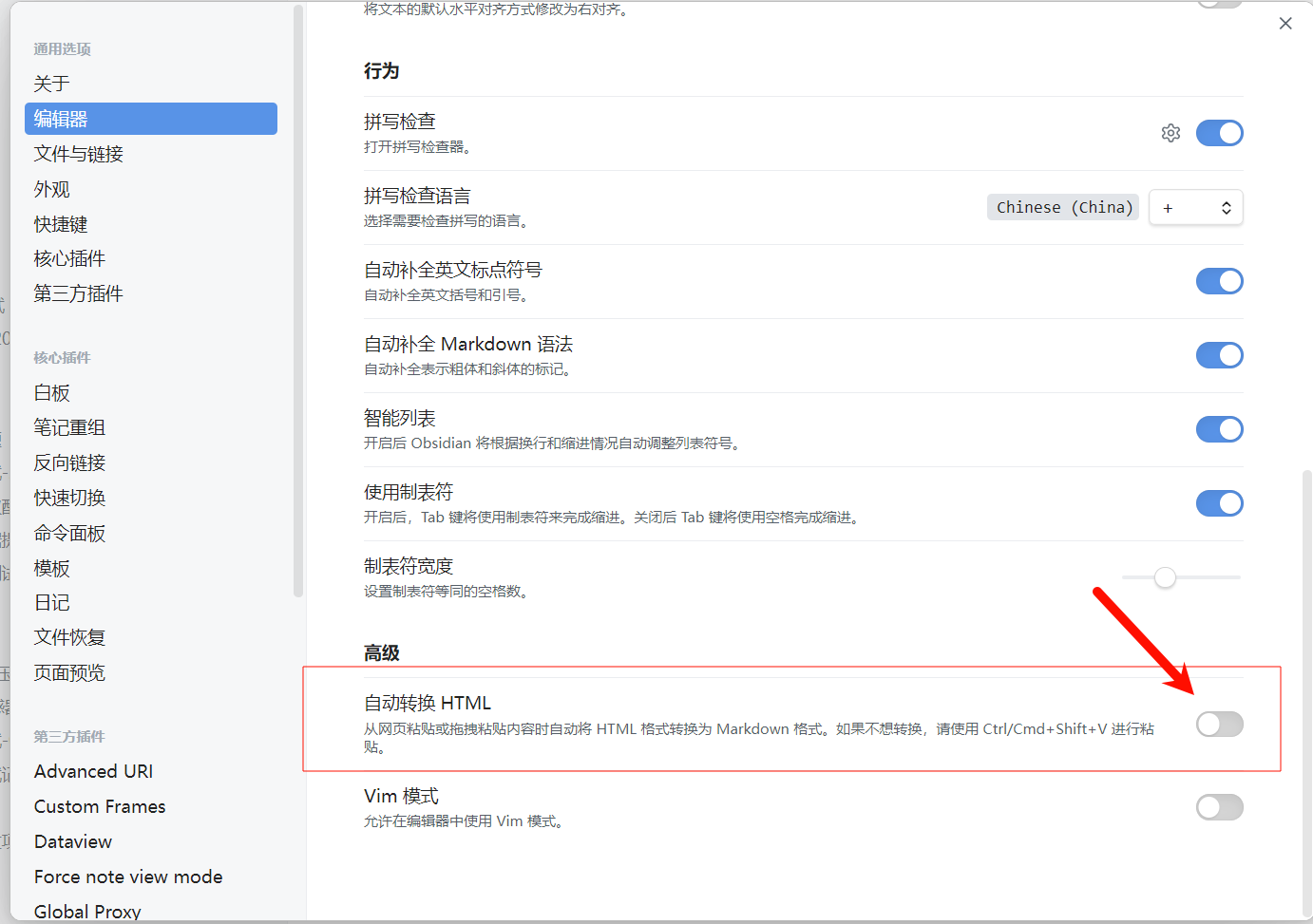
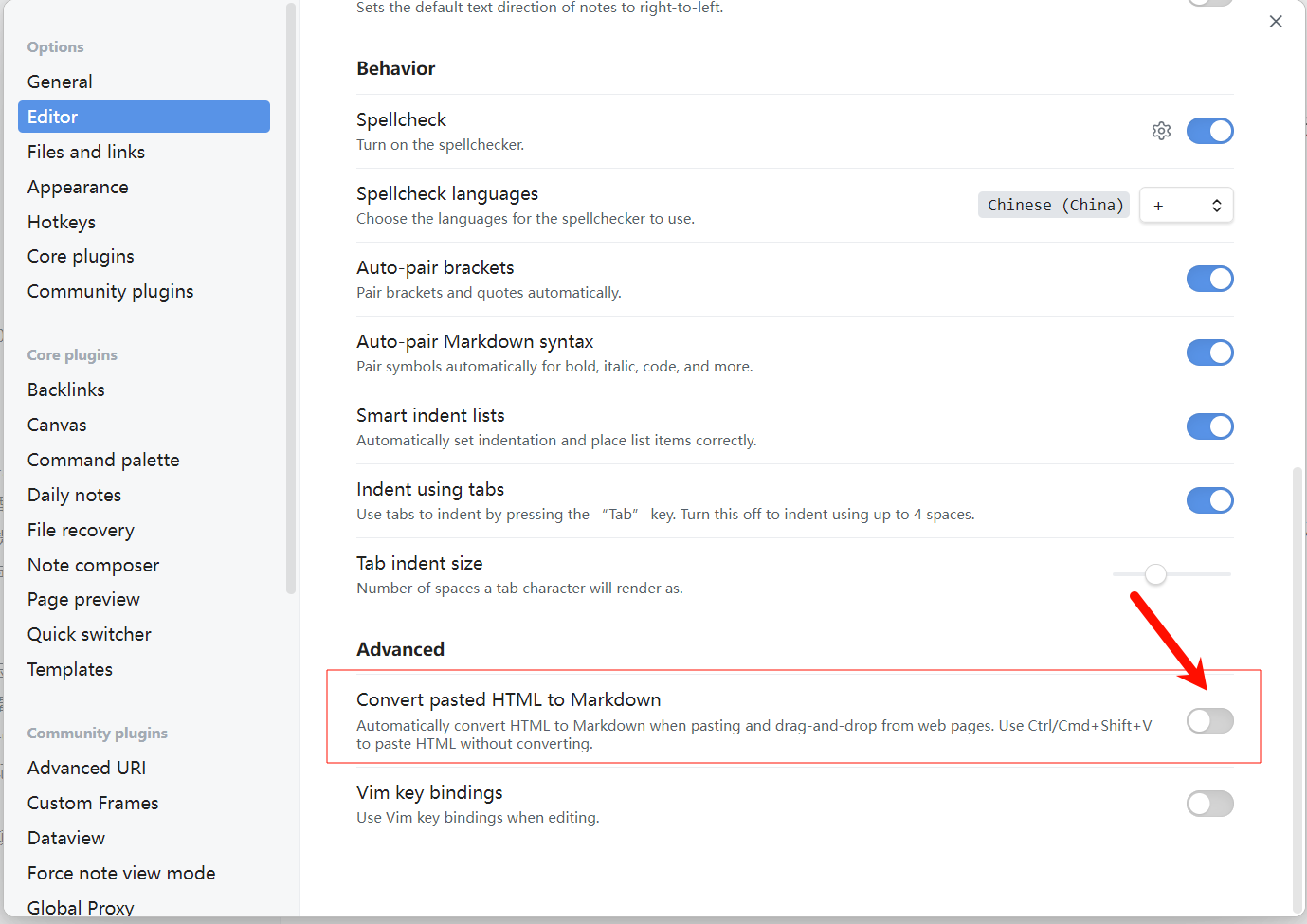
Turn off Settings → Editor → Auto convert HTML. Otherwise, paste AI answers as plain text, so the formula delimiters survive the paste.
Usage
- Command:
Ctrl+P→Convert LaTeX to MathJax - Ribbon icon: click the σ icon in the left sidebar
The conversion is undoable with Ctrl+Z.
Known limitations
- The whole file is converted at once.
- Code blocks are not skipped: literal
\(...\)examples inside code will also be converted. - Only delimiters are replaced; formula content is left untouched.
Credit
Forked from xixia123/obsidian-transfer-latex-from-gpt by Xixia, with thanks.
中文
将 ChatGPT、DeepSeek、Gemini 等 AI 回答中的 LaTeX 公式,一键转换为 Obsidian 能够正确渲染的 MathJax 语法,帮助你在笔记中便捷地使用数学公式,提高学习与科研效率。
为什么需要这个插件
直接从 AI 网页复制回答到 Obsidian,公式经常无法渲染,常见两类形式:
| 形式 | 示例 | 常见来源 |
|---|---|---|
| 标准定界符 | \( E=mc^2 \)、\[ \int_0^1 f(x)\,dx \] |
ChatGPT 等 AI 的默认输出 |
| 双反斜杠转义 | \\( E=mc^2 \\)、\\[ ... \\] |
网页复制或 JSON / API 输出被二次转义 |
本插件一键将它们转换为 Obsidian 支持的 $ ... $(行内)与 $$ ... $$(块级)。
转换规则
| 输入 | 输出 |
|---|---|
\( ... \) |
$ ... $ |
\[ ... \] |
$$ ... $$ |
\\( ... \\) |
$ ... $ |
\\[ ... \\] |
$$ ... $$ |
- 幂等:已是
$ ... $/$$ ... $$的内容不会再次改动,重复执行安全。 - 稳健:未闭合的定界符(只有
\(没有\))保持原样,不会误吞后文。 - 范围:仅转换定界符;
\begin{align}等 LaTeX 环境 Obsidian 本身已支持,无需转换。
安装
方式一:手动安装(推荐)
需要 Node.js(建议 18+)与 npm
git clone https://github.com/crazy5/obsidian-transfer-latex-from-AI
cd obsidian-transfer-latex-from-AI
npm install
npm run build
构建完成后,将 main.js、manifest.json、styles.css 三个文件复制到你的库目录:
<你的库>/.obsidian/plugins/transfer-latex-from-ai/
然后在 Obsidian 中:设置 → 第三方插件 → 关闭受限模式 → 启用 Transfer LaTeX from AI。
方式二:BRAT 安装
- 安装并启用 BRAT 插件
- 打开 BRAT 设置 → Beta plugin list → Add Beta plugin
- 填入仓库地址:
crazy5/obsidian-transfer-latex-from-AI - 在第三方插件列表中启用 Transfer LaTeX from AI
社区市场上游原版为 Transfer LaTeX from GPT,不含本仓库的
\\( ... \\)双反斜杠支持。
使用前设置
使用前,请在 设置 → 编辑器 中关闭「自动转换 HTML」选项;否则粘贴 AI 回答时请使用纯文本格式,以免公式定界符在粘贴时丢失。
使用方式
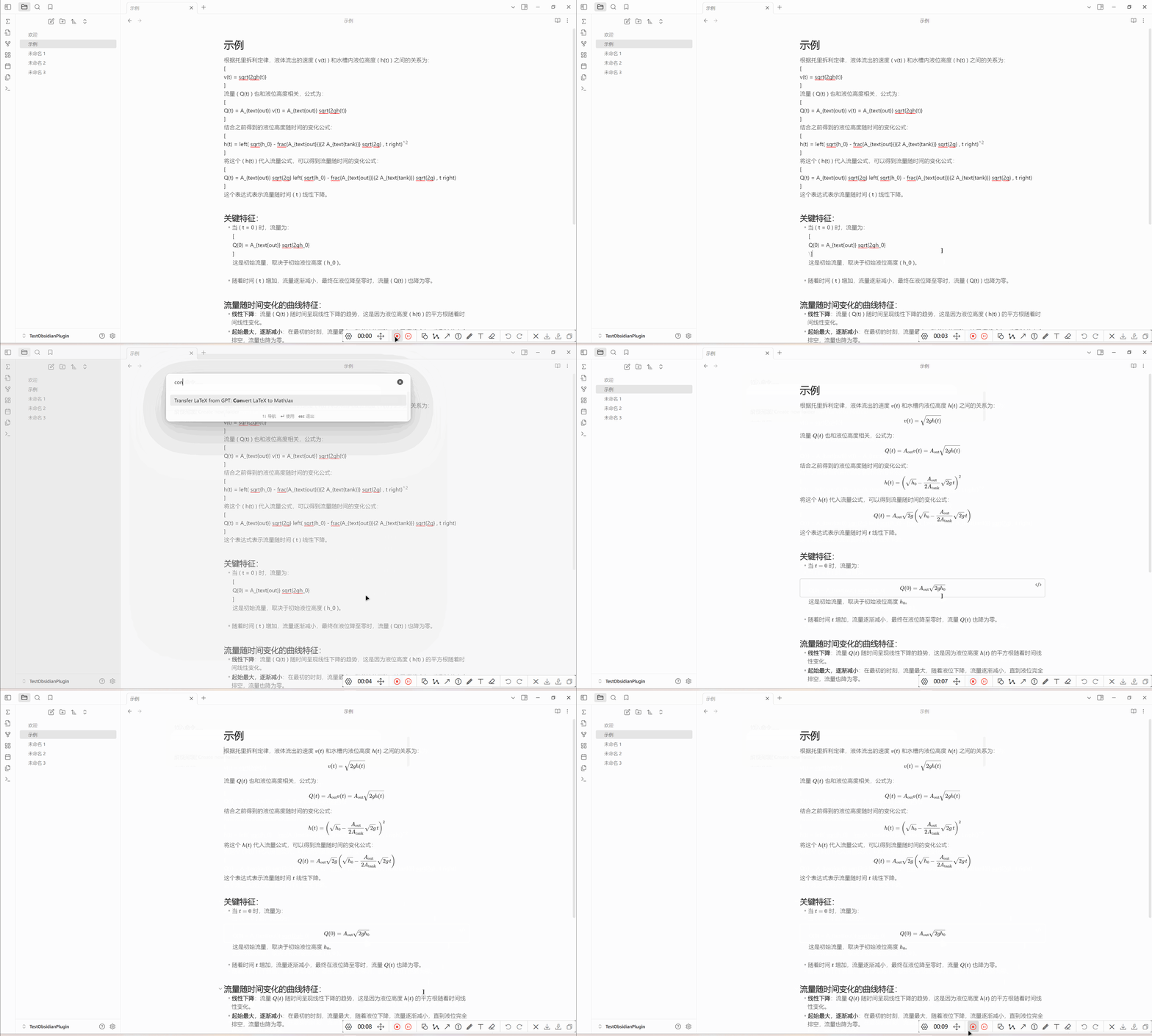
方式一:通过命令使用
Ctrl + P 打开命令面板 → 输入 Convert LaTeX to MathJax
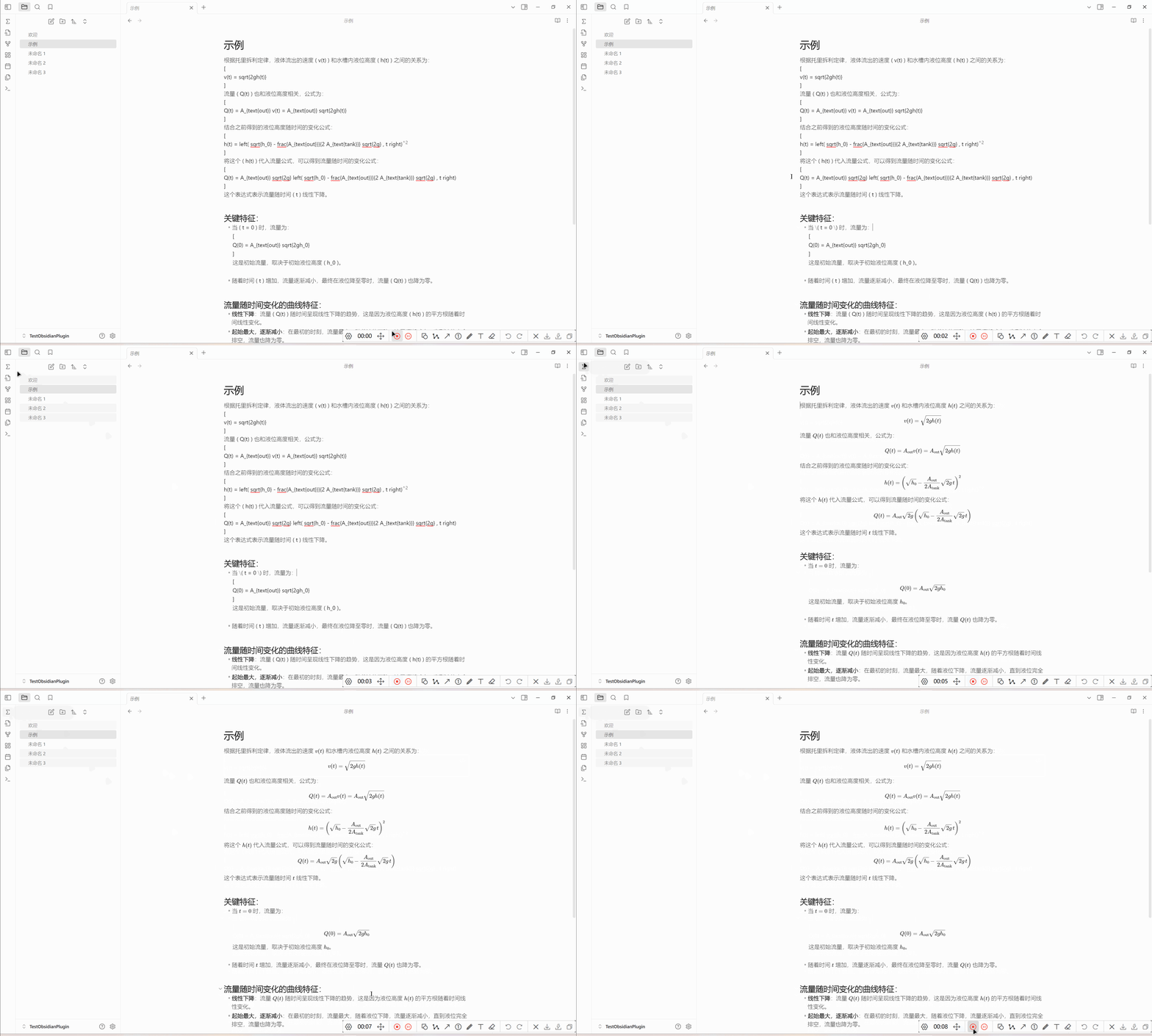
方式二:通过点击左侧按钮使用
点击左侧栏的 σ 按钮,转换当前打开的文件。
已知限制
- 转换作用于整篇文件;写入走编辑器接口,转换后可用
Ctrl + Z撤销。 - 不跳过代码块:代码里字面出现的
\(...\)示例同样会被转换。 - 只替换定界符,不修改公式内容本身。
许可证
致谢
本项目基于 xixia123/obsidian-transfer-latex-from-gpt 二次开发,感谢原作者 Xixia。项目的英文介绍见上文 English 段。
AI生成