TeXcore
 Jovi Koikkara391 downloads
Automatic equation numbering, Tex Diagrams rendering, and more for Obsidian.md.
- Overview
- Scorecard
- Updates2
A minimalistic, high-performance LaTeX assistant for automatic equation numbering, referencing, and TikZ rendering with basic GUI editing in Obsidian.md to transforms your vault into a rich ecosystem for scientific drafting and study.
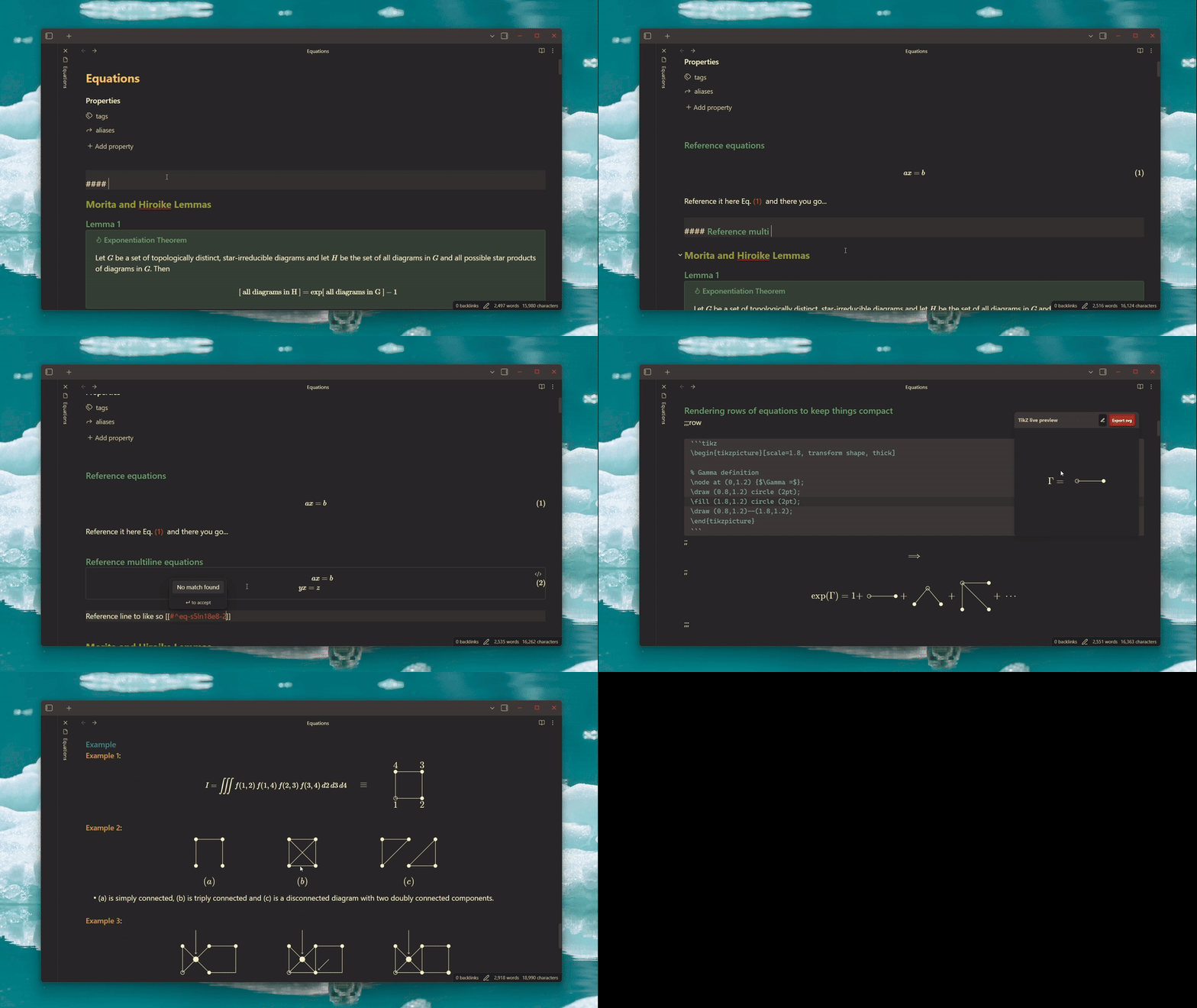
Key Features
- Equation Numbering & referencing: Auto-numbers equations with custom IDs and provides search-based fuzzy autocomplete suggestion dropdowns via
\eqref. - On-Demand TikZ Diagrams: Compiles TikZ code blocks asynchronously in a Web Worker, lazy-downloading and caching assets to remain lightweight and bloat-free.
- Advanced PDF Export: Highly configurable single-note or batch folder PDF exports featuring customizable headers, footers, page sizes, and style overrides.
Behind the Scenes: The WebAssembly Engine
To render TikZ diagrams without forcing you to install a full local LaTeX distribution, TeXcore runs the compiler directly inside Obsidian using WebAssembly:
- TeX in Wasm: The core Pascal source code of TeX is compiled into a WebAssembly binary (
tex.wasm) via theweb2jscompiler. - Background Compilation: Because TeX compilation is CPU-bound, the plugin spawns a background Web Worker to run the Wasm engine. This keeps Obsidian's UI completely smooth and responsive.
- On-Demand CDN Fetching: When you first run a TikZ diagram, the plugin downloads the pre-compiled format engine (
core.dump.gz) and the font stylesheet (tikzjax.css), caching them locally on your disk. - Lazy Caching: If your diagram includes specific packages (e.g.
\usepackage{circuitikz}), the loader resolves the files, downloads them from a CDN, and saves them locally. Subsequent renders of the same packages work fully offline.
License
This plugin is licensed under the MIT License.
Credits & Sourcing
The TikZJax engine and assets are derived from and built upon the incredible work of the following open-source projects:
- kisonecat/tikzjax by Jim Fowler — The original browser-based TeX-in-Wasm compiler.
- drgrice1/tikzjax by Glenn Rice — Added Web Worker support, along with additional TeX library and package compilations.
- artisticat1/obsidian-tikzjax by
artisticat1— Inspiration for Obsidian integration wrapper that packaged these components.
Note: The underlying TeX engine binaries, format dumps, and LaTeX style packages are distributed under their respective open-source licenses (GPL-3.0+ / LPPL v1.3c).