PageInk
 henry76 downloads
Write Markdown notes, annotate PDFs, and draw on paginated pages or an infinite canvas, with a separate scratchpad.
- Overview
- Scorecard
- Updates7
在 Obsidian 中写字、手写和整理想法。
在 Obsidian 中写文字、逐页绘写、展开无边画布,也能批注 PDF,用独立草稿纸演算和摘录。
Write Markdown notes, annotate PDFs, and draw on paginated pages or an infinite canvas, with a separate scratchpad. The interface is in Simplified Chinese.
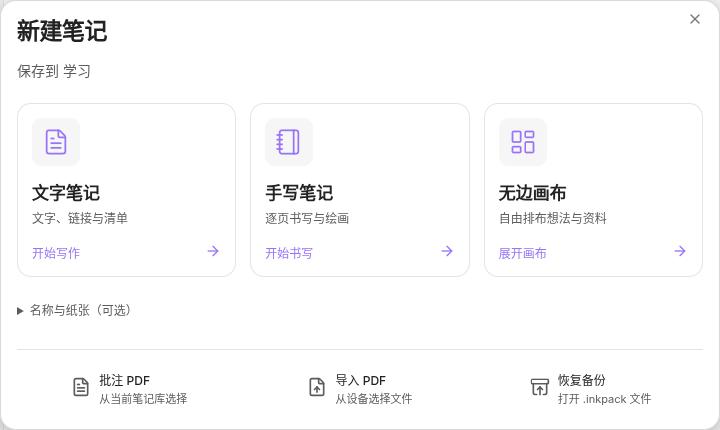
三种记录方式
| 类型 | 用途 |
|---|---|
| 文字笔记 | 普通 Markdown .md 文件,使用 Obsidian 原生编辑器。 |
| 手写笔记 | 分页书写和绘画,支持翻页、纸张模板与页边距。 |
| 无边画布 | 无边画布,用文字、笔迹和卡片展开想法。 |
- PDF 批注:在教材和文档上书写,摘录内容到草稿纸。
- 文字与手写互通:在文字笔记中引用手写区域,或把文字段落放进手写笔记和无边画布。
- 文件夹浏览:在原生文件树新建,按文件夹查看内容预览、搜索与分屏阅读。
- 导出与备份:导出 PDF、PNG,或保存可恢复编辑的完整备份。
安装
需要 Obsidian 1.12.7 或更高版本。桌面已在 Windows 和 Linux 验证;移动端尚未完成真机验证。
在「设置 → 第三方插件 → 浏览」中搜索 PageInk,安装并启用。已有用户可在第三方插件设置中检查更新。也可从官方插件目录打开安装页。
手动安装:从 Releases 下载 pageink-0.1.7.zip,将其中的 pageink 文件夹解压至笔记库的 .obsidian/plugins/,重启并启用。也可将同一版本的 main.js、manifest.json 和 styles.css 放入 .obsidian/plugins/pageink/。
开始使用
在文件列表顶部或文件夹右键菜单中选择新建类型即可开始。「以缩略图浏览」查看当前文件夹的内容预览;「纸张设置与导入」可选择名称、纸张、PDF 或备份文件。书写页沿用原生标签页,草稿纸默认停靠,支持边看边写。
笔记自动保存在本地。绘写文档的完整备份请使用「导出 → 可编辑备份」;单独复制 .inknote 文件不包含笔迹和附件。多设备使用时,等待同步工具完成传输后再切换设备。
离线与隐私
PageInk 免费、开源,无账号要求、无广告、无遥测,不发起运行时网络请求。字体、PDF 处理和解码资源随插件提供,因此主脚本约 46 MB。
主脚本超过 Obsidian Sync Standard 的 5 MB 单文件同步上限,使用该方案时请在每台设备分别安装插件。
仅在你主动选择导入 PDF、图片或备份文件时读取所选库外文件,并将所需内容复制入库。
Installation and usage
PageInk requires Obsidian 1.12.7 or later. The interface is currently in Simplified Chinese. Desktop workflows have been tested on Windows and Linux; mobile devices have not been verified yet.
- Search for PageInk in Settings → Community plugins → Browse, then install and enable it. Existing users can check for updates in Community plugins. For manual installation, download the ZIP from Releases and extract
pageinkinto.obsidian/plugins/. - Use the New note menu in the file explorer: 文字笔记 for Markdown, 手写笔记 for paginated drawing, or 无边画布 for an infinite canvas. 纸张设置与导入 imports a PDF or backup.
- Notes save locally. To back up a drawing, choose 导出 → 可编辑备份; copying an
.inknotefile alone does not include its ink and attachments. PDF and PNG exports are also available.
PageInk works offline without an account, ads, or telemetry. Fonts and PDF resources are bundled. The main script exceeds the 5 MB file limit of Obsidian Sync Standard, so install the plugin separately on each device when using that plan. Files outside the vault are read only when you select them for import. Original code is MIT-licensed; bundled dependencies retain their own licenses.
开发与许可
构建和源码说明见开发指南。
自有代码采用 MIT 许可证。绘图内核使用 Excalidraw,图标使用 Lucide;第三方代码、字体及资源保留各自许可,详见第三方声明。