Search...Search plugins and themes...
⌘K
Sign in
  • Get started
  • Download
  • Pricing
  • Enterprise
  • Account
  • Obsidian
  • Overview
  • Sync
  • Publish
  • Canvas
  • Mobile
  • Web Clipper
  • CLI
  • Learn
  • Help
  • Developers
  • Changelog
  • About
  • Roadmap
  • Blog
  • Resources
  • System status
  • License overview
  • Terms of service
  • Privacy policy
  • Security
  • Community
  • Plugins
  • Themes
  • Discord
  • Forum / 中文论坛
  • Merch store
  • Brand guidelines
Follow us
DiscordTwitterBlueskyThreadsMastodonYouTubeGitHub
© 2026 Obsidian

External Link Opener

zorazrrzorazrr5k downloads

Open external links using a modal or a tab.

Add to Obsidian
  • Overview
  • Scorecard
  • Updates1

A simple Obsidian plugin to allow customized choices of where to open an external link.

Usage

In settings, select which method you would like to open an external link with. You can also adjust the link opener modal's width and height.
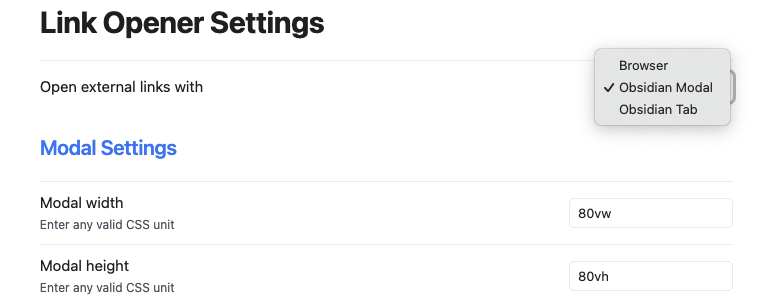
Manually installing the plugin

Copy over main.js, styles.css, manifest.json to your vault VaultFolder/.obsidian/plugins/obsidian-link-opener/.

Demo

Opening an external link with Obsidian Modal:

61%
HealthFair
ReviewSatisfactory
About
Choose how to open external links by selecting a preferred opener method or using a modal to pick per-link options. Adjust the link-opener modal's width and height to fit your workspace.
LinksInterfaceNavigation
Details
Current version
1.0.2
Last updated
3 years ago
Created
4 years ago
Updates
1 release
Downloads
5k
Compatible with
Obsidian 0.15.0+
Platforms
Desktop only
Report bugRequest featureReport plugin
Author
zorazrrzorazrr
zorazrr.github.io/
GitHubzorazrr
  1. Community
  2. Plugins
  3. Links
  4. External Link Opener

Related plugins

Hover Editor

Transform the Page Preview hover popover into a fully working editor instance.

Strange New Worlds

Reveal networked thought and the strange new worlds created by your vault.

Influx

A bullet journaling plugin that aggregates a terse stream of backlinked clippings in the footer of notes.

Graph Banner

Display a local graph view to the note header

Dragger

Drag and drop any block (paragraphs, headings, lists, etc.) to rearrange content like Notion.

Table of Contents

Create a table of contents for a note.

Notebook Navigator

A better file browser and calendar inspired by Apple Notes, Bear, Evernote and Day One.

Homepage

Open a note, base, or workspace on startup, or set it for quick access later.

Recent Files

Display a list of recently opened files.

Hider

Hide interface elements such as tooltips, status bar, titlebar, and more.